

Facebook Messenger In Dark Mode Is Quite Impressive And Being Tested In Some Countries
Facebook was committed to simplifying Facebook Messenger Dark Mode a year ago and since then a new design has been extended: the dark theme.

The social media giant was changing. Facebook was committed to simplifying Facebook Messenger a year ago and since then a new design has been extended: the dark theme. Now, this dark theme is starting to happen, finally, to some users.
The dark theme was the most popular feature that Facebook Messenger want to experience with, now it seems to be ready. For the moment, it is only available for some users and it will be necessary to see how long it will take to reach them, because traditionally, Facebook simplifies the implementation of new functions.
Similar Design In Dark Mode
Although we are not getting dark mode in our Facebook accounts, it has shared screenshots where we can see this new cover of Dark. The truth is that, like a dark road, it does not have much science. It’s the same as before, but instead of being black texts on a white background, they are white texts on a black background, which should be more user-friendly with your battery and your view, only if you use the night.
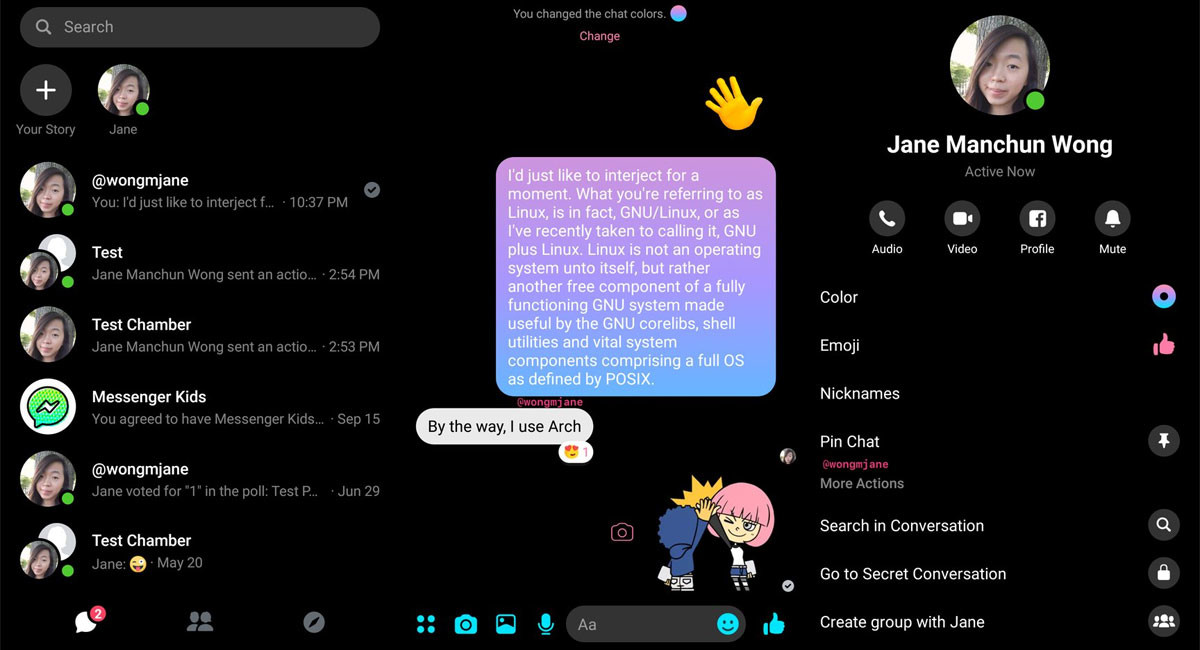
To activate the dark mode you must touch on your profile picture, top left (where it puts Chats) to go to the settings of the application. There, below, you should see a switch to activate and deactivate the dark mode. If you do not show up yet, be patience, that means you still do not have it active.
Out of curiosity, the dark mode remains unfinished and, therefore, a window warns you as soon as you activate it. This indicates that they have finished implementing the dark mode. It is possible that some windows retain the previous design white. We do not know when the dark mode of Facebook Messenger will be available for everyone, but if you expect it, the best thing to do is to sign up for the Facebook Messenger beta to receive news before someone ‘other.
More in News
How to Fix VPN Slowing Down Your Internet Speed: 8 Fixes That Work
Your VPN will always cost you a little speed, but it shouldn’t cripple your connection. Here are eight fixes, from picking a closer server to switching to WireGuard, in the order I’d try them.
How to Fix iPhone Proximity Sensor Not Working Properly After iOS 26
After the iOS 26 update, a growing number of iPhone users are reporting issues with the proximity sensor. In some cases, the screen does not turn off during voice calls. In others, features like Always On Display behave oddly in low-light conditions. If your iPhone’s proximity sensor feels “broken” or inconsistent after updating, you are…
Is a VPN Worth It in 2026? Best VPNs for US Users
A VPN hides your traffic from your ISP and public Wi-Fi and changes your apparent location, but it won’t make you anonymous or stop scams. Here’s when it’s worth paying for in the US, what to check before you buy, and which providers to compare.
The week in tech, minus the noise.
New reviews, fixes and the stories that matter — once a week, straight to your inbox.
We only use your email to send the newsletter. Unsubscribe any time. See our privacy policy.
Comments