

Is a VPN Worth It in 2026? Best VPNs for US Users
A VPN hides your traffic from your ISP and public Wi-Fi and changes your apparent location, but it won’t make you anonymous or stop scams. Here’s when it’s worth paying for in the US, what to check before you buy, and which providers to compare.

Photo by Sasun Bughdaryan on Unsplash
Every few weeks somebody asks me the same thing. Do I actually need a VPN, or is it just that thing YouTubers keep trying to sell me? Honestly, fair question. The ads make it sound like your bank account will drain itself the second you hop on coffee shop Wi-Fi without one.
The truth is somewhere in the middle. A VPN is really handy for a few specific jobs and pretty close to pointless for others. Once you figure out which is which, deciding gets way easier (and you stop paying for protection a VPN never actually promised you).
So below I’m going to walk through what a VPN does and doesn’t do, when it’s worth it if you’re in the US, what to check before you buy, and which providers I’d shortlist. I’ll also be upfront about what I could confirm on official pages and what you’ll need to check yourself, because VPN pricing changes all the time. Like, all the time.
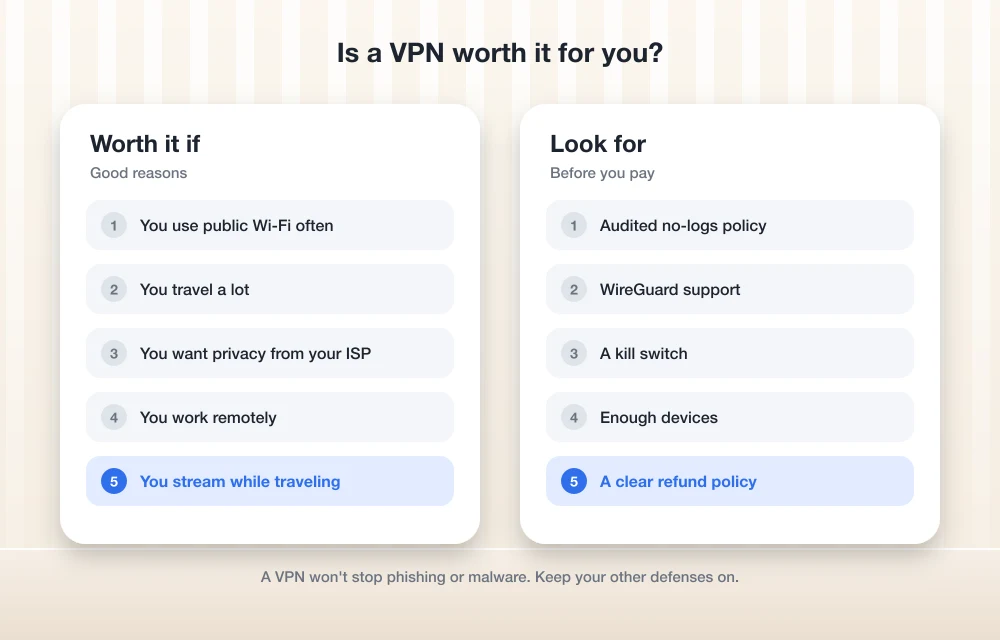
Quick answer: For most people in the US, a VPN is worth it if you use public Wi-Fi often, travel, or want to keep your browsing hidden from your internet provider. It won’t make you anonymous and it won’t protect you from malware or phishing, so treat it as one layer of security, not the whole plan. If you mostly browse at home on your own secured network, you can probably skip it. If you do buy one, look for an audited no-logs policy, a modern protocol like WireGuard, a kill switch and a fair refund policy.
What a VPN actually does
A VPN (virtual private network) sets up an encrypted tunnel between your device and a server the VPN company runs. Encrypted just means scrambled, so anyone sitting in the middle can’t read it. Your traffic goes through that tunnel and then heads out to the internet from the VPN’s server.
Flip it on and two things change. One, your internet service provider (ISP) and whoever’s running the Wi-Fi you’re on can’t see which sites you visit or what you’re sending. They can tell you’re connected to a VPN. That’s pretty much it. Two, websites see the VPN server’s IP address instead of yours, so your apparent location shifts. Connect to a server in another city and sites think you’re sitting there.
That’s genuinely useful! But look at what really happened. Your data didn’t disappear. It just took a different road. I’ll be real with you: a VPN generally won’t make you fully anonymous, it just moves your trust from your ISP or Wi-Fi provider over to the VPN company. The FTC also points out that a VPN app gets permission to intercept all of your internet traffic. All of it. So which company you pick matters way more than the ads let on.
If you want more everyday safety habits on top of a VPN, CISA’s Secure Our World tips are free and a decent place to start.
What a VPN doesn’t do
Okay, this is the part where VPN marketing gets a little carried away.
It doesn’t make you anonymous. Sign in to Google, Facebook or Amazon and they know it’s you, VPN or no VPN. Cookies, logged-in accounts and browser fingerprinting (where sites recognize your device from stuff like screen size, fonts and browser version) all keep working just fine.
It doesn’t stop malware or phishing either. Download a dodgy file or type your password into a fake login page, and the VPN will cheerfully encrypt that mistake on its way out the door. Same deal with those scary pop-ups saying your computer’s infected. If you get one of those, I’ve written up how to fix a tech support scam pop-up so you don’t fall for it.
And weak or reused passwords? A VPN does nothing there. Honestly, if your passwords are still a mess, I’d fix that before spending a cent on a VPN. A good password manager plus two-factor authentication protects your accounts in a way a VPN just can’t. Want somewhere to start? I put together the best password managers for families and small businesses.
When a VPN is worth it
You use public Wi-Fi a lot
Airports, hotels, cafes, libraries. This is the classic one, and it’s a solid reason. You have no clue who runs that network or who else is on it. A VPN encrypts your traffic so the network operator (or anybody snooping) can’t read it.
It’s not the only thing you should do though. CISA, the US government’s cybersecurity agency, warns in its guide to securing wireless networks that unsecured public Wi-Fi plus file sharing turned on can expose your files, and it says to switch sharing off on public networks. CISA also suggests checking a hotspot’s name and password with staff before you connect, since attackers set up fake “evil twin” hotspots with really convincing names. A VPN helps, sure. But not much if you’ve happily joined the hacker’s network and left your shared folders wide open.
You travel
On the road you end up on hotel networks, airport networks, whatever’s around. A VPN gives you the same protection no matter where you are. It can also make it look like you’re connecting from the US, which can help with sites and services that act differently when you’re abroad. One thing though: VPN rules vary by country, so look up the local rules before you go.
You want different streaming libraries
Since a VPN changes your apparent location, people use it to get at a streaming service’s library from another region. Here’s the thing, though. Streaming services’ terms of use can restrict VPN use, and some of them actively block VPN connections. Read the terms for whatever service you’re paying for before you try it. And please don’t buy a VPN just because it promises to work with one particular service.
You want privacy from your ISP
No VPN? Your ISP can see which websites you visit, even when the pages themselves are encrypted with HTTPS. With a VPN, all it sees is a connection to the VPN server and not a whole lot else. If that bugs you, honestly, that alone can be worth the money.
When you can skip it
Say you mostly browse at home on your own Wi-Fi with a strong password and barely ever touch public networks. A VPN adds less than you’d think. Most sites already use HTTPS, which encrypts what you send and receive, so the main extra thing a VPN gives you is hiding which sites you visit from your ISP.
You can also skip it if what you’re really worried about is getting hacked. Account takeovers usually come from phishing, reused passwords and malware, and a VPN doesn’t fix any of that. Need real anonymity? A commercial VPN isn’t the tool for that. You’re handing a company everything you do online.
Oh, and one more. If the only VPN you’d use is some random free app with no clear owner, I’d honestly rather you used nothing. More on that further down.
What to look for in a VPN
An audited no-logs policy
A no-logs policy means the company says it doesn’t keep records of what you do online. Anybody can say that, right? An audit means an independent firm actually checked. Find the audit report on the provider’s own site, see how recent it is and what it really covered. I couldn’t verify every provider’s audits for this post, so you’ll want to do this check yourself before paying.
WireGuard or another modern protocol
A protocol is basically the rulebook a VPN uses to build its tunnel. WireGuard is a modern, open one that’s known for being fast and lightweight. Some providers have their own, like ExpressVPN’s Lightway, which ExpressVPN says now has post-quantum protection (meaning it’s built to hold up against code-breaking by future quantum computers).
A kill switch
If your VPN drops even for a second, your device can quietly slip back onto your normal connection and expose your real IP address. Not great. A kill switch cuts off internet access until the VPN reconnects. I wouldn’t buy a VPN without one, period.
Enough devices
Count everything. Phones, laptops, tablets, everyone else’s stuff in the house. Device limits vary a lot between providers, and sometimes between plans from the same provider. A VPN set up on your router only counts as one connection, which comes in handy if you’re bumping up against the limit.
Good US servers
If you’re in the US, having servers spread across different US regions means better speeds and fewer headaches with US-only services. Take a look at the provider’s server list before you sign up.
A clear refund policy
A money-back window lets you test speeds on your own connection, which is the only test that really counts. Read the fine print though. Exclusions are super common, and buying through an app store can change how refunds work.
The VPNs I’d shortlist for US users
These six are well-known names that are worth comparing. I’ve stuck to official sources, and wherever I couldn’t confirm something on the provider’s own page, I just said so instead of guessing. Also, full disclosure, I haven’t run my own speed tests for this roundup.
| Provider | Confirmed from official pages | Check before you buy |
|---|---|---|
| ExpressVPN | 10, 12 or 14 devices (Basic, Advanced, Pro); servers in 113 countries; Lightway with post-quantum protection; 30-day money-back guarantee for new subscribers | Current promo price, renewal price, refund exclusions |
| NordVPN | Plans and prices listed on its own blog; 7-day free trial with some higher-tier 1- and 2-year plans | Current plans and prices on its pricing page, device limit, audits, refund terms |
| Proton VPN | Offers a free plan as well as paid plans | Free plan limits, paid prices, device limit, audits |
| Surfshark | Not yet verified | Prices, device limit, audits, refund terms |
| Mullvad | Not yet verified | Price and billing currency, device limit, audits, refund terms |
| Private Internet Access | Not yet verified | Prices, device limit, audits, refund terms |
ExpressVPN
ExpressVPN is the one I was able to dig into the most. There are three tiers, Basic, Advanced and Pro, which allow 10, 12 and 14 devices. It lists servers in 113 countries. A dedicated IP (an IP address that only you use) comes included with Pro and is a paid add-on on the other plans. New subscribers get a 30-day money-back guarantee, which you request through its 24/7 support. The page does put an asterisk on it for exclusions though, so go read those.
Pricing is where things get messy. ExpressVPN’s order page showed a 2-years-plus-4-months deal in USD, and after that, plans renew yearly at the prices on its pricing page:
| Plan | Intro price (28 months) | Billed up front | Yearly renewal |
|---|---|---|---|
| Basic | $3/mo | $84 for the first 28 months | $99.95/yr |
| Advanced | $4.50/mo | $126 for the first 28 months | $119.95/yr |
| Pro | $7.50/mo | $210 for the first 28 months | $199.95/yr |
These numbers bounce around with promotions, so use them as a rough guide and check the live page before you pay. See that jump at renewal? That’s normal for VPNs, and honestly it’s the number you should actually budget for. US prices stay in USD, even while ExpressVPN rolls out local currency pricing in other places. My full take is in my ExpressVPN review if you want it.
NordVPN
NordVPN’s own blog lists its plans and prices, and says some higher-tier 1-year and 2-year plans come with a 7-day free trial. Thing is, what the US checkout shows seems to change with sales, and I couldn’t confirm the current plans on its pricing page. So I’m not quoting a price. Check nordvpn.com/pricing on the day you actually buy, and look hard at that renewal price.
Proton VPN
What makes Proton VPN stand out is the free plan it offers next to its paid ones. If you want to try a VPN from an established provider without paying anything, or you only need one every now and then, this is the first one I’d look at. I couldn’t confirm the free plan’s exact limits or the paid prices for this post, so head to protonvpn.com/pricing to see what the free tier gets you and what upgrading costs.
Surfshark, Mullvad and Private Internet Access
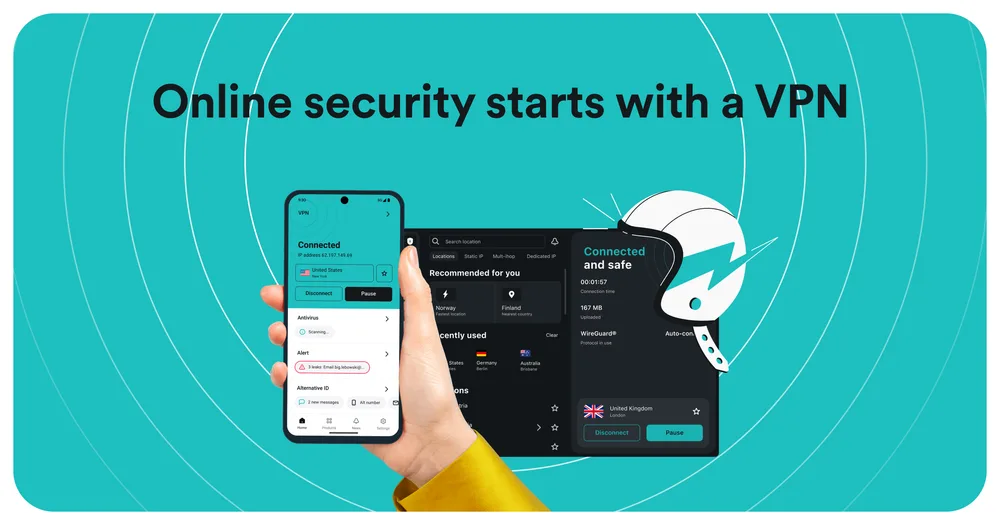
These three are well-known alternatives and worth lining up next to the others. I haven’t managed to verify their current prices, device limits or audit details on their official pages yet, and I’d rather not repeat claims I can’t back up. Just run each one through the checklist above. With Mullvad, also check what currency you’ll get billed in, because that changes what you actually end up paying in dollars.
Free VPNs: what’s the catch?
Running VPN servers costs real money. So if you’re not paying, how is the company paying? Worth asking.
The FTC’s VPN guidance is pretty blunt here. It reminds you a VPN app can intercept all your traffic, so you should check what permissions it wants and read the privacy policy for any sharing with advertisers or other third parties. It also mentions a study of nearly 300 VPN apps that found some didn’t use encryption at all. Think about that for a second. A VPN that doesn’t encrypt is worse than nothing, because it makes you feel safe when you’re not.
My rule is simple. If you want free, stick to a free tier from an established provider that also sells paid plans, like Proton VPN, and still read the privacy policy. The no-name apps with flashy icons and vague owners? Skip them.
Is it legal to use a VPN in the US?
For regular people, yep, using a VPN is generally legal in the US. But anything that’s illegal without a VPN is still illegal with one (obviously). Streaming services can restrict VPN use in their terms, and your employer or school might have their own rules for their devices and networks. Heading abroad? Check the local laws, because they’re different from country to country.
VPN on your phone or your router?
On your phone
This is the easiest way to go. Grab the provider’s app from the App Store or Google Play, sign in, and let it add the VPN configuration when your phone asks. After that you’ll see the VPN listed in your phone’s settings. In the app, look for a kill switch and an option to auto-connect on untrusted Wi-Fi, since your phone is the thing most likely to jump onto random networks.
A lot of Android phones also have a built-in setting to keep a VPN always on and block connections whenever the VPN isn’t running. Where you’ll find it depends on who made your phone and which Android version you’re on.
On your router
Putting the VPN on your router covers every device on your home network, including smart TVs and other gadgets that can’t run VPN apps, and it only counts as one connection toward your device limit. The downside? Setup varies a ton depending on your router and provider, often with WireGuard or OpenVPN configuration files involved, and switching locations is way more fiddly than tapping a button in an app. Have a look at your provider’s own router guide before you start.
So, is a VPN worth it for you?
If you’re on public Wi-Fi a lot, travel regularly, or just don’t love the idea of your ISP seeing every site you visit, then yeah, I think a VPN earns its keep. Go for one with an audited no-logs policy, a kill switch and a refund window, and budget for the renewal price, not the shiny intro deal.
If you mostly stay home on your own network, I’d put your energy into a password manager, two-factor authentication and a healthy suspicion of pop-ups and weird links first. Those are what stop the attacks that actually hit most people. A VPN is a nice extra layer, sure. Magic shield, though? Nope, whatever the ads say.
Frequently Asked Questions
Does a VPN make me anonymous online?
Nope. A VPN hides your traffic from your ISP and the Wi-Fi network you’re on, and it changes your apparent location. But websites still know it’s you through logins, cookies and browser fingerprinting, and the VPN company itself can see your traffic. The FTC notes that a VPN moves your trust over to the VPN provider instead of making you fully anonymous.
Do I need a VPN at home?
Usually not, as long as your home Wi-Fi has a strong password and most sites you use have HTTPS. The main perk at home is hiding which sites you visit from your internet provider. If that matters to you, a VPN helps. If it doesn’t, honestly, a password manager and two-factor authentication are a better use of your money.
Are free VPNs safe?
Some are, plenty aren’t. The FTC says to check a VPN app’s permissions and privacy policy for sharing with advertisers, and it mentions a study of nearly 300 VPN apps where some didn’t use encryption at all. If you want free, go with a free tier from an established provider that also sells paid plans, like Proton VPN.
Is it legal to use a VPN in the US?
For ordinary people in the US, using a VPN is generally legal. Anything illegal without a VPN is still illegal with one, though, and streaming services can restrict VPN use in their terms. Employers, schools and other countries might have their own rules too.
Will a VPN protect me from viruses and phishing?
No. A VPN encrypts your connection, but it won’t stop you from downloading malware or typing your password into a fake login page. Keep your devices updated, use a password manager and be careful with links and pop-ups.
Featured image: Sasun Bughdaryan on Unsplash.
You might also like

Best VPN and VPN Service Providers Online
There are millions of people using Virtual Private Network (VPN) service to secure their privacy when using the internet and the number of them continued to grow as the lack of security in using the internet technology can leak their personal information to unauthorized people that may use it for illegal purposes. VPNs help prevents…

How to setup VPN on PS4
PS4 is a fantastic gaming console and loved by millions of users. To improve the ping rate, access the players in different regions, and to protect the online play from online attacks, many users prefer VPN on PS4. Unfortunately, there is no straightforward process for the VPN setup on PS4. However, every popular VPN service…

VPN Beginner’s Guide – Why We All Need VPN?
Have you ever considered how anonymous you really are online? Although being able to track internet users is useful when it comes to criminals and the likes, are regular people who are doing no harm right to want to remain anonymous? Or, do you want to stay anonymous for a reason, such as accessing geo-blocked…
The week in tech, minus the noise.
New reviews, fixes and the stories that matter — once a week, straight to your inbox.
We only use your email to send the newsletter. Unsubscribe any time. See our privacy policy.
Comments