

Microsoft rolls out Xbox Mode for Windows 11 PCs
Microsoft is rolling out a new Xbox mode for Windows 11 PCs, bringing a console-like gaming experience to desktops, laptops

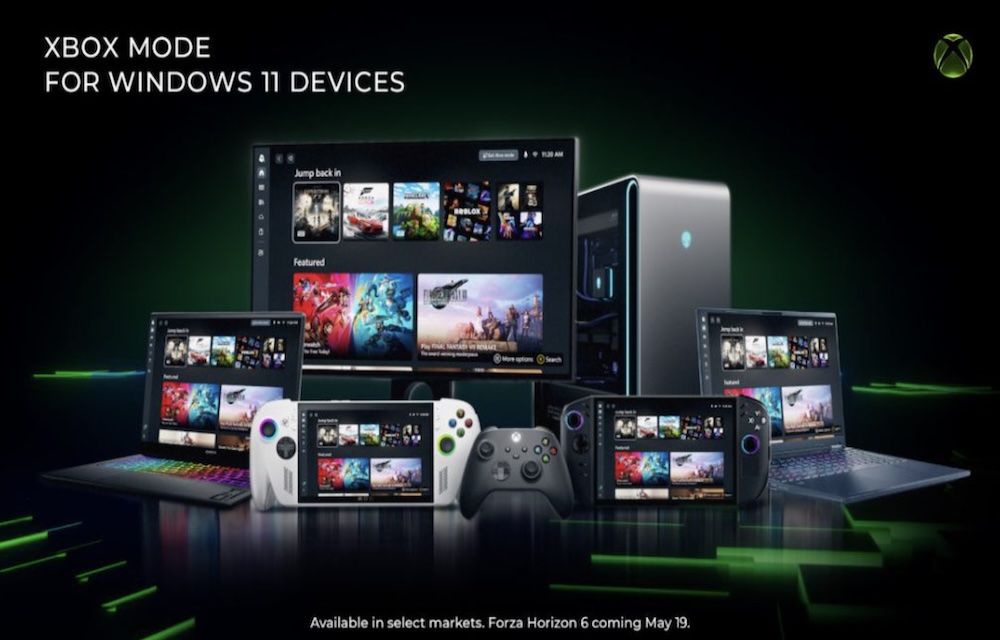
Microsoft is rolling out a new Xbox mode for Windows 11 PCs, bringing a console-like gaming experience to desktops, laptops, and tablets in select markets. The feature is designed to make PC gaming feel more focused, more controller-friendly, and less cluttered by the usual Windows desktop distractions.
The new mode gives users a full-screen gaming interface that puts their game library and recently played titles front and center. Instead of navigating through the traditional desktop layout, players can move around the interface using a game controller, making it easier to jump straight into a game.
One of the biggest advantages of Xbox mode is its unified library. It brings together installed games from multiple PC storefronts and also highlights the full Xbox Game Pass catalog in one place. That means users no longer need to switch between different launchers just to find and start their games.
Microsoft says this experience was originally tested on Windows gaming handhelds under the name “full screen experience.” Feedback from those devices helped shape the broader version now arriving on standard Windows 11 hardware. This shows the company is trying to build a more consistent Xbox experience across multiple device types without losing the flexibility of PC gaming.
Another useful part of the feature is the ability to switch back and forth between Xbox mode and the regular Windows 11 desktop. So while the mode creates a distraction-free gaming space, users are not locked into it permanently. They can still return to the normal desktop whenever needed.
The rollout is happening gradually, starting with a limited group of users in select regions. Microsoft is taking this phased approach to monitor stability and make sure the experience works smoothly before expanding access.
Users who want to check for the update can do so through Windows 11 settings. Microsoft recommends turning on the option to get the latest updates as soon as they are available. Once the update is installed, supported devices will be able to launch directly into Xbox mode.
This move is part of Microsoft’s larger effort to blur the line between console and PC gaming.
More in News
How to Fix Windows 11 Blue Screen Caused by a Wi-Fi Driver
A bad Wi-Fi driver is one of the most common reasons a Windows 11 PC suddenly blue-screens. Today the driver runs inside the Windows kernel, so when it crashes, the whole PC goes down with it. Microsoft plans to change that in 2027 by moving Wi-Fi drivers out of the kernel, Windows Latest reported on…
Xbox Confirms Wolfenstein 3 and Brings 25 Original Xbox Games to PC for Its 25th Anniversary
Xbox confirmed Wolfenstein 3 is in production at MachineGames and added 25 original Xbox games to PC, plus Halo Firefight, DOOM Slaughter Mode and free items.
How to Fix USB Headset or Speakers With No Sound (Code 10) on Windows 11
More guides: See all our Windows 11 fixes. Update (November 11, 2026): Microsoft has now fixed this bug. The November 10 security update, KB5132061 for Windows 11 versions 24H2, 25H2 and 26H2 (KB5132059 on 26H1), fixes USB Audio 1.0 devices failing to start with Code 10, so installing it from Settings > Windows Update is…
The week in tech, minus the noise.
New reviews, fixes and the stories that matter — once a week, straight to your inbox.
We only use your email to send the newsletter. Unsubscribe any time. See our privacy policy.
Comments