

Oxygen Updater can no longer fetch OTA updates for OnePlus devices
OnePlus users are in for a disappointment and a major one at that. This is because one of their favourite applications has stopped working. This

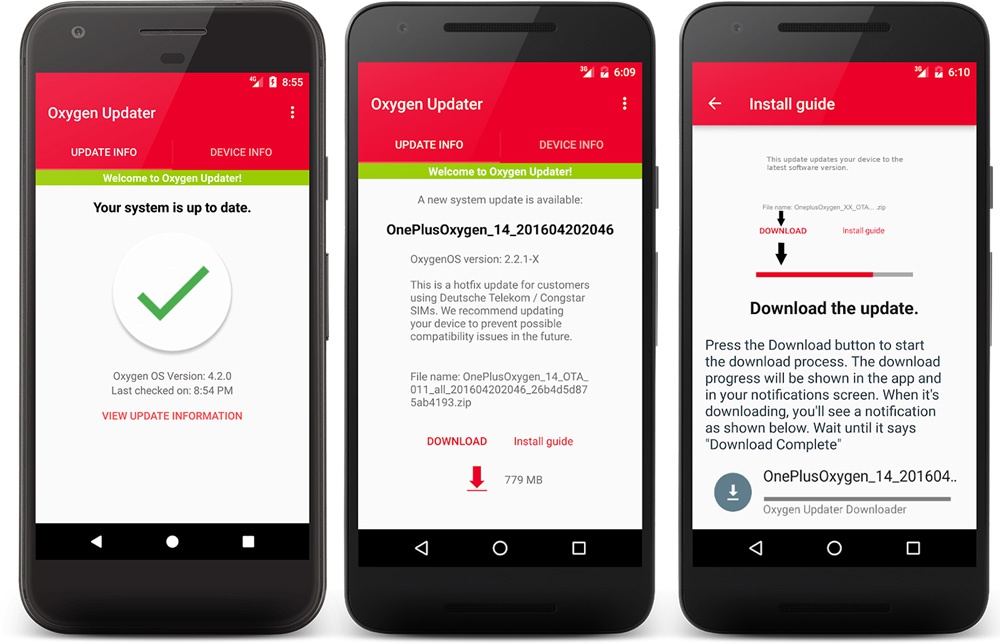
OnePlus users are in for a disappointment and a major one at that. This is because one of their favourite applications has stopped working. This application is none other than the Oxygen Updater app. This app was used by almost all the OnePlus users. Basically, this application is used to fetch the OTA updates from OnePlus servers as soon as possible. Therefore, as soon as OnePlus releases a new update, OnePlus users would download them from Oxygen Updater and install them on their device by sideloading. This was an excellent method to fetch OTA and it worked really very well.
However, it was great while it lasted. As the application has stopped working. The developers of Oxygen Updater have announced that OnePlus made some changes to their servers. This means that something is broken from the server side and the call is not getting from application to the server. Now, OnePlus users will no longer be able to download OTA updates from Oxygen Updater. Therefore, you will now have to wait in line for the company to roll out the update to your device. Unless and until, someone posts an OTA which you can sideload.
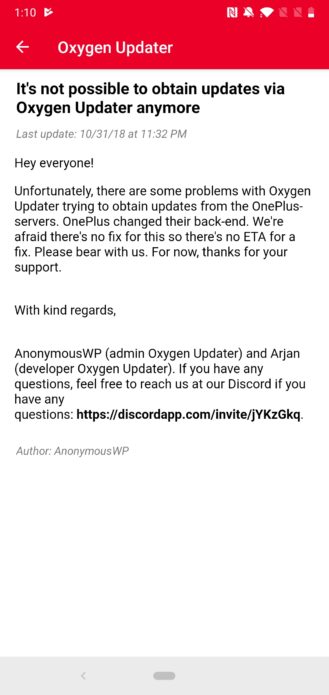
Talking about Oxygen Updater, it was a really popular application among OnePlus users. And we are telling this to you based on some facts and figures from the Google Play Store. Yes, Oxygen Updater already had 1 lakh+ downloads on the Google Play Store. Talking about fetching the updates, Oxygen Updater would fetch the update as soon as OnePlus uploaded them on their servers. Sometimes, it would happen that OnePlus was late in announcing the update whereas the Oxygen Updater already showed a new update. Also, the developers say that there’s no fix for this so they have not given ETA for this issue to be fixed. But we do hope that this will be fixed soon for the OnePlus fans to rejoice once again.
More in News
How to Fix “Headphones Not Recognized” on iPhone After iOS 26 Update
After the iOS 26 update, a small but noticeable group of iPhone users started reporting a strange issue: wired headphones are no longer being recognized properly. Some are stuck in speaker-only mode, while others see their headphones connect and disconnect randomly. Although most complaints are about wired headphones, a few Bluetooth users are facing similar…

How to Fix Netflix Black Screen With Sound: 8 Fixes for Home and Travel
Few things are more irritating than settling in for a show and getting a pitch-black screen while the dialogue plays on like nothing is wrong. At home it is annoying. On a trip, in a hotel room after a long day or on a train with your tablet, it is worse. The good news: Netflix’s…

Windows 11 26H2 Is Installing Automatically: How to Pause or Delay It
Microsoft is now installing Windows 11 version 26H2 automatically. Since November 18, 2026, Microsoft says it is “gradually expanding automatic delivery, beginning with devices running Windows 11, versions 24H2 and 25H2, that are not managed by IT departments,” according to the Windows 11 26H2 release health page. If you’d rather wait, you can pause it…
The week in tech, minus the noise.
New reviews, fixes and the stories that matter — once a week, straight to your inbox.
We only use your email to send the newsletter. Unsubscribe any time. See our privacy policy.
Comments