

How to Fix Netflix Black Screen With Sound: 8 Fixes for Home and Travel
Few things are more irritating than settling in for a show and getting a pitch-black screen while the dialogue plays on like nothing is wrong. At home it is annoying. On a trip, in a hotel room after a long day or on a train with your tablet, it is worse. The good news: Netflix’s…


Photo by Timothy Low on Unsplash
Few things are more irritating than settling in for a show and getting a pitch-black screen while the dialogue plays on like nothing is wrong. At home it is annoying. On a trip, in a hotel room after a long day or on a train with your tablet, it is worse.
The good news: Netflix’s Help Center says sound with no picture usually means your device or a video cable is blocking the video, not your account. So the fix is in your setup.
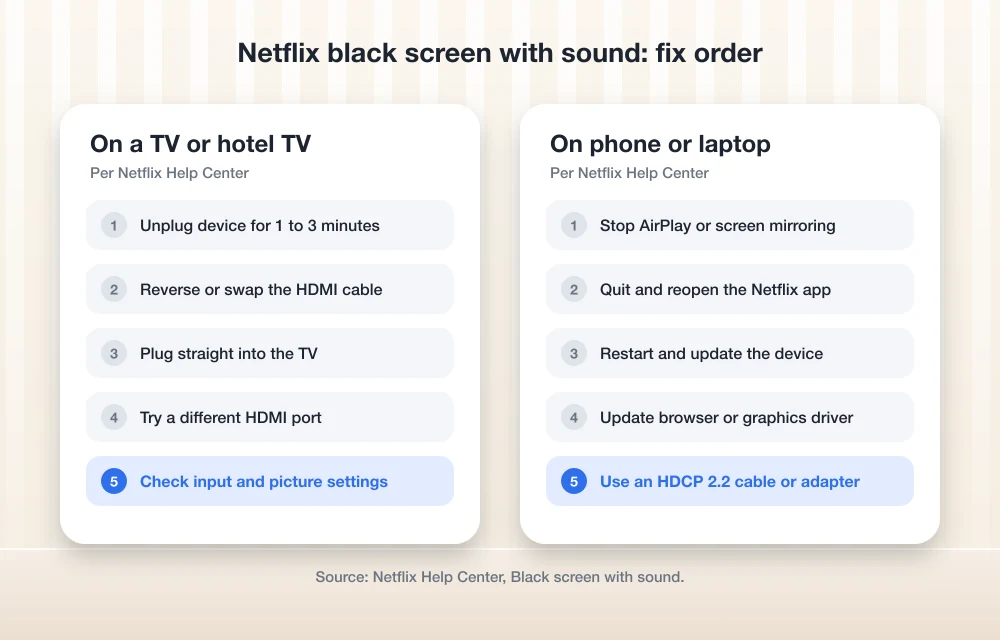
Quick answer: If Netflix plays audio over a black screen, stop any AirPlay or screen mirroring first, since Netflix no longer supports it. Then restart your device, reverse or swap the HDMI cable, plug straight into the TV and try another HDMI port. On a computer, update your browser and graphics driver. If you use a USB-C or Lightning adapter, make sure it supports HDCP 2.2.
Why Netflix Shows a Black Screen but Still Plays Sound
Netflix video is copy protected. When something in the chain looks unsupported, like a mirroring app, a cheap adapter or a flaky HDMI link, the picture gets blocked while the audio keeps going. Hotel TVs, borrowed cables and phone casting are classic triggers.
1. Stop Screen Mirroring and AirPlay
Check this first on any trip. According to Netflix’s black screen help page, AirPlay, Screen Mirroring and Sidecar are no longer supported. If you are mirroring your iPhone or Android phone to a hotel TV, you will likely get sound and nothing else. Use the TV’s own Netflix app, a streaming stick or a supported cable instead. On Chromecast, Netflix says to disconnect Google Home screen mirroring.
2. Restart the Device Properly
For a TV or streaming stick, Netflix suggests unplugging it, pressing the power button once, waiting a minute (or leaving it unplugged for three), then plugging it back in. On a phone, turn it fully off rather than just locking it. On iPhone or iPad, swipe Netflix away in the App Switcher and reopen it before restarting.
3. Fix the HDMI Connection
Hotel TVs and travel cables are the usual suspects here. Netflix recommends these steps in order:
- Reverse the ends of the HDMI cable.
- Connect your device straight to the TV, skipping any soundbar or receiver.
- Try a different HDMI port on the TV.
- Try a different cable.
If it works on another TV, the first TV’s port is the problem.
4. Use an HDCP-Compatible Adapter
Plugging a laptop, iPad or iPhone into a hotel TV? The adapter matters. Netflix says USB-C and Thunderbolt video cables or adapters need to support HDCP 2.2. For Lightning, only Apple’s HDMI adapter models A1438 and A1621 are supported, and you can check yours in Settings, then General, then About, then Apple HDMI Adapter. A no-name airport adapter is a common culprit.
5. Check the TV Input and Picture Settings
Make sure the TV is set to the right input for your device. Picture settings vary by brand, so check the TV manual if the input is right and the screen is still black.
6. Update Your Browser or Graphics Driver
Watching on a laptop? Update your browser or switch to a supported one. On Windows, Netflix says to update your graphics driver through the AMD or NVIDIA software, or uninstall and reinstall it if the update fails. You can also reset the Windows Netflix app under Settings, Apps, Installed apps, Netflix, Advanced options. That signs you out.
7. Update Your Phone or Tablet
Install any waiting system update, then try again. If your phone needs a full update before a trip, our guide to fixing iPhone updates that do not show up can help.
8. Check Your Connection, Then Contact Netflix
Weak hotel Wi-Fi rarely causes this, but if your laptop shows Wi-Fi with no internet, see our Wi-Fi fix. Apple TV owners having other trouble can check our Apple TV fix. If nothing works, Netflix says it is investigating the issue on some devices and asks you to contact Netflix.
FAQs
Why is Netflix black but I can hear sound?
Netflix says this usually means your device or a video cable is stopping the video from showing. Screen mirroring, unsupported adapters and loose HDMI connections are common causes.
Why does Netflix go black when I mirror my phone?
Netflix no longer supports AirPlay or screen mirroring. Use the TV’s Netflix app or a supported cable instead.
Why does Netflix go black on a hotel TV?
Hotel TVs often involve mirroring, unfamiliar HDMI ports or adapters that do not support HDCP 2.2. Switch to a supported connection and try another port or cable.
Featured image: Timothy Low on Unsplash.
Disclosure: TheTechHacker has no paid relationship with Netflix or any company mentioned here.
More in How-to
How to Fix iPhone Siri Activating Randomly Without Saying “Hey Siri” on iOS 26
Has Siri started activating randomly on your iPhone after the iOS 26 update? You may suddenly see the Siri interface appear even though you did not say “Hey Siri” or intentionally touch the screen. Apart from being frustrating, unexpected Siri activation can interrupt your work, trigger unwanted actions, or create privacy concerns when the phone…
How to Fix Windows 11 26H2 Black Screen After Sign-In
Seeing a black screen after signing in on Windows 11 26H2? Microsoft confirmed the issue, mainly on Azure Virtual Desktop with FSLogix, and fixed it in KB5127648. Here’s how to get your desktop back.

How to Fix iPhone Freezing When Moving Widgets in iOS 27
Is your iPhone freezing when you drag widgets between Home Screen pages on iOS 27? Here’s which iOS 27 bug Apple has fixed, which one it hasn’t acknowledged, and what you can do right now.
The week in tech, minus the noise.
New reviews, fixes and the stories that matter — once a week, straight to your inbox.
We only use your email to send the newsletter. Unsubscribe any time. See our privacy policy.
Comments