

The latest Windows Terminal that Microsoft announced earlier is now available
We recently saw an all-new Windows Terminal being announced by Microsoft at its annual developer conference called Build 2019. Microsoft did not announce

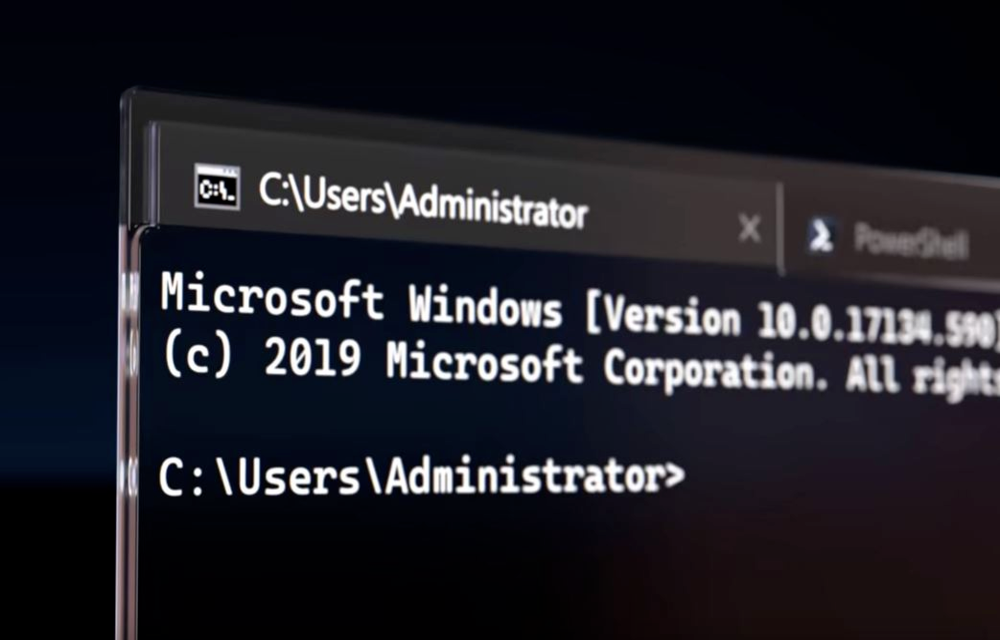
We recently saw an all-new Windows Terminal being announced by Microsoft at its annual developer conference called Build 2019. Microsoft did not announce exactly when its new Windows Terminal was going to be available. However, the new Windows Terminal was spotted last night in the Microsoft Store but it was not available for download.
Now, Microsoft has come out and released a blog post regarding its new Windows Terminal’s release. Microsoft says that this is just the preview of Windows Terminal 1.0 and the actual release of Windows Terminal 1.0 will be in Winter 2019 which looks like the release date of next version of Windows 10 too.
As far as the new Terminal goes, there are several changes to it. First of all, the icon or logo of the Windows Terminal has changed and it now shows code signs along with a rectangular structure as seen in movies. Also, the new Windows Terminal has multiple tab support, as well as GPU, accelerated DirectWrite/DirectX-based text rendering engine. Along with that, it has support for many settings and config options. Also, you can now change the way how your Windows Terminal looks right inside its settings.
There are various ways in which you can change its appearance from a more geeky look to a more subtle look with beach backgrounds and more. If you use Windows 10 on your PC, you can download the preview of Windows Terminal right away from the Microsoft Store. Also, the Windows Terminal has already been open-sourced by Microsoft which means that you can contribute to its development.
The source-code files of Windows Terminal are already live on Github so you can contribute to that project as much as you want. Also, Emoji support is now available inside the Windows Terminal which gives a more fun touch to the Terminal and you will no longer have to just stare at the text blocks inside your Terminal window.
More in News

Microsoft Ignite 2026: Copilot Is Getting File Actions on Copilot+ PCs, Plus Copilot in Windows Search
At Ignite 2026, Microsoft said Copilot on Copilot+ PCs will soon move, rename and organize files and diagnose PC problems, plus a Copilot handoff in Windows Search.
Windows 11 23H2 Enterprise and Education Reach End of Updates on November 10, 2026
Windows 11 23H2 Enterprise and Education get their last update on November 10, 2026. Here's who is affected, how to check your version and how to upgrade.
How to Fix USB Headset or Speakers With No Sound (Code 10) on Windows 11
More guides: See all our Windows 11 fixes. Update (November 11, 2026): Microsoft has now fixed this bug. The November 10 security update, KB5132061 for Windows 11 versions 24H2, 25H2 and 26H2 (KB5132059 on 26H1), fixes USB Audio 1.0 devices failing to start with Code 10, so installing it from Settings > Windows Update is…
The week in tech, minus the noise.
New reviews, fixes and the stories that matter — once a week, straight to your inbox.
We only use your email to send the newsletter. Unsubscribe any time. See our privacy policy.
Comments