

Coolmuster Data Recovery For iPhone iPad iPod Review
Even after creating a plan to disaster-proof data backup sometimes we fail to protect. Sometimes iTunes itself can erase all data stored on your iOS device in syncing error issues.


Even after creating a plan to disaster-proof data backup sometimes we fail to protect. Sometimes iTunes itself can erase all data stored on your iOS device in syncing error issues. Finding a perfect data recovery solution for iPhone, iPad or iPod is a tough task, but we found a simple solution called Coolmuster Data Recovery for iPhone iPad iPod. The program offers a nearly one-click solution for recovering any data that was accidentally wiped from your iPhone using iTunes Backup file.

What is Coolmuster Data Recovery For iPhone?
The very first screen of the installer shows the simplicity of installation; it is pretty much easy to install the program. It is not necessary to have an iPhone connected to your PC when using this program because it finds the iTunes backup of your previously synced iPhone iPad or iPod and extracts it. When you have multiple device backups, it shows all the available backups as a list.
It’s true that you get a free trial after installing the program, but you still need a license key to avail full features of the program. In a trial period, you’ll able to recover only first three items in the list. To get started select your device backup and click on start scan button to proceed.
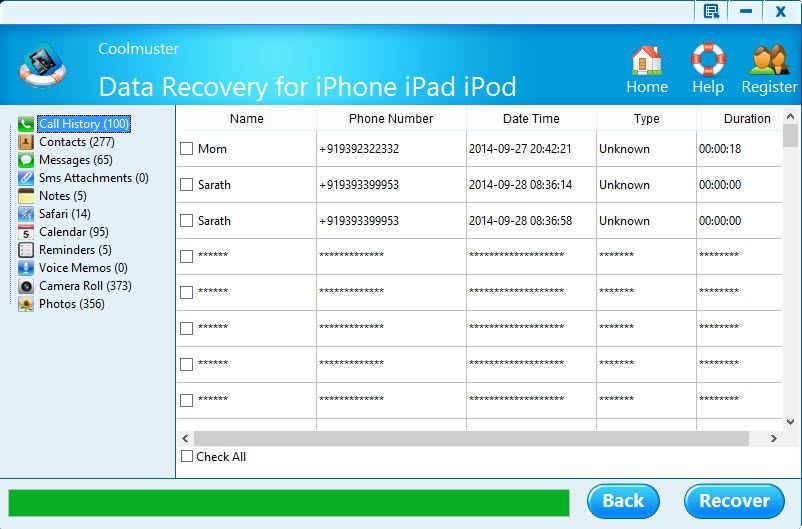
After scanning it shows a list of items like Call History, Contacts, Messages, SMS attachments, Notes, Safari, Calendar, Reminders, Voice Memos, Camera Roll and Photos. You can recover all items once by clicking on “Check Box” and click on recover. Or if you want a particular item to recover click on a single item and start recovery. Is that simple to lost recover your lost data from an iTunes backup file.
Features
- Recover contacts, SMS, calendars, photos, notes, music, and more from iPhone, iPad, and iPod within one click.
- Automatically detect all iTunes backup files on the computer.
- Intelligently restore data from iTunes backup files.
- Work perfectly for iPhone 6/5S/5/4S/4/3GS, iPad 2/1, the New iPad and iPod touch 4
Verdict
We find Coolmuster Data Recovery For iPhone iPad iPod is a pretty simple program to recover all lost data from an iTunes backup file.
Download Coolmuster Data Recovery For iPhone iPad iPod.
You might also like
Tenorshare Reiboot Review – A Simple Tool To Fix iOS Problems
When it comes to fixing iPhone/iPad/iPod problems, there are many utility software out there which comes for the purpose of fixing them. But, only a few of them are really doing the job to solve the problems affecting your Apple devices by entering the recovery mode. iOS devices sometimes freeze or hang during the iOS firmware update. In…
iStonSoft iPad/iPod/iPhone Data Recovery-Review
Lost your iPhone or iPad or iPod? you might end up regretting lost important data. Data contains your memories in photos, music, videos, messages, notes, events and much more. There are many file recovery tools available out there that let you recover deleted files from iPhone directly. If you are searching Google for How to Recover…

iSkysoft iPhone Data Recovery Software Review
iPhone is such a handy device were the information stored like in a locker. The security provided by Apple is almost unbreakable on their lovely device. So, we all using the same for storing our data, even it is super important. But, what about once we lost it like in any other smartphones? The things…
The week in tech, minus the noise.
New reviews, fixes and the stories that matter — once a week, straight to your inbox.
We only use your email to send the newsletter. Unsubscribe any time. See our privacy policy.
Comments