

How to Fix GTA 6 Preload Not Showing or Not Starting on PS5 and Xbox Series X|S
Can’t find the GTA 6 preload button, or is the download stuck at 0%? Here’s how to track down the preload on PS5 and Xbox Series X|S and get it moving before the November 19 launch.

Fix-GTA-6-Preload-Not-Showing-PS5-Xbox
GTA 6 is finally close. Rockstar has confirmed that the digital preload opens on November 10, 2026, and the game launches on November 19, 2026, on PS5 and Xbox Series X|S. If you pre-ordered and your console shows no download button, or the download just sits there doing nothing, you’re not alone.
A preload means downloading the game files before launch day. When the game goes live, you start playing right away instead of waiting hours for a huge download. When it works, it’s great. When the button is missing, it’s maddening.
In this guide I’ll go through every likely reason the GTA 6 preload isn’t showing or isn’t starting, with fixes for both PS5 and Xbox. I’ll also tell you plainly what Rockstar, Sony and Microsoft haven’t confirmed yet, so you don’t waste time chasing a fix that doesn’t exist.
Quick answer: The GTA 6 preload is for digital pre-orders. It only shows up on the account that bought the game, and only from November 10, 2026. If you can’t see it, check that your pre-order actually went through and that you’re signed in to the right account, then look in your game library or on the game’s store page for a download option. If the download starts but stays at 0%, free up storage, fully restart the console, and check your internet connection and the PlayStation Network or Xbox service status.
What’s confirmed and what isn’t
Let me get this out of the way first, because a lot of confusion comes from guesswork online.
Confirmed by Rockstar: the digital preload begins on November 10, 2026, and GTA 6 launches on November 19, 2026. You can check Rockstar’s own announcements on the Rockstar Newswire.
Not confirmed from an official source at the time I’m writing this:
- The exact start time on each platform. It may be midnight in your local time, or a single global time that lands at a different hour where you live. I couldn’t verify this on an official page.
- The exact download size. Check the GTA 6 page in the PlayStation Store or Microsoft Store, which should list the size.
- Exactly how code-in-box copies (a physical box with a download code inside) work for the preload.
So if it’s early on November 10 and nothing shows up, don’t panic yet. You might just be early.
Quick fixes at a glance
| Problem | Likely cause | What to do |
|---|---|---|
| No preload button at all | Boxed copy, not a digital pre-order | Preload is for digital orders. Check with your retailer for disc or code details. |
| Game not in your library | Wrong account signed in | Sign in with the account that placed the pre-order. |
| Game not in your library | Pre-order didn’t complete | Check your transaction history and order emails. |
| Preload not live yet | Time zone or start time | Wait and check again later on November 10. |
| Download stuck at 0% | Storage, network or a stuck queue | Free space, restart fully, pause and resume, check service status. |
| Download stops overnight | Rest mode or power settings | Let the console stay connected to the internet while asleep. |
Why the GTA 6 preload button might be missing
You bought a boxed copy, not a digital pre-order
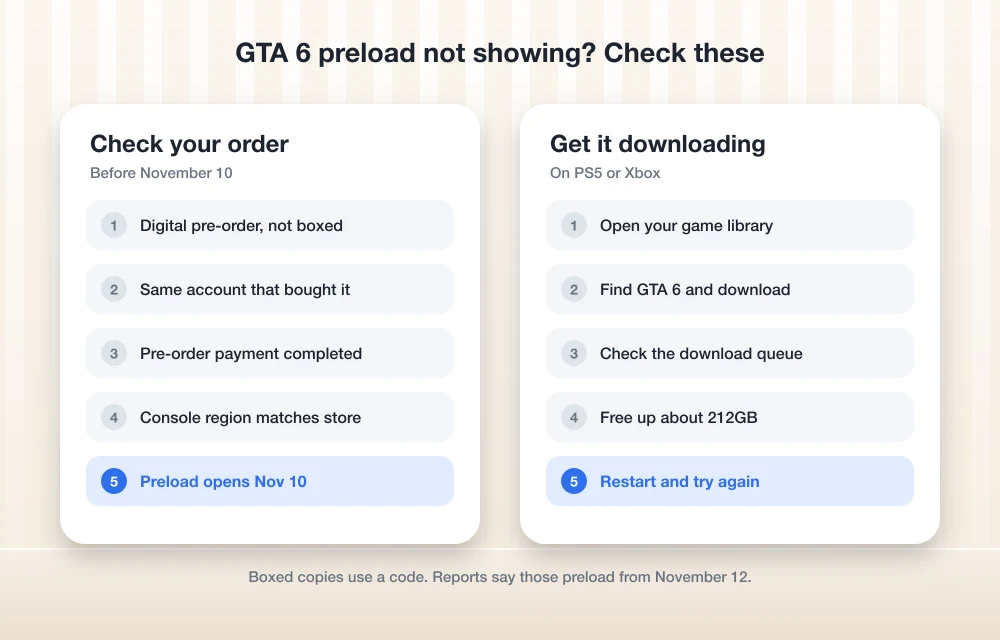
This is the big one. The preload is for digital pre-orders, meaning you bought the game from the PlayStation Store or the Microsoft Store on your account. If you pre-ordered a disc from a shop, there’s nothing to preload on your console because the game isn’t in your account yet.
Code-in-box copies are trickier. As far as I can tell, these come through the retailer, but I couldn’t confirm from Rockstar, Sony or Microsoft exactly when those codes arrive or whether you can redeem one early enough to preload. If that’s what you bought, ask the retailer directly. They’re the ones who’ll know when your code is coming.
You’re signed in to the wrong account
Game licenses belong to the account that bought them. If your brother pre-ordered GTA 6 on his account and you’re signed in on yours, the preload won’t show for you.
This happens a lot in homes with one console and several profiles. Switch to the profile that placed the order, then look again. Also double-check you didn’t pre-order on an old account you’d forgotten about. Your order confirmation email will tell you which account was used.
The pre-order didn’t actually go through
Maybe the card was declined, the payment timed out, or you added the game to your cart and never finished checking out. Any of these leaves you with no pre-order.
Check your transaction history on PlayStation or Xbox, and search your email for a confirmation. No confirmation usually means no pre-order. If the game is still available, you can place the order again, but make sure you’re not about to pay twice.
It isn’t time yet where you live
Rockstar confirmed November 10, 2026, but I couldn’t confirm the exact hour for each platform. If the preload starts at a fixed global time, people in some countries may get it on the evening of November 9, while others don’t see it until later on November 10.
If you’re checking right at midnight and nothing’s there, give it a few hours. Try again later in the day before you start resetting things.
Your account region doesn’t match
If you bought the game on a store account set to one country and you live in another, timings and availability can behave differently. I can’t give you a definitive rule here because none of the platforms has published one for GTA 6. If you’ve done anything unusual with regions, that’s a good thing to mention to support.
You’re on the wrong console
GTA 6 is coming to PS5 and Xbox Series X|S. It isn’t listed for PS4 or Xbox One, so you won’t find a preload on those consoles. If you’re not sure which PlayStation you’ve got, my guide to PS4 vs PS5 and the differences between them will help.
How to find and start the GTA 6 preload on PS5
I couldn’t confirm Sony’s exact menu steps for this preload, so here’s the general route that should get you there:
- Make sure you’re signed in to the PS5 profile that bought GTA 6.
- Open your game library and look for GTA 6 among your purchased games.
- If it’s there, select it and look for a download option.
- If it isn’t there, open the GTA 6 page in the PlayStation Store. If your pre-order is linked to your account, you should see a download option on that page once the preload is live.
- Open your downloads list to confirm the download has started and is making progress.
If you get stuck, the official PlayStation Support site has Sony’s latest instructions for pre-orders and downloads.
Let the PS5 download in rest mode
Pre-ordered games on PS5 can download automatically if automatic downloads are turned on. That’s handy, because you can put the console in rest mode overnight and let it work.
For that to happen, the PS5 has to stay online while it’s resting. Look in the power saving section of your PS5 settings for the rest mode options, and make sure staying connected to the internet is turned on. Also check that automatic downloads are enabled in your settings. The exact menu names can change between system updates, so look for those options rather than one fixed path.
One more tip: if you turn the PS5 fully off instead of putting it in rest mode, the download stops. Rest mode is what you want.
How to find and start the GTA 6 preload on Xbox Series X|S
Microsoft hasn’t published Xbox steps specific to this preload that I could confirm, so again, here’s the general approach:
- Sign in with the Xbox profile that placed the pre-order.
- Open your games collection and check your full library of owned games, including games you own but haven’t installed yet.
- If GTA 6 shows up, select it and choose to install.
- If it doesn’t, open the GTA 6 page in the Microsoft Store on your console. Once the preload is live and your pre-order is linked, you should see an install option.
- Open your download queue to check that it’s actually moving.
For anything beyond that, the Xbox Support site is the place to check for Microsoft’s current instructions.
Keep the Xbox downloading while you sleep
Xbox consoles have power options that decide what happens when you turn them off. Some settings keep the console ready to download updates and games, while energy-saving settings shut it down more completely.
If you want the preload to finish overnight, go into your console’s power settings and pick an option that keeps it connected for downloads and updates. If it’s set to fully shut down to save power, the download will pause until you turn it back on.
How to fix a GTA 6 download stuck at 0%
This is the most annoying version of the problem. The download is in the queue, it looks like it should be working, and the progress bar just won’t move. Work through these in order:
- Check the time. If the preload hasn’t officially opened in your region yet, the download may sit in the queue waiting. Give it time.
- Check your storage. GTA 6 is going to be big. If there isn’t enough free space, the download may not start at all.
- Pause and resume. Go to your downloads list or queue, pause the GTA 6 download, wait a few seconds, then resume it. It sounds too simple, but it often gets things moving.
- Fully restart the console. Don’t just put it to sleep or into rest mode. Do a proper restart so the system clears out whatever’s stuck.
- Check your connection. Run the network test in your console settings. If you can, plug in an ethernet cable instead of using Wi-Fi.
- Check the service status. On launch week, millions of people will be downloading at once. Look up the PlayStation Network status or Xbox status page. If there’s an outage, the only fix is waiting.
- Install any system update. If your console has a pending system update, install it first. Downloads can stall behind it.
- Cancel and start again. If nothing else works, cancel the download, restart the console, and start the download again from your library or the store page.
Be patient around November 10. Some slowness that day may simply be heavy demand on the servers, not a problem with your console.
Make sure you have enough storage
I can’t give you an official download size yet, because I couldn’t confirm one from Rockstar or the console stores. What I can tell you is that it’ll be a very large download, and running short on space is one of the most common reasons a preload refuses to start.
Check the size on the GTA 6 store page on your console, then clear more space than it asks for, because you’ll want room for updates too. If you need help deciding what to delete or move, I’ve written a full guide on how to fix not enough storage when preloading GTA 6 on PS5 and Xbox Series X|S.
Still won’t start? Here’s what to do next
If you’ve tried everything above and the preload still won’t show or start, here’s what I’d do:
- Contact the store you bought from. For digital pre-orders, that’s PlayStation Support or Xbox Support. Have your order number and confirmation email ready.
- Contact your retailer if you bought a boxed or code-in-box copy.
- Check Rockstar’s announcements in case there’s a known issue or a change to the preload timing.
- Don’t buy the game a second time just to get the preload. Sort out the original order first.
For the confirmed dates, download size and editions in one place, see my GTA 6 preload guide.
And remember the worst case isn’t that bad. If the preload never works for you, you’ll still be able to download GTA 6 on launch day. You’ll just be waiting a bit longer than everyone else.
Before you go
Most GTA 6 preload problems come down to a few simple things: a boxed copy instead of a digital pre-order, the wrong account, a pre-order that never went through, or checking before the preload has opened in your time zone. Get those right and make room on your console, and you should be good.
My advice is to clear your storage now, double-check your pre-order and account, and turn on the settings that let your console download while it rests. Then on November 10, let it do its thing and get ready for November 19.
Frequently Asked Questions
When does the GTA 6 preload start?
Rockstar has confirmed the digital preload starts on November 10, 2026, ahead of the game’s launch on November 19, 2026. The exact start time for each platform hasn’t been confirmed on an official page I could check, so it may open at a different hour depending on where you live.
Can I preload GTA 6 if I bought a disc copy?
The preload is for digital pre-orders made on the PlayStation Store or Microsoft Store. A disc copy isn’t in your console account, so there’s nothing to preload. If you bought a code-in-box copy, ask your retailer when you’ll get your code, since the exact process hasn’t been officially confirmed.
How much storage do I need for GTA 6?
The official download size hadn’t been confirmed when I wrote this. Check the GTA 6 page in the PlayStation Store or Microsoft Store for the listed size, and free up extra space on top of that for future updates.
Why is my GTA 6 download stuck at 0%?
It may be waiting for the preload to open in your region, or there may not be enough free storage. It could also be a network issue, a pending system update, or busy servers. Try pausing and resuming, fully restarting the console, using a wired connection and checking the PlayStation Network or Xbox status page.
Will GTA 6 download in PS5 rest mode?
Pre-ordered games can download automatically on PS5 if automatic downloads are turned on and the console is set to stay connected to the internet in rest mode. If you switch the PS5 fully off instead, the download will stop.
More in How-to
How to Fix Not Enough Storage When Preloading GTA 6 on PS5 and Xbox Series X|S
Rockstar says the GTA 6 preload needs up to 212GB. Here’s how to check your free space, clear room, add an M.2 SSD or Xbox expansion card, and get a stuck download moving again.

How To Fix Your Xbox One Mic Not Working Issue Easily
We have all noticed how online streaming and game streaming, in particular, have picked up ever since people have been locked down to their houses due to the pandemic. In this scenario, e all know that gaming can be a stress buster as well as a good way to pass time as well. Talking about…

How To Charge Your Smartphone While Your Computer is in Sleep Mode
It is a myth that the computer totally sleeps after closing the laptop lid. But technically when the laptop lid is closed the USB ports go into sleep mode. But with a simple tweak you can disable the sleep mode of the USB ports while the computer in sleeping mode. Sounds interesting? Yes, this simple…
The week in tech, minus the noise.
New reviews, fixes and the stories that matter — once a week, straight to your inbox.
We only use your email to send the newsletter. Unsubscribe any time. See our privacy policy.
Comments