

How To Delete Facebook Account
Facebook had a special long term relationship with our lives. With people addicting to social networking sites, Facebook is their first choice to join. Facebook became part of our life, features like photo, location, music, links including our emotional feelings as the latest update. We already discussed Facebook addiction and the best ways to avoid…


Facebook had a special long term relationship with our lives. With people addicting to social networking sites, Facebook is their first choice to join. Facebook became part of our life, features like photo, location, music, links including our emotional feelings as the latest update.
We already discussed Facebook addiction and the best ways to avoid Facebook in our previous post. Also, Facebook is popular for keeping and using users data for generating income. If you don’t want to be part of their income generation model, then you can delete Facebook account.
In this tutorial, we learn how to delete or deactivate Facebook account permanently.
If you are an avid user of Facebook and contains a lot of your information please make sure to create a copy of your Facebook data.
To create and download a copy of your Facebook data follow these simple steps.

- Click on the ‘Down arrow‘ at the top right of any Facebook profile or page and select Settings
- Click Download a copy of your Facebook data below your General Account Settings
- Now click “Start My Archive”
Now it creates an archive and downloads in your PC.
How To Delete Your Facebook Account – In Easy Steps
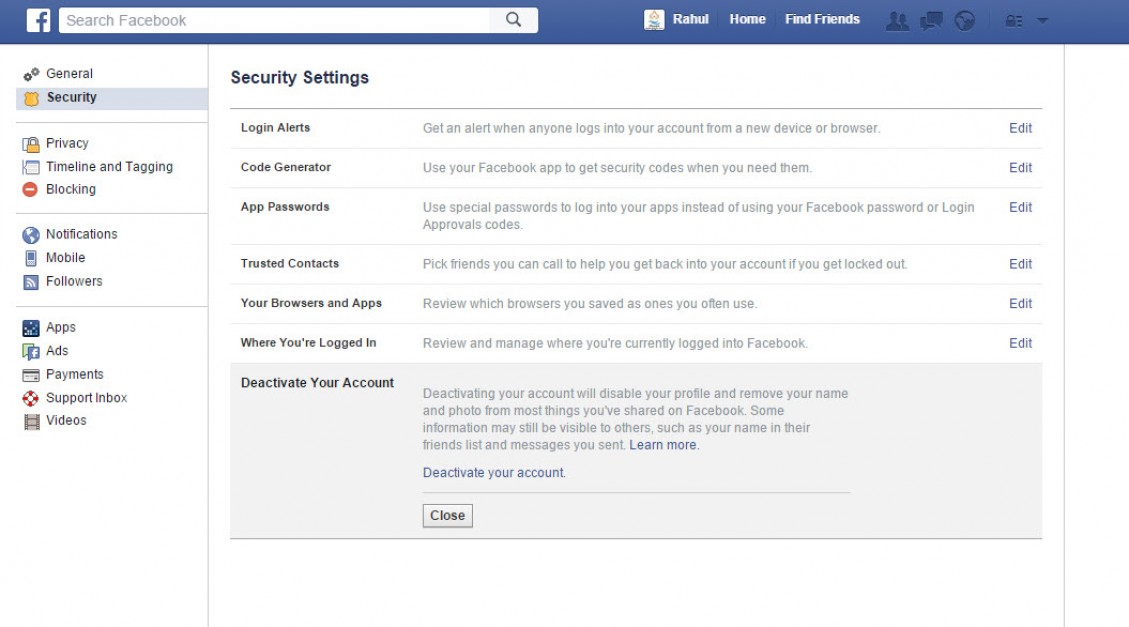
- To delete your Facebook account open Settings by clicking on the ‘Down arrow‘ at the top right of the Facebook page.
- Here click on the ‘Security’ option in the left column of the Window.
- Now you can see a list of security options in the main Window.
- Here click on the last option ‘Deactivate Your Account.‘
- Before going to take action, please read the Facebook info.
Deactivating your account will disable your profile and remove your name and photo from most things you've shared on Facebook. Some information may still be visible to others, such as your name in their friends list and messages you sent. - Now click on “Deactivate your account.” finally to remove your Facebook account permanently.
That’s it.
More in How-to
How to Deactivate Facebook on Android
Are you becoming consumed by your Facebook use and considering a break? Deactivating your Facebook account on your Android device could be the answer. In this blog article, we’ll explain why you might wish to cancel your account and walk you through the process. Let’s get started! There are plenty of reasons for this decision.…

How To Remove Search History From Your Facebook Account
Facebook has been regarded as the most popular means of communication among social media networks, with millions of users all over the world. Individuals and businesses connect with others and interact either gathering information or promoting goods and services. The innumerable special features of Facebook have made it a gigantic presence in social media. However,…

How To Delete LinkedIn Account In No Time
LinkedIn is the only platform that helps you to make business contacts, also it is an interesting tool for hunting new jobs. If you have already created an account for one or the other of these things, but over time, it has stopped interest you, you will still have the option to delete it. And…
The week in tech, minus the noise.
New reviews, fixes and the stories that matter — once a week, straight to your inbox.
We only use your email to send the newsletter. Unsubscribe any time. See our privacy policy.
Comments