

How to Factory Reset Samsung Gear S2 SmartWatch
Samsung recently launched the Gear S2 as the successor of the previous models. When it comes to the smartwatches, Samsung always paid attention in producing high-quality products. The elegance in the design and the simplicity in the manufacturing process made it stand out in the crowd of the competitors. The device power packs a number…


Samsung-gear-2-Smartwatch
Samsung recently launched the Gear S2 as the successor of the previous models. When it comes to the smartwatches, Samsung always paid attention in producing high-quality products. The elegance in the design and the simplicity in the manufacturing process made it stand out in the crowd of the competitors. The device power packs a number of features like a Rotating Bezel and a solid health tracking system. While this two are not enough to describe a good smartwatch, the gear s2 incorporates a number of trendy features under the hood. Samsung put a $299 price tag for the Gear S2 which sounds like an average pricing on the industry.
Also check:
- F68 Bluetooth Smartwatch – Features, Price and Review
- Oukitel A29 Smartwatch – Sensational Design with SIM Card support
- No.1 D3 Smartwatch – Specifications, Price and Review
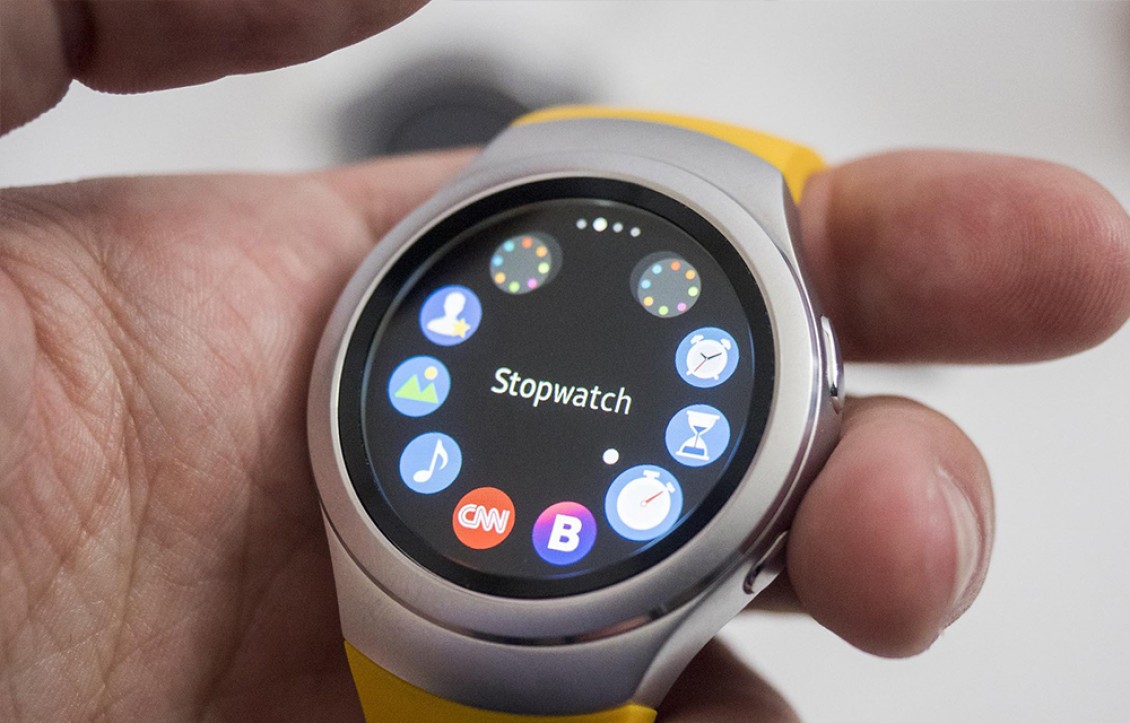
You may face several situations where you need to reset your Gear S2. For example: If you switch your smartphone and want to connect your device to the new one, it is always better to go for the factory reset. There are two types Reset options available on the device. The Light Reset and The Factory Reset. In Light Reset, medias and personal data will not be deleted. But, the downloaded apps and S health data which haven’t been synced will be deleted. In Factory reset, All data including downloaded apps and personal information will be permanently erased from your device. You can go for the best fit for your needs.
If you own a piece of the Samsung Gear S2 smartwatch this article will help you to Reset your gear to the Factory settings. So, in below steps, we are showing you “How to reset your Samsung Gear s2 Smartwatch to the factory settings.” So, let’s have a look at it.
Steps to Factory Reset Samsung Gear S2 SmartWatch
Simply follow the steps given below to reset your Samsung Gear S2 smartwatch.
- Open the Settings of your SmartWatch
- Scroll down to the Reset Gear option at the bottom and Tap on it.
- In the Reset Gear window, you will find two options namely, Light Reset and the Factory Reset.
- Head up to the Factory reset option and tap on it.
- A message to confirm the action will be displayed. Confirm it by tapping “yes“.
- Tap on the tick mark on factory reset screen.
- A message telling, “Performing Factory reset” will be displayed on the screen.
- Now the device will reboot and you might have the Factory reset done on the Gear.
All done and you are ready to go with the device. The Factory reset deletes all settings and personal configurations on the device. If you prefer the Lite Reset of the device. You can follow the same steps given above by selecting the Light reset option.
More in How-to

How To Turn Off YouTube Voice Description On Samsung Smart TV’s
YouTube voice description refers to an additional audio track that tends to describe the visual elements of a YouTube video. With closed captions, YouTube voice description isn’t really very popular these days but there are still plenty of its use-cases even if you have Samsung Smart TV of the current generation. Unfortunately, no matter how…
How To Reset PS5
Are you trying to reset your brand new PS5 to default factory settings? If yes, this article will help you to reset the PS5 factory settings, and this tutorial works for both PS5 Standard and Digital editions. Note: A factory reset on PS5 will erase all the games installed along with save data and other…
5 Things to do Before Selling Smartphones
Most of you own a smartphone which already out of fashion. Most probably you may be trying to sell it to some of your friends or through the online markets. Anyways, you are selling something you owned for some days. So, it might contain some files and data’s which only own by you. Private files…
The week in tech, minus the noise.
New reviews, fixes and the stories that matter — once a week, straight to your inbox.
We only use your email to send the newsletter. Unsubscribe any time. See our privacy policy.
1 comment
How do I charge the watch? Charger flashes red when the watch is placed on the charger.