

How To Check CPU Temperature On Mac
Apple Mac machines are very popular among passionate users. They offer many features for video editors, Business people, and students. Upon continuous usage, every machine will heat up, and even Mac’s too. If you are looking to find a way to check CPU temperature on Mac this tutorial will help you. It is pretty easy…

How To Check CPU Temperature On Mac
Apple Mac machines are very popular among passionate users. They offer many features for video editors, Business people, and students. Upon continuous usage, every machine will heat up, and even Mac’s too. If you are looking to find a way to check CPU temperature on Mac this tutorial will help you.
It is pretty easy to find CPU temperature on Mac using some tools. Unfortunately, Mac doesn’t have any native tools to check CPU temperature.
Check CPU Temperature on Mac Using Terminal
The terminal is like a command box for Mac users. If you are recently switched from Windows to Mac, this terminal command trick will help you to find out CPU temperature on Mac.
Follow the below steps to check your Mac CPU temperature using Terminal.
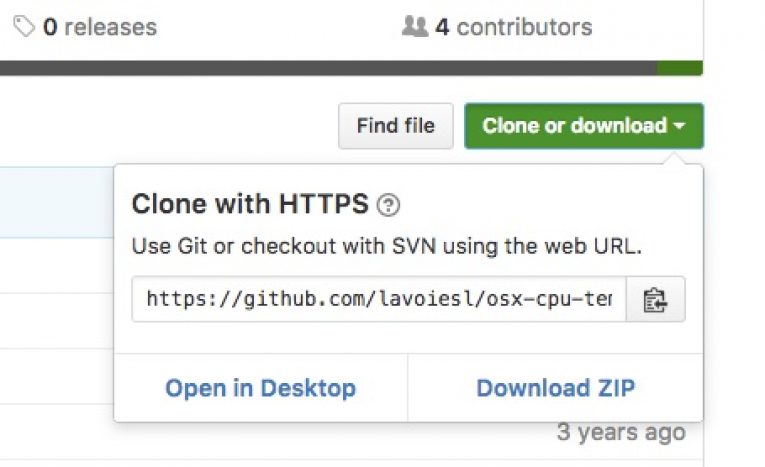
- First, download the source code from GitHub repository by clicking on the “Download” button.
- Now unzip the downloaded archive file and launch terminal. Now navigate to the unzipped downloaded file location.
- To run the app, type “./osx-cpu-temp.” to display the Mac CPU temperature.
- If you are inconvenient to read the temperature in the centigrade unit you can change it to Fahrenheit by below command.
./osx-cpu-temp -F - To display temperature as Centigrade, enter the following command.
./osx-cpu-temp -C
If you want to check Mac temperature regularly, you have to always open terminal from “osx-cpu-temp” directory.

Checking Mac Temperature Using Monit App
Monit is a paid app available in the Mac app store. The app lets you monitor not only CPU temperature, but it also lets you track Memory, Disk usage, network stats and battery performance.
After installation, the app works like Notification bar on the right side of the screen. The user interface of the app is pretty detail and you can easily check your Mac CPU temperature.

Fanny Widget
Fanny is a free temperature monitoring app available for Mac. It is developed by Daniel Storm. The app is completely free and pretty useful for monitoring Mac CPU Fan current speed and target speed in RPM’s. The UI is pretty understandable and you can easily monitor the CPU temperature of your Mac from Notification or Menu Bar.
More in Mac

Zend Server Turns Your Mac Into A Local PHP Web Server
For the web development, testing environment is very important. When you work on a local server it saves money (hosting) as well as errors, you can view product privately before launching into world wide web. Most developers and testers check their project on a testing environment to check the benchmark results.

Anchorium For Mac Review-Free SEO Tool For Mac
There are so many SEO tools available for bloggers, webmasters to check their site positions in popular search engines, such as Google, Bing, and Yahoo. For Mac users there is a shortage of SEO tools, luckily we have Anchorium. Anchorium is a free SEO software for Mac users, it helps you to gain good positions on…

How to find the Mac serial number
Every smartphone, gadgets, laptops come with a unique serial number. These serial numbers are unique to every device and they are helpful to identify them. It works similarly like fingerprints to humans, each fingerprint is unique no one can have the same one. Mac’s are also not exceptional, they do have serial numbers. The serial…
The week in tech, minus the noise.
New reviews, fixes and the stories that matter — once a week, straight to your inbox.
We only use your email to send the newsletter. Unsubscribe any time. See our privacy policy.
Comments