

How to find the Mac serial number
Every smartphone, gadgets, laptops come with a unique serial number. These serial numbers are unique to every device and they are helpful to identify them. It works similarly like fingerprints to humans, each fingerprint is unique no one can have the same one. Mac’s are also not exceptional, they do have serial numbers. The serial…

How to find the Mac serial number
Every smartphone, gadgets, laptops come with a unique serial number. These serial numbers are unique to every device and they are helpful to identify them. It works similarly like fingerprints to humans, each fingerprint is unique no one can have the same one. Mac’s are also not exceptional, they do have serial numbers. The serial number of the Mac is tied with the motherboard. It is also printed somewhere on your Mac hardware for identity.
The serial number is embedded on your machine software and as well as on hardware. It is easy to find the serial number of Mac laptops and iMac’s using MacOSX. You don’t need to open the hardware components in order to get the serial number.
Before going to tell you the process I want to show some examples of why you need to check and note the serial number always.
Reasons for Checking Mac serial number
There are several reasons for finding Mac serial number. As we discussed, the number is unique and it won’t repeat on the other hardware.
The serial number helps you to identify your Mac in the quickest way. If you ever need to contact the Apple support, the serial number will help customer support guy to check the system configuration easily.
If you have given your Mac to a third-party computer mechanic store, it is helpful to identify the hardware tampering done by a mechanic. It is easy to remove the serial number placed sticker on the hardware component but it is not possible to change the serial number embedded in the software.
If you are planning to give Mac to a third-party mechanic it is always advisable to note down the serial number. Discuss the serial number before giving it to them so that they know you are aware of your hardware configuration.
Find Mac serial number
Here are the detailed steps to find Mac serial number.
- Turn on your Mac.
- Now click on the Apple icon at the top left corner of the screen.
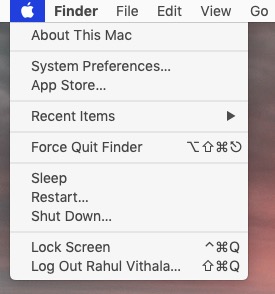
About this Mac - Here you will see an option called “About this Mac” and click on it.
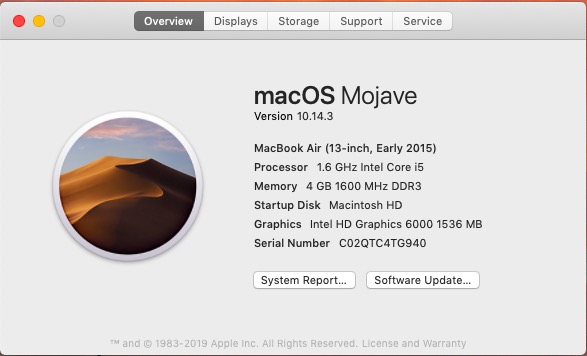
Mac serial number - When you click a small box opens showing the details of your Mac.
- Here you will find the Mac serial number at last.
That’s it. I hope you found your Mac number easily and noted down for further use.
Let us know your valuable feedback in the comment box below.
More in Mac

How to get Mac address in Mac
Not long ago, Microsoft Windows was the most popular operating system on the planet. Sure, with the progress of technology, we have the operating systems like Linux and Mac. Today, our topic will be a special guide on how to find the mac address in your Mac. As you know, Mac is pretty straightforward and…
Disk Clean Pro: An App to Clean Mac Disk Space
If you are looking forward to installing a Mac-cleaning application, there is no shortage of available options. Whether you are searching for a quick solution to boost your Mac’s speed or looking for an affordable way of keeping your computer agile for years to come, cleaning applications tick the right boxes. But not all apps…

8 Best Uninstaller Apps For Mac
Do you have any application on your Mac that you wish to totally remove from your system? Simply deleting it will not work because the app will still leave temporary files and preferences. To get rid of it, you have to completely uninstall the application using a reliable Mac uninstaller. Here are some of the…
The week in tech, minus the noise.
New reviews, fixes and the stories that matter — once a week, straight to your inbox.
We only use your email to send the newsletter. Unsubscribe any time. See our privacy policy.
Comments