

You can edit the background blur of your photos even without the iPhone XS with this method
It is well-known that the latest iPhone Xs series is a powerful lineup from Apple. First of all, it comes with the company’s A12 Bionic chip. Other than that, it has a dual camera setup on the back which shoots portrait shots too. This means that you get shallow depth of field effect if you…

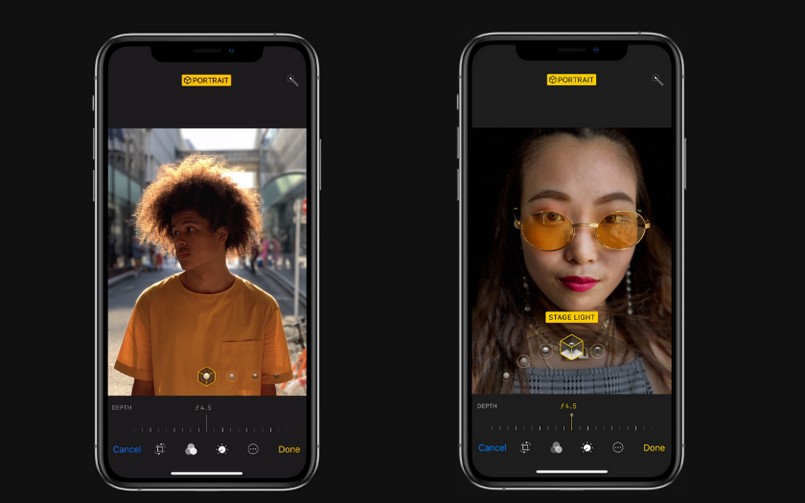
iPhone Xs portrait mode
It is well-known that the latest iPhone Xs series is a powerful lineup from Apple. First of all, it comes with the company’s A12 Bionic chip. Other than that, it has a dual camera setup on the back which shoots portrait shots too. This means that you get shallow depth of field effect if you take a shot in portrait mode.
Evidentally, people love to take photos in portrait mode so that they can get that DSLR-like effect to their photos.
Now, Apple also introduced a feature to the iPhone XS with which you can adjust the background blur intensity of your photos even after taking them. This is a great feature to have and it works wonders to the photos too.
Sadly, this feature is limited to the iPhone XS and XR series only. So, if you have an older iPhone then you might be feeling left out. Thus, we are here to tell you how you can also get the same feature of iPhone XS to your device.
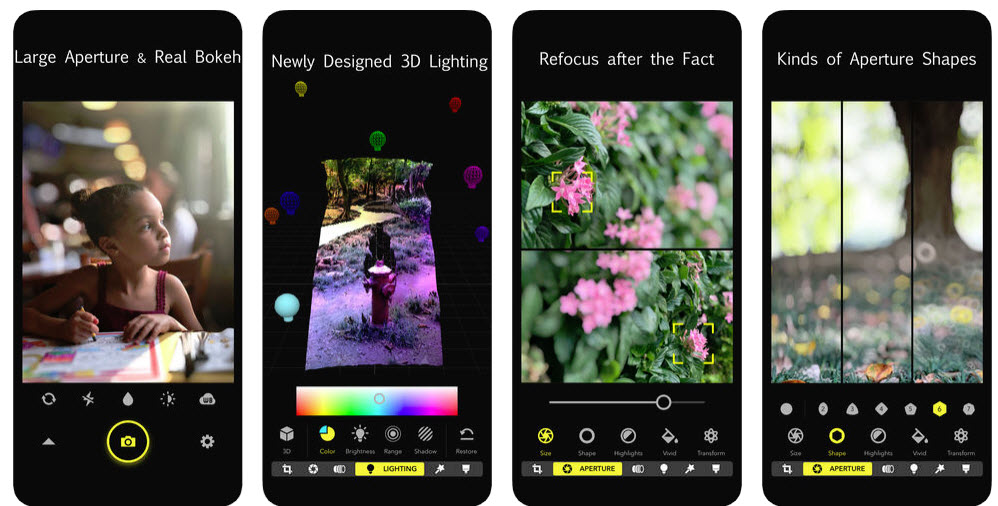
You need to download an application called Focos from the App Store. This is a freemium app and it allows you to edit your photos’ bokeh, increasing or decreasing the amount of background blur all based on the photo’s depth map. Now, the depth map is captured only on the iPhones that have a dual camera setup. Thus, you are out of luck if you use any iPhones other than the iPhone 7 Plus, iPhone 8 Plus or the iPhone X.
Focos also makes it very simple to edit this photos. Because Focos will only show you the photos which have depth map in your camera roll. Therefore, if you don’t have any then you will be left with a blank screen.
Adjusting the background blur is very simple with Focos, you just have to move the slider and see what background blur intensity feels the best and boom. As Focos is a freemium app, you need to pay $11 to get even more features and unlock the full potential of this application.
More in iOS
How to Fix iPhone Showing Low Storage Space When You Still Have Free Space
If your iPhone keeps showing a Low Storage Space warning even though you clearly have enough free space, the issue is usually caused by an iOS storage indexing glitch, cached files, or a software bug rather than a real storage shortage. In many cases, the warning appears while the phone is still calculating storage or misreading how…
Worthy features of iOS26 (Transparent feature not included)
iOS 26 is designed as a meaningful step forward for iPhone, focusing on intelligence, communication, privacy, and small conveniences that add up in daily use, while skipping the transparent UI talk here by design. The release blends on‑device Apple Intelligence with thoughtful app updates like Phone, Messages, Photos, Safari, and Notes to make routine tasks…

What Does “Low Disk Space” Mean on iPhone? (And How to Clear It)
You try to take a photo, and the camera refuses. You try to update iOS, and it says there’s not enough space. Somewhere in between, you see a warning about storage and start wondering: what does low disk space mean on iPhone, and how serious is it? Don’t worry, it is one of the most…
The week in tech, minus the noise.
New reviews, fixes and the stories that matter — once a week, straight to your inbox.
We only use your email to send the newsletter. Unsubscribe any time. See our privacy policy.
Comments