

How to identify real download buttons in a website
In most cases, download links and buttons are annoying and confusing. If you click on the wrong button, you end up with lots of pop-ups and advertisements windows open. The ads are used by the download providers to earn extra income from the website. Many third-party ad services use various forms of ad formats and…


How to identify real download buttons in a website
In most cases, download links and buttons are annoying and confusing. If you click on the wrong button, you end up with lots of pop-ups and advertisements windows open. The ads are used by the download providers to earn extra income from the website. Many third-party ad services use various forms of ad formats and some ads disguise themselves as a download button.
It is the most common thing we face while we trying to download something from a website. Ad services use the most promising and shiny download buttons which looks like a real download link. Human psychology misleads at that time and we click on the wrong download button. Upon the clicking, these ads redirect to various pop-ups and some services try to install an extension or software on your device. Advertisers use clickbait techniques to click on their ad.
Before making a click decision, read our guide to ditch the wrong download links and identify the real download buttons.
1. Check the outgoing link
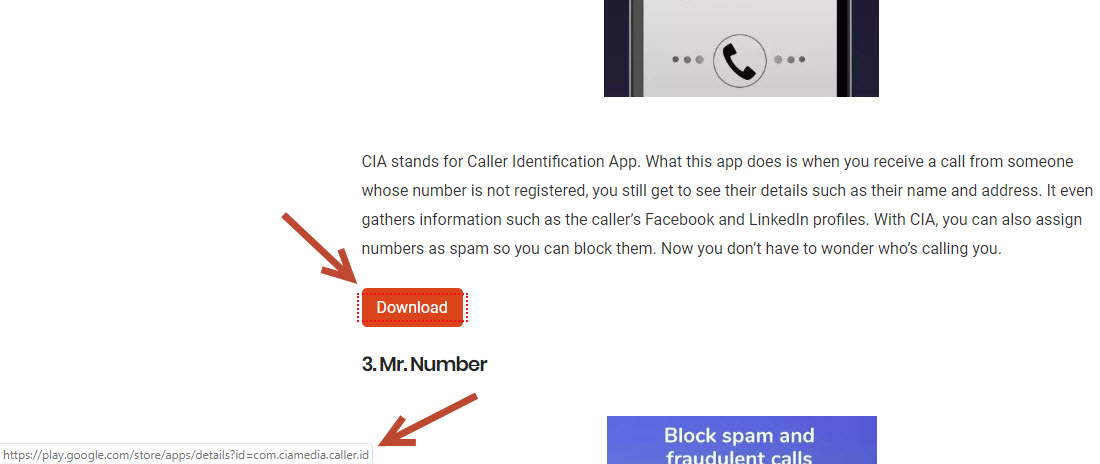
It is the basic thing to check what you actually clicking and where it redirects. Every link on a website opens another webpage. To check which link is real in a cluster of wrong links, check the outgoing link first. When hover mouse pointer on a download button, you will see a little box containing the URL of that box.
For example, check the below screenshots for easy understanding.
2. Check buttons before clicking
Usually, a real download button doesn’t look like a fancy button with a unique color. Advertisers use stylish and fancy buttons to attract people and clickable. So closely look the buttons available on a page and pick the right download button.
3. Avoid unknown sites
Daily we see a number of new sites appear in Google. Most of the sites are fake and try to serve more ads on the page you visit. In many cases, they do not offer the data you are looking and uses clickbait techniques to make money. Avoid the unknown sites and visit only popular and reputable sites to download files.
These are the most possible techniques to avoid wrong download clicks on a website.
If you have any technique which is not on the list, please mention in the below comment box.
More in How-to
How to find direct download link on a website?
Downloading games, songs, and movies common from a website. There are plenty of websites that offer such kind of entertainment stuff. But many websites make their download link complicated to find. The reason is, they fill the website with third-party ads and many ads show “Download now” or “Download here” buttons everywhere on the website.…
How to remove ‘Congratulations You Won’ virus on Android smartphone?
‘Congratulations You Won‘ is a type of virus which appears on the Android smartphone. If you are receiving these types of messages, your device might be infected with the virus. Congratulations You Won and You are today’s lucky visitor virus reasons It is not a surprising or fun thing when you receive these messages. Your…
How to Convert DAT File to AVI
A couple of years back, Video CDs were the most sought-after home electronic gadgets in the market, but fast-forward to a few years, and you’ll realize that they have been overtaken by other devices. But that doesn’t mean you cannot watch your favorite movies from your Video CDs anymore. Of course, you can if you…
The week in tech, minus the noise.
New reviews, fixes and the stories that matter — once a week, straight to your inbox.
We only use your email to send the newsletter. Unsubscribe any time. See our privacy policy.
Comments