

How to Fix Not Enough Storage When Preloading GTA 6 on PS5 and Xbox Series X|S
Rockstar says the GTA 6 preload needs up to 212GB. Here’s how to check your free space, clear room, add an M.2 SSD or Xbox expansion card, and get a stuck download moving again.

Fix-Not-Enough-Storage-GTA-6-Preload-PS5-Xbox
GTA 6 is finally close. Rockstar has it launching on Thursday, November 19, 2026, on PS5 and Xbox Series X|S, and digital preloads open a few days before that. The catch is the size. Rockstar says the preload needs up to 212GB, and a lot of consoles simply don’t have that much room sitting free.
If you’ve hit a “not enough storage” message, or you just want to be ready before the preload opens, this guide walks you through it. I’ll cover how much space you need, how to check and clear space, how to add an M.2 SSD on PS5 or an expansion card on Xbox, why the 512GB Series S is a special headache, and what to try if the download gets stuck.
One heads-up before we start. A few details still aren’t confirmed by Rockstar, Sony or Microsoft. I’ll flag those clearly so you know what’s solid and what isn’t.
Quick answer: Rockstar says the GTA 6 preload needs up to 212GB depending on your device, and digital preloads start on November 10, 2026. On PS5, check your space under Settings > Storage, delete or move games under Console Storage > Games and Apps, and leave extra room, because Sony says installs can need about twice the game’s size. On Xbox, uninstall or move games, or add a Seagate or SanDisk expansion card. If you own the 512GB Series S, expect to clear out most of your other games or buy more storage.
How Much Space Does the GTA 6 Preload Need?
Rockstar’s own wording is that the preload “will require up to 212 GB” depending on your device. Before that, the PlayStation Store’s game size listing showed about 210GB on October 27, so the number has stayed in the same ballpark.
What Rockstar hasn’t given is a separate size for PS5, Xbox Series X and Xbox Series S. “Up to 212GB” suggests some versions may be a bit smaller, but I can’t tell you which ones or by how much. It also isn’t confirmed whether 212GB is the final installed size, or how big any day-one patch will be. My advice is simple: plan for at least 212GB and leave some breathing room on top.
PS5 owners have one more thing to think about. Sony’s support page for the “not enough space” error (code CE-107872-5) says installing a game may need about twice the free space the game itself takes up. If that applies to GTA 6, you could temporarily need around 424GB free. That’s my own maths based on Sony’s guidance, not a figure from Sony or Rockstar. But it explains why some people see the error even when their free space looks bigger than 212GB.
When Does the GTA 6 Preload Start?
You may have seen both November 10 and November 12 floating around. Both were true at different times. Rockstar first said preloading would start on November 12, then moved the digital preload two days earlier, to November 10, in a Newswire post on November 3. Rockstar’s official Newswire post on the November 19 launch now shows a “Pre-Load Begins November 10” banner.
| Version | Preload starts | Notes |
|---|---|---|
| PS5 (digital) | November 10, midnight local time | Rolls out time zone by time zone, so New Zealand gets it first |
| Xbox Series X|S (digital) | November 10, 12am GMT | Same moment worldwide, which is 4pm PT / 7pm ET on November 9 in the US |
| Boxed copies (both consoles) | November 12 (reported) | The box contains a download code, not a disc |
| Full launch | November 19, 2026 | PS5 and Xbox Series X|S only; no PC version has been announced |
The platform start times and the boxed-copy details come from reporting on Rockstar’s announcement. I haven’t seen Rockstar’s own wording for the boxed-copy part, so treat November 12 for boxed copies as likely rather than locked in. And since a boxed copy is just a code, you’ll still need the full download space either way.
How to Check Your Free Space
On PS5
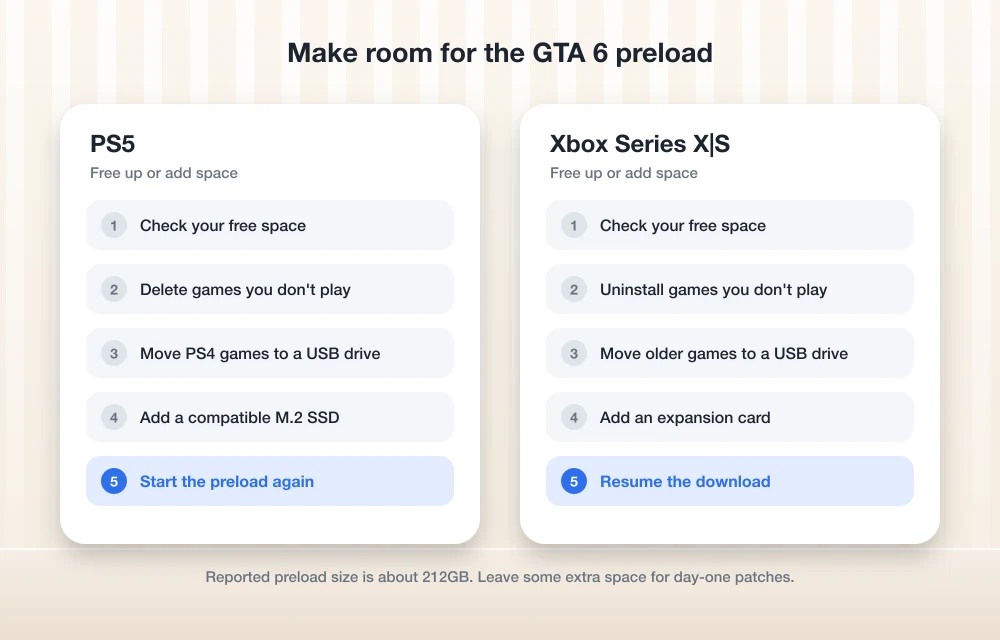
Go to Settings > Storage. This is where Sony shows how much free space you have. Compare that number with 212GB, and keep Sony’s “about twice the space” guidance in mind. If you’re well short, skip ahead to the sections on clearing space or adding an M.2 SSD.
On Xbox Series X|S
I’ll be straight with you here. I couldn’t confirm Microsoft’s exact menu path for the storage screen against an official Xbox support page, and I don’t want to send you hunting for a menu that’s named differently on your console. Look for the storage section in your console’s settings, or check Microsoft’s Xbox support site for its current storage guide.
How to Free Up Space for GTA 6
Delete or move games on PS5
Sony’s steps are short:
- Go to Settings > Storage.
- Select Console Storage.
- Select Games and Apps.
- Choose the games you don’t need and delete them. For games you want to keep but aren’t playing right now, Sony lets you move them to USB extended storage instead.
Moving is the smarter choice for big games you’ll come back to, since you can bring them back later instead of downloading everything again. Deleting is fine for anything you’ve finished for good.
Start with your biggest games. Clearing two or three huge titles usually frees far more space than deleting a dozen small ones.
Free up space on Xbox
The idea is the same: uninstall games you’ve finished and move the ones you want to keep somewhere else. A regular USB drive works as a parking spot. Series X|S games can be stored on a USB drive, but you have to move them back to the internal SSD or an expansion card before you can play them. That’s fine for games you’re not playing right now, and it keeps them off your main drive while GTA 6 downloads.
Because I couldn’t confirm Microsoft’s menu names, I’m not listing click-by-click Xbox steps. Use the storage section in your settings and follow the on-screen options.
How to Add an M.2 SSD to Your PS5
If deleting games feels painful, the PS5 has a slot for an extra internal SSD. An M.2 NVMe SSD is a small, stick-shaped drive that plugs straight into the console’s board. It’s much faster than a USB drive, and you can play games directly from it.
Here’s what Sony says your drive needs:
- Type: PCIe Gen4 x4 M.2 NVMe SSD (Key M)
- Capacity: 250GB to 8TB
- Sizes: 2230, 2242, 2260, 2280 or 22110 (the numbers are width and length in millimetres, so 2280 means 22mm wide and 80mm long)
- With a heatsink: up to 25mm wide and 11.25mm thick
- Speed: Sony recommends 5,500MB/s or faster
I wouldn’t go small. A 250GB drive meets Sony’s rules, but it would leave you with almost nothing after a game the size of GTA 6. A larger drive gives you room for GTA 6 and the next few big releases.
Sony’s installation steps look like this:
- Turn off your PS5 and let it cool down.
- Remove the console cover.
- Remove the expansion slot cover.
- Adjust the spacer to match the length of your SSD.
- Fit the SSD and fasten it in place.
- Put the expansion slot cover and console cover back on.
- Turn the PS5 on and format the SSD when prompted.
The cover and slot look a little different depending on your model, and Sony has a separate video for the CFI-2000 “Slim” and the CFI-7000 “Pro”. Check Sony’s official M.2 SSD installation guide for the version that matches your console before you open anything up.
Once it’s formatted, go to Settings > Storage > Installation Location to send new downloads straight to the M.2 drive. You can manage what’s on it under Settings > Storage > M.2 SSD Storage.
How to Add Storage on Xbox Series X|S
Xbox Series X|S consoles have a storage expansion slot on the back. Expansion cards slide into that slot, and games installed on them play just like they do from the internal drive. Here are the options I could confirm from official pages:
| Option | Play Series X|S games from it? | What I could confirm |
|---|---|---|
| Seagate Storage Expansion Card | Yes | 1TB, 2TB and 4TB; works with Series X and Series S; matches the internal SSD’s speed |
| SANDISK Optimus GX C50 Storage Expansion Card | Yes | The card formerly sold under the WD name; supports Quick Resume |
| Regular USB drive | No | Can store Series X|S games, but they must be moved back to play |
The Seagate card is the one most people know. You plug it into the storage expansion slot on the back of the console and that’s it. The 4TB version launched on June 9, 2025, at $499.99. That’s the launch price, not necessarily what it costs today, and I couldn’t confirm current prices for the 1TB and 2TB cards, so check your local retailer.
The card that used to carry the WD name is now sold as the SANDISK Optimus GX C50. SanDisk says you can play games directly from it and it supports Quick Resume, the Xbox feature that lets you jump back into a suspended game right where you left off. I couldn’t confirm its capacities or prices, so again, check the retailer listing before you buy.
The Xbox Series S 512GB Problem
This is the one I’d worry about most. The Series S comes with a 512GB internal SSD, but you don’t get all of that for games, because the console’s own system software lives on the same drive. I couldn’t find an official figure from Microsoft for how much space is actually usable, so I won’t guess at a number.
Even without an exact figure, the maths is rough. A game of up to 212GB would take a big share of what’s left. If the install also needs some extra room while it unpacks, you may have to clear out almost everything else on the console.
If you own a Series S and want to keep more than a couple of other big games installed, an expansion card is the most practical fix. If that’s not in the budget, move your other games to a USB drive to keep them safe, and uninstall the rest before November 10.
How to Start the GTA 6 Preload
If you’ve bought or pre-ordered the digital version, the preload opens on November 10 at the times in the table above. I couldn’t find GTA 6-specific preload steps from Sony or Microsoft, so I’m not going to make up menu paths. Once the window opens, the download option should show up on the game’s page in your library or in the PlayStation Store or Microsoft Store.
A couple of things to sort out first:
- Clear your space before the window opens, so you’re not deleting games while everyone else is already downloading.
- On PS5, if you’ve added an M.2 SSD, set Settings > Storage > Installation Location to the drive with the most room before you start.
- If you have a boxed copy, keep the download code handy. Reports say boxed copies can’t be preloaded until November 12.
What to Do If the GTA 6 Preload Is Stuck
On PS5
If you see error CE-107872-5, that’s Sony’s “not enough space” error. Sony’s fix is to free up more space (remember the “about twice the game’s size” rule) and, if it still fails, to try switching the save location between console storage and extended storage. You can change where games install under Settings > Storage > Installation Location.
To see what your download is doing, press the PS button, then go to Control Centre > Downloads/Uploads. From there you can pause a download. If the progress bar hasn’t moved in a long while, pausing and resuming it is worth a try before you do anything drastic.
Beyond that, the basics still apply. Check your internet connection, and try a full restart of the console if nothing else works. Sony’s support site didn’t give me a dedicated stuck-download guide I could confirm, so if none of this helps, contact PlayStation Support.
On Xbox
Start with free space, because a full drive is the most likely reason a 212GB download stalls. Then check your internet connection and restart the console. I couldn’t confirm Microsoft’s official troubleshooting steps for stuck downloads, so if the problem keeps coming back, Microsoft’s Xbox support site is the place to go next.
Keep in mind that a huge game with a fixed start time means millions of people may hit download servers at once. If your download is slow but still moving on November 10, giving it some time may be all it needs.
My Advice Before November 10
Don’t wait until preload day. Check your free space now, and aim for well over 212GB on PS5 because of Sony’s “twice the space” guidance. Move the games you love to USB storage and delete the ones you’ve finished.
If you keep running out of room anyway, this is probably the push to finally add an M.2 SSD to your PS5 or an expansion card to your Xbox. Series S owners especially will feel the squeeze.
For the dates, download size and unlock time in one place, see my GTA 6 preload guide. If you’re still setting up a new console, my guide on how to set up a PS5 walks through the basics. And if you’re still choosing between the two, my PS5 vs Xbox Series X comparison covers storage and much more.
I’ll update this guide if Rockstar shares separate sizes for each console or a day-one patch size.
Frequently Asked Questions
How much storage does the GTA 6 preload need?
Rockstar says the preload will require up to 212GB depending on your device. It hasn’t shared separate sizes for PS5, Xbox Series X or Series S, and the size of any day-one patch isn’t confirmed yet.
Why does my PS5 say not enough space when I have more than 212GB free?
Sony’s support page for error CE-107872-5 says installing a game may need about twice the free space the game requires. For a game of up to 212GB, that could mean around 424GB free temporarily. That figure is my own estimate based on Sony’s guidance.
When does the GTA 6 preload start?
Digital preloads start on November 10, 2026. On PS5 it begins at midnight local time in each time zone. On Xbox it begins at 12am GMT everywhere, which is 4pm PT / 7pm ET on November 9 in the US. Boxed copies reportedly can’t be preloaded until November 12. The game launches on November 19, 2026.
Is the 512GB Xbox Series S enough for GTA 6?
It’s tight. You don’t get the full 512GB for games, and Microsoft hasn’t given an official usable-space figure that I could find. A game of up to 212GB would take a big share of the drive, so most Series S owners will need to clear other games or add an expansion card.
Can I play GTA 6 from a USB drive on Xbox Series X|S?
No. A USB drive can store Series X|S games, but you have to move them to the internal SSD or an expansion card, like the Seagate card or the SANDISK Optimus GX C50, to play them.
You might also like
What Does “Low Disk Space” Mean on iPhone? (And How to Clear It)
You try to take a photo, and the camera refuses. You try to update iOS, and it says there’s not enough space. Somewhere in between, you see a warning about storage and start wondering: what does low disk space mean on iPhone, and how serious is it? Don’t worry, it is one of the most…

Fix “insufficient storage available” error Message when Updating Android
Ever tried to update android devices? Ever got an error saying “insufficient storage available” while trying to update it? If so, this article is for you. In this article, you will get a basic idea about what the error implies and how to fix it with the step by step guide. Before we starting, there is…
How to Fix Apps Crashing While Multitasking After iOS 26 Update
The latest iPhones are powerful enough to handle heavy multitasking without breaking a sweat. So when your device starts crashing, freezing, or stalling while switching apps after the iOS 26 update, it feels especially frustrating. This issue can stem from several sources: a bug in the iOS build, misconfigured background refresh settings, insufficient storage, or…
The week in tech, minus the noise.
New reviews, fixes and the stories that matter — once a week, straight to your inbox.
We only use your email to send the newsletter. Unsubscribe any time. See our privacy policy.
Comments