

How to Fix iPhone 18 Pro Restarting When Face ID Fails or During Apple Pay
If your iPhone 18 Pro restarts when Face ID fails, Apple has fixed that bug in iOS 27.0.1. This guide covers how to update, what to try next, and what is still unknown about the Apple Pay shutdowns.

Fix-iPhone-18-Pro-Restarting-Face-ID
You glance at your new iPhone 18 Pro, Face ID misses you for a second, and the whole phone goes black and reboots. If that has been happening to you, it’s a real bug.
Apple has acknowledged that some iPhone 18 Pro and iPhone 18 Pro Max units could restart when Face ID failed to authenticate, and it shipped a fix in iOS 27.0.1. Separately, some owners have reported their phones shutting down or rebooting in the middle of an Apple Pay payment. That one is much more stressful when you’re standing at a checkout counter with a queue behind you.
In this guide I’ll walk you through the symptoms, the update that fixes the Face ID restart, the other steps worth trying, and when to hand the problem over to Apple. I’ll also be clear about what Apple has confirmed and what is still only owner reports.
Quick answer: Update your iPhone to iOS 27.0.1 or later (Settings > General > Software Update). Apple’s iOS 27.0.1 release notes list a fix for iPhone 18 Pro and Pro Max units restarting when Face ID fails. If the phone still restarts, force restart it, reset Face ID and set it up again, and check battery health. If restarts or Apple Pay shutdowns continue after that, contact Apple Support, because Apple hasn’t publicly explained the Apple Pay shutdowns.
What the problem looks like
There are really two problems here. They may be related, but nobody outside Apple knows that for sure yet.
The first is the one Apple has confirmed. Face ID tries to recognize you, fails, and instead of simply asking you to try again or enter your passcode, the iPhone restarts. You see the screen go dark, then the Apple logo, then the phone boots back up. A Face ID attempt can fail for ordinary reasons: you’re holding the phone at an odd angle, the light is poor, or you weren’t looking at the screen.
The second problem comes from owner reports. iPhone 18 Pro and Pro Max owners, especially in South Korea, have described sudden reboots while using Apple Pay or Face ID, starting around September 20, 2026. Some describe these as “panic full” restarts. A panic, in simple terms, is when the iPhone’s system hits a serious error it can’t recover from, so it reboots itself to start fresh. Since Apple Pay on these phones asks for Face ID to confirm a payment, it’s easy to see why people connect the two issues. Apple hasn’t said whether they share a cause.
Face ID restarts vs. Apple Pay shutdowns at a glance
| Issue | Confirmed by Apple? | Fixed by an update? | What to do |
|---|---|---|---|
| iPhone restarts when Face ID fails | Yes, listed in the iOS 27.0.1 release notes | Yes, in iOS 27.0.1 and later | Update, then test Face ID again |
| Shutdown or restart during Apple Pay | No, owner reports only | Unknown | Update, try the steps below, contact Apple if it continues |
What Apple has confirmed so far
Here’s what I could confirm from Apple’s own pages. According to Apple’s developer releases page, iOS 27.0.1 (build 24A446) came out on September 28, 2026. Its release notes include a fix for some iPhone 18 Pro and iPhone 18 Pro Max units that could restart when Face ID failed to authenticate.
At the time of writing, the newest public version I found on that same page is iOS 27.2 (build 24B119), released October 26, 2026. Because later updates include earlier fixes, you don’t need to hunt for 27.0.1 specifically. Just install iOS 27.0.1 or anything newer that your phone offers.
What Apple has not said matters just as much. The release notes don’t mention Apple Pay at all. Apple hasn’t explained what causes the Apple Pay shutdowns, and it hasn’t said whether the Face ID fix also stops them. Some owners say they received replacements or refunds, but I couldn’t find any official Apple policy for this issue, so please don’t count on either.
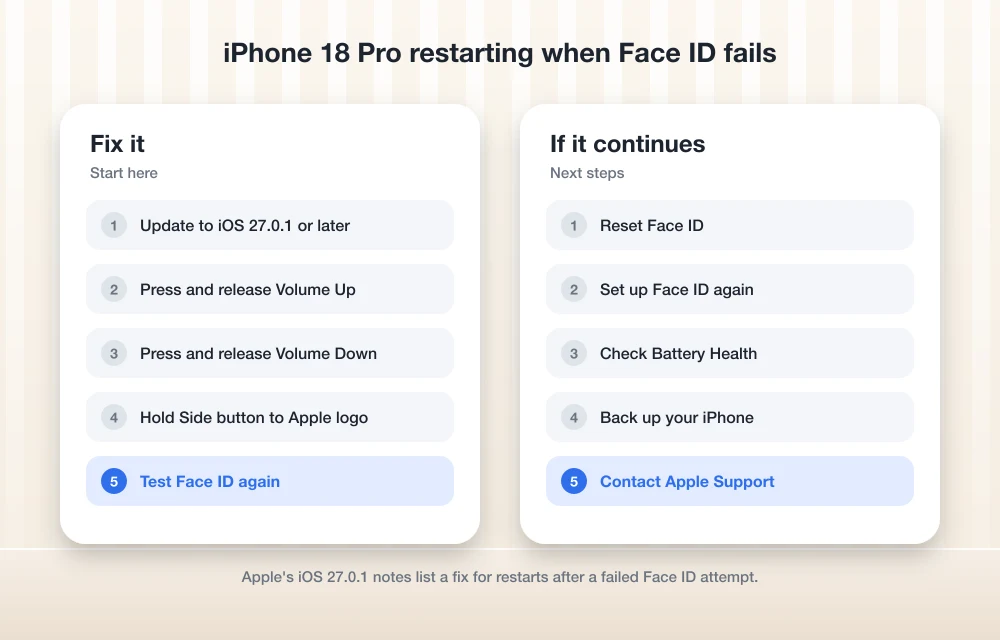
Fix 1: Update to iOS 27.0.1 or later
This is the most important step, and for the Face ID restart it’s the actual fix. Everything else in this guide is either a workaround or a way to rule things out.
Before you start, back up your iPhone to iCloud or your computer. Updates rarely go wrong, but a phone that’s already restarting on its own is not the one I’d skip a backup on.
- Connect your iPhone to Wi-Fi and plug it into a charger.
- Open Settings.
- Tap General, then Software Update.
- If iOS 27.0.1 or a newer version is listed, follow the on-screen prompts to download and install it.
- Enter your passcode when asked, then leave the phone alone until it restarts and finishes setting up.
That menu path is Apple’s standard one. I haven’t rechecked it for iOS 27, so if the wording looks slightly different on your phone, look for the Software Update option under General.
Once you’re updated, use your phone normally for a day. Let Face ID fail now and then, for example by glancing at the phone from an angle, and see if it stays on. If it no longer restarts, you’re done with the main problem.
If you’re on iOS 27 and also seeing the screen lock up when you rearrange your Home Screen, I’ve covered that separately in my guide on fixing iPhone freezing when moving widgets in iOS 27.
Fix 2: Force restart your iPhone 18 Pro
A force restart is not the same as turning the phone off and on. It cuts power to the running software and makes the iPhone start completely fresh, which can clear a temporary glitch. It doesn’t erase your apps, photos or data.
I’d do this right after updating, and again any time the phone feels stuck or acts strangely.
- Press and release the Volume Up button.
- Press and release the Volume Down button.
- Press and hold the Side button.
- Keep holding until the Apple logo appears, then let go.
Do the two volume presses quickly, one after the other. If you see the power-off slider, don’t use it. Just keep holding the Side button until the Apple logo shows up.
Fix 3: Reset Face ID and set it up again
My reasoning for this step is simple. The bug Apple fixed is triggered when Face ID fails. A fresh Face ID scan may mean fewer failed attempts, which means fewer chances to trip whatever is still going wrong. It isn’t an official fix, but it’s harmless and takes about two minutes.
- Open Settings and tap Face ID & Passcode.
- Enter your passcode.
- Tap Reset Face ID.
- Set up Face ID again and follow the on-screen prompts to scan your face.
As with the update path, these menu names come from Apple’s usual instructions and I haven’t rechecked them for iOS 27. Do the new scan in decent light, and give the top of the screen a quick wipe first so a smudge isn’t getting in the way.
Fix 4: Check your battery health
On a phone this new, the battery is unlikely to be the cause. I still think it’s worth a look, because it takes ten seconds and it’s one of the first things Apple Support may ask about when a phone shuts down unexpectedly.
- Open Settings.
- Tap Battery.
- Tap Battery Health. On some iOS versions this is called Battery Health & Charging.
If everything looks normal, you’ve ruled the battery out. If the screen shows anything unusual or recommends service, mention that when you contact Apple.
What to do about Apple Pay shutdowns
This is the part where I have to be honest: nobody outside Apple knows yet whether the iOS 27.0.1 Face ID fix also stops the Apple Pay shutdowns. Apple hasn’t connected them, and it hasn’t explained them.
Here’s what I’d do in the meantime:
- Update first. Install iOS 27.0.1 or later. Apple Pay uses Face ID on these phones, so it’s possible the fix helps, even if Apple hasn’t said so.
- Run through Fixes 2 to 4. A force restart, a fresh Face ID setup and a battery check cover the basics.
- Carry a backup way to pay. Until you’re sure the problem is gone, keep a physical card or another payment method with you. A phone that reboots mid-payment can leave you stuck at the counter.
- Write down what happens. Note the date, time, what you were doing and your iOS version each time it happens. That makes your conversation with Apple much quicker.
When to contact Apple
Reach out to Apple if any of these apply:
- Your iPhone still restarts when Face ID fails after you’ve installed iOS 27.0.1 or later.
- The phone keeps shutting down or rebooting during Apple Pay, even after updating.
- The phone won’t turn back on or gets stuck on the Apple logo after a restart.
- Battery Health shows anything unusual on a phone this new.
You can start a request on Apple’s support site, or call 1-800-MY-APPLE if you’re in the US. In other countries, use Apple’s support site to find local contact options.
When you talk to them, share the notes you’ve kept and mention that you’ve already updated, force restarted and reset Face ID. That saves you from being walked through the same steps again. I can’t tell you what Apple will offer, because it hasn’t published repair or replacement terms for this specific issue. Some owners report getting replacements or refunds, but that’s their experience, not an official promise.
A quick word on other update issues
Big iOS updates sometimes shake other things loose. Last year’s iOS 26 cycle brought its share of oddities, and I’ve written guides for a couple of them. If your connection gets flaky after updating, see how to fix Wi-Fi or cellular connectivity drops after the iOS 26 update. If wired or wireless audio stops behaving, my guide on fixing “Headphones Not Recognized” on iPhone after iOS 26 is a good place to start.
My take
If your iPhone 18 Pro restarts when Face ID fails, the fix is straightforward: install iOS 27.0.1 or later. Apple has confirmed the bug and fixed it, so this should be the end of it for most people. A force restart and a fresh Face ID setup are good extras while you’re at it.
The Apple Pay shutdowns are less clear. Apple hasn’t confirmed them or explained them, so update, carry a backup card, keep notes, and let Apple Support take over if it keeps happening. A phone at this price shouldn’t leave you stranded at a checkout, and you’re well within your rights to push for a proper answer.
Frequently Asked Questions
Does iOS 27.0.1 fix the iPhone 18 Pro restarting when Face ID fails?
Yes. Apple’s iOS 27.0.1 release notes include a fix for some iPhone 18 Pro and iPhone 18 Pro Max units that could restart when Face ID failed to authenticate. Install iOS 27.0.1 or any newer version through Settings > General > Software Update.
Does the iOS 27.0.1 update stop Apple Pay shutdowns?
Nobody knows yet. Apple’s release notes don’t mention Apple Pay, and Apple hasn’t explained what causes the shutdowns owners have reported. Update anyway, try the other steps in this guide, and contact Apple if the shutdowns continue.
Should I install iOS 27.0.1 or the newest version?
Install the newest version your iPhone offers. At the time of writing, the latest public version I found on Apple’s developer releases page is iOS 27.2, which came after 27.0.1 and includes its fixes.
Will a force restart delete anything on my iPhone?
No. A force restart only makes the iPhone start fresh. Your apps, photos and data stay where they are. Press and release Volume Up, press and release Volume Down, then hold the Side button until the Apple logo appears.
Will Apple replace my iPhone 18 Pro if it keeps restarting?
Apple hasn’t published repair or replacement terms for this issue. Some owners say they received replacements or refunds, but that isn’t an official policy. Contact Apple Support with notes on when the restarts happen and what you’ve already tried.
More in How-to
How to Fix iPhone Proximity Sensor Not Working Properly After iOS 26
After the iOS 26 update, a growing number of iPhone users are reporting issues with the proximity sensor. In some cases, the screen does not turn off during voice calls. In others, features like Always On Display behave oddly in low-light conditions. If your iPhone’s proximity sensor feels “broken” or inconsistent after updating, you are…
How to Fix Siri Not Responding on Apple Watch
Is Siri not responding when you try to use it on your Apple Watch? You may raise your wrist, say “Hey Siri,” or press the Digital Crown, but nothing happens. This can be frustrating, especially when you depend on Siri for quick messages, reminders, calls, directions, or other hands-free tasks. The problem may be caused…
How to Fix iPhone 18 Pro and Pro Max Speaker Crackling and Popping
Hearing crackles, pops or ticks from your iPhone 18 Pro or Pro Max earpiece? Here’s how to tell software from hardware, which settings to check, and when to take it to Apple.
The week in tech, minus the noise.
New reviews, fixes and the stories that matter — once a week, straight to your inbox.
We only use your email to send the newsletter. Unsubscribe any time. See our privacy policy.
Comments