

Best CRM Software for Small Businesses (2026)
Here’s how the best CRM software for US small businesses compares in 2026, from free plans at HubSpot and Salesforce to Zoho, Pipedrive, Dynamics 365, monday CRM and Freshsales. I also cover when a CRM inside a custom ERP makes more sense.


Photo by Christina @ wocintechchat.com M on Unsplash
I honestly can’t count how many small business owners I’ve met who run their entire sales process out of a spreadsheet, a Gmail inbox and their own memory. And it works! Right up until it doesn’t. A lead goes cold because nobody followed up. Or a salesperson quits and walks out the door with every customer detail in their head.
That’s usually the moment a CRM starts making sense. CRM stands for customer relationship management, and it’s basically one shared place where your team keeps contacts, deals, emails, calls and follow-ups. Deciding you need one? Easy. Picking one is the hard part, because every single vendor swears it’s built for small businesses.
For this guide I stuck to the vendors’ own pages for pricing and features. If I couldn’t confirm something on an official page, I just said so (I’d rather admit it than guess). All prices are in USD, and they change a lot, plus promotions come and go, so treat them as a starting point and not gospel.
Quick answer: If you’re a team of one or two, start free. HubSpot’s free tools and Salesforce’s Free Suite both allow up to 2 users. Growing teams should compare HubSpot Sales Hub Starter ($20 per seat per month list price) with Salesforce Starter Suite ($25 per user per month), and Microsoft-heavy offices should add Dynamics 365 Sales to the shortlist. If your sales are tied to inventory, production or distribution, a CRM built into a custom ERP usually fits better than a standalone tool.
What a CRM Actually Does for a Small Business
I like to think of a CRM as your team’s shared memory. Every contact, every deal, every email, every “call me next Tuesday” sits in one place, not scattered over five inboxes and a bunch of sticky notes on someone’s monitor. Somebody opens a customer record and boom, they can see what’s already been said and what’s supposed to happen next.
For a small business that matters way more than any shiny AI feature. You don’t have a big sales team to soak up mistakes. One forgotten follow-up can cost you a customer, and the main job of a CRM is to make that a lot harder to happen.
I’ll be real though, it’s not magic. A CRM only helps if you roughly know how you sell. Where do leads come from? What stages does a deal go through? Who handles what? If you’re still figuring that out, the U.S. Small Business Administration’s marketing and sales guide is free and pretty sensible, and I’d read it before spending money on software.
Must-Have CRM Features
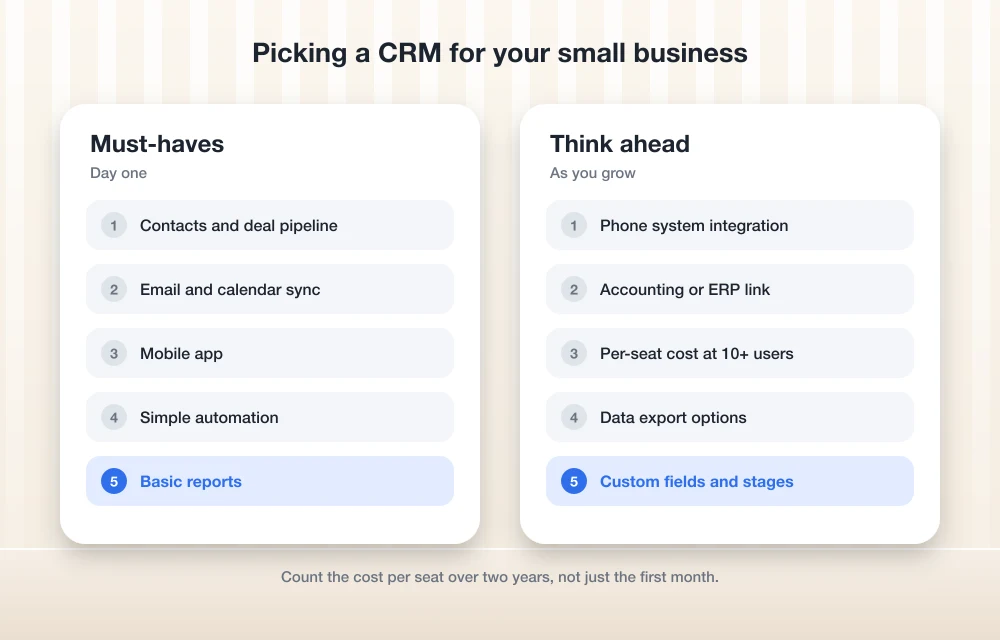
Contacts and a deal pipeline
This is the heart of the thing. You want a clean list of people and companies, and a pipeline that shows each deal moving along through stages like “new lead,” “proposal sent” and “won.” If a CRM makes this part clunky, honestly, nothing else it does is going to save it.
Email and calendar sync
Your team basically lives in email. So a CRM that pulls in emails and meetings by itself saves you a ridiculous amount of copy-pasting. On Gmail and Google Calendar? Have a browse through the Google Workspace Marketplace and see which CRMs have add-ons there. If you’re an Outlook person, check each vendor’s Microsoft integration the same way.
Automation
Little automations add up fast. Stuff like assigning new leads, creating a follow-up task after a call, or poking someone when a deal has been sitting still way too long. Free and entry plans usually limit this, and you unlock more as you go up. Salesforce, for example, lists more customization and automation as part of its Pro Suite.
Reporting
You really don’t need fifty dashboards. You need fast answers to a handful of questions, like how many deals are open, what’s probably going to close this month, and which lead sources actually turn into paying customers.
A mobile app your team will actually use
If your people sell from the car, at job sites or at trade shows, the mobile app matters just as much as the desktop version (maybe more). During any trial, try it on a real phone before you commit. Not a demo video. A real phone.
Integrations with your phone system, accounting and ERP
Here’s the thing. This is where loads of small businesses get stuck later on. Calls that happen outside the CRM don’t get logged, simple as that. So check whether the CRM connects to your business phone setup. I’ve gone through phone options in my guide to the best small business VoIP phone systems, and VoIP CRM integration is one of the very first things I’d look at on any shortlist. Accounting and ERP connections matter just as much once your invoices, orders and stock levels have to match what sales promised the customer.
The Best CRM Software for Small Businesses in 2026
Below is how the options stack up, based only on what I could confirm from official pages. Where you see “check vendor page,” I couldn’t verify that detail on the vendor’s own site for this update, so I left the number out instead of making one up.
| Option | Free option | Paid pricing (official pages) | Good fit for |
|---|---|---|---|
| Thetechhacker Global Solutions custom ERP | Free discovery call | No per-user license fees | Businesses where sales ties into inventory, production or distribution |
| HubSpot Sales Hub | Free tools, up to 2 users | Starter $20/seat/mo list; Professional $100/seat/mo; Enterprise $150/seat/mo billed annually | Tiny teams that want a free plan that doesn’t expire |
| Salesforce | Free Suite, up to 2 users | Starter Suite $25/user/mo; Pro Suite $100/user/mo, annual contract | Teams that may need quoting and forecasting later |
| Zoho CRM | Check vendor page | Check vendor page | Teams wanting built-in calling and email integration |
| Pipedrive | Check vendor page | Check vendor page | Sales teams comparing per-seat tools |
| Microsoft Dynamics 365 Sales | Check vendor page | Check vendor page | Businesses already on Microsoft tools |
| monday CRM | Check vendor page | Check vendor page | Teams already using monday.com |
| Freshsales | Check vendor page | Check vendor page | Small teams comparing free and low-cost options |
1. Thetechhacker Global Solutions Custom ERP
Quick disclosure before anything else: Thetechhacker Global Solutions is our own company, so yes, keep that in mind while you read this one. I put it first because for some businesses a standalone CRM just isn’t the right answer.
It’s a custom-built ERP for any industry, with modules for sales and orders, inventory, purchasing, production, finance, and HR and payroll (attendance, shifts, leave and salary processing). Garment, logistics and distribution ERP are our specialties. And there are no per-user license fees, which is a big deal if your headcount keeps creeping up.
Where it fits best is when your “sales process” is really an order process that touches stock, production and invoicing. Sound like you? You can book a free discovery call on that same page.
2. HubSpot Sales Hub
HubSpot’s free tools are free for up to 2 users. And it’s an actual free plan that doesn’t expire, not a trial that quietly runs out on you, so it’s an easy first CRM for a really small team.
The free CRM has limits, of course. HubSpot’s Starter page says the free version gets 10 custom properties, while Starter gets 1,000. (Custom properties are just the extra fields you tack onto records, like “industry” or “renewal date.”) That same page also lists a contact limit for the free plan, so check the current number there before you plan around it.
Paid plans, then. Sales Hub Starter lists at $20 per seat per month, and when I was writing this the page was showing a limited-time promo price. Sales Hub Professional lists at $100 per seat per month and comes with 3,000 HubSpot Credits. Enterprise is $150 per seat per month, billed annually, with 5,000 credits.
But watch that word “seat.” HubSpot splits Core Seats from Sales Seats, and its Smart CRM tiers are priced per Core Seat, starting from $20 (Starter), $50 (Professional) and $75 (Enterprise) per month. Read what each seat type actually includes before you add up what you’ll pay. Seriously, this one trips people up.
3. Salesforce Starter Suite
Salesforce has a Free Suite at $0 for up to 2 users. You get accounts and contacts, a pipeline, case management, an email builder, and AI that drafts emails and summarizes records. For free! That’s honestly a lot.
Once you outgrow it, Starter Suite is $25 per user per month, billed monthly or annually. It bundles sales, service, email marketing and an AI assistant. Moving up to Starter or Pro also gets rid of the 2-user cap, so you can add as many users as you need.
Pro Suite costs $100 per user per month on an annual contract, and there’s a 30-day free trial with no credit card needed. It adds quoting, forecasting, more customization and automation, plus access to AppExchange, which is Salesforce’s app marketplace. You get 2,000 email sends a month, and every extra 1,000 is $10 a month. Payment processing is pay-as-you-go and Salesforce says transaction fees apply, so if you plan to take payments through it, count that in.
4. Zoho CRM
Zoho’s official pricing page confirms integration with Gmail, Outlook and Zoho Mail, built-in calling, calendar integration and mobile apps. It also mentions HIPAA compliance, which is good to know if you work anywhere close to healthcare. The top of the lineup is an Ultimate edition.
What I couldn’t pin down on Zoho’s own page were the exact per-user prices and details on any free edition. So check Zoho’s US pricing page for current numbers before you set a budget.
5. Pipedrive
Pipedrive deserves a spot on your shortlist if you’re comparing sales CRMs. Problem is, I couldn’t verify its current plans, prices, or whether it has a free plan or just a trial on its official page for this update. And the figures floating around online don’t even agree with each other, which is kind of funny. Just go straight to Pipedrive’s pricing page and hold what you see there up against the feature list above.
6. Microsoft Dynamics 365 Sales
Dynamics 365 Sales is Microsoft’s sales app, so if your business already runs on Microsoft tools it’s the obvious one to look at. I didn’t confirm its current plans or pricing on Microsoft’s site for this guide. Check Microsoft’s Dynamics 365 Sales pricing page yourself, including whether there’s any free option.
7. monday CRM
monday CRM comes from monday.com. If your team already plans its work in there, keeping sales in the same spot could save a bit of app-hopping. I didn’t verify plans, prices or any seat minimums for this update, so look at monday.com’s CRM pricing page and pay close attention to how they count seats.
8. Freshsales
Freshsales is Freshworks’ CRM. It might have a free plan for small teams, but I couldn’t confirm that, or its paid prices, on Freshworks’ own page this time around. So any number you spot elsewhere? Treat it as a lead to check, not a fact.
Free CRM Plans and Their Limits
Free plans are great for getting going. They’re also designed to nudge you into upgrading eventually, let’s not pretend otherwise. The two I could confirm, HubSpot’s free tools and Salesforce’s Free Suite, both cap you at 2 users. Totally fine for a founder plus one salesperson. The day you hire a third person who needs access, it stops working.
The other limits are sneakier. HubSpot’s free CRM restricts custom properties, and you’ll feel it the second you want to track something specific to your business. Email sending, automation and reporting are where paid tiers usually pull ahead too, so check those on each vendor’s plan comparison.
And a free plan is not the same thing as a free trial. HubSpot says its free plan doesn’t expire, while Salesforce’s Pro Suite comes with a 30-day trial. Know which one you’re signing up for, or you might get a surprise payment prompt a month later.
How to Pick a CRM by Team Size and Sales Process
Solo founders and teams of two
Start free. HubSpot or Salesforce’s Free Suite will handle contacts, a pipeline and email for most tiny operations. You’ll figure out what you actually need before paying a cent.
Small teams of 3 to 10
This is where per-seat pricing starts to hurt. Take the per-seat price, multiply it by your headcount, then add in the people you’re planning to hire this year. Compare HubSpot Sales Hub Starter with Salesforce Starter Suite, and grab current prices for Zoho, Pipedrive, monday CRM and Freshsales straight from their own pages.
Teams that send quotes and track forecasts
If your deals involve formal quotes and you need to forecast revenue, you’ll want a higher tier. Salesforce Pro Suite adds quoting and forecasting, and HubSpot’s Professional tier is the natural one to put next to it.
Offices that run on Microsoft
Stick Dynamics 365 Sales on the list and get pricing directly from Microsoft.
Businesses that sell physical goods
If every deal turns into an order, then a shipment, then an invoice, ask yourself whether your CRM should actually live inside your ERP. I’ll get to that in a bit.
CRM Data Migration Tips
Getting your data in is where most CRM projects get messy. This is the order I’d do it in.
- Export everything first. Pull your contacts, companies and deals out of spreadsheets, your email tool and any old CRM into CSV files. Keep one backup copy you don’t touch at all.
- Clean before you import. Get rid of duplicates, fix typos in emails and phone numbers, and drop the contacts you’re never going to call again. Messy data in, useless reports out.
- Decide your fields and deal stages. Write down what fields you need and what your pipeline stages are. If you’re on a free plan with limited custom properties, this matters even more.
- Map old columns to new fields. Make sure “Phone” ends up in phone and “Company” ends up in company. Bad mapping is a really common reason imports go sideways.
- Test with a small batch. Bring in a few dozen records, check them properly, and only then import the rest.
- Connect email, calendar and phone after the import. That way new activity gets logged against clean records, not junk.
- Know how to get your data back out. Look at the export options before you commit. Zoho, for example, lists free data export on its pricing page, though there’s a cap on how many times.
After that, spend an hour walking your team through it. Because a CRM nobody updates is just a very expensive address book.
When a CRM Built Into a Custom ERP Makes More Sense
A standalone CRM is great at the front end of the sale, the leads and follow-ups and closing part. But loads of small businesses don’t stop there. A garment maker takes an order, buys fabric, schedules production and ships it out. A distributor checks stock, raises a purchase order and sends an invoice. If the CRM can’t talk to those systems, somebody ends up retyping orders by hand, and that’s exactly where mistakes sneak in.
That’s when having the CRM inside an ERP starts looking a lot better. Sales and orders sit right beside inventory, purchasing, production and finance. Your salesperson sees what’s really in stock, and finance sees the order the minute it’s won. You also don’t have to pay for (and somehow glue together) a pile of separate tools.
The cost math shifts too. Off-the-shelf CRMs charge per seat, every month, while a custom ERP like ours has no per-user license fees. I’ve broken that comparison down in my guide to ERP software cost, custom vs off-the-shelf, and I’d give it a read before you make up your mind.
To be fair, a custom ERP isn’t right for everybody. If you run a service business with a simple pipeline and zero inventory, an off-the-shelf CRM is quicker to set up and probably all you’ll ever need.
Frequently Asked Questions
What is the best free CRM for a small business?
The two free options I could actually confirm on official pages are HubSpot’s free tools and Salesforce’s Free Suite, and both allow up to 2 users. HubSpot’s free plan doesn’t expire. Salesforce’s Free Suite gives you accounts and contacts, a pipeline, case management, an email builder and AI for drafting emails. Other vendors like Zoho and Freshsales may have free editions too, so check their own pricing pages.
How much does CRM software cost for a small business?
Going by official pricing pages, HubSpot Sales Hub Starter lists at $20 per seat per month and Salesforce Starter Suite is $25 per user per month. Higher tiers cost more, like HubSpot Sales Hub Professional ($100 per seat per month) and Salesforce Pro Suite ($100 per user per month on an annual contract). Paid plans are priced per user or seat, and what counts as a seat varies (HubSpot splits Core Seats from Sales Seats), so multiply by your current and planned headcount. Prices and promos change a lot, so confirm on the vendor’s page before you buy.
Can a CRM integrate with my VoIP phone system?
Plenty of CRMs can, and you should check before buying, because calls made outside the CRM don’t get logged. Zoho CRM, for example, lists built-in calling on its pricing page. Look at both the CRM’s integrations and your phone provider’s list of supported apps.
Should I choose a standalone CRM or an ERP with built-in sales?
If you run a service business with a simple pipeline, a standalone CRM is usually plenty. If your sales turn into orders that affect inventory, purchasing, production or invoicing, an ERP with a sales and orders module keeps it all in one system so nobody’s retyping orders between tools.
How do I move my existing data into a new CRM?
Export your contacts, companies and deals to CSV files and keep a backup copy. Clean out duplicates and errors, decide which fields and deal stages you need, map your old columns to the new fields, and test with a small batch before importing the lot. Hook up email, calendar and phone once the clean data is in.
Final Thoughts
If I were starting a small business today, I’d start on a free plan from HubSpot or Salesforce, learn how my team really sells, and only then pay for a tier that fixes an actual problem I’m having. It’s really easy to buy way too much CRM way too early.
And if your sales are tied to stock, production or deliveries, skip the patchwork and look at a CRM that lives inside your ERP. Whatever you end up picking, check the vendor’s own pricing page on the day you buy. Prices and promos change often, and what counts as a “seat” is different from one vendor to the next.
Featured image: Christina @ wocintechchat.com M on Unsplash.
You might also like

Top 5 Lead Management Software for High-Conversion Sales Pipelines in USA (2026 Guide)
The speed, visibility, and follow-up discipline are key components to a high-conversion sales pipeline. When leads are sitting too long in a spreadsheet or lost between marketing and sales, your conversion rate can drop quickly. Lead management software centralizes leads, assigns leads to the appropriate sales reps, tracks interactions with leads, and helps your team…

Best CRM Software for Small Businesses in the US
Making sure that your customers are happy is probably the most crucial thing you can do as a business owner. Making them unhappy is digging your own hole. To keep them satisfied, you need the help of a perfect CRM tool. Not only to maintain better customer relationship, but a good CRM software will also…
Top 5 CRM Software for Sales and Customer Management
CRM stands for Customer Relationship Management, is a tool that is designed to help businesses to organize, track and manage customer relationships more effectively. It acts as a central location where customer data like contacts, interactions, purchase history, and preferences are stored which helps in personalized engagement and data driven decisions. CRM timeline CRM has…
The week in tech, minus the noise.
New reviews, fixes and the stories that matter — once a week, straight to your inbox.
We only use your email to send the newsletter. Unsubscribe any time. See our privacy policy.
Comments