

How Much Does ERP Software Cost in 2026? Custom vs Off-the-Shelf
A plain-English breakdown of what US small and mid-size businesses pay for ERP in 2026, from per-user subscriptions to implementation, hidden costs and 3-5 year total cost of ownership, plus when a custom ERP is the cheaper choice.

ERP-Software-Cost-Featured
Ask any vendor what ERP costs and you get the same little smile and the same answer: “It depends.” Fair enough, they’re not wrong. But that answer is pretty useless when you run a 25-person distributor or a garment unit and you need an actual number for next year’s budget.
Quick definition before anything else. ERP (enterprise resource planning) software pulls your accounting, inventory, purchasing, sales, production and reporting into one system. Everybody fixates on the license or subscription. Honestly, in my experience that’s often not even the biggest line on the bill.
So in this guide I’m going to walk you through what US small and mid-size businesses really pay for in 2026. I’ll put off-the-shelf SaaS ERP next to a custom-built system over three to five years, and I’ll show you how to get quotes you can actually trust. And if a vendor doesn’t publish a price? I’ll just say so.
Quick answer: Published cloud ERP pricing for small businesses runs from free (Odoo’s one-app plan) to about $110 per user per month (Microsoft Dynamics 365 Business Central Premium), while NetSuite, Acumatica and SAP Business One are mostly sold by quote. On top of the subscription you pay for implementation, data migration, integrations and training, which typically lands anywhere from about $5,000 to $250,000 depending on the product and how complex your business is. Custom ERP costs more upfront but has no per-user fees, so it can work out cheaper over 3-5 years if your workflows are unusual or your team is growing.
What You’re Actually Paying For
It’s way easier to compare products once you know the pieces. Every ERP quote I’ve seen, custom or SaaS, is made of roughly the same parts. Some vendors bundle them together. Most don’t bother.
Licenses or subscriptions
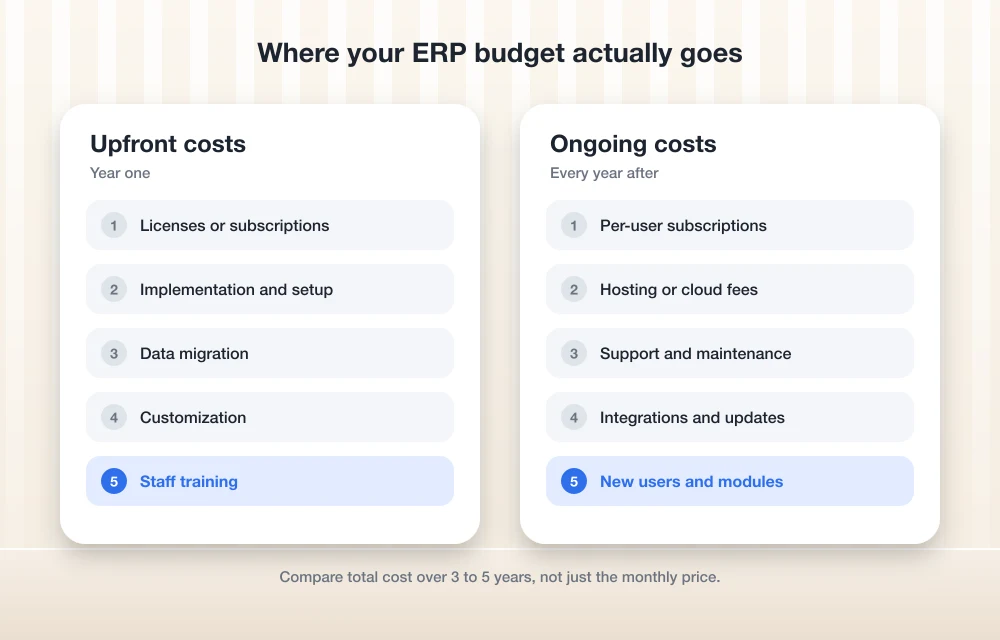
SaaS ERP is usually priced per user, per month, and billed yearly. Some vendors stack a base platform fee on top of that. The older on-premise products sell a perpetual license (you pay once) and then charge a yearly maintenance fee. Custom ERP has no license fee at all. You either own the code or have the rights to use it, depending on what your contract says.
Implementation
This is the setup work. Configuring the system, your chart of accounts, warehouses, approval rules, user roles, reports. With SaaS ERP it’s normally a certified partner doing it, not the software company. And I’ll be real, this is where budgets blow up most often.
Data migration
ERP data migration is moving your customers, vendors, items, open orders, opening balances and sometimes years of history out of your old system (or a big pile of spreadsheets) and into the new one. What drives the cost isn’t really how much data you have. It’s how messy it is. Duplicate customers, five different spellings of the same fabric, missing SKUs… somebody has to sit there and fix all that, and those are paid hours.
Customization
Basically anything the software doesn’t do out of the box. Custom fields, new screens, special pricing logic, extra approval steps. On SaaS platforms, heavy customization also makes future upgrades harder, so you end up paying for it again down the road.
Integrations
Hooking the ERP up to your e-commerce store, payment gateway, shipping carriers, CRM, payroll or bank feeds. Some of these connectors are ready-made apps that come with their own monthly fee. Others need someone to build them.
Training
Partners usually bill training by the hour or sell it as a package. The bigger hidden cost, though, is your own people’s time away from their actual jobs, and the productivity dip you’ll feel for the first few weeks after go-live.
Hosting
With SaaS ERP, hosting is baked into the subscription. With a custom ERP, or a self-hosted open-source setup like Odoo Community, you pay a cloud provider yourself. Google lists its virtual machine rates by machine family on its Compute Engine pricing page, and there’s a link to a pricing calculator there so you can estimate a monthly bill before committing to anything.
Support and maintenance
SaaS vendors take care of platform updates, but partner support for your particular setup is usually a separate bill. Perpetual licenses come with annual maintenance. For SAP Business One that’s typically around 18-20% of the license cost every year (that’s a range partners quote, not an SAP figure). Custom ERP needs a developer or a team on call for bug fixes, security patches and small changes. If you’re self-hosting anything with a lean team, go read how small IT teams handle urgent server access. Trust me, the day your ERP server goes down is not the day you want to be figuring that out.
Off-the-Shelf and SaaS ERP Pricing in 2026
Below is what I managed to pin down for the products US small businesses ask me about the most. A few vendors publish prices. A lot of them don’t. Prices also change, and some depend on region, so use this table as a starting point and double-check each vendor’s own pricing page before you put anything in a budget.
| Product | How it’s priced | Price (USD) | How sure is this? |
|---|---|---|---|
| Odoo (Standard / Custom) | Per user per month, billed yearly | One App Free: $0. Standard: $24.90 for the first 12 months, then $31.10. Custom: $49 for the first year, then $61. | Odoo’s published US pricing; check again, it changes by region |
| Odoo Community | Open source | $0 license | Hosting and implementation are extra |
| Microsoft Dynamics 365 Business Central | Per user per month, billed yearly | Essentials: $80. Premium: $110. Team Members: $8. | US list price as quoted by Microsoft partners; confirm with Microsoft |
| Acumatica | By “resources” (transaction volume plus modules), unlimited users | Quote only | No public price |
| Oracle NetSuite | Base platform license + per-user licenses + optional modules; 12-60 month terms | Quote only. Typical range reported by implementation partners: base around $999+/month, users roughly $99-$199/month | Not Oracle’s numbers |
| SAP Business One | Sold only through partners; cloud or perpetual | Typical range: cloud roughly $110-$219/user/month; perpetual roughly $1,350-$3,500/user plus about 18-20% yearly maintenance | Partner ranges, not SAP’s numbers |
| Sage Intacct | Quote-based, as far as I can tell | Not published | I couldn’t confirm current pricing |
A couple of things jumped out at me. Odoo’s first-year discount is genuine, but please budget on the renewal price, not the intro one. Acumatica’s unlimited-users model is pretty interesting if you’ve got lots of occasional users (think warehouse staff who just scan and receive). And NetSuite’s multi-year terms mean you’re locked in for a while, so push hard on the negotiation upfront.
What Custom ERP Development Costs
I’m not going to make up a number for you here. A custom build that handles inventory and invoicing for one warehouse is a totally different animal from a multi-location system with production planning, shop-floor tablets and a dozen integrations.
So what actually moves the price on custom ERP development?
- How many modules you need on day one versus later on
- How unusual your workflows are (honestly, this is the big one)
- How many integrations, and what kind
- How much old data has to be migrated and cleaned up
- Mobile or shop-floor apps, barcode scanning, working offline
- Reporting and dashboards
- Where it’s hosted, and who looks after it once it’s live
Developers tend to price it one of two ways: a fixed bid per phase, or time and materials (you pay for the hours worked). For a first ERP, my preference is a paid discovery phase and then fixed-price phases after that. You end up with a written scope and nobody’s guessing.
The trade-off isn’t complicated. You pay more on day one, and then you never pay per user again. Hosting and maintenance stick around forever though, so plan for them from the beginning.
Total Cost of Ownership Over 3-5 Years
Total cost of ownership (TCO) is everything you spend on the system over its whole life, not just the first year. This is the rough formula I use:
TCO = subscription (users x monthly price x 12 x years) + implementation + data migration + customization + integrations + training + hosting + support + your own staff’s time
Take just the subscription part for a 20-user business, using the published or partner-quoted prices from above. It’s simple math, not a quote:
| Scenario (20 users) | Per year | 5-year subscription total |
|---|---|---|
| Business Central Essentials at $80/user/month | $19,200 | $96,000 |
| Business Central Premium at $110/user/month | $26,400 | $132,000 |
| Odoo Standard ($24.90 year one, then $31.10) | $5,976 year one, then $7,464 | $35,832 |
Now pile implementation on top. The ranges implementation partners typically report are roughly $25,000-$250,000 for Business Central, $30,000-$150,000+ for NetSuite and $5,000-$200,000 for Odoo. Yes, those are wide, and that’s on purpose. A clean, simple setup lands at the bottom. Heavy customization and messy data shove you toward the top.
And we haven’t even touched renewal price increases, extra users as you grow, or add-on apps. Those numbers also assume your headcount doesn’t change for five years. When does that ever happen?
Custom ERP looks different over five years. One bigger build cost up front, then hosting and maintenance every year. Your 21st user, or your 60th, costs nothing extra in licensing. That’s really the whole reason custom can come out ahead over a long stretch.
Hidden Costs Nobody Puts in the First Quote
These are the ones that catch business owners off guard the most. To be clear, none of them are scams. They just don’t make it onto page one of the proposal.
Renewal increases are first on my list. Your price in year two or year four can end up higher than what you signed for, and intro deals like Odoo’s first-year rate run out. Then you’ve got add-on modules, sandbox environments and extra storage you had no idea you’d need.
Change requests catch people too. After go-live, every new report or little tweak is billable partner time. Integrations can also break after a platform update, and somebody has to go fix them.
Internal time is the one almost nobody budgets for. Your finance lead, your warehouse manager and you yourself will lose weeks to workshops, testing and data cleanup. No invoice shows up for that, but it’s still real money.
If you host anything yourself, backups and disaster recovery are your problem. Your ERP holds your books, your inventory and your customer orders, so losing it just can’t happen. Our guide to the top backup and data recovery software for US businesses is a decent place to start pricing that bit out.
Last one, exit costs. Say you leave a SaaS ERP someday. How easily can you export your data, and what format does it come out in? Ask before you sign, not after.
When Custom ERP Is Cheaper in the Long Run
Off-the-shelf ERP is designed for the average business, and that’s exactly why it’s good. If your accounting, purchasing and inventory look like everybody else’s, SaaS is usually the quicker and cheaper route, especially when there’s nobody in-house to own a custom system.
Some industries, though, just aren’t average.
Garment manufacturing is the textbook case. You’ve got style-color-size matrices, cut-make-trim stages, fabric consumption per piece, job work going out to subcontractors and sometimes piece-rate wages too. Cramming all of that into a generic manufacturing module means a lot of customization, and you pay for that customization all over again every time the platform updates.
Logistics companies need stuff like multi-leg shipments, carrier rate rules, driver apps and proof of delivery. Distribution businesses are often juggling customer-specific pricing, several warehouses, lot tracking and dozens of part-time users who only ever need one screen.
The way I think about it, custom starts making financial sense when one or more of these is true for you:
- Your SaaS quote has a big customization budget in it just to match how you already work
- You’d be paying full per-user fees for a bunch of people who only touch a tiny slice of the system
- You’re hiring fast, so those per-user costs just keep going up
- Your process is part of what makes you better than competitors, and you don’t want to bend it to suit some software
There’s a middle option too. Run a standard ERP for accounting and build custom modules around it for production or dispatch. It isn’t always cheaper, but sometimes it’s the most practical choice.
Full disclosure, since it’s my site: our team at Thetechhacker Global Solutions builds custom ERP for exactly these kinds of businesses. If you can’t decide which way to go, you can see how our custom ERP development works and get an honest opinion from us, even if that opinion is that off-the-shelf fits you better.
How to Budget and Get Accurate Quotes
Vague requirements get you vague quotes. Simple as that. The more homework you do before you talk to vendors, the closer their numbers will be to what you end up spending.
- Map your processes. Write out how an order goes from quote to cash, and how stock goes from purchase to shipment. Flag anything weird.
- Count users by role. Split full users from light users who only view, approve or scan. On per-user plans this changes the price a lot.
- Take stock of your data. What has to move over, how many years of history, and how clean is it really?
- List every integration. Your store, payments, shipping, payroll, bank, CRM.
- Ask for a 3-5 year quote, itemized. Subscription, implementation, migration, training, support and expected renewal pricing, each on its own line.
- Add a contingency buffer. ERP projects hardly ever come in under budget, so plan for some overrun.
- Check your cash flow. The U.S. Small Business Administration has a guide to managing your business finances that’s free and genuinely handy when you’re planning a big spend like this.
One more budgeting thing. Software purchases and custom development might get treated differently for taxes. The rules changed recently and I’m not a tax advisor, so ask your CPA how each option would be handled before you make a call.
Questions to Ask ERP Vendors
Take this list into every demo. The answers will tell you more than any slide deck.
- What’s my total cost for my number of users over three years and five years, renewals included?
- Will you put a cap on annual price increases in the contract? (Worth fighting for at signing, especially on multi-year terms.)
- Which of my requirements need actual customization and not just standard configuration?
- Who’s doing the implementation, and are they certified on this product?
- Is data migration included? How many test migrations do I get?
- Which integrations are ready-made and which need custom work? Do they have their own monthly fees?
- What does support cost after go-live, and how fast do you respond?
- Can light users (approvers, warehouse scanners) get a cheaper license?
- If I leave, how do I export all my data?
- For custom builds: who owns the source code, and what’s included in monthly maintenance?
- Can I talk to a customer in my industry who’s been live for more than a year?
My Take Before You Sign Anything
Please don’t choose an ERP based on the monthly per-user price. It’s the easiest number to compare and, on its own, the least useful. Work out a 3-5 year TCO for every option, your own team’s time included, and compare those instead.
If your business runs on pretty standard processes, a SaaS ERP like Odoo or Business Central will usually get you live faster and for less. If you’re in garment manufacturing, logistics or distribution and every SaaS quote comes back with a fat customization line, take custom seriously. Whichever way you go, get itemized quotes, check every price on the vendor’s own page, and never sign a multi-year deal without asking about renewal increases first.
Frequently Asked Questions
How much does ERP software cost per user per month?
For small-business cloud ERP, published prices go from free (Odoo’s One App Free plan) up to about $110 per user per month (Microsoft Dynamics 365 Business Central Premium, as quoted by Microsoft partners). NetSuite, Acumatica and SAP Business One are mostly quote-based, so you’ll have to ask for pricing for your number of users.
How much does ERP implementation cost for a small business?
Honestly, it’s all over the place. Typical ranges reported by implementation partners go from roughly $5,000 for a simple Odoo setup to $250,000 for a complex Business Central project. Your data quality, how much customization you need and how many integrations you have matter more than how big your company is.
Is custom ERP more expensive than off-the-shelf ERP?
Upfront, yes, usually. But there are no per-user subscription fees with custom ERP, so over 3-5 years it can come out cheaper for businesses with unusual workflows, lots of customization needs or a team that’s growing fast. You’ll still need to budget for hosting and ongoing maintenance.
What hidden costs should I expect with ERP?
The usual suspects are renewal price increases, first-year discounts running out, add-on modules, change requests after go-live, integrations breaking after updates, staff time spent on training and testing, backups for self-hosted systems and whatever it costs to export your data if you leave.
How do I get an accurate ERP quote?
Map out your key processes, count your users by role, look at how much data has to move, list every integration, and ask each vendor for an itemized 3-5 year quote with renewal pricing, implementation, migration, training and support all included.
More in Guides
CRM Implementation Challenges and How to Solve Them in the USA (2026 Guide)
When implementing a CRM system, you want to make it easy for your sales, marketing, and customer service to perform their jobs; unfortunately, the opposite usually happens with most CRM projects in the USA due to the fact that many people do not properly roll out the system, have poor data quality and that they…
How to Back Up Your Business Data: Cloud Backup Options Compared (2026)
A plain-English guide for US small businesses on backing up files, email, accounting data and Microsoft 365 or Google Workspace, with a simple 3-2-1 setup that holds up against ransomware.

Top 5 Lead Management Software for High-Conversion Sales Pipelines in USA (2026 Guide)
The speed, visibility, and follow-up discipline are key components to a high-conversion sales pipeline. When leads are sitting too long in a spreadsheet or lost between marketing and sales, your conversion rate can drop quickly. Lead management software centralizes leads, assigns leads to the appropriate sales reps, tracks interactions with leads, and helps your team…
The week in tech, minus the noise.
New reviews, fixes and the stories that matter — once a week, straight to your inbox.
We only use your email to send the newsletter. Unsubscribe any time. See our privacy policy.
Comments