

Best Business Phone Systems (VoIP) for Small Businesses in 2026
A plain-English guide to choosing a small business VoIP phone system in 2026, covering RingCentral, Nextiva, Dialpad, Zoom Phone, Google Voice, Teams Phone, Grasshopper and Quo, plus the 10DLC, E911 and porting details most buyers miss.

Business-VoIP-Featured
If your business still runs off one person’s cell number, I get it. Honestly, that’s how most of us start. But then you miss a customer’s call at 8 p.m., or a new hire has to pick up the main line, and suddenly a proper small business VoIP phone system doesn’t feel like a luxury anymore.
Good news? You don’t need a closet full of wiring these days. Cloud phone systems run over your internet connection and work on the phones and laptops your team already has. Usually you just pay a monthly fee per user.
I went through the official pages for the big names below. Some prices I could confirm directly and some I couldn’t, and I’ll tell you which is which. Pricing in this space changes a lot (like, a lot), so treat every number here as a starting point and check the vendor’s page before you sign anything.
Quick answer: For most US small teams, RingCentral, Nextiva, Dialpad and Zoom Phone are the strongest all-round picks. RingCentral’s RingEX Core lists at $20 per user per month billed annually, and Dialpad’s Connect Standard at $15. If you already pay for Google Workspace or Microsoft 365, look at Google Voice or Teams Phone first, while solo owners can start with lighter options like Grasshopper or Quo (formerly OpenPhone). Whatever you pick, make sure it handles E911, number porting and 10DLC texting registration properly.
What Is a Cloud Phone System (VoIP)?
VoIP stands for Voice over Internet Protocol. Plain English version: your calls travel over the internet as data, not over those old copper phone lines.
A cloud phone system is just VoIP where the provider runs everything on its own servers. You don’t buy a phone box (the old-school PBX), and you don’t pay someone to come install it. You get business numbers and an admin dashboard, and usually apps for phones and computers too. Your team can answer the main line from a desk phone, a laptop or their own cell, and customers only ever see the business number.
That last bit is the real win for small businesses, if you ask me. Your personal number stays personal.
Features That Actually Matter
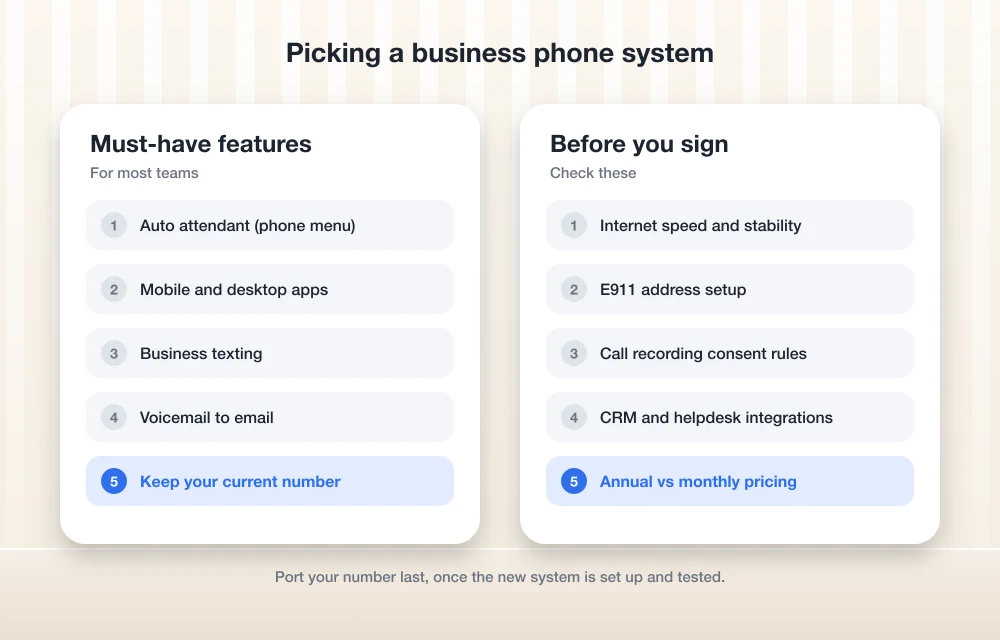
Every vendor’s feature list goes on for pages. Most of it you’ll never touch. These are the ones I’d actually bother checking.
Auto attendant (IVR)
This is the “press 1 for sales, press 2 for support” menu. The technical name is IVR, which is short for interactive voice response. Even a two-person shop sounds more established with one, and it gets callers to the right person without anybody having to play receptionist.
Make sure it’s on the tier you’re actually buying. Some vendors now sell AI receptionists on top of this. RingCentral, for example, includes an AI Virtual Assistant with RingEX Core but charges extra for its AI Receptionist.
Call forwarding and mobile apps
This is the one that frees you from your desk. Calls ring the app on your phone, and when you call out, the customer sees your business number, not your personal one. For small teams working from job sites, from home or from the car, I’d honestly rank this above almost everything else.
Look for business hours settings too. That way calls stop ringing your phone at dinner and go to voicemail instead.
Business texting and 10DLC registration
Customers text. A lot. Appointment reminders, quick questions, “are you open today?” So a business number that can send and receive texts is worth having.
Here’s the thing though. In the US there’s a catch called 10DLC, short for 10-digit long code, which just means a regular 10-digit phone number. If you text customers from one, you’re expected to register your business (your “brand”) and what you’re texting about (your “campaign”) through The Campaign Registry. US carriers filter or block unregistered business texts. Ask your provider how it handles registration and what it charges, because fees vary by vendor.
Keep an eye on the included text allowance as well. RingEX Core includes 25 texts per user per month, while Nextiva says its Core plan includes 100. Is your team texting all day? Then that gap adds up fast.
Voicemail to email
Small thing, big time saver. Voicemails land in your inbox, often with a written transcript, so you can skim them between jobs. Nextiva lists voicemail transcription on its Core plan. Google Voice has a setting to get voicemail via email, though Google likes to rearrange its menus now and then, so poke around Voice settings if it isn’t where you expect.
Call recording (and consent laws)
Recording calls helps with training and disputes, and with simply remembering what a customer asked for. RingEX Core includes on-demand call recording, and Zoom lists call recording in its Zoom Phone plans.
Now the legal bit. This is general information, not legal advice, okay? Federal law (18 U.S.C. § 2511(2)(d)) only needs one person on the call to consent, and that person can be you. But some states, including California under Penal Code § 632, require everyone on the call to agree. The list of states varies. If you talk to customers in different states, a quick “this call may be recorded” message is the easiest habit to build. And if recordings are central to how you work, a lawyer is worth a call.
One more thing people forget. Recordings, voicemails and texts are business records, and you’ll want them if some dispute pops up a year later. I’d make sure they’re covered when you back up your business data rather than just assuming they’ll live forever in the vendor’s cloud.
CRM and helpdesk integrations
This is where a phone system goes from nice to actually saving you hours. A CRM (customer relationship management software, basically where you track customers and deals) integration can pull up the caller’s record when the phone rings and log calls automatically.
Plans differ here. Dialpad puts CRM integrations on its Pro plan, not Standard. Zoom Phone lists integrations with Salesforce, Slack, Microsoft and Google. Before choosing anything, write down the tools your team lives in (your CRM and helpdesk at the very least) and check each vendor’s integration list.
If you’re also planning bigger back-office software, it makes sense to think about phones and ERP together. My breakdown of ERP software cost, custom vs off-the-shelf covers that side. And if your processes are unusual enough that you’re weighing custom ERP software, ask phone vendors about API access early on, since that’s typically how custom systems hook into your phone data.
Porting your existing number
Switching doesn’t have to mean a new number. Interconnected VoIP providers have to follow the FCC’s local number portability rules, so generally you can take your existing number with you.
I’m not going to guess how long a port takes, because it depends on the providers involved. My advice is simple. Don’t cancel your old service until the new provider confirms the port is complete.
E911
This is the part most buyers skip. And it’s the one that matters most when something goes wrong. The FCC’s guide to VoIP and 911 service says interconnected VoIP providers have to offer 911, and that you need to register the physical address where you use the service and update it whenever you move. It also warns that 911 may not work during a power or internet outage.
Two federal laws apply to multi-line business systems. Kari’s Law requires that people can dial 911 directly, without a prefix like “9,” and that someone on site gets notified. RAY BAUM’S Act requires a “dispatchable location,” such as a street address plus floor or suite, to be sent along with 911 calls.
So what does that mean in practice? Ask any vendor how it handles emergency addresses for remote and hybrid staff. And keep a charged cell phone around as a backup.
The Best Business Phone Systems to Consider
Quick heads-up before we get into it. I haven’t done a long-term test of each of these. What follows is based on each vendor’s official pages plus my own judgement about who each one suits.
RingCentral RingEX
RingCentral is the safe, full-featured pick. On its official pricing page, RingEX Core is $20 per user per month billed annually or $30 billed monthly, and RingEX Advanced is $25 annually or $35 monthly. RingCentral says annual billing saves “up to 33%.”
Core includes unlimited domestic calling, on-demand call recording, 100 toll-free minutes, 25 texts per user per month and HD video meetings for up to 300 people. There’s also a higher Ultra tier, but I couldn’t confirm its price on RingCentral’s own page, so check before you budget for it. The one thing I’d watch? That low text allowance on Core.
Nextiva
Nextiva suits small teams that want calling, texting and customer service tools all in one place. On its own site, Nextiva describes its Core plan as including 100 texts per user per month, auto attendants, voicemail transcription and mobile and desktop apps.
Higher tiers called Engage and Scale add more, though the top tier still shows up under an older name in places, so I’d expect the lineup to keep shifting. I couldn’t load Nextiva’s official pricing page directly, so I’m not quoting numbers. Check nextiva.com/pricing for current rates.
Dialpad
Dialpad leans hard into AI stuff. Its official pricing page lists Connect Standard at $15 per user per month billed annually ($27 monthly) and Pro at $25 annually ($35 monthly). Enterprise is custom pricing.
Standard already includes real-time transcripts and call summaries, which is a nice touch on an entry plan. Pro adds CRM integrations and 24/7 support. There’s a 14-day free trial, and honestly, use every day of it. Make real calls from your actual office, on your actual Wi-Fi, before you commit.
Zoom Phone
If your team already lives in Zoom meetings, Zoom Phone keeps everything in one app. Zoom’s product page says plans include domestic texting, 50 fax pages a month, call recording, a domestic number and integrations with Salesforce, Slack, Microsoft and Google. Those fax pages are handy if you still deal with offices that insist on fax (yes, they’re still out there).
Zoom offers a metered calling option and an unlimited domestic plan that covers the US and Canada. I couldn’t load the official Zoom Phone pricing page to confirm current rates, so check zoom.us/pricing/zoom-phone before deciding.
Google Voice for Google Workspace
If your business already runs on Google Workspace, Google Voice is the easy add-on. It sits right inside the Google apps your team opens every morning anyway, which makes it a sensible part of Google Workspace for small business setups.
Plans are tiered as Starter, Standard and Premier, and you need a paid Workspace subscription underneath. I do have prices for each tier in my notes, but I couldn’t verify them on a Google page, so check the official Google Voice for Workspace page. The Starter tier reportedly caps the number of users, so if your team’s growing, look at Standard or above.
Microsoft Teams Phone
For Microsoft 365 shops, Teams Phone turns Teams into your phone system. It’s an add-on license, and you’ll typically need a Calling Plan or some other connection to the regular phone network on top of it.
My understanding is Microsoft has changed its pricing in recent years, including a higher rate for monthly billing, so I’m not quoting a number here. Add up the license plus calling costs on Microsoft’s own Teams Phone page. If everyone’s in Teams all day, it’s a natural fit. If you just want a simple business line, it’s probably overkill.
Grasshopper
Grasshopper is aimed at very small businesses, and its plan names (True Solo, Solo Plus and Small Business, last I saw) kind of give that away. My notes suggest flat monthly pricing rather than per-user pricing, which could work out cheaper for a tiny team. But I couldn’t confirm that on its pricing page, so verify before you buy.
Quo (formerly OpenPhone)
OpenPhone has rebranded as Quo. Its plans come in Starter, Business and Scale tiers, but the prices I found were secondhand and didn’t agree with each other, so I’m leaving numbers out. Check Quo’s own pricing page for the real figures.
Quick Comparison
| System | Best for | Published starting price | Watch out for |
|---|---|---|---|
| RingCentral RingEX | All-in-one calling and meetings | $20/user/mo annual, $30 monthly (Core) | 25 texts per user per month on Core |
| Nextiva | Texting-heavy small teams | Check vendor page | Tier names have changed |
| Dialpad | AI transcripts on a budget | $15/user/mo annual, $27 monthly (Standard) | CRM integrations need Pro |
| Zoom Phone | Teams already on Zoom | Check vendor page | Metered vs unlimited calling |
| Google Voice | Google Workspace users | Check vendor page | Needs a paid Workspace plan |
| Microsoft Teams Phone | Microsoft 365 users | Check vendor page | Calling costs usually extra |
| Grasshopper | Solo owners | Check vendor page | Confirm flat vs per-user pricing |
| Quo | Small teams and startups | Check vendor page | Secondhand prices conflicted |
These prices came from official vendor pricing pages, and they can change at any time.
How to Choose by Team Size
Solo or two people
You mainly need a business number, a good mobile app, texting and voicemail to email. Grasshopper or Quo are built for exactly this, and Google Voice makes sense if you’re already on Workspace. Don’t pay for call center features you’ll never open.
Small teams (roughly 3 to 20)
This is the sweet spot for RingCentral, Nextiva, Dialpad and Zoom Phone. Auto attendants, call groups (one number that rings several people) and integrations start earning their keep at this size. My suggestion? Shortlist two, run the free trials side by side and go with the one your team actually likes using.
Growing or support-heavy teams
Look at upper tiers, admin controls and support hours. Dialpad Pro’s 24/7 support is one example of what changes as you move up. E911 handling for remote workers becomes a bigger deal too. And this is the stage where it’s worth getting on a call with sales about annual pricing.
Desk Phones vs Softphones
A softphone is just an app that acts like a phone on your computer or cell. A desk phone is a physical IP phone that plugs into your network.
Most small teams can start with softphones and a decent headset. Cheaper, and nothing to install. Desk phones make sense for a reception desk, a shared workspace or staff who simply hate headsets (they exist, and trust me, they’re vocal about it).
If you do want hardware, check the vendor’s list of supported phones before buying, because not every phone works with every service. And remember the E911 point. A desk phone stays put, but laptops and mobile apps move around, so emergency addresses need to be kept up to date.
Internet Requirements (Don’t Skip This)
VoIP lives or dies by your connection. A commonly cited ballpark for a standard-quality call using the G.711 codec (the audio format a lot of phone systems use) is about 100 kbps in each direction, per call. That’s tiny. But stability and upload speed matter way more than the big download number your internet provider loves to advertise.
Every vendor publishes its own network requirements, so read the ones for whatever system you pick. Plug desk phones and main computers into wired ethernet where you can. If your router supports QoS (quality of service, a setting that puts voice traffic first), turn it on. Then test during your busiest hour, not at 7 a.m. when nobody’s online.
And keep that FCC warning in mind. If the power or internet goes down, so do your calls, 911 included, unless you’ve got a backup like cell phones.
My Final Advice
If I were setting this up for a small US business today, I’d start with what you already pay for. Google Workspace points to Google Voice, Microsoft 365 points to Teams Phone, and a team that’s always in Zoom should try Zoom Phone first.
If none of those apply, I’d shortlist RingCentral and Dialpad, since those are the two where I could confirm pricing, and add Nextiva if texting matters a lot to you. Run the trials and check the text allowance. Sort out 10DLC registration before you send a single marketing text. Port your number before you cancel anything.
Don’t lock into a long contract until you’ve made real calls on your real internet. I’ll be real with you, your customers will hear the difference long before you’d ever spot it in a feature list.
Frequently Asked Questions
What is the cheapest VoIP phone system for small businesses?
Of the prices I could actually confirm on official pricing pages, Dialpad Connect Standard came in lowest at $15 per user per month billed annually. Other vendors may advertise lower entry prices, so check their official pricing pages too. And remember that add-ons like extra texts or AI features can change what you really end up paying.
Can I keep my existing business phone number if I switch to VoIP?
Generally, yes. Interconnected VoIP providers have to follow the FCC’s local number portability rules. How long it takes depends on the providers involved, so don’t cancel your old service until your new provider confirms the port is complete.
Do I need 10DLC registration to text customers?
If you’re texting customers from a regular 10-digit business number in the US, you’re expected to register your brand and campaign through The Campaign Registry. Carriers filter or block unregistered business texts. Fees vary by vendor, so ask your provider how it handles registration.
Does 911 work on a VoIP phone system?
Interconnected VoIP providers have to offer 911, but you must register the physical address where you use the service and update it whenever you move. The FCC warns that 911 may not work during a power or internet outage, so keep a cell phone around as a backup.
Is it legal to record business phone calls?
Federal law only requires one person on the call to consent, but some states, including California, require everyone on the call to agree. This is general information, not legal advice. A recorded-call notice at the start of calls is an easy habit to build, and a lawyer can advise on your specific situation.
You might also like

Best VoIP Systems for Small Business
VoIP stands for Voice Over Internet Protocol. If you deploy a VoIP system in a small and medium business, it will not only replace the existing telephone mechanism but also will add more value. You will be able to experience rich features, quality including transparency in your organization. The main purpose of the deployment of…

Best CRM Software for Small Businesses in the US
Making sure that your customers are happy is probably the most crucial thing you can do as a business owner. Making them unhappy is digging your own hole. To keep them satisfied, you need the help of a perfect CRM tool. Not only to maintain better customer relationship, but a good CRM software will also…

Top 5 Cybersecurity Tools Small Businesses Need in 2026
Cybersecurity tools are very much essential for all businesses in 2026. Despite growing awareness, many small and medium businesses struggle to secure themselves from cyberattacks. Generally, small businesses assume they are too small to be a target, but research shows that majority of SMBs prone to cyber attacks because they lack a robust defense system.…
The week in tech, minus the noise.
New reviews, fixes and the stories that matter — once a week, straight to your inbox.
We only use your email to send the newsletter. Unsubscribe any time. See our privacy policy.
Comments