

Best Home Security Cameras for 2026 (No Monthly Fee vs Subscription)
Choosing a home security camera now means choosing a plan too. Here’s how no-monthly-fee cameras compare with subscription ones across storage, smart alerts, privacy, Wi-Fi and smart home support.
Security-Cameras-Featured
Shopping for a security camera used to be about the camera. Now it’s just as much about the plan that comes with it. You can buy a camera on sale, set it up in ten minutes, and only find out weeks later that the clip you needed was never saved because the free trial quietly ended.
So in this guide I’m splitting things the way I actually think about them: cameras that are happy with no monthly fee, and cameras that really want a subscription. I’ll explain where your video lives, what gets paywalled, and the hardware stuff that matters, then go brand by brand.
One honest note before we start. I verified Ring’s and Google’s plan details on their official pages. For Arlo, Wyze, TP-Link Tapo, Blink, eufy and Reolink, I’m describing how their systems have generally worked, so please check the official page before you buy. Plans in this category change a lot.
Quick answer: If you don’t want a monthly fee, pick a camera that records locally, such as Reolink, eufy, or a Wyze or TP-Link Tapo model with a microSD slot. If you want the most polished app and smart alerts with easy cloud history, Google Nest and Ring are strong choices, but budget for Google Home Premium or a Ring Home plan, because without one you get little or no saved video. Arlo and Blink land in between, depending on the model and whether you add local storage.
No Monthly Fee vs Subscription: What You’re Really Choosing
Every camera does two jobs. It records video, and it decides what’s worth telling you about. The real question is where those jobs happen.
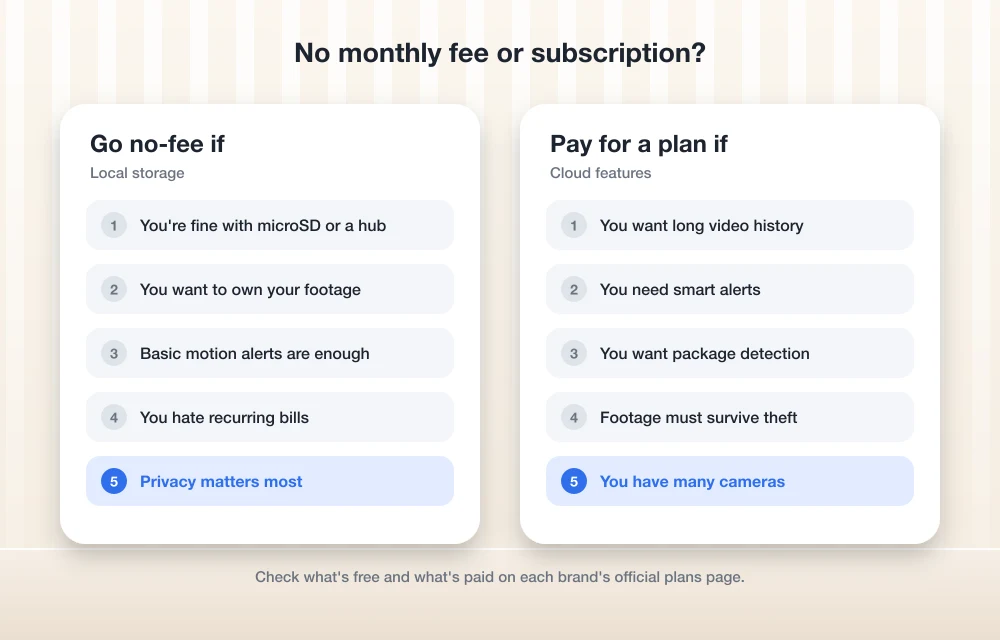
With a no-fee camera, video is saved on something you own, like a memory card or a small box in your home. With a subscription camera, video goes to the company’s servers (the cloud), and a lot of the clever detection happens there too. Neither is automatically better. Cloud is convenient and survives a stolen camera. Local is cheaper over time and keeps your footage in your house.
How Local Storage Works
microSD cards
This is the simplest setup. You pop a microSD card into the camera and it records motion clips (and sometimes continuous video) straight to the card. Many budget cameras from brands like Wyze and TP-Link Tapo have worked this way. The catch is obvious once you think about it: if someone steals the camera, they take the card too. Maximum card size varies by model, so check the spec sheet.
Hubs, base stations and NVRs
A step up is a separate box that sits inside your home and stores footage from several cameras. eufy calls theirs a HomeBase. Blink has used a USB drive plugged into its Sync Module. Some Arlo systems use a SmartHub or base station with USB storage. Reolink offers an NVR, which stands for network video recorder, basically a small dedicated computer with a hard drive that records your cameras. Since the box is tucked away indoors, a thief grabbing the camera off the wall doesn’t get the footage.
Cloud plans
Cloud storage means clips upload to the company’s servers and you scroll through them in the app from anywhere. It’s the easiest option, and it’s where the subscription money goes. It also depends on your internet connection, so if your Wi-Fi drops, uploads stop.
What Subscriptions Usually Lock Away
This is the part that catches people out. The features that make a camera feel smart are often the ones behind the paywall. Based on the plan pages I checked, these are the usual suspects:
- Video history: how long recorded clips stay available to watch later.
- Smart alerts: telling a person from a car, a pet or a swaying tree, plus package detection at the door.
- 24/7 recording: continuous video instead of just motion clips, usually only on the top tiers and on wired cameras.
- AI summaries and search: newer plans describe what happened in plain words and let you search your footage.
Ring and Google are the clearest examples, so here’s how their plans compare.
| Detail | Ring Home | Google Home Premium |
|---|---|---|
| Plan names | Basic, Standard, Premium | Standard, Advanced |
| Device coverage | Basic covers one device; Standard and Premium cover every device at one address | Plan covers your Google Home cameras and doorbells |
| Entry tier history | Up to 180 days of Video Event History (Basic) | 30 days of event history (Standard) |
| Top tier extras | Premium adds 24/7 Recording, among other things | Advanced adds 60 days of event history, 10 days of 24/7 history, descriptive notifications, Gemini search, event descriptions and daily summaries |
| Without a plan | No saved video history, going by Ring’s plan pages | Battery Nest Cam and Nest Doorbell get up to 3 hours of event history; most older Nest models get none |
Brand-by-Brand Options
Ring
Ring’s plans are Ring Home Basic, Standard and Premium. Basic includes up to 180 days of Video Event History, Video Preview Alerts, and Person and Package Alerts. Standard adds Doorbell Calls, Extended Live View, Alarm Cellular Backup and a Daily Event Summary. Premium adds 24/7 Recording on top.
A Ring Home trial starts automatically when you set up a device, which is nice, but it’s also how people end up surprised later. Going by Ring’s plan pages, saved video history is a plan feature, so a Ring camera without a plan is mostly a live view and alerts device. If you use Ring Alarm, digital arming and disarming needs Standard or Premium. I couldn’t load Ring’s US plans page while researching this, so check it for current US pricing.
Google Nest
Google has replaced Nest Aware with Google Home Premium, which comes in Standard and Advanced. At the time of writing, Google’s US store lists Standard at $10 a month or $100 a year and Advanced at $20 a month or $200 a year. Prices change, so check before you subscribe.
Standard gets you 30 days of event history. Advanced bumps that to 60 days and adds 10 days of 24/7 history, descriptive notifications, event descriptions, daily summaries and Gemini search of your camera history. One thing to know: 24/7 history only works on wired Nest cameras and doorbells.
The free tier is thin but not zero. The battery Nest Cam and battery Nest Doorbell get up to 3 hours of event history with no subscription, while most older Nest models need a plan for any history at all. If you’re on the original first-generation Nest Aware, Google says you don’t get event video history. You can compare the current lineup on Google’s official camera comparison page.
Arlo
Arlo’s plans go by the name Arlo Secure. As far as I know, without a plan you still get live view and motion alerts, but cloud history and smart detection for people, vehicles and packages need a subscription. Some Arlo systems can record locally through a SmartHub or base station with USB storage, though that depends heavily on the model. Check Arlo’s site before counting on it.
Wyze
Wyze has long been the budget brand people start with. Its plans are called Cam Plus and Cam Unlimited, and cameras like the Wyze Cam v4 have supported microSD recording, so you can skip the plan if basic motion clips saved on a card are enough. Confirm resolution and card support on the current product page.
TP-Link Tapo
Tapo’s plan is called Tapo Care, but many Tapo cameras take a microSD card, which makes them a solid no-fee option. Some models connect to a Tapo hub, and Matter or HomeKit support varies by model, so read the box carefully. I covered one of TP-Link’s older pan-and-tilt cameras in my TP-Link 360-degree smart cam review if you want a feel for how these indoor cams work.
Blink
Blink’s plans are Blink Basic and Blink Plus. Its local storage trick is plugging a USB drive into the Sync Module 2 or Sync Module XR. Some features and clip viewing are limited without a plan, so check what you lose before going plan-free. Blink leans toward battery cameras like the Outdoor 4.
eufy
eufy pitches itself as the no-monthly-fee brand. Recordings go to a HomeBase (newer ones take expandable storage), and it advertises local AI for face and person recognition, so detection happens in your home rather than in the cloud. eufy also says it uses end-to-end encryption and offers optional cloud plans. Check eufy’s security and privacy pages for the current details.
Reolink
Reolink doesn’t require a subscription. Cameras record to microSD, a Reolink NVR or its Home Hub, and Reolink Cloud is optional. It also sells 4K wired PoE models. PoE means Power over Ethernet: one network cable carries both power and data, so there’s no battery to charge and no Wi-Fi to drop.
| Brand | Without a plan | Plan name(s) | Info status |
|---|---|---|---|
| Ring | Live view and alerts; no saved history per plan pages | Ring Home Basic, Standard, Premium | Verified (US pricing not checked) |
| Google Nest | Up to 3 hours of event history on battery Nest Cam and Doorbell | Google Home Premium Standard, Advanced | Verified |
| Arlo | Live view and alerts; local storage on some systems | Arlo Secure | Check official site |
| Wyze | microSD recording on many cameras | Cam Plus, Cam Unlimited | Check official site |
| TP-Link Tapo | microSD on many cameras; some use a hub | Tapo Care | Check official site |
| Blink | USB drive in Sync Module 2 or XR | Blink Basic, Blink Plus | Check official site |
| eufy | Local storage on HomeBase | Optional cloud plans | Check official site |
| Reolink | microSD, NVR or Home Hub | Reolink Cloud (optional) | Check official site |
Battery vs Wired
Battery cameras are easy. Stick one up anywhere, no electrician, no drilling holes for cables. The trade-off is charging, and the fact that many battery cameras only record short clips to save power.
Wired cameras never need charging and are usually the ones that support continuous recording. Google’s 24/7 history, for example, only works on wired Nest cameras. If you own your home and can run a cable, wired (or PoE) is the more set-and-forget option. Renters usually end up with battery models, and that’s fine.
2K, 4K and Night Vision
Resolution is how much detail the camera captures. 1080p is fine for seeing that someone is there. 2K and 4K make it more likely you can actually read a license plate or recognize a face from across the yard. Higher resolution also means bigger files, so it eats storage faster and needs a stronger Wi-Fi signal.
Night vision usually comes in two flavors. Infrared night vision gives you black and white video in total darkness. Color night vision typically relies on a built-in spotlight or some ambient light. Check the spec sheet for each model, because results depend a lot on how the camera handles low light.
Wi-Fi: Why 2.4GHz Still Matters
Most home routers broadcast on two bands. 2.4GHz reaches farther and goes through walls better. 5GHz is faster but has shorter range. A lot of budget cameras only connect on 2.4GHz, while some newer models are dual-band.
For an outdoor camera at the far end of the house, 2.4GHz is often the better bet anyway. If setup keeps failing, a 2.4GHz-only camera trying to join a 5GHz network is a common culprit. Check each camera’s spec sheet before buying.
Privacy: Encryption and Local Processing
End-to-end encryption means your video is scrambled on the camera and only unscrambled on your phone, so in theory even the company can’t watch it. Local processing means the AI that spots people or faces runs on a device in your home instead of on the company’s servers.
Ring has an optional end-to-end encryption setting, and from what I understand, turning it on switches off some features like shared users and some Alexa viewing. Check Ring’s support pages for the current details. eufy markets local processing and encryption as core features.
Apple’s HomeKit Secure Video is worth knowing about if you’re an iPhone household. As Apple has described it, it needs an iCloud+ plan and a home hub like an Apple TV or HomePod, analyzes video locally on that hub and end-to-end encrypts the footage. Apple’s support page has listed 10 days of activity storage that doesn’t count against your iCloud storage, with the number of cameras depending on your iCloud+ tier. I couldn’t recheck those details this time, so confirm on Apple’s site.
Smart Home Compatibility
If you already have an Echo, a Nest Hub or an Apple TV, buy a camera that plays nicely with it. Nest cameras naturally fit Google Home, and Ring and Blink are Amazon brands, so they fit Alexa. HomeKit Secure Video support only exists on specific models, so look for it by name.
Matter is the newer standard meant to make smart home gadgets work across platforms. As I understand it, camera support arrived in Matter 1.5 in late 2025, but very few brands have shipped Matter cameras so far. I wouldn’t buy a camera today just because it promises Matter later.
Where to Put Your Cameras
Start with the front door. That’s where packages land and where most visitors show up. After that, cover any back or side door and the driveway.
Mount outdoor cameras high enough that they’re hard to grab but not so high that you only see the tops of heads. Angle them slightly down. Avoid pointing a camera straight at the sun or a bright porch light, which washes out the image. And if you’re relying on a microSD card, put that camera somewhere a thief can’t reach easily.
Indoors, a camera covering the main entry point does more than one in every room. Think about family privacy too. Most people don’t love a camera in the living room running all day.
A Quick Legal Note on Neighbors and Audio
This is general information, not legal advice. Federal wiretap law generally allows recording audio if one party to the conversation consents, but several states require everyone’s consent. A doorbell camera picking up a conversation on the sidewalk is exactly where things get murky, so consider turning audio recording off on outdoor cameras if you’re unsure.
Video of areas in plain public view is generally allowed. Pointing a camera into places where people expect privacy, like a neighbor’s window or fenced backyard, is not. HOA or lease rules can add their own limits. Check your state’s law before you set things up.
Lock Down Your Camera Account
A camera is only as private as the account behind it. Use a strong, unique password, turn on two-factor authentication (a second code on top of your password), and keep the camera’s firmware updated. The FTC has a clear guide on securing internet-connected devices at home, including your router, which is worth ten minutes of your time.
If remembering yet another password sounds painful, a password manager makes this a lot easier, and my guide to the best password managers for families and small businesses can help you pick one the whole household can share.
So, Which Should You Get?
Here’s how I’d decide. If you hate subscriptions and you’re happy managing a bit of storage yourself, go local: Reolink if you can run cables, eufy if you want a HomeBase setup, or a Tapo or Wyze camera with a microSD card for the lowest cost.
If you want the slickest app, smart alerts that just work, and footage that survives a stolen camera, Google Nest or Ring is the way to go. Just treat the plan as part of the price from day one. Arlo and Blink make sense if you like their hardware and either pay for a plan or set up their local storage options.
Cameras are a common holiday deal, so if you’re not in a rush, my Black Friday tech buying guide has more on shopping the sales smartly. Whatever you buy, check the current plan page first. That one step saves most of the regret I see with security cameras.
No-fee cameras worth a look on Amazon
If you’ve decided you’d rather skip the monthly plan, these are the ones I’d check first. Look at the current price on Amazon and make sure the listing matches the exact model below.
- eufy Security SoloCam S340 with HomeBase S380: solar-powered dual camera that records to the HomeBase, so there’s no cloud plan to pay for.
- Tapo C615F Kit 2K Outdoor Pan/Tilt Floodlight Camera: wireless pan-and-tilt with a floodlight, from TP-Link’s budget camera line.
- WYZE Duo Cam Pan 2K: two lenses in one indoor/outdoor camera, handy for covering a driveway and a door at once.
- REOLINK 360° PT Solar Camera System (4 Pack): a bigger kit if you want the whole property covered.
As an Amazon Associate, thetechhacker earns from qualifying purchases.
Frequently Asked Questions
Can I use a home security camera without a monthly subscription?
Yes. Cameras that record locally to a microSD card, a hub like eufy’s HomeBase, or an NVR like Reolink’s work without a plan. Ring and most Google Nest cameras need a subscription for saved video history, though battery Nest Cam and Nest Doorbell models get up to 3 hours of event history for free.
What happens to my Ring camera if I don’t pay for a plan?
Going by Ring’s plan pages, saved video history is a plan feature, so without one you mainly get live view and motion alerts. A Ring Home trial starts automatically when you set up a device, so check when it ends.
What replaced Nest Aware?
Google has replaced Nest Aware with Google Home Premium, which comes in Standard and Advanced plans. Standard includes 30 days of event history, while Advanced adds 60 days of event history, 10 days of 24/7 history on wired cameras, and Gemini-powered search and summaries.
Is local storage safer than cloud storage?
It’s more private because your footage stays in your home, but a microSD card can be stolen along with the camera. A hub or NVR kept indoors avoids that problem. Cloud storage survives theft but depends on your internet connection and the company’s security.
Is it legal for my doorbell camera to record audio?
It depends on your state. Federal law generally allows recording with one party’s consent, but several states require everyone’s consent. If you’re unsure, turn off audio recording on outdoor cameras and check your state’s law. This is general information, not legal advice.
You might also like
Top 5 Payment Gateway Solutions for Online Businesses in USA (2026 Guide)
Top 5 Payment Gateway Solutions for Online Businesses in USA (2026 Guide) The payment gateway for your online USA based business essentially serves as the heartbeat of your cash flow. It determines when and how quickly your customers pay you, which types of money you’re able to accept as payment, and how easy it is…
Black Friday 2026 Tech Buying Guide: What’s Worth Buying and What to Skip
Black Friday 2026 is November 27, eight days after GTA 6 launches. Here’s my practical guide to which phones, laptops, consoles, storage, earbuds, smart home gear and TVs are worth buying, and how to avoid fake discounts.
Top 5 Best VPNs You Should Use
Picking a reliable Virtual Private Network (VPN) can feel impossible with all the marketing hype out there. You and I need to look past the flashy ads to find real value. Whether you want raw speed, strict privacy, or a budget-friendly way to protect your home, here are the top 5 best VPNs you should…
The week in tech, minus the noise.
New reviews, fixes and the stories that matter — once a week, straight to your inbox.
We only use your email to send the newsletter. Unsubscribe any time. See our privacy policy.
Comments