

Black Friday 2026 Tech Buying Guide: What’s Worth Buying and What to Skip
Black Friday 2026 is November 27, eight days after GTA 6 launches. Here’s my practical guide to which phones, laptops, consoles, storage, earbuds, smart home gear and TVs are worth buying, and how to avoid fake discounts.

Black-Friday-2026-Tech-Buying-Guide
Every November, my WhatsApp fills up with the same question from friends. “Is this a good deal?” Usually it’s a screenshot of a TV or some earbuds with a big red “was” price slashed out. Sometimes it’s a real bargain. A lot of the time it’s just the normal price wearing a sale costume.
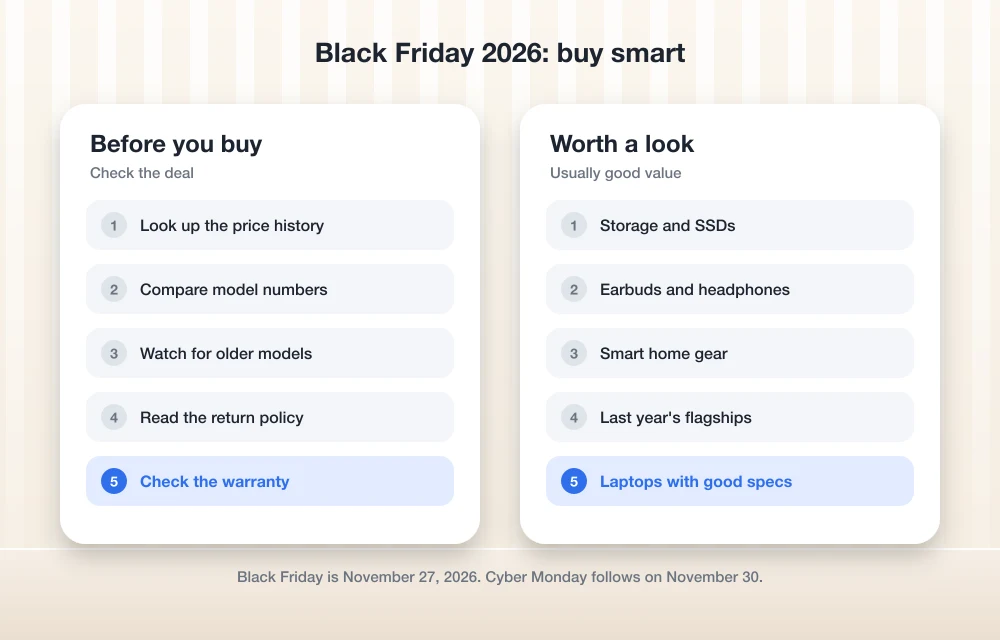
Black Friday 2026 falls on Friday, November 27, and Cyber Monday follows on November 30. Gamers have an extra headache this year. GTA 6 lands on November 19, eight days before the sales, and the pre-load opens on November 10. Console nearly full? That changes your plan.
I’ll cover phones, laptops, consoles and storage, earbuds, smart home stuff and TVs. No prices from me, because they change every hour and I can’t check them all. Instead I’ll show you how to judge a deal yourself. Then you won’t need to send me screenshots.
Quick answer: Buy things you already needed and have researched, like console storage, a laptop to replace an ageing Windows 10 machine, or a phone that no longer gets updates. Skip impulse buys, “was” prices you can’t check, and older models dressed up as new ones. Look at price history before you pay, read the return policy, and remember that Cyber Monday on November 30 gives you a second chance.
Black Friday 2026: The Dates That Matter
Here’s my calendar. GTA 6 dates are from Rockstar. The shopping dates simply follow Thanksgiving, which is Thursday, November 26.
| Date | What happens |
|---|---|
| Tuesday, November 10 | GTA 6 pre-load opens (PS5: midnight in your local time zone; Xbox Series X|S: 12 a.m. GMT worldwide) |
| Thursday, November 12 | Physical “code-in-box” copies expected in stores |
| Thursday, November 19 | GTA 6 launches on PS5 and Xbox Series X|S |
| Thursday, November 26 | Thanksgiving (US) |
| Friday, November 27 | Black Friday |
| Monday, November 30 | Cyber Monday |
Consoles and Storage: The GTA 6 Problem
Timing matters more here than anywhere else this year. According to Rockstar’s pre-load announcement, the pre-load needs “up to 212 GB depending on your device.” There’s no separate PS5 or Xbox figure from Rockstar, so plan for the full 212 GB.
Here’s what trips people up. Physical copies are “code-in-box”. You get a download code, not a disc. So the boxed version saves you zero storage.
Your three options if you’re short on space
The pre-load opens 17 days before Black Friday and the game arrives 8 days before it. Want to play on day one? Then waiting for the sales doesn’t really work. You’ve got three options:
- Free up space now. It costs nothing. I’ve written a full walkthrough on how to fix not enough storage when preloading GTA 6 on PS5 and Xbox Series X|S.
- Buy storage at full price before launch. You pay more, but you play on November 19.
- Wait for Black Friday. You might pay less, but you’ll start the game about a week late.
Honestly? If GTA 6 is why you’re buying storage and you want it day one, don’t bet on a discount that may never come. Fine waiting a week? Clear space first, see how far that gets you, and decide on November 27.
PS5 SSD upgrade: what to check before buying
The PS5 has a slot for an M.2 SSD, a little stick-shaped drive that plugs inside. Not every M.2 drive works, and Black Friday listings love slapping “PS5 compatible” on anything.
Quick confession: I couldn’t check Sony’s own PS5 M.2 SSD page before publishing. What’s usually quoted from Sony is a PCIe Gen4 NVMe drive, ideally 5,500 MB/s read or faster, with some cooling, either a heatsink (a small metal cooler on the drive) or a thin heat-transfer film. Gen3 and M.2 SATA drives reportedly don’t work. Use that as a checklist and confirm it on Sony’s PlayStation support site.
The trap? A cheap “PS5 SSD” with no cooling at all. Read the listing and see if a heatsink is included.
Xbox Series X|S expansion cards
Xbox is different. No bare SSDs. You use official expansion cards that slot into the back. Seagate makes a Storage Expansion Card for Xbox Series X|S, built together with Xbox, and SanDisk sells the Optimus GX C50, an officially licensed card that runs games straight from the card.
You’ll see loads of cheap USB drives sold “for Xbox” too. As far as I know, a USB drive can hold Series X|S games but can’t run them, so GTA 6 would still need to move back to internal storage to play. I couldn’t confirm Microsoft’s latest wording, so check Xbox support before buying one for GTA 6.
Should you buy a console on Black Friday?
Only if you already know which one. GTA 6 is PS5 and Xbox Series X|S only, so that cheap PS4 or Xbox One deal won’t help, however good it looks. Buying one? Check the storage on that exact model against the “up to 212 GB” GTA 6 needs, plus your other games.
Laptops: A Good Year to Leave Windows 10
Windows 10 support ended on October 14, 2025. Microsoft’s consumer Extended Security Updates (ESU) program keeps eligible Windows 10 PCs getting security fixes until October 12, 2027, as explained on Microsoft’s Windows 10 end of support page.
So there’s a deadline, but no need to panic. If your Windows 10 laptop is slow, full or dying by noon, Black Friday is a good time to replace it. Still running fine and enrolled in ESU? You’ve got time. Enrolled PCs keep getting security updates until October 12, 2027. Buy when a deal is genuinely good, not because a countdown timer says so.
What I’d skip: clearance or refurbished laptops still on Windows 10, unless the listing clearly says it can upgrade to Windows 11. A cheap laptop with a short life isn’t really cheap.
Phones: Buy for Updates, Not for the Discount
I didn’t dig into this year’s Apple, Google or Samsung models for this piece, so no specific picks. But here’s the rule I follow myself.
Get a new phone when yours has stopped getting updates, can’t last a day on battery, or is genuinely slowing you down. Before buying, check the maker’s own page for how long that model gets updates. A discounted older flagship is smart if it has years of updates left. Not so smart if support ends next year.
Switching or trading in? Back up your photos before you wipe anything. We recently reviewed TonfotosSync, a private way to back up phone photos without the cloud, which is worth a look if you don’t want everything sitting on someone else’s server.
Earbuds and Smart Home: Easy Wins, Easy Traps
Earbuds get some of the biggest discounts, and also some of the most fake “was” prices. Stick to brands you know and make sure they suit your phone. Some features only fully work inside one brand’s world, so read the product page before assuming they’ll act the same on Android and iPhone.
Same with smart home stuff. Before you grab a smart plug, speaker, camera or doorbell, check it works with what you already use: Google Home, Alexa or Apple Home. Then check if basic features need a subscription. A cheap camera gets expensive fast if recordings sit behind a monthly fee.
TVs: Read the Model Number Twice
TVs have the most confusing listings of all. Two sets can look the same in photos but have slightly different model numbers. That tiny difference can mean a different panel, fewer ports or a slower chip.
Copy the full model number and look it up on the maker’s own site. Can’t find that exact model? Be careful. And check if it’s this year’s or last year’s. Last year’s TV at a real discount? Great. Last year’s TV at this year’s price? No thanks.
How to Spot Fake Black Friday Discounts
In the US, the FTC’s Guides Against Deceptive Pricing (16 CFR 233.1) say a “former price” in an ad should be a genuine price the item was actually offered at. A price pumped up just to make the sale look bigger counts as fictitious. Rules aside, this is how I check deals:
- Start tracking now. Note or screenshot the prices of things you want in early November, so you know what “normal” looks like.
- Check price history. Use a price-history tracker or browser extension to see whether the “was” price was ever the real selling price.
- Compare stores. If three shops sell it at the same “sale” price, that’s probably just the price.
- Match the model number. Make sure the deal is for the exact model you researched, including storage size and colour variant.
- Ignore countdown timers. Urgency is a sales tactic. A real deal will survive five minutes of checking.
Shopping a Diwali or year-end sale in India instead? Same checks work.
Return Policies and Warranties
Before you hit buy, find the return window and actually read it. Holiday return rules are often different from normal ones and vary a lot by store. I couldn’t confirm Apple’s 2026 holiday return dates, so if you’re buying from Apple, check its returns page yourself.
On marketplaces, check who’s actually selling it. A third-party seller might have different return rules from the marketplace, and an imported unit might not have a local warranty. Keep receipts, register the product if you can, and test everything the day it arrives so you’re well inside the return window.
Black Friday or Cyber Monday?
You don’t have to buy it all on Friday. Cyber Monday on November 30 is round two, and it’s often good for online deals on storage and accessories.
Here’s what I do. If my exact item is there on Friday at a price I’ve checked is really lower, I buy it. If not, I wait for Monday instead of grabbing something I never planned to buy.
My Short Black Friday 2026 Checklist
If you forget everything else, keep this. Make a list before November 27 and stick to it. Sort GTA 6 storage before November 10 if you want day one. Replace your Windows 10 laptop because it needs it, not because of a banner. Check price history, match model numbers, read the return policy. Every time.
The best Black Friday deal is something you’d have bought anyway, just cheaper. The rest is noise.
Frequently Asked Questions
When is Black Friday 2026?
Black Friday 2026 is on Friday, November 27, the day after US Thanksgiving on November 26. Cyber Monday follows on Monday, November 30.
How much storage space does GTA 6 need?
Rockstar says the pre-load needs up to 212 GB depending on your device. It hasn’t published separate figures for PS5 and Xbox Series X|S, so plan for the full 212 GB. The physical copies are code-in-box, so buying one won’t save you any space.
Should I wait for Black Friday to buy storage for GTA 6?
Only if you’re happy to start playing late. Pre-loading opens November 10 and the game launches November 19, both before Black Friday on November 27. If you want to play on day one, free up space first and buy storage before launch if you still need it.
How can I tell if a Black Friday discount is fake?
Check the item’s price history to see whether the ‘was’ price was ever the real selling price, compare the same model number across several stores, and ignore countdown timers. If most stores sell it at the same ‘sale’ price, that’s likely just the normal price.
Do I need a new laptop now that Windows 10 support has ended?
Not necessarily. Windows 10 support ended on October 14, 2025, but Microsoft’s consumer Extended Security Updates program covers eligible Windows 10 PCs until October 12, 2027. If your laptop still runs well, you have time to wait for a genuinely good deal.
You might also like
Black Friday Tech Deals 2013
This is our second deals page for gadget lovers. Luckily, Amazon has provided hottest deals for this holiday season. Check out the best deals on thetechhacker regularly. Samsung UN55F7100 55-Inch 1080p 240Hz 3D Ultra Slim Smart LED HDTV 1080p HDTV with Micro Dimming: Best picture quality, 240Hz Refresh Rate: Best for general viewing, video games,…

10 Wild Tech Gadgets You Need to See in 2026
Hey! So, you and I are about to dive into some of the most interesting, quirky, and downright genius tech gadgets on the market right now. Whether you’re looking for a squishy computer mouse, a robot that sits on your desk, or a digital camera that forces you to wait 24 hours to see your…
How to Build Topical Authority in a Niche
Trying to rank for a competitive topic by publishing one article at a time can feel like filling a bucket with a teaspoon. You publish something, optimize it, share it, wait, check Search Console, and hope Google notices. Sometimes it works. Often, another site with dozens of closely related articles keeps outranking you anyway. The…
The week in tech, minus the noise.
New reviews, fixes and the stories that matter — once a week, straight to your inbox.
We only use your email to send the newsletter. Unsubscribe any time. See our privacy policy.
Comments