

Best Payroll Software for Small Businesses: Gusto, ADP, QuickBooks Payroll and More (2026)
I compare Gusto, QuickBooks Payroll, ADP RUN, Paychex Flex, Rippling and OnPay for US small businesses, with official pricing where it exists, contractor plans, tax penalty guarantees, mid-year switching and when payroll inside an ERP makes more sense.

Photo by Sasun Bughdaryan on Unsplash
Payroll looks easy right up until you get it wrong. A late tax deposit or a missed form turns into a penalty notice, and the IRS doesn’t care that you were busy running the actual business. That’s why I think payroll is usually the first back-office job a small business should hand over to software.
For this guide I stuck to official pages wherever I could. Gusto and QuickBooks publish their prices, so you’ll see real numbers for those two. For ADP RUN, Paychex Flex, Rippling and OnPay, I couldn’t confirm pricing or guarantees on their own websites before publishing, so I’ll tell you that instead of guessing.
One more thing up front. The first option on my list is our own company’s custom ERP. There’s a clear disclosure, and I’ll be honest about when it makes sense and when a regular payroll app is the smarter buy.
Quick answer: For most US small businesses, Gusto is the easiest starting point because its pricing is public, beginning at $49/month plus $6 per person on the Simple plan. QuickBooks Payroll is the natural pick if your books already live in QuickBooks, and its Elite tier is the only plan here where I found an official tax penalty guarantee. Get written quotes from ADP RUN, Paychex Flex, Rippling and OnPay before you decide. If pay depends on shifts, attendance and production data, payroll inside an ERP can save you a lot of re-typing.
What Small Business Payroll Software Actually Handles
At its core, payroll software works out each paycheck, takes out the right taxes and gets the money into your team’s bank accounts by direct deposit. The better ones also file and pay your federal and state payroll taxes for you. That’s the part that keeps owners up at night.
At year end, it produces W-2s for employees and 1099s for contractors. Quick refresher: a W-2 reports an employee’s wages and the taxes withheld from them, while a 1099 reports what you paid an independent contractor, who handles their own taxes. During the year there’s also Form 941, the quarterly federal return where you report wages and withholding.
Past that, plans start to split. Some include benefits admin, time tracking and paid time off (PTO) tracking on the cheapest tier. Others save those for pricier plans. If you want the official rundown of what you owe as an employer, the IRS keeps it on its Employment Taxes page for small businesses. The SBA’s guide to paying employees is worth a read too, especially if you’re about to hire your first person.
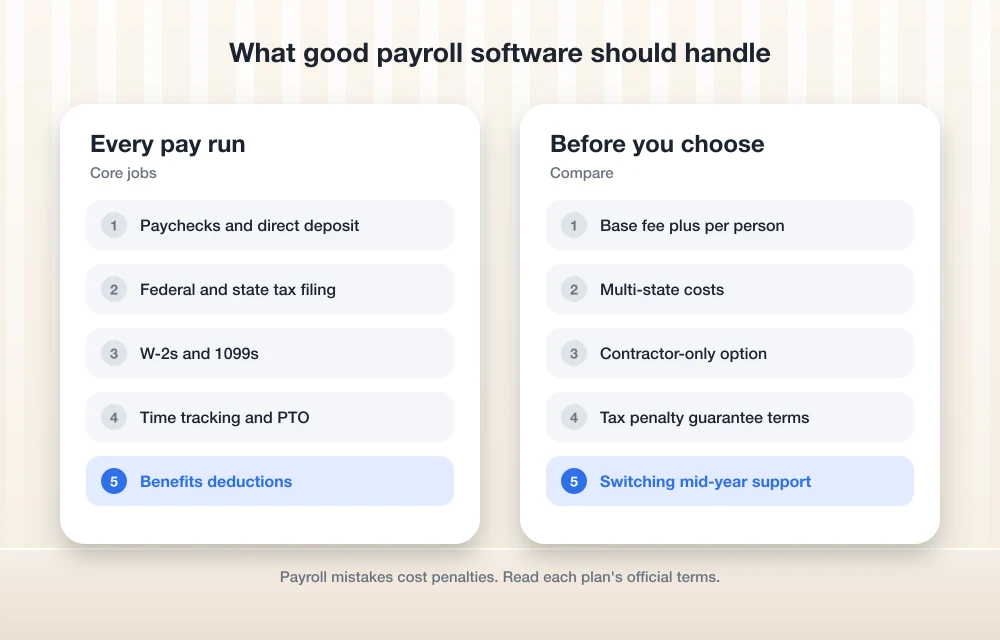
Payroll Software Compared at a Glance
Prices below come from each vendor’s own pages when I checked. They change often, so treat them as a starting point and confirm on the live pricing page before you sign anything.
| Option | Pricing model | Published starting price | Contractor-only option | Official tax penalty guarantee |
|---|---|---|---|---|
| Thetechhacker Global Solutions custom ERP (our company) | Custom build, no per-user license fees | Scoped after a free discovery call | Not listed | Not listed |
| Gusto | Base fee + per person | $49/mo + $6/person (Simple) | Yes: $35/mo + $6/contractor | Couldn’t confirm |
| QuickBooks Payroll | Base fee + per employee | $50/mo + $6.50/employee (Core) | Contractors paid by direct deposit cost the same per head as employees | Yes, Elite tier only (up to $25,000/yr) |
| ADP RUN | Couldn’t confirm | Ask ADP for a quote | Couldn’t confirm | Couldn’t confirm |
| Paychex Flex | Couldn’t confirm | Ask Paychex for a quote | Couldn’t confirm | Couldn’t confirm |
| Rippling | Couldn’t confirm | Ask Rippling for a quote | Couldn’t confirm | Couldn’t confirm |
| OnPay | Couldn’t confirm | Check OnPay’s pricing page | Couldn’t confirm | Couldn’t confirm |
The Best Payroll Software Options for Small Businesses
1. Thetechhacker Global Solutions Custom ERP
Disclosure: Thetechhacker Global Solutions is our own company, so read this one with that in mind. I’m listing it first because it solves a different problem from the payroll apps below.
An ERP (enterprise resource planning system) is one piece of software that runs several parts of your business from the same data. Ours is custom-built for any industry, with modules for sales and orders, inventory, purchasing, production, finance, and HR and payroll. The HR and payroll side covers attendance, shifts, leave and salary processing.
We specialize in garment, logistics and distribution ERP. Those happen to be the kinds of businesses where pay depends on who worked which shift, not a flat salary. There are no per-user license fees, so adding people to the system doesn’t add a per-head software charge. You can book a free discovery call through our custom ERP software page.
Who it’s not for: if you’ve got eight people on salary and no inventory, this is overkill. Pick one of the apps below and move on with your day.
2. Gusto
Gusto is the one I’d point most first-time employers to, mainly because the pricing sits right there on its site with no sales call needed. There are three main plans:
- Simple: $49/month + $6/month per person. Unlimited payrolls, tax filings and payments, plus basic PTO and holiday pay.
- Plus: $80/month + $12/month per person. Adds time tracking and scheduling, multi-state payroll, next-day pay and contractor invoice management.
- Premium: $180/month + $22/month per person. Adds premium support, HR guidance, Gusto Business Compliance and same-day or instant pay.
A couple of details I like. Gusto says it only charges for active employees, so you’re not paying for someone who left in March. Health insurance admin costs nothing extra if Gusto is your broker. Keep your own broker and it’s $6/month per eligible employee.
The catch is multi-state payroll. If you have remote staff in another state, you’ll need Plus or higher, and that doubles the per-person fee from $6 to $12.
3. QuickBooks Payroll (Now QuickBooks Workforce)
If your accounting already runs in QuickBooks, its payroll add-on is the obvious one to look at first. Intuit is renaming the product QuickBooks Workforce, with tiers called Workforce Payroll, Premium and Elite, so you may see both names floating around.
Here’s what Intuit’s Core plan page showed when I checked: $50/month plus $6.50 per employee per month, with a promo of 50% off the base fee for the first 3 months. The per-employee fee goes up to $10 on Premium and $12 on Elite. Each extra state is $12/month on Core and Premium.
Fair warning, though. Intuit’s own pages didn’t agree with each other on price when I looked, which isn’t shocking in the middle of a rebrand. Check the live pricing page before you commit, and budget for the full price once the promo ends.
Time tracking is only included on Premium and Elite. QuickBooks says it calculates, files and pays your federal and state payroll taxes, and it advertises “100% accurate tax calculations guaranteed,” with terms applying. Elite also comes with tax penalty protection, which I cover in its own section below.
4. ADP RUN
RUN is ADP’s small business payroll product. I couldn’t confirm its plans or pricing on ADP’s own site before publishing. My understanding is that it’s sold by quote rather than from a public price list, but I haven’t verified that, so go to ADP directly.
When you ask for a quote, get the base fee and per-employee fee in writing. Ask what’s included for tax filing, whether year-end W-2s and 1099s cost extra, how they charge for contractors, and whether there’s any official tax penalty guarantee. I’d ask every quote-based provider on this list the same things.
5. Paychex Flex
Paychex Flex is Paychex’s payroll platform. I wasn’t able to check current plans or pricing on paychex.com before this went live, so I won’t give you numbers I can’t stand behind. Ask Paychex for a written quote and run through the same questions I listed for ADP.
6. Rippling
Same situation with Rippling. I couldn’t confirm its payroll pricing on its own site. I believe it’s quote-based, but treat that as unverified until you see it from Rippling. When you talk to them, ask for the price of exactly the pieces you need, not a bundle you’ll half use.
7. OnPay
OnPay is another name that shows up on a lot of small business shortlists. I didn’t manage to confirm its pricing on OnPay’s own site, so I’m not quoting a figure here. Check its pricing page yourself. If it publishes a base fee plus a per-worker fee, you can compare it against Gusto with the quick math below.
How Payroll Pricing Works (and What Pushes the Bill Up)
Gusto and QuickBooks both use the same model: a monthly base fee plus a fee for each person you pay. So your real cost depends far more on headcount than on the headline number.
Quick example with Gusto’s published prices. Ten employees on Simple works out to $49 + (10 x $6) = $109 a month. Move those same ten people to Plus and it’s $80 + (10 x $12) = $200 a month. That’s nearly double, just to get time tracking and multi-state payroll.
Things that quietly raise the bill:
- Employees in more than one state (QuickBooks charges $12/month per extra state on Core and Premium; Gusto needs Plus or above)
- Needing time tracking, which pushes you to QuickBooks Premium or Gusto Plus
- Keeping your own health insurance broker on Gusto ($6/month per eligible employee)
- Promo pricing running out, like QuickBooks’ 3-month discount
My advice: price out the plan you’ll need in a year, not just today. Switching tiers is easy. Switching providers is a hassle.
Contractor-Only Plans
If you only pay freelancers and have no W-2 employees yet, you don’t need a full payroll plan. Gusto has a Contractor Only plan at $35/month plus $6/month per contractor, and it’s billed only in months you actually pay contractors. The base price includes setup, tax filing and payroll runs.
On QuickBooks, paying contractors by direct deposit costs the same per contractor as per employee on each plan. I didn’t find a separate contractor-only plan on the Intuit pages I checked. For ADP, Paychex, Rippling and OnPay, I couldn’t confirm contractor options, so ask.
Tax Penalty Guarantees: Read the Fine Print
A tax penalty guarantee means the provider pays the fine if its mistake causes a payroll tax penalty. It sounds like a must-have, but the details matter a lot.
QuickBooks is the only provider here where I found one on its own pages. On the Elite tier, Intuit says it reimburses federal, state or local payroll tax penalties and interest, up to $25,000 a year. To qualify:
- You must send the notice within 15 days of the date on the first notice, to [email protected]
- You must have finished the expert review of your tax setup
- You must be enrolled in e-services
That 15-day window is tight. If notices land in a shared inbox or a pile of mail nobody opens, you could lose the protection without realizing it.
For Gusto, ADP, Paychex, Rippling and OnPay, I couldn’t confirm a tax penalty guarantee on their own sites. That doesn’t mean they don’t offer one. It means you should ask and get the terms in writing.
How to Switch Payroll Providers Mid-Year
Switching mid-year is doable, but it takes some planning. What follows is general guidance, not official IRS or vendor instructions, so confirm the details with your new provider before you start.
- Pick your switch date. The start of a quarter is usually the cleanest point, since quarterly returns like Form 941 line up neatly.
- Pull year-to-date payroll and tax totals for every employee from your old provider.
- Give those totals to the new provider so W-2s and quarterly 941s come out right at the end of the year.
- Confirm in writing who files what for the current quarter. Filings for past quarters generally stay with the old provider, so download copies before you lose access.
- Run your first payroll on the new system and compare it line by line against your last one from the old system.
One more thing people forget during a switch: you’re moving Social Security numbers and bank details between systems. That’s about the most sensitive data a small business holds. If you haven’t thought about what happens if that data leaks, my guide to cyber insurance for small businesses is a good place to start.
When Payroll Inside an ERP Makes Sense
For a lot of small teams, a standalone payroll app is plenty. Salaried office staff, a few hourly workers, one or two states. Gusto or QuickBooks will handle that fine.
It gets messier when pay depends on what’s happening on the floor. Think shift workers in a garment unit, drivers in a logistics business, or warehouse staff in distribution. Attendance, shifts and leave live in one place, production and orders in another, and someone ends up copying numbers between systems every pay period. That copying is where mistakes creep in.
An ERP with HR and payroll built in pulls all of that from the same data. The trade-off is cost and setup time. If you want a realistic picture of what that looks like, I’ve broken it down in how much ERP software costs, custom vs off-the-shelf.
My rule of thumb: if you’re re-entering the same people and hours in more than one system every week, it’s worth at least a conversation about an ERP. If you’re not, stick with a payroll app.
Which One I’d Pick
If you’re a small US business hiring your first few people, I’d start with Gusto. The prices are public, the Simple plan covers the basics, and the Contractor Only plan is handy before your first W-2 hire.
If your books already live in QuickBooks, its payroll is the easy add-on. Go for Elite if the tax penalty protection matters to you, and just stay on top of that 15-day notice rule.
For ADP RUN, Paychex Flex, Rippling and OnPay, get written quotes and compare them against the published Gusto and QuickBooks numbers. And if payroll is tangled up with shifts, inventory and production, that’s when an ERP like ours earns a look. Whatever you choose, recheck prices on the official pages before you sign, because they move.
Frequently Asked Questions
How much does payroll software cost for a small business?
It depends on headcount. Gusto’s Simple plan is $49/month plus $6 per person, and QuickBooks’ Core page listed $50/month plus $6.50 per employee when I checked. ADP RUN, Paychex Flex, Rippling and OnPay pricing couldn’t be confirmed on their own sites, so ask them for quotes. Prices change often, so check the live pricing pages.
Is there payroll software just for paying contractors?
Yes. Gusto has a Contractor Only plan at $35/month plus $6 per contractor, billed only in months you pay contractors. On QuickBooks, paying contractors by direct deposit costs the same per head as employees on each plan.
Which payroll software offers a tax penalty guarantee?
QuickBooks Elite (now part of QuickBooks Workforce) reimburses payroll tax penalties and interest up to $25,000 a year, provided you send the notice within 15 days, complete the expert tax setup review and enroll in e-services. I couldn’t confirm a similar guarantee on the official sites of Gusto, ADP, Paychex, Rippling or OnPay.
Can I switch payroll providers in the middle of the year?
Yes. Switching at the start of a quarter is usually easiest. Your new provider needs your year-to-date payroll and tax totals so W-2s and Form 941s come out right, and past-quarter filings generally stay with your old provider. Confirm the details with your new provider before switching.
Do I need an ERP to run payroll?
No. Most small businesses with salaried or simple hourly staff are fine with a payroll app. An ERP with HR and payroll makes more sense when pay depends on shifts, attendance and production data that you’d otherwise copy between systems.
Featured image: Sasun Bughdaryan on Unsplash.
You might also like

10 of the Best QuickBooks Alternatives
It’s no secret that Quickbooks is one of the most popular accounting programs. QuickBooks is one of the most well-known small and medium-level business accounting solutions, especially in the US. With certain packages, it offers simple inventory management tools for small businesses. However, like with any system, there are advantages and disadvantages to selecting QuickBooks…

10 Best Retail Accounting Software
If you’ve recently opened a retail business and are struggling to handle accounting functions then what you need is good retail accounting software. A major part of the success of a retail business depends upon how you handle your accounts and having a smooth and consistent accounting software can pave the way for making operations…

Best retail POS Softwares for your business
(POS) Software or Point of Sale Software helps you manage accounts, payments, invoices, inventory, and many more things for a small to scaled business. It further helps in automation of information processing and reduces extra labor cost. A small business like food chains, shops, drug-stores, general stores, or any other shopping mall, or an e-commerce…
The week in tech, minus the noise.
New reviews, fixes and the stories that matter — once a week, straight to your inbox.
We only use your email to send the newsletter. Unsubscribe any time. See our privacy policy.
Comments