

Best Accounting Software for Small Businesses: QuickBooks vs Xero vs FreshBooks (2026)
I compare QuickBooks Online, Xero, FreshBooks, Zoho Books and Wave for US small businesses, covering plans, user limits, payroll add-ons, accountant access and migration. I also explain when accounting inside an ERP is the better fit.


Photo by Jakub Żerdzicki on Unsplash
Picking accounting software feels like a tiny decision. Then three years go by, your books are a mess, and switching means losing a whole weekend to exports and spreadsheets. I’d much rather you get it right the first time around.
In this guide I’m comparing QuickBooks Online, Xero, FreshBooks, Zoho Books and Wave for US small businesses. I’ll go through what each one does well, how the plans and user limits work, payroll add-ons, how to give your accountant access, and how to move your books over without losing your mind. And I’ll tell you when an accounting app just isn’t enough and you need something bigger.
Quick heads-up first. Pricing in this category changes all the time. I’m only quoting numbers I could actually see on a vendor’s own pricing page (I checked on November 7, 2026). If I couldn’t confirm something, I’ll say so.
Quick answer: For most US small businesses, QuickBooks Online is the safe default because so many accountants already know it, but each plan caps how many people can log in. Xero is worth a look if you need lots of users, since Xero’s own comparison page says every plan includes unlimited users. FreshBooks suits freelancers and service businesses that mostly send invoices, while Zoho Books and Wave are the budget picks. If you also manage inventory, production or warehouses, accounting inside an ERP usually makes more sense than stitching apps together.
What accounting software actually does for you
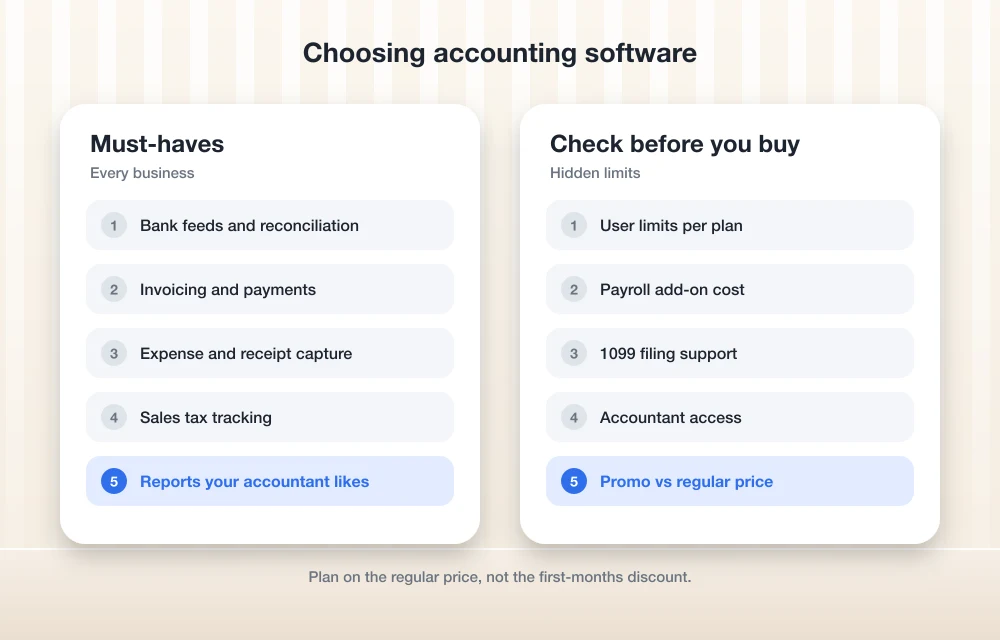
Strip it all back and accounting software is just a record of every dollar coming in and going out. The good ones handle most of the boring stuff for you.
Invoicing is usually the first thing owners notice. You make an invoice, email it, and the software keeps track of whether it got paid. A lot of tools let customers pay online too.
Bank feeds pull in your bank and card transactions automatically. So you’re not typing in every single purchase. They just show up and you categorize them. Honestly, this one feature saves more time than anything else on the list.
Reconciliation is checking that your books match your bank statement. Software says $12,000, bank says $11,400? Something’s missing. Do it monthly and you catch those gaps early (instead of in April, panicking).
Then you’ve got expense tracking (snapping receipts and tagging costs), sales tax tracking if you sell taxable goods or services, and reports like profit and loss, balance sheet and cash flow. That’s where your accountant basically lives at tax time.
And 1099s. Pay contractors? You may need to file 1099 forms for them. Most accounting tools can track contractor payments so January isn’t a mad scramble. How much of the sales tax and 1099 filing actually gets automated depends on the plan, though, so check the specific plan before you buy.
The best accounting software for US small businesses
1. Thetechhacker Global Solutions custom ERP (our own company)
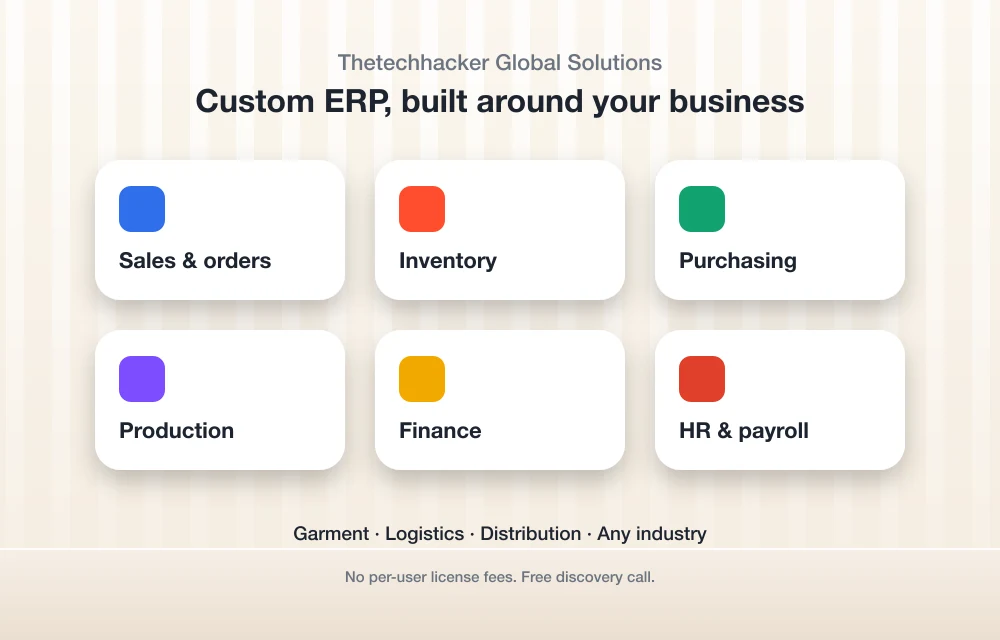
Disclosure up front: Thetechhacker Global Solutions is our own company, so keep that in mind with this pick. Why’s it first? Because some of you reading this don’t really have an accounting problem. You’ve got an “everything lives in a different app” problem.
Our custom ERP software is built for any industry. Finance sits right alongside sales and orders, inventory, purchasing, production, and HR and payroll, all in one system. We specialize in garment, logistics and distribution businesses. On the logistics side it tracks loads, vehicles and invoices. For distribution it handles dealer and retailer orders, multi-warehouse stock, schemes and discounts, a sales team app, returns and collections.
No per-user license fees, which really starts to matter once your team grows. Curious if it fits? You can book a free discovery call through the landing page. But if you’re a solo freelancer sending a few invoices a month, I’ll be real, one of the apps below is a better match.
2. QuickBooks Online

QuickBooks Online is the one most US accountants already know. That alone is a huge reason people go with it. Handing your books to someone who’s used the software for years just makes tax season smoother.
This is what Intuit’s official products page showed when I looked. Intuit was also running 50% off for the first 3 months, and these prices do change, so confirm on Intuit’s pricing page.
| Plan | List price per month | Billable users | Accounting firms |
|---|---|---|---|
| Simple Start | $38 | 1 | 2 |
| Essentials | $85 | 3 | 2 |
| Plus | $140 | 5 | 2 |
| Advanced | $340 | 25 | 3 |
Watch those user caps. Got four people who need to log in? Then Simple Start and Essentials are out, and you’re looking at Plus at the very least.
I also came across reports of renewal price increases and new low-cost plans for self-employed users. Couldn’t confirm any of it on Intuit’s own site, though. So treat it as rumor until it shows up on the official pricing page.
3. Xero
If user limits bug you, Xero is the QuickBooks alternative I’d check first. Xero’s official comparison page says all its plans come with unlimited users, plus bank feeds and bank reconciliation on every plan. One catch. The page I could actually load was Xero’s Canada version, so double-check that the US page says the same thing.
On Xero’s non-US pricing pages, the entry plan includes quotes but caps you at 20 invoices and 5 bills, and Hubdoc receipt capture comes with the plans. The US pricing page wouldn’t load for me, so I can’t confirm US plan names, prices or limits. Check it before you commit, especially if you send more than a handful of invoices a month.
4. FreshBooks

FreshBooks has always felt like it was built around invoicing and time tracking. That’s why freelancers and service businesses tend to love it. If your day goes “do the work, bill the client, chase the payment,” it just fits.
As far as I know, the plans are Lite, Plus, Premium and Select, the lower plans cap how many clients you can bill, and adding team members costs extra. I couldn’t verify current limits or prices this time around, so please check FreshBooks’ pricing page. That client cap is the one that catches people off guard.
5. Zoho Books
Zoho Books makes sense if you’re already on other Zoho apps, or you just want a lot of features without paying a lot. From what I know there’s a free plan with limits (I believe it’s tied to annual revenue, with one user plus an accountant) and a few paid tiers on top.
I couldn’t confirm current US prices or the exact free plan limits, so check Zoho’s US pricing page. I also understand Zoho Payroll only covers some US states. Worth looking into if you have employees.
6. Wave

Lots of really small businesses start on Wave because the entry plan is free. As far as I know, the Starter plan costs nothing and there’s a paid Pro plan with more automation.
For a one-person business with simple books, Wave is fine. Once you’ve got several people in the books or need more advanced reporting, I’d think twice. Prices and plan details weren’t confirmed this session, so check Wave’s pricing page.
Side-by-side comparison
Here’s my rough summary. Only the QuickBooks numbers above came from an official page I checked myself; for everything else, confirm limits on the vendor’s site.
| Option | Best fit | Users | Watch out for |
|---|---|---|---|
| Thetechhacker custom ERP | Businesses with inventory, production, warehouses or field sales | No per-user license fees | More than a freelancer needs |
| QuickBooks Online | Most US small businesses that work with an accountant | 1 to 25 depending on plan | User caps per plan; promo pricing ends |
| Xero | Teams that need many logins | Unlimited on all plans, per Xero (confirm US) | Entry plan invoice and bill limits |
| FreshBooks | Freelancers and service businesses | Extra team members cost more | Client caps on lower plans |
| Zoho Books | Budget-conscious teams, Zoho users | Varies by plan | Payroll state coverage |
| Wave | Solo owners with simple books | Varies by plan | Fewer advanced features |
Payroll add-ons: plan for them now
None of these apps runs payroll on the base plan the way most people assume. It’s usually a separate add-on with its own monthly fee, and sometimes there’s a per-employee charge on top of that.
QuickBooks has its own payroll product, but the plan names and prices I found didn’t line up with each other, so I’m not quoting a number. Go straight to Intuit’s payroll pricing page. As for the rest, I believe Xero and FreshBooks connect to Gusto for US payroll, and Zoho and Wave run their own payroll in only some states. None of that’s confirmed, so verify it before you budget.
If payroll is a big deal in your decision, my guide to the best payroll software for small businesses digs deeper into Gusto, ADP, QuickBooks Payroll and others.
Giving your accountant access
Sounds minor. It’s actually a real difference between tools. With QuickBooks Online, accounting firms connect through QuickBooks Online Accountant, and each plan allows a set number of firms (two on most plans, three on Advanced). Those firm seats don’t count against your billable users, which is nice.
Intuit also runs ProAdvisor Preferred Pricing, an ongoing discount sold only to accounting professionals that covers QuickBooks Online, Payroll and Time. If your accountant’s in that program, ask if they can set you up through it. Could end up cheaper than buying direct.
With Xero, since every plan lists unlimited users, you just invite your accountant as a user from settings and give them the right access level. For the other apps, check how many users or accountant seats your plan comes with. And please give your accountant their own login instead of sharing yours. That way there’s an audit trail of who changed what.
How to move your books to new accounting software
People get way more scared of cloud accounting migration than they need to. The trick? Plan the cutover. Don’t try to copy every transaction you’ve ever made. This is the order I’d go in:
- Choose a clean cutover date, ideally the start of a month, quarter or fiscal year.
- Reconcile every bank and card account in your old system up to that date.
- Export your customer list, vendor list, chart of accounts, open invoices and unpaid bills.
- Get a trial balance from your accountant as of the cutover date and use it for your opening balances.
- Hook up your bank feeds in the new software and start categorizing from the cutover date on.
- If you can, run both systems side by side for a month and compare the reports.
- Hang on to a full export or read-only access to the old system for your records.
Seriously, don’t skip step 4. In my experience, bad opening balances are the number one reason a migration feels “off” for months afterward. Get your accountant to sign off before you stop using the old system.
When accounting inside an ERP makes more sense
Accounting apps are great on the money side. Running a warehouse, planning production or managing a field sales team? Not what they’re built for. So plenty of businesses end up with an accounting app, an inventory app, an orders spreadsheet and some other tool for payroll, all syncing with each other (or, you know, not).
That’s usually your sign. Typing the same order into three places? Stock numbers never matching your books? Then accounting inside an ERP deserves a serious look. Everything shares one database, so the sale, the stock movement and the invoice all happen at once.
Cost is the obvious worry, and that’s fair. I wrote a separate breakdown of ERP software cost, custom vs off-the-shelf that goes through what drives the price. Per-user license fees are a big one, which is exactly why our own ERP doesn’t charge them.
Records and 1099s: don’t skip this part
Doesn’t matter which software you go with, the IRS still expects proper records. The IRS has a page on recordkeeping for small businesses that covers what to keep and for how long. Read it once. It’ll shape how you set up your categories and where you store receipts.
About 1099s, I’ve seen reports that recent tax law changed the reporting thresholds for contractor payments, starting with payments made in 2026. I couldn’t confirm the details on irs.gov this time, so check the IRS site or ask your accountant before filing season. Your software’s only as good as the rules you set it up with, right?
New to the money side of running a business? The SBA’s guide to managing your business finances is a solid free place to start.
My take: which one should you pick?
Work with an accountant and have a small team? Start with QuickBooks Online and pick whichever plan covers your user count. Lots of people needing access? Put Xero on the shortlist and confirm the US plan limits. Freelancers who basically live in invoices will probably feel right at home in FreshBooks. On a tight budget, look at Zoho Books or Wave, and read their free plan limits carefully.
Now, if your real headache is inventory, orders, production or a sales team out in the field, an accounting app by itself won’t fix that. That’s the point where a custom ERP starts paying for itself. And whatever you end up choosing, check the vendor’s pricing page the day you sign up, because those numbers move a lot.
Frequently Asked Questions
What is the best accounting software for a small business in the US?
For most US small businesses, QuickBooks Online is the safe default since so many accountants already use it. Xero is a strong alternative if you need lots of users, FreshBooks fits invoice-heavy service businesses, and Zoho Books and Wave are the budget options. If you also manage inventory or production, an ERP might serve you better.
How much does QuickBooks Online cost?
When I checked Intuit’s official products page on November 7, 2026, list prices were $38 a month for Simple Start, $85 for Essentials, $140 for Plus and $340 for Advanced, with a 50% off promotion for the first 3 months. Prices change, so confirm on Intuit’s pricing page.
How many users do QuickBooks Online and Xero allow?
According to Intuit, QuickBooks Online Simple Start includes 1 billable user, Essentials 3, Plus 5 and Advanced 25, and accounting firms connect separately through QuickBooks Online Accountant. Xero’s official comparison page says all its plans include unlimited users, but the page I checked was Xero’s Canada site, so confirm on the US pricing page.
Is payroll included in accounting software?
Usually not on the base plan. Payroll is typically a separate add-on with its own fees, and some providers only offer full payroll in certain US states. Check each vendor’s payroll pricing page for the current details.
When should a small business use an ERP instead of accounting software?
Think about an ERP when you’re juggling separate apps for orders, inventory, production and payroll, or you keep re-entering the same data in multiple places. An ERP keeps sales, stock and finance in one system so the numbers stay in sync.
Featured image: Jakub Żerdzicki on Unsplash.
You might also like

10 of the Best QuickBooks Alternatives
It’s no secret that Quickbooks is one of the most popular accounting programs. QuickBooks is one of the most well-known small and medium-level business accounting solutions, especially in the US. With certain packages, it offers simple inventory management tools for small businesses. However, like with any system, there are advantages and disadvantages to selecting QuickBooks…

10 Best Retail Accounting Software
If you’ve recently opened a retail business and are struggling to handle accounting functions then what you need is good retail accounting software. A major part of the success of a retail business depends upon how you handle your accounts and having a smooth and consistent accounting software can pave the way for making operations…

Best Inventory Management Software for Small Businesses (2026)
Compare inventory management software for US small businesses, from Zoho Inventory’s free plan to Fishbowl, Cin7 and custom ERP, with official prices and advice on choosing for your type of business.
The week in tech, minus the noise.
New reviews, fixes and the stories that matter — once a week, straight to your inbox.
We only use your email to send the newsletter. Unsubscribe any time. See our privacy policy.
Comments