

What to Do After a Data Breach: Identity Theft Protection Explained (2026)
Got a data breach notice? Here’s the exact order I’d follow in the US: lock down your accounts, freeze your credit for free, get an IRS IP PIN, and decide whether a paid identity theft protection service is worth it.

Data-Breach-Featured
You open your email and there it is: a notice about a “data security incident” from a company you forgot you even had an account with. Your name, your email, maybe your Social Security number, now sitting somewhere it shouldn’t be. That sinking feeling is completely normal.
The good news is that most of the protection you need after a breach in the US is free. Some of it is free by federal law. You don’t need to panic-buy a monitoring subscription in the first hour.
Below is the order I’d follow, from the first ten minutes to the slower stuff like tax season. I’ll also be honest about what paid identity theft protection services actually do, and when I think paying for one makes sense.
Quick answer: First, find out exactly what was exposed, then change the affected password (and the username if you can) and turn on multi-factor authentication. Next, freeze your credit at Equifax, Experian and TransUnion. It’s free, and the FTC calls it the best way to stop someone opening new accounts in your name. If your Social Security number leaked, get a free IRS Identity Protection PIN, and if someone has already used your details, report it at IdentityTheft.gov to get a recovery plan.
Step 1: Find out what was actually exposed
Every breach is different, and what you need to do depends on what leaked. A stolen email address and a stolen Social Security number are very different problems.
Read the breach notice carefully. It should list the types of data involved. If you want more detail, don’t click links inside the email. Go to the company’s website yourself by typing the address, or use their app. Scammers love sending fake breach notices (more on that below).
The FTC also runs a page at IdentityTheft.gov/databreach that gives step-by-step advice based on what was exposed, such as your SSN, account logins or card numbers. Here’s a quick way to prioritize:
| What was exposed | What to do first |
|---|---|
| Account login (email, username, password) | Change the password, change the username if the site allows it, turn on multi-factor authentication |
| Card number | Contact your card issuer and watch your statements |
| Social Security number | Freeze your credit, get an IRS IP PIN, file your taxes early, check your credit reports |
| Phone number | Ask your carrier about extra protection against number transfers, expect scam texts |
| Name, address, email only | Expect phishing that uses your real details to look convincing |
One more thing from the FTC: if the breached company offers you free credit monitoring or identity theft insurance, take it. It costs you nothing, and it’s one less thing to pay for later.
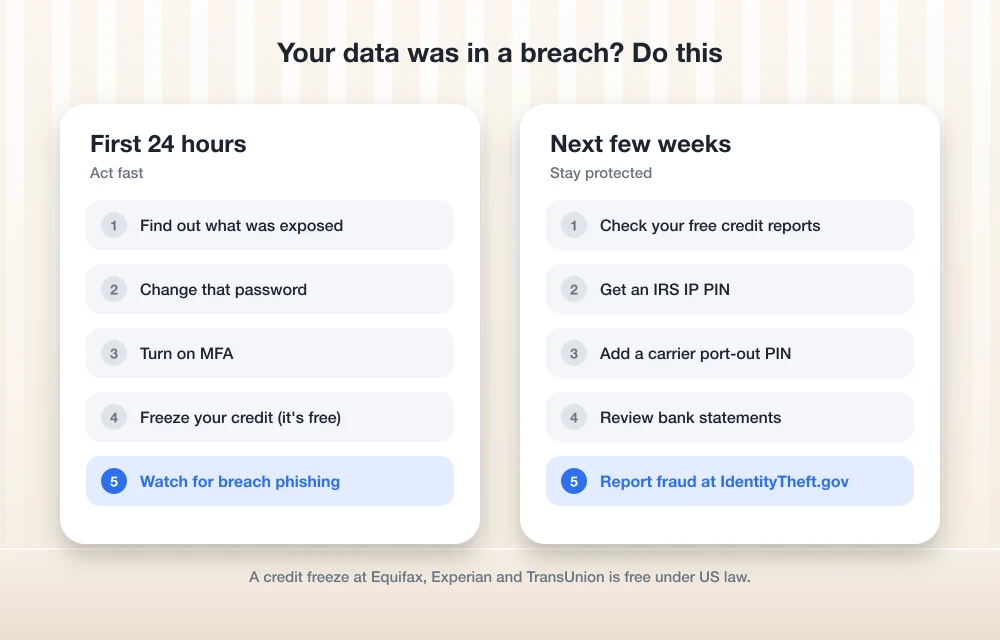
Step 2: Change passwords and turn on MFA
If a login was exposed, change that password right away. The FTC also suggests changing the username if you can, since attackers now have the pair.
Then think about where else you used that same password. Be honest with yourself here. If you reused it anywhere, change it there too. A password manager makes this so much easier, because it can create and remember a different password for every site.
Now turn on multi-factor authentication (MFA). That just means the site asks for a second proof of identity, like a code from an app, on top of your password. Even if someone has your password, they can’t get in without that second step. Start with your email account, because whoever controls your email can reset almost everything else.
If you want a refresher on everyday habits that keep your personal data safe, I put together some simple ways to improve your digital safety.
Step 3: Freeze your credit at all three bureaus
This is the single most useful thing you can do, especially if your SSN was exposed. A credit freeze stops lenders from pulling your credit report, which means a thief can’t easily open a new credit card or loan in your name.
The FTC describes a freeze as “the best way you can protect against an identity thief opening new accounts in your name.” A lot of people worry it’ll mess with their finances. It won’t. According to the FTC, a freeze doesn’t affect your credit score or your existing cards, and it doesn’t stop you from applying for a job, renting a place or buying insurance.
The rules, in plain English
- Placing and lifting a freeze is free. That’s been federal law since September 21, 2018.
- You have to freeze your file at each of the three bureaus separately. Freezing one doesn’t freeze the others.
- A freeze stays on until you lift it.
- If you know which bureau a lender will check, you can lift just that one temporarily.
The FTC has a clear explainer on credit freezes and fraud alerts if you want the official version.
How to freeze at Equifax, Experian and TransUnion
Doing it online is the easiest route. You’ll need to create an account at each bureau. Keep those login details somewhere safe, because you’ll need them when you want to lift the freeze later.
| Bureau | Online | Phone | |
|---|---|---|---|
| Equifax | myEquifax account via equifax.com/personal/credit-report-services/credit-freeze/ | Check Equifax’s site for the current number (published numbers vary) | See Equifax’s site |
| Experian | Experian Freeze Center | 888-397-3742 | Experian Security Freeze, P.O. Box 9554, Allen, TX 75013 |
| TransUnion | transunion.com/credit-freeze | 888-909-8872 (automated) or 800-916-8800 (agent) | TransUnion, P.O. Box 160, Woodlyn, PA 19094 |
TransUnion’s agent line is open Monday to Friday, 8am to 10pm ET, and weekends 8am to 5pm ET. At Experian, once you’re signed in, you’ll find freeze controls under the Help Center as “Manage freeze” or “Security freeze.”
When you need to apply for credit later, lifting a freeze online or by phone is typically immediate, according to the bureaus. By mail, expect it to take longer.
Freeze vs. credit lock
You’ll see the bureaus advertise credit “locks.” These are a separate product, and some come as part of paid plans. A freeze is the free option protected by federal law. For most people, I think the free freeze does the job.
Step 4: Consider a fraud alert
A fraud alert is a lighter tool. It doesn’t block access to your credit report. Instead, it tells lenders to take extra steps to confirm it’s really you before opening an account.
Here’s what the FTC says about it:
- It’s free and lasts one year, and you can renew it.
- You only contact one bureau, and that bureau has to notify the other two.
- When you place one, you can get a free copy of your report from each bureau.
- If you’re already a victim of identity theft, you can get an extended fraud alert that lasts 7 years. You’ll need an FTC Identity Theft Report or a police report.
- Service members can place an active duty alert.
My take: if your SSN leaked, go for the freeze. A fraud alert is a polite “please check with me first” note. A freeze actually shuts the door.
Step 5: Check your credit reports for free
AnnualCreditReport.com is the only federally authorized site for free credit reports from all three bureaus. You can order online, by phone at 1-877-322-8228, or by mail. The reports don’t include your credit score, and that’s fine. You’re looking for problems, not a number.
Check the site for how often you can pull reports right now. When you read them, look for accounts you didn’t open, credit checks you didn’t ask for, and addresses you’ve never lived at. Any of those is a sign to move to the IdentityTheft.gov step below.
Step 6: Get an IRS Identity Protection PIN
If your SSN was exposed, this one matters a lot. Someone with your SSN could try to file a tax return in your name and grab your refund. An Identity Protection PIN (IP PIN) is a free 6-digit number from the IRS that has to be on your return, so a thief without it can’t file as you.
Anyone with an SSN or ITIN can get one, including people living abroad. Here’s how, based on the IRS’s own steps:
- Go to IRS.gov/IPPIN.
- Sign in to your IRS Individual Online Account. If you don’t have one, you’ll go through identity verification first.
- Open the Profile section and choose IP PIN.
- Write the PIN down somewhere safe.
A few things to know. You get a new IP PIN every year, and you can retrieve it starting in mid-to-late January. It goes on every federal return you file that year, including prior-year and amended returns. Your tax preparer can’t request one for you.
Can’t verify online? If your income is under the IRS limit, you can file Form 15227 and the IRS will call you to verify. Check the Form 15227 page for the current income limit. You can also visit an IRS Taxpayer Assistance Center in person.
If someone has already filed a return in your name, use IRS Form 14039, the Identity Theft Affidavit. And the FTC’s advice for anyone whose SSN was exposed is simple: file your taxes early.
Step 7: Protect your phone number from SIM swaps
A SIM swap is when a scammer convinces your carrier to move your phone number to their SIM card. Once they have your number, they get your text message codes, which can open the door to your email and bank accounts.
Breaches make this easier, because a scammer armed with your name, address and date of birth sounds a lot more like you when they call your carrier.
Call your carrier or check your account settings and ask about a port-out PIN or a number lock, which adds a check before your number can be moved. The exact steps differ by carrier, and I haven’t confirmed each carrier’s current process, so ask them directly. If you’ve ever moved your number yourself, my guide on how to switch carriers and keep your phone number shows how a transfer works. That’s the same process a scammer tries to abuse.
Where a site lets you choose, I’d also pick an authenticator app over text message codes for MFA.
Watch out for breach-themed phishing
Right after a big breach, scammers send fake emails and texts pretending to be the company. “Claim your free credit monitoring.” “Verify your account to stay protected.” Some will even include your real name and address, which they got from the breach.
My rule is boring but it works. Never click a link or call a number from a breach message. Go to the company’s website yourself, or call the number on the back of your card. A real company won’t ask for your full SSN or password over email.
A security suite with web protection can act as a backup, but it won’t catch everything. Phishing is also the main risk flagged after the DigiCert customer data breach, so this isn’t theoretical. Your own caution still does most of the work.
If your identity has already been stolen
If you spot accounts you didn’t open or a tax return you didn’t file, head to IdentityTheft.gov, the FTC’s official site. It builds an FTC Identity Theft Report and a personal recovery plan for you, including sample letters you can send to companies.
If you don’t create an account there, print or save your report and plan right away, because you won’t be able to get back to them. You can also call 1-877-438-4338. The Spanish version is RobodeIdentidad.gov. That FTC report is also what you need to get the 7-year extended fraud alert.
Identity theft protection services: what they do vs. what’s free
Paid identity theft protection services usually bundle things like credit monitoring, alerts about your information, and sometimes insurance and help with recovery. Features vary a lot from plan to plan. I couldn’t confirm official FTC guidance on these services while researching, so treat this section as my own read.
Here’s the thing most ads don’t say clearly. Monitoring tells you after something has happened. A freeze helps stop it from happening in the first place, and the freeze is free.
| Protection | Free option | What a paid service may add |
|---|---|---|
| Stopping new credit accounts | Credit freeze at all three bureaus | Sometimes a credit lock, often within an app |
| Spotting fraud | Free credit reports at AnnualCreditReport.com | Ongoing automatic alerts |
| Tax identity theft | IRS IP PIN | Usually nothing beyond the free PIN |
| Recovery | IdentityTheft.gov report and recovery plan | Someone to help with calls and paperwork |
| Covering costs | None | Insurance, depending on the plan’s terms |
I’m not listing prices because I couldn’t find official figures, and they change often. Compare the plan details yourself before signing up.
When paying for protection makes sense
If the breached company offers monitoring for free, take it. That’s the FTC’s advice too.
Paying out of pocket can make sense if you’ve already been hit by identity theft and want someone to handle recovery calls for you, or if you simply know you won’t keep up with checking reports yourself. Convenience is a real benefit. If you go that route, read exactly what the insurance covers and what the recovery help includes.
What doesn’t make sense is paying for a service instead of freezing your credit. Do the free steps first. A paid plan is an add-on, not a replacement.
My bottom line
A breach notice feels scary, but you have more control than it seems. Change the exposed password, turn on MFA, freeze your credit at all three bureaus, and grab an IRS IP PIN if your SSN was involved. Lock down your phone number with your carrier and ignore any breach email that asks you to click.
Most of that takes an afternoon and costs nothing. Do it once, and the next breach notice will be a lot less stressful.
Frequently Asked Questions
Does freezing my credit hurt my credit score?
No. The FTC says a credit freeze doesn’t affect your credit score or your existing cards, and it doesn’t stop you from applying for a job, renting a home or buying insurance. The freeze stays on until you lift it, and placing or lifting it is free under federal law.
What’s the difference between a fraud alert and a credit freeze?
A fraud alert asks lenders to verify your identity before opening an account, lasts one year, and you only need to contact one bureau. A freeze blocks access to your credit report until you lift it, and you must place it at each of the three bureaus. A freeze is the stronger option.
Do I need an IRS Identity Protection PIN after a data breach?
If your Social Security number was exposed, getting one is a smart move. The IP PIN is free, you get a new one every year, and it must be on your federal return, which makes it much harder for someone to file taxes in your name.
Should I accept the free credit monitoring a company offers after a breach?
Yes. The FTC recommends taking free credit monitoring or identity theft insurance if the breached company offers it. Sign up through the company’s official website rather than a link in an email.
Should I pay for an identity theft protection service?
Do the free steps first: freeze your credit, check your free reports, and get an IRS IP PIN if your SSN leaked. A paid service can make sense if you want ongoing alerts or help with recovery, but it doesn’t replace a free credit freeze.
You might also like
Is TutuApp Safe? Why We Don’t Recommend It (and Safe Alternatives)
TutuApp is one of those names that keeps coming up when people look for free versions of paid apps or “hacked” games on Android and iPhone. We used to have a guide on how to install it. We have replaced that guide, because after looking at how TutuApp works and the risks involved, we can’t…

How to test your VPN connection for privacy leaks
VPN’s are meant for providing the security and privacy of an online user. They are designed in such a way to anonymize the user identity online. If you are new to VPN term, let me explain a brief introduction about the VPN service. What is a VPN? VPN is a service which lets the user…
Top 5 Backup & Data Recovery Software for Businesses in USA (2026 Guide)
In 2026, US businesses will face challenges related to data loss due to numerous causes — including ransomware attacks and hardware failures — as well as the potential for accidental deletions or outages related to their cloud computing environments. When trying to scale your business, selecting the best backup and recovery solutions should be a…
The week in tech, minus the noise.
New reviews, fixes and the stories that matter — once a week, straight to your inbox.
We only use your email to send the newsletter. Unsubscribe any time. See our privacy policy.
Comments