

How to Switch Carriers and Keep Your Phone Number (AT&T, Verizon, T-Mobile)
Thinking about leaving AT&T, Verizon or T-Mobile? Here’s how to switch carriers in the US without losing your phone number, from getting your transfer PIN to handling a port that fails.
Image by magnific on Magnific
Phone bills keep creeping up, and this year a lot of people finally hit their limit. Verizon and AT&T have both reportedly raised prices on some plans this year. If you’ve been staring at your bill wondering whether to jump ship, I get it.
Here’s the good part. You don’t have to give up your phone number to switch. The number you’ve had for ten years can follow you to AT&T, Verizon, T-Mobile or a smaller prepaid carrier. Moving a number like this is called “porting,” and when it goes right, it barely takes any effort on your part.
When it goes wrong, it’s almost always one small detail. An expired PIN. A typo in the account number. Canceling the old plan a day too early. So I’ll walk you through it in the order I’d actually do it myself.
Quick answer: Don’t cancel your current plan. Get your account number and a transfer PIN from your current carrier (AT&T and Verizon call it a Number Transfer PIN, T-Mobile calls it a Temporary Port Out PIN), then sign up with the new carrier and give it those details. The new carrier starts the transfer, and your old line is closed once the port finishes. If you’re keeping your phone, check that it’s unlocked before you start.
Your Right to Keep Your Number
This isn’t a favor your carrier does for you. It’s a federal rule. According to the FCC’s guide to keeping your phone number, you can keep your number when you switch providers as long as you stay in the same geographic area. It even works between different types of service, so you can move a number between wireless, landline and internet phone providers.
A few points from that FCC page are worth knowing before you talk to anyone:
- You start the port by contacting your new company, not your old one. You give it your 10-digit number and whatever other details it asks for.
- Once you’ve requested service with the new company, your old company can’t refuse to port your number, even if you owe a balance or an early termination fee. You still owe that money, though.
- Companies may charge a porting fee. You can ask for it to be waived or negotiated.
- If you’re moving to a different part of the country, you may not be able to keep your number.
The FCC also suggests asking your new carrier whether your 911 service will be affected while the port is in progress. It’s a small question, but I’d ask it, especially if this is the only phone in your household.
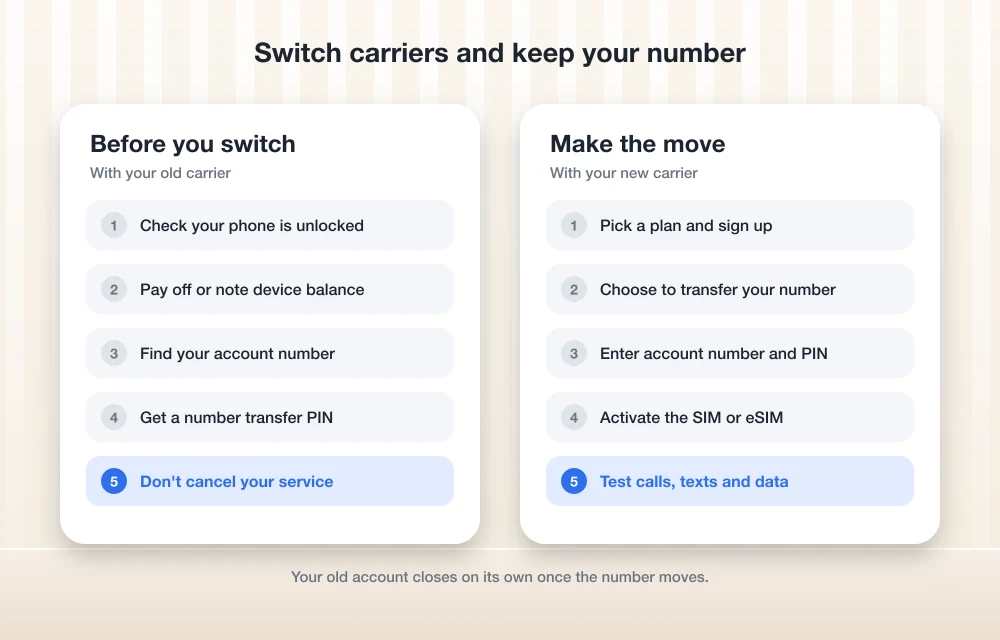
Before You Start: Get These Things Sorted
Don’t cancel your old service
This is the big one, so I’m putting it first. If you cancel your current plan before the port is done, you risk losing the number entirely. Your old carrier gets disconnected automatically when the new carrier completes the transfer. Verizon says this directly on its support page: don’t disconnect your service until the transfer is complete. That advice applies no matter who you’re leaving.
Check whether your phone is unlocked
If you’re bringing your current phone to the new carrier, it has to be unlocked. A locked phone only works with the carrier that sold it, so it simply won’t connect on another network.
Unlocking rules differ between AT&T, Verizon and T-Mobile, and they often depend on things like whether the phone is paid off and how long it’s been active. I haven’t been able to confirm each carrier’s current requirements, so I’m not going to guess at waiting periods here. I’ve also seen reports that the FCC changed Verizon’s 60-day unlocking requirement in early 2026, but I couldn’t confirm the official order. Please check your carrier’s own unlock page or call them before you rely on any specific timeline.
On most phones you can see whether the phone is carrier-locked in the settings, and your carrier can confirm it too. Do this before you order a new SIM, not after.
Deal with device installments and balances
If you’re still paying off your phone in monthly installments, that balance doesn’t disappear when you leave. As the FCC points out, your old carrier can’t block the port because you owe money, but you’re still responsible for paying it.
How each carrier handles a remaining installment balance after you leave is something I couldn’t confirm, so ask your current carrier before you switch. Also ask whether paying the phone off affects when it can be unlocked. Those two answers together will tell you whether it makes sense to switch now or wait a bit.
Turn off number lock features
Carriers offer extra protection to stop scammers from stealing your number, which is great until you try to move it yourself. Verizon says Number Lock has to be turned off before you can create a Number Transfer PIN. T-Mobile has a setting called Port Out Protection that you manage on T-Mobile.com. I couldn’t confirm whether it has to be turned off for a port, but it’s worth checking. Just remember to turn similar protection back on with your new carrier. My guide on how to protect your SIM card from hackers explains why this matters.
How to Get Your Number Transfer PIN
Each of the big three carriers makes you create a special PIN before your number can leave. This is separate from your regular account PIN or passcode. You’ll also need your account number, which you can find in your online account or on your bill.
AT&T
AT&T calls it a Number Transfer PIN, and it recommends requesting it close to the time you’ll actually submit the port, because the PIN expires 4 days after you request it (14 days for business accounts). Only users with primary online access can request one.
- Online: Sign in to your AT&T account, find Transfer phone number, and select Request new PIN. The PIN appears on screen.
- AT&T app: Tap Settings, scroll to Transfer phone number, then select Request new PIN.
- By phone: Dial *PORT and follow the prompts. The PIN arrives by text, and you’ll need your account passcode.
If your account is suspended, AT&T says you can only request the PIN online or in the app. On business accounts, only the primary user can request it.
Verizon
Verizon also calls it a Number Transfer PIN. You need a standard monthly account and you have to be signed in to My Verizon. According to Verizon’s port-out FAQ, you have a few options:
- Dial #PORT from the smartphone with the number you’re moving, and Verizon sends you a link.
- Create the PIN in the My Verizon app.
- Create it on the My Verizon website, on the “Create Your Number Transfer PIN” page.
The PIN lasts 7 days, and one PIN covers every line on a standard account, which is handy for families. Verizon sends a confirmation text when a transfer happens. If you didn’t authorize it, call the number in that message right away.
For Verizon Business accounts, it works per line: one PIN per line, valid for 7 days. Verizon also says not to generate a new PIN once you’ve given one to your new carrier, which is good advice for anyone.
T-Mobile
T-Mobile calls it a Temporary Port Out PIN, or TPOP. Personal accounts need one; Business and Government accounts don’t. Only the Primary Account Holder can create it, so if you’re on a family plan as an authorized user, you’ll need to ask whoever owns the account.
On T-Mobile.com, log in and look for Request a transfer PIN, then Get a transfer PIN. In the app, start at Account > Profile Settings and look for the transfer PIN option. Honestly, T-Mobile’s menus have shifted around (it also has the newer T-Life app), so if you can’t find it, call T-Mobile support at 1-800-937-8997.
Prepaid carriers and MVNOs
An MVNO is a smaller carrier that rents network space from one of the big three. Mint, Visible, Cricket and Metro are common examples. Most need the same basic info to port a number out: your account number and some kind of PIN. I couldn’t confirm each provider’s exact process, so check your current provider’s support page or app for its port-out instructions.
| Carrier | What it’s called | Who can create it | How long it lasts |
|---|---|---|---|
| AT&T | Number Transfer PIN | Users with primary online access | 4 days (14 for business) |
| Verizon | Number Transfer PIN | Signed-in My Verizon users on standard monthly accounts | 7 days |
| T-Mobile | Temporary Port Out PIN | Primary Account Holder only | Not confirmed on T-Mobile’s page |
Step-by-Step: Making the Switch
Once your phone is unlocked and you know where your PIN comes from, the actual switch looks like this:
- Pick your new carrier and plan, and confirm the phone you want to use works on its network.
- Ask the new carrier about porting fees and whether 911 will be affected during the transfer.
- Write down your current account number.
- Generate your transfer PIN. Do this right before you sign up, since AT&T’s PIN expires in just 4 days.
- Sign up with the new carrier and choose the option to keep or transfer your existing number. Enter your number, account number and PIN exactly as shown.
- Activate your new SIM or eSIM when the carrier tells you to.
- Wait for the port to finish. Your old carrier closes the line automatically.
- Make a test call and send a text before you get rid of anything from the old carrier.
Moving to an eSIM
An eSIM is a digital SIM built into your phone, so there’s no plastic card to swap. Most new carriers let you set one up during signup or in their app. The exact steps depend on your phone and your new carrier, and I couldn’t confirm each one, so I’ll keep this general: follow the activation instructions your new carrier gives you, and don’t delete your old eSIM until your new line is working and your number has moved over.
How Long Does a Port Take?
I wish I could give you a firm number, but the FCC page doesn’t list a timeline, and I couldn’t confirm one from the carriers. Ask your new carrier when you sign up. In the meantime, keep your old phone or SIM handy so you’re not stranded if something takes longer than expected.
What to Do If the Port Fails
A failed port is stressful, but it’s usually fixable. Start with your new carrier, since they’re the ones who submitted the request. Then check the usual suspects:
- Did the PIN expire? AT&T’s lasts 4 days and Verizon’s lasts 7. If it did, generate a fresh one and give the new one to your new carrier.
- Is the account number correct? A single wrong digit will stop the transfer.
- Is Number Lock or a similar protection still turned on at your old carrier?
- Did you cancel your old service early? If so, call your old carrier immediately and ask about getting the number back.
If your old carrier is refusing to release your number, remember that the FCC says it can’t do that once you’ve requested service elsewhere. You can file a complaint through the FCC’s online consumer complaint center, which handles both porting and unlocking problems.
After the Switch: If You See No Service
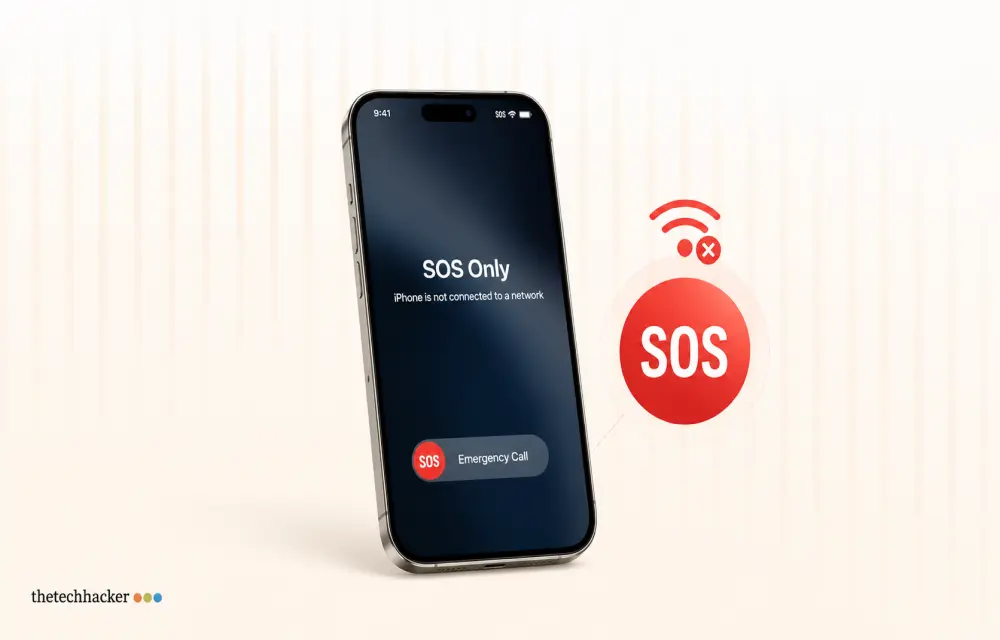
Sometimes the port works, but the phone still doesn’t connect. If you moved to AT&T with an iPhone and you’re stuck on No Service or SOS, my guide on fixing iPhone No Service or SOS on AT&T walks through what to try. On Android, a “not registered on network” message is common right after a switch, and this fix for the Android not registered on a network error should help.
My Take Before You Switch
Switching carriers is a lot less scary than it used to be. The law is on your side, the PIN takes a couple of minutes to create, and your new carrier does most of the work.
If I had to pick one thing to remember, it’s this: keep your old service running until your number is working on the new carrier. Everything else is fixable. A canceled number might not be. Sort out unlocking and any device balance first, generate your PIN at the last minute, and you’ll be on your new plan without losing the number everyone already has saved.
Frequently Asked Questions
Can my old carrier refuse to port my number if I owe money?
No. According to the FCC, once you request service from a new company, your old company can’t refuse to port your number even if you owe a balance or termination fee. You still have to pay what you owe.
Should I cancel my old phone plan before switching?
No. Keep your old service active until the transfer is complete. Your new carrier handles the port, and your old line is closed automatically once it finishes. Canceling early can put your number at risk.
How long does a number transfer PIN last?
AT&T’s Number Transfer PIN expires after 4 days (14 days for business accounts), and Verizon’s lasts 7 days. T-Mobile’s page didn’t confirm how long its Temporary Port Out PIN lasts, so generate it close to when you sign up.
How do I get a transfer PIN from Verizon?
Dial #PORT from the smartphone with the number you’re moving to get a link, or create the PIN in the My Verizon app or on the My Verizon website. You need a standard monthly account and Number Lock must be off.
Who can request a transfer PIN on a T-Mobile family plan?
Only the Primary Account Holder can generate T-Mobile’s Temporary Port Out PIN. Authorized users need to ask the Primary Account Holder to create it.
Featured image: magnific on Magnific.
You might also like
How To Resolve iPhone 17 Stuck in SOS Service
Learn how to fix your iPhone 17 when it’s stuck in SOS mode, preventing normal cellular connection.

How To Block A Phone Number To Avoid Unwanted Calls
Reasons are so many to avoid a phone call, it is very frustrating when you receive an unwanted phone call in the middle of a meeting, classroom or any other situation. In recent years there are so many spam calls are disturbing our privacy and time. Choosing a simple method to block a phone number…
How to Fix iPhone 18 Pro Max No Service or SOS on AT&T
Is your iPhone 18 Pro Max stuck on SOS or No Service on AT&T? Here’s how to tell if it’s the issue Apple has acknowledged, what to try first, and how to get a replacement.
The week in tech, minus the noise.
New reviews, fixes and the stories that matter — once a week, straight to your inbox.
We only use your email to send the newsletter. Unsubscribe any time. See our privacy policy.
Comments