

How to Freeze Your Credit at Equifax, Experian and TransUnion: Step-by-Step Guide
A run of data breach disclosures in recent days, including stolen driver’s license data at Uber and a vendor-linked cyberattack at Expedia, has put the same question in front of millions of Americans: what do I do now that my personal details may be out there? Credit monitoring tells you after something has gone wrong.…

Photo by Sasun Bughdaryan on Unsplash
A run of data breach disclosures in recent days, including stolen driver’s license data at Uber and a vendor-linked cyberattack at Expedia, has put the same question in front of millions of Americans: what do I do now that my personal details may be out there? Credit monitoring tells you after something has gone wrong. A credit freeze stops the most common kind of identity theft before it starts, and under federal law it costs nothing.
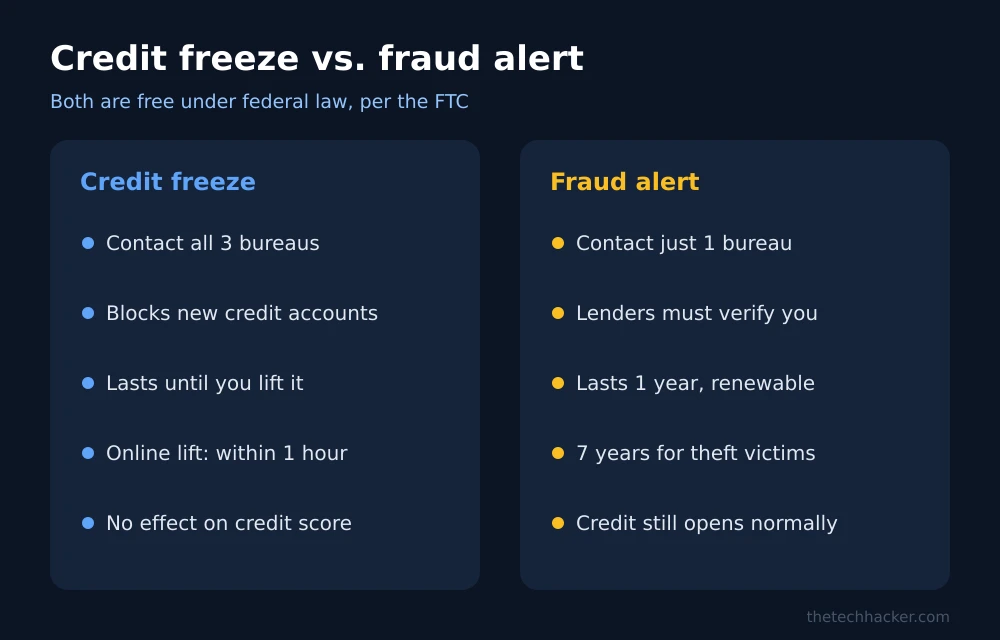
Quick answer: To freeze your credit, contact each of the three nationwide credit bureaus, Equifax, Experian and TransUnion, separately, online or by phone. According to the Federal Trade Commission, a freeze is free, does not affect your credit score, and stays in place until you lift it. When you request it online or by phone, the bureau must place the freeze within one business day, and it must lift a freeze within one hour when you need to apply for credit.
What a credit freeze does, and what it doesn’t
A freeze restricts access to your credit report. Since most lenders check a credit report before approving a new card or loan, a thief who has your name, date of birth and Social Security or driver’s license number generally cannot open new credit in your name while the freeze is in place.
It is worth being precise about the limits. According to the FTC’s guidance on credit freezes and fraud alerts:
- It does not affect your credit score.
- It does not stop you from using your existing cards and accounts.
- It does not prevent misuse of accounts you already have, so you still need to watch your statements.
- Anyone can place one, even if your identity has not been stolen.
Some existing companies, such as your current card issuers, collection agencies and certain government agencies, can still see your report. That is normal and does not weaken the protection against new accounts.
How to freeze your credit: step by step
- Gather your details. Have your full name, current and previous addresses, date of birth and Social Security number ready. Each bureau verifies your identity before placing a freeze.
- Freeze at Equifax. Go to Equifax’s official website, create or sign in to an account, and choose the option to place a security freeze. You can also call Equifax.
- Freeze at Experian. Repeat the process on Experian’s official freeze center.
- Freeze at TransUnion. Repeat the process on TransUnion’s official site.
- Save your credentials. Each bureau gives you an account login or PIN to manage the freeze. Store them in a password manager; you will need them to lift the freeze later.
- Confirm all three. A freeze at one bureau does not carry over to the others. Lenders may check any of them, so all three need to be frozen.
The FTC’s IdentityTheft.gov lists the bureaus’ official contact details. Use those, or type the bureau’s address yourself, rather than clicking links in emails or texts, which scammers imitate.
How long it takes, by the numbers
| Action | Online or by phone | By mail |
|---|---|---|
| Place a freeze | Within 1 business day | Within 3 business days of receipt |
| Lift a freeze | Within 1 hour | Within 3 business days of receipt |
| Cost | Free | Free |
These timelines come from the federal law that made freezes free in 2018, as summarized by the FTC.
How to lift a freeze when you need credit
You do not need to unfreeze everything to apply for a loan or a new card. Ask the lender which bureau it will check, then lift the freeze only at that bureau, either temporarily for a set number of days or for that specific lender. When the application is done, the freeze returns on its own if you chose a temporary lift, or you can refreeze it right away.
The same applies to new apartment leases, mobile phone plans and some job background checks, which may also pull your credit.
Freeze vs. fraud alert vs. credit lock
| Credit freeze | Fraud alert | Credit lock | |
|---|---|---|---|
| Cost | Free by law | Free by law | Varies; some charge monthly |
| Bureaus to contact | All three | One (it notifies the others) | Each bureau’s own product |
| How long | Until you lift it | 1 year, or 7 years for identity theft victims | Per the bureau’s terms |
| Effect | Blocks access to your report for new credit | Lenders must take steps to verify your identity | Similar to a freeze, set by contract rather than law |
The FTC notes that if you want the protections guaranteed by federal law at no cost, choose a freeze. A fraud alert is a reasonable extra layer, and an extended seven-year alert is available if you have filed an identity theft report at IdentityTheft.gov or a police report.
Freezing a child’s credit
Children under 16 can also have a free freeze placed by a parent or guardian, according to the FTC. The process is different from an adult freeze because a child usually has no credit file yet; each bureau creates one and freezes it. Since a child’s identity can be misused for years before anyone notices, this is worth doing for families affected by a breach.
After the freeze: three habits that matter
- Check your credit reports for accounts or inquiries you do not recognize. The FTC explains how to get free reports.
- Watch existing accounts. A freeze does not cover cards you already have. Turn on transaction alerts with your bank.
- Reduce your exposure. Data brokers sell personal details that make identity theft easier; our guide to data removal services covers how to reduce that.
If you were affected by this week’s Uber data breach, a freeze is the single most useful step you can take. Recent incidents such as the Optimizely website attack show how often personal and card data now leaks through third-party vendors rather than the company you deal with directly.
This guide explains federal consumer protections and is not personalized financial or legal advice.
FAQs
Does freezing your credit hurt your credit score?
No. The FTC says a credit freeze does not affect your credit score.
How much does a credit freeze cost?
Nothing. Placing and lifting a credit freeze is free at all three bureaus under federal law.
Do I need to freeze my credit at all three bureaus?
Yes. A freeze at one bureau does not apply to the others, and lenders may check any of them.
How fast can I unfreeze my credit?
If you ask online or by phone, the bureau must lift the freeze within one hour. Mail requests can take up to three business days after the bureau receives them.
Featured image: Sasun Bughdaryan on Unsplash.
Disclosure: TheTechHacker has no paid relationship with Equifax, Experian, TransUnion or any company mentioned here.
More in Guides
What to Do After a Data Breach: Identity Theft Protection Explained (2026)
Got a data breach notice? Here’s the exact order I’d follow in the US: lock down your accounts, freeze your credit for free, get an IRS IP PIN, and decide whether a paid identity theft protection service is worth it.

How to Fix Apps Crashing While Multitasking After iOS 26 Update
The latest iPhones are powerful enough to handle heavy multitasking without breaking a sweat. So when your device starts crashing, freezing, or stalling while switching apps after the iOS 26 update, it feels especially frustrating. This issue can stem from several sources: a bug in the iOS build, misconfigured background refresh settings, insufficient storage, or…

How to Fix iPhone Freezing When Moving Widgets in iOS 27
Is your iPhone freezing when you drag widgets between Home Screen pages on iOS 27? Here’s which iOS 27 bug Apple has fixed, which one it hasn’t acknowledged, and what you can do right now.
The week in tech, minus the noise.
New reviews, fixes and the stories that matter — once a week, straight to your inbox.
We only use your email to send the newsletter. Unsubscribe any time. See our privacy policy.
Comments