

Best Online Course Platforms 2026: Teachable vs Kajabi vs Thinkific vs Podia vs LearnWorlds
I compared Teachable, Kajabi, Thinkific, Podia and LearnWorlds on what affects your income most: transaction fees, payout timing, marketing tools and official pricing. Where I couldn’t confirm a number, I say so.

Photo by Christin Hume on Unsplash
Disclosure: TheTechHacker has no paid relationship with the companies in this article.
Choosing where to sell an online course mostly comes down to two questions: how much of each sale reaches your bank account, and how soon. Teachable, Kajabi, Thinkific, Podia and LearnWorlds each describe their fees a little differently, so lining them up side by side is harder than it should be. Annoying, but fixable. I’ve compared the five on three things that shape a course business’s cash flow and admin time: platform transaction fees, payout speed, and the marketing tools each plan includes.
Quick answer: For most new creators, Podia is the easiest pick. Its pricing is clear, and the Shaker and Earthquaker plans charge no Podia transaction fees. Teachable’s a strong choice if you want flexible payouts and help paying affiliates, and it charges 0% on Builder and higher plans when you use Teachable Payments. Kajabi has the widest checkout options, plus automatic sales tax and accounting integrations through Kajabi Payments. Thinkific and LearnWorlds might suit you too, but I couldn’t verify their current prices.
Transaction fees and processing fees are not the same cost
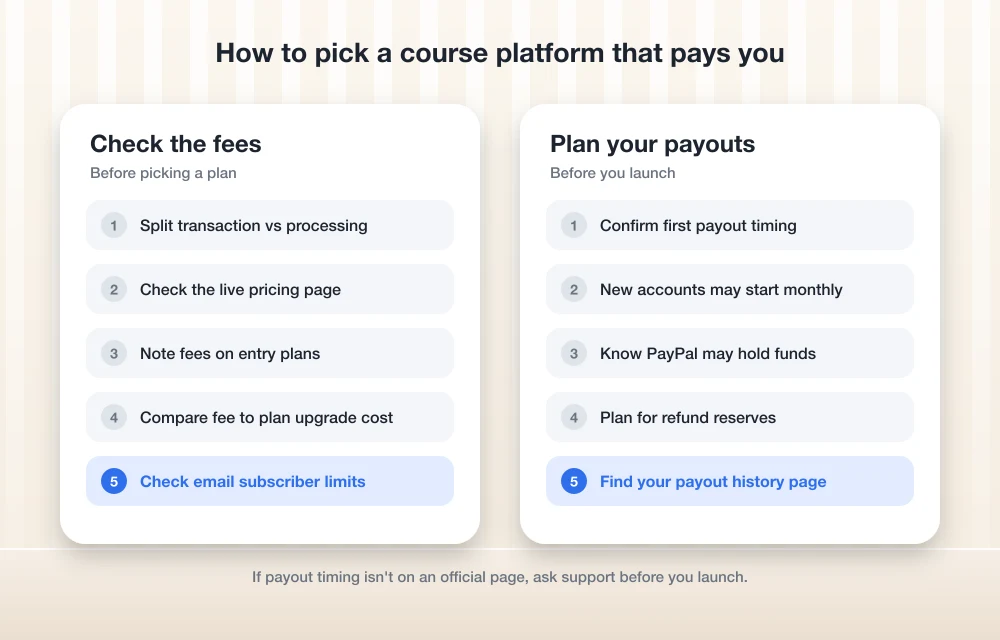
It’s worth pulling two costs apart before comparing anything. A transaction fee is the platform’s own cut of every sale. A payment processing fee goes to Stripe, PayPal or the platform’s own processor for handling the card. You’ll pay a processing fee on almost any platform, and there’s not much you can do about that. The transaction fee is different. You can often avoid it just by picking the right plan, so it’s the first number I’d check.
Online course platforms compared
Everything in this table comes from each vendor’s published pricing, help and terms pages. If I couldn’t find a figure there, I’ve left it out on purpose rather than guess.
| Feature | Teachable | Kajabi | Thinkific | Podia | LearnWorlds |
|---|---|---|---|---|---|
| Platform transaction fee | 7.5% on Starter; 0% on Builder, Growth and Custom with Teachable Payments | Not confirmed | Not confirmed (terms say a fee applies to every transaction, including refunds) | 5% on Mover; 0% on Shaker and Earthquaker | Reported $5 per sale on Starter (unconfirmed) |
| Fastest payout option | Daily, business days only | Instant Payouts any day, including weekends (fees and limits apply) | Instant payouts on a daily schedule | Not confirmed | Not confirmed |
| Checkout payment methods | Cards, Apple Pay, Google Pay; PayPal with BackOffice | Cards, Apple Pay, Google Pay, Link, Afterpay, Klarna | Thinkific Payments, your own Stripe or PayPal | Stripe or PayPal | Not confirmed |
| Tax and accounting extras | BackOffice collects author and affiliate tax forms | Automatic sales tax, invoicing, QuickBooks Online and Xero (Kajabi Payments only) | Not confirmed | Not confirmed | Not confirmed |
| Affiliate tools | BackOffice pays affiliates and collects tax forms | Not confirmed | Not confirmed | Affiliate marketing from Shaker up | Not confirmed |
| Free trial | Not confirmed | Not confirmed | Not confirmed | 14 days, no card needed | Not confirmed |
| Official pricing confirmed | Growth only (verify on live page) | No | No | Yes, all three plans | No |
Where a cell says “Not confirmed”, I couldn’t verify that item on an official page. It doesn’t mean the feature is missing.
The best online course platforms in 2026
1. Teachable
If payouts matter to you as much as features, Teachable is the platform I’d look at first. Only the Starter plan carries a platform transaction fee (7.5%). On Builder, Growth and Custom it drops to 0%, as long as you use Teachable Payments.
Pricing is murkier. Teachable’s pricing page data shows Growth at $239/mo billed monthly or $189/mo billed yearly, but that data looked dated to me, so treat it as a rough guide and check the live page. Starter and Builder? I couldn’t confirm those prices at all.
You get two built-in ways to be paid: Teachable Pay and the Monthly Payment Gateway. The official payments guide from Teachable walks through both. And if Teachable Pay isn’t available to you and you’re on Growth or higher, you can set up a custom gateway instead.
BackOffice is the feature I rate most highly. Once it’s switched on, Teachable pays your co-authors and affiliates, collects their tax forms, and adds PayPal as a checkout option. Chasing affiliate tax paperwork by hand eats admin time, and that time grows with every partner you add, so for a course business with several affiliates this is worth a lot.
What I liked
- 0% platform fee on Builder and up with Teachable Payments
- Payouts daily, weekly or monthly
- BackOffice takes care of affiliate payouts and tax forms
- Apple Pay and Google Pay at checkout on supported devices
What could be better
- Starter plan has a 7.5% fee
- Couldn’t confirm Starter and Builder prices
- Custom gateways are Growth or higher only
2. Podia

Of the five, Podia has the clearest pricing. It’s the only one where I could confirm every plan’s price on the official page, and the plans are easy to compare.
Mover has a 5% transaction fee. Shaker and Earthquaker don’t charge any Podia transaction fees. Shaker also adds affiliate marketing and upsells (offering a buyer a related product right after checkout). And there’s a 14-day free trial with no card required, so trying it out costs you nothing but some time.
Stripe or PayPal still take their own share, though. Podia lists that at 2.9% + 30¢ on its official pricing page and notes it may vary by location. The real limit is email. Mover covers only 100 subscribers, and a growing course will outgrow that quickly.
Mover
Billed annually, or $49/mo billed monthly. 5% transaction fee.
- 50 products
- 25 community spaces
- Email for 100 subscribers
Shaker
Billed annually. No Podia transaction fees.
- 150 products
- 100 community spaces
- Email for 500 subscribers
- Affiliate marketing and upsells
Earthquaker
$1,800 billed annually. No transaction fees.
- Unlimited products and community spaces
- Unlimited video storage
- Email for 1,000 subscribers
I took these prices from Podia’s official pricing page while researching this article. They do change, so confirm before you buy. I couldn’t confirm the monthly-billing prices for Shaker or Earthquaker.
I couldn’t find Podia’s payout timing on an official page, so I’d ask support about it before you launch.
3. Kajabi
Kajabi Payments is Kajabi’s own payment processor, and it takes cards, Apple Pay, Google Pay, Link, Afterpay and Klarna. That’s the longest checkout list in this roundup. Buy now, pay later options like Afterpay and Klarna may make a pricier course easier for some buyers to commit to.
But the bigger advantage sits on the back-office side. Automatic sales tax, invoicing and the QuickBooks Online and Xero integrations only work with Kajabi Payments, not with Stripe or PayPal. If you’d rather not handle sales tax and bookkeeping by hand, that takes a fair amount of ongoing admin off your plate.
The catch is payout timing for new accounts. They start on monthly payouts with a 7-day delay (Kajabi writes this as T+7). Not ideal if you’re counting on launch revenue. Other schedules may open up 1 to 2 business days after your first sale, though whether you get daily or weekly varies by site. Instant Payouts work any day, weekends and holidays included, but they come with daily limits and fees.
I couldn’t confirm Kajabi’s plan prices or its exact US processing rates. I wasn’t able to reach the official pricing page, so I’ve left those out rather than estimate them.
What I liked
- Biggest set of checkout options, Afterpay and Klarna included
- Automatic sales tax plus QuickBooks Online or Xero sync
- Instant Payouts even on weekends and holidays
What could be better
- New accounts start out on monthly payouts
- You need Kajabi Payments for the tax and accounting tools
- Couldn’t confirm prices or processing rates
4. Thinkific
On Thinkific Payments, payouts run on a daily schedule that depends on your country. Your first payout should arrive within 7 to 14 days of your first sale. You can switch to a Manual schedule, but staying on daily is what keeps instant payouts available. Want to change the schedule? You’ll need to contact Thinkific support.
Thinkific’s terms say it charges a fee on every transaction, refunds included, and that your payout schedule depends on your plan. That refund detail is easy to miss. With your own Stripe account, the first payout comes 7 to 10 days after your first payment. PayPal can hold funds for up to 21 days on new business accounts, which matters a great deal if you need launch-week revenue to cover costs.
There are several things I couldn’t confirm from Thinkific’s own pages: current plan prices, a reported price change on August 13, 2026, whether the free plan still exists, and the fees for using your own Stripe or PayPal. I’d check each of these on Thinkific’s pricing page before committing.
5. LearnWorlds
I couldn’t reach any official LearnWorlds page while researching, so nothing in this section is confirmed. The plans have been reported as Starter, Pro Trainer, Learning Center and High Volume & Corporate, with Starter charging a $5 fee per sale. The reported prices contradict each other, so I’m not listing any.
That doesn’t make LearnWorlds a poor choice. It just means I can’t rank it ahead of the others until its official pricing has been checked.
Transaction fees: what you actually keep
Podia’s the one platform where I’ve confirmed figures for both fees, so it makes a handy worked example. Take a $100 sale on Podia Mover. The 5% transaction fee is $5, and Stripe or PayPal take about $3.20 at Podia’s listed 2.9% + 30¢ rate. You keep roughly $91.80. On Shaker the $5 disappears, and you keep about $96.80.
On Teachable Starter, the platform fee alone would be $7.50 on that same sale. Move to Builder with Teachable Payments and the fee goes away. So the pattern holds across the market: entry plans take a slice of every sale, while higher plans cost more each month but leave more of each sale with you.
Payouts: when your money reaches the bank
Teachable Pay sends money to your bank through Stripe Express, daily, weekly or monthly. Weekly payouts land on Thursdays. Nothing goes out on weekends or US holidays, only on business days. The Monthly Payment Gateway works differently: it pays to PayPal, in USD, on the first business day of each month.
Teachable Pay also holds back part of your earnings as a reserve for refunds and chargebacks, then releases it on a rolling basis. Kajabi, as I mentioned above, starts you on monthly payouts and unlocks faster options later. Thinkific runs daily by default, depending on your country.
Only two of these platforms publish where to find your payout history:
Teachable
Head to Sales → Payouts to see your payout dates and history. You can export a CSV too if your accountant wants one.
Kajabi
Head to Dashboard → Sales > Payouts → View payouts to see every payout and its details.
Marketing tools and the extras around your course
Built-in marketing is where these platforms differ most, and it’s also where my confirmed information is thinnest. Podia includes email marketing on every plan, capped at 100, 500 or 1,000 subscribers depending on the plan, and adds affiliates and upsells from Shaker up. Teachable’s BackOffice handles affiliate payments and tax forms. Kajabi’s invoicing and accounting sync help with the work that comes after the sale.
Once your list outgrows what the course platform allows, a dedicated email tool is usually the better option. I compared the main ones in my guide to the best email marketing software for small businesses.
Selling coaching packages or team training alongside a course? Then you’ll probably want clients to sign an agreement first, and my roundup of e-signature software for small business covers tools for that. If you only plan to sell a couple of downloads, a standard website may be all you need, and my website builder comparison for small business can help you decide.
Matching a platform to how you sell
If you’re a new creator who wants predictable costs, I’d start with Podia’s free trial and plan to move to Shaker once sales pick up. If you work with affiliates or co-authors, Teachable’s BackOffice and the 0% fee on Builder and up are the strongest fit. And if sales tax and bookkeeping are the jobs you most want off your plate, Kajabi’s built-in tools are the main reason to look at it.
Thinkific and LearnWorlds are worth a look too. Just check their official pricing first, since I couldn’t confirm it.
Podia
Every plan price confirmed, a free trial with no card, and zero Podia fees from Shaker up.
Teachable
BackOffice pays your affiliates and collects their tax forms, and payout schedules are flexible.
Kajabi
Afterpay, Klarna and automatic sales tax, all through Kajabi Payments.
Frequently Asked Questions
Which online course platform has no transaction fees?
Teachable charges 0% on Builder, Growth and Custom when you use Teachable Payments. Podia doesn’t charge Podia transaction fees on Shaker and Earthquaker. But you’ll still pay a processing fee to Stripe, PayPal or the platform’s own processor.
What’s the difference between a transaction fee and a processing fee?
The transaction fee is the course platform’s own cut of each sale. The processing fee goes to whoever handles the card payment. Podia, for example, lists the Stripe or PayPal fee at 2.9% + 30¢ and says it may vary by location.
How fast do Teachable payouts arrive?
Teachable Pay can pay you daily, weekly or monthly, straight to your bank through Stripe Express. Weekly payouts land on Thursdays, and nothing goes out outside business days. The Monthly Payment Gateway pays to PayPal on the first business day of each month.
Why are my Kajabi payouts only monthly?
New Kajabi Payments accounts start on monthly payouts with a 7-day delay. Other schedules may open up 1 to 2 business days after your first sale, but whether you get daily or weekly varies by site. You can also use Instant Payouts any day, with limits and fees.
When will I get my first Thinkific payout?
On Thinkific Payments, your first payout should arrive within 7 to 14 days of your first sale. With your own Stripe account it’s 7 to 10 days. PayPal can hold funds for up to 21 days on new business accounts.
Featured image: Christin Hume on Unsplash.
You might also like

60 Best Study Websites for Students
Online learning has become far more trendy and effective than the book-and-pen method. Apart from having a 500-page book, there is a wide world inside that small CPU and monitor on your desk. If you are a student and want to explore the wider world of learning, there are thousands of learning websites available on…

Best Social Media Marketing Courses
Are you looking for something on the Internet that can help you boost your business growth? Well, you are in the right place. As we know, every person has a smartphone in their pockets nowadays. And, Everyone out there is using the medium of Social Media for whatever reason. Therefore, Social Media can be a…

Which Businesses Need Digital Marketing Most? Top 10 Industries Ranked
At present, almost all online businesses are connected with their clients. Nearly every business, from neighborhood tea stalls to multinational corporations, requires some form of digital marketing to stay relevant and competitive. With over 900 million internet users in India and digital ad spending growing at 40% annually, the question isn’t whether businesses need digital…
The week in tech, minus the noise.
New reviews, fixes and the stories that matter — once a week, straight to your inbox.
We only use your email to send the newsletter. Unsubscribe any time. See our privacy policy.
Comments