

How to Fix Claude Not Working: Login Errors, Outages and Sign in With Apple
Claude had a rough couple of days. On November 13, Anthropic logged two separate incidents with elevated errors across claude.ai, the Claude API and Claude Code. The first stopped people from signing in, and the second, a few hours later, hit chats, connectors and agents. Late that night, purchases and plan upgrades failed for about…

Photo by Immo Wegmann on Unsplash
Claude had a rough couple of days. On November 13, Anthropic logged two separate incidents with elevated errors across claude.ai, the Claude API and Claude Code. The first stopped people from signing in, and the second, a few hours later, hit chats, connectors and agents. Late that night, purchases and plan upgrades failed for about 90 minutes. Then on November 14, Sign in with Apple stopped working in the Claude iPhone app for some users.
Most of those are fixed now. If Claude still isn’t working for you, the cause is often on your end, such as a VPN, a browser extension or a stale login. I’ll start by showing you how to tell an outage apart from a local problem, then go through the fixes I’d try, including a few specific to Claude Code.
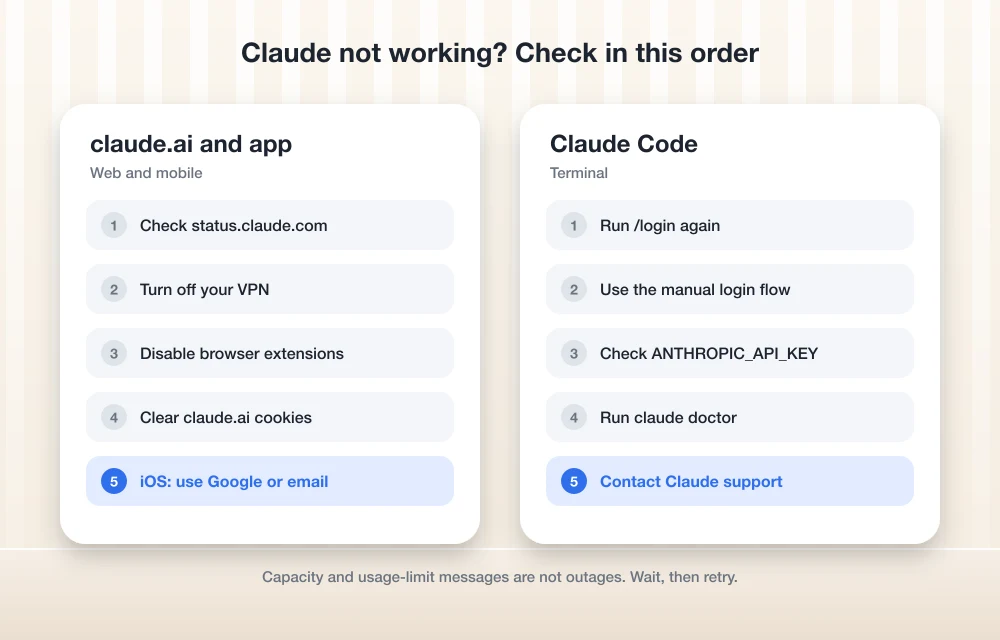
Quick answer: Check status.claude.com first. If there’s an active incident, wait it out. If everything is green, turn off your VPN, disable browser extensions, and clear your cache and cookies for claude.ai, which is what Anthropic recommends for “There was an error logging you in.” On the iPhone app, sign in with Google or email if Sign in with Apple fails. In Claude Code, run /login again, and if it hangs, use the manual login flow.
What went wrong on November 13 and 14
All of these come from the incident history on Anthropic’s Claude status page. Times are Eastern.
| When (ET) | What broke | Status |
|---|---|---|
| Nov 12, 11:03 a.m. to Nov 13, 11:40 a.m. | Microsoft 365 connector and Claude for Outlook, caused by a Microsoft 365 service incident | Resolved |
| Nov 13, 4:58 a.m. | Signing in to claude.ai and Claude Code | Fix deployed 6:05 a.m., resolved |
| Nov 13, 8:09 a.m. | Elevated errors on claude.ai, the API, Claude Code, connectors and agents | Resolved 10:38 a.m. |
| Nov 13, 9:34 to 11:03 p.m. | Purchases, plan upgrades and cancellations on claude.ai | Resolved |
| Nov 14, 2:11 a.m. | Sign in with Apple on the Claude iOS app | Investigating at the time of writing |
The Microsoft 365 connector problem came from the same Microsoft outage that took down Outlook. Our guide to fixing Outlook during the Microsoft 365 outage covers that side.
1. Check the Claude status page
Start here, because no amount of troubleshooting fixes a server-side outage. Open status.claude.com and look at claude.ai, the Claude API and Claude Code. If any of them shows an active incident, wait for the “Resolved” update. You can subscribe to updates by email or text on the same page.
2. Fix “There was an error logging you in”
If the status page is clear and you still can’t sign in, Anthropic’s guide to Claude error messages recommends three things:
- Turn off your VPN. Then reload claude.ai.
- Disable browser extensions. Ad blockers and privacy tools are the usual suspects. A private window is a quick way to test without them.
- Clear your cache and cookies for claude.ai, then sign in again.
3. Use Google or email on the iPhone app
While the Sign in with Apple problem is open, Anthropic says you can sign in with Google or email instead. The issue mainly affects new accounts. If you already have an account that was created with Apple, keep an eye on the status page for the fix.
4. Retry if Claude says it’s at capacity
A message saying Claude is unable to respond “due to unexpected capacity constraints” isn’t an outage. Anthropic says it means temporary high demand, so wait a few minutes and send your message again.
5. Check whether you hit a usage limit
Messages like “5-hour limit reached” or “You’ve reached your weekly limit” aren’t errors either. They tell you when your allowance resets. On a paid plan, you can turn on usage credits in your Usage settings to keep going before the reset.
6. Fix Claude Code sign-in problems
Claude Code had its own trouble during the November 13 sign-in incident. If it still won’t authenticate, Anthropic’s Claude Code troubleshooting guide covers these fixes:
- Log in again. Run
/logininside Claude Code. - Use the manual flow if login hangs. If the terminal is stuck on “Waiting for authentication…”, copy the URL it prints, finish signing in in any browser, and paste the code back into the terminal. This happens a lot over SSH or in dev containers.
- Check for a stray API key. Run
echo $ANTHROPIC_API_KEY. If a key was exported in another shell, it can cause “Not authenticated” errors. - Run diagnostics. Run
claude doctorfrom your normal shell, not from inside a Claude session. It prints a report you can attach to a support ticket.
7. Reconnect connectors that failed
Anthropic said that adding new connectors on claude.ai was still unavailable when the second November 13 incident moved to monitoring. If a connector such as Microsoft 365 is still throwing errors, disconnect it and connect it again in Claude’s settings now that the incident is resolved. Anthropic also said some scheduled tasks ran hours late or were skipped that morning, so check any that were due.
8. Contact Claude support
If nothing works, open the Claude Help Center and use the chat messenger in the lower-right corner. For sign-in problems, choose the “I can’t login” option. Anthropic handles support in writing, not by phone.
Claude isn’t the only service that had a bad week. Nvidia’s leadership change has also been shaking up the AI world, which we covered in our report on Jensen Huang resigning as Nvidia CEO. If you want backup tools for days like this, see our list of AI tools for content creators.
FAQs
Is Claude down right now?
Check status.claude.com for live status. Anthropic posts each incident there with updates until it’s resolved, including which parts of Claude are affected.
Why does Claude say “There was an error logging you in”?
Anthropic says to turn off your VPN, disable browser extensions, and clear your cache and cookies. If that doesn’t help, check the status page for an active incident.
Why can’t I sign in to the Claude iPhone app with Apple?
On November 14, Anthropic began investigating an issue with Sign in with Apple on the Claude iOS app, mainly affecting new accounts. It says you can use Google or email instead.
How do I fix Claude Code stuck on “Waiting for authentication”?
Copy the login URL Claude Code prints, complete the sign-in in any browser, and paste the returned code back into the terminal.
Featured image: Immo Wegmann on Unsplash.
Disclosure: TheTechHacker has no paid relationship with Anthropic or any company mentioned here.
More in How-to

Bing Chat not working on Edge or Windows? Best fixes to get it running today
Bing Chat, now powered by the latest ChatGPT-based model and integrated across Microsoft Edge and Windows, is drawing strong adoption, but users frequently report that it stops responding, fails to load, or throws generic “Something went wrong” errors. The good news is most issues are routine and fixable with a handful of browser, network, and…

How to Fix Remote Desktop Error 0xC000000D on Windows 11 26H2
Remote Desktop failing with error 0xC000000D on Windows 11 26H2? Microsoft has confirmed the bug and fixed it in KB5127936. Here’s who is affected, how to check your build, and what to do until you’re updated.

How to Fix Outlook Not Working After the Microsoft 365 Outage
If Outlook has been spinning, refusing to send, or showing an empty inbox since Thursday, November 12, you’re not alone and it probably isn’t your computer. Microsoft has been dealing with a large Microsoft 365 incident that hit Exchange Online, the service behind work and school Outlook mailboxes, and features in Teams and other apps…
The week in tech, minus the noise.
New reviews, fixes and the stories that matter — once a week, straight to your inbox.
We only use your email to send the newsletter. Unsubscribe any time. See our privacy policy.
Comments