

How to Fix Chase App Not Working: Login, Balance and Transfer Problems
On Monday, November 16, a lot of Chase customers found the app stuck, transfers slow and logins failing, and Chase later confirmed a real problem on its end. But an outage is not the only reason the Chase app stops working. Plenty of sign-in trouble comes from the phone itself, and that part you can…


Photo by sarah b on Unsplash
On Monday, November 16, a lot of Chase customers found the app stuck, transfers slow and logins failing, and Chase later confirmed a real problem on its end. But an outage is not the only reason the Chase app stops working. Plenty of sign-in trouble comes from the phone itself, and that part you can usually fix in a few minutes.
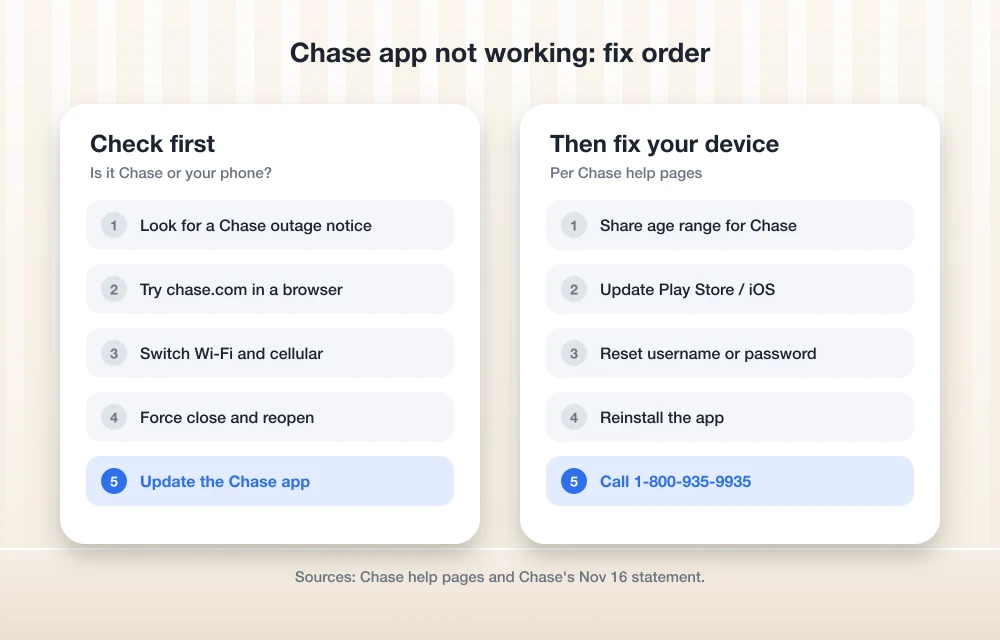
So I put together the fixes in the order I would try them, using Chase’s own help pages and its official statement.
Quick answer: First check whether Chase itself is having problems, since a software bug slowed Chase transactions on November 16. If Chase is fine, try chase.com in a browser, switch between Wi-Fi and cellular, then force close and update the Chase app. If you still cannot sign in, make sure you shared your age range with Chase in your phone’s settings, which Chase now needs before you can use the app. For anything else, call Chase at 1-800-935-9935.
What Happened With Chase on November 16
On Monday afternoon, JPMorganChase posted an official statement saying it had “experienced a temporary issue related to a software bug in on-premise hardware systems” and that there was “no evidence this is cyber-related.” The bank said it was taking longer than usual to service some customers, that other banks may have been affected where Chase was part of a transaction, and that customers still had access to their accounts and funds. It said it was working to fix the problem by the end of the day.
If your problem started on November 16 and was mostly slow transactions, pending transfers or Zelle payments that took longer than usual, that bug is the likely cause. Give pending items time to post before you try sending money again, so you do not end up paying twice.
1. Check Whether It Is Chase or Your Phone
Before you change anything, sign in at chase.com in a web browser. If the website works and the app does not, the problem is on your phone. If both fail, it is probably Chase, and the only real fix is to wait. Chase’s official social media accounts are the place to look for updates.
2. Switch Between Wi-Fi and Cellular
A flaky network causes more app errors than people think. Turn Wi-Fi off and try on cellular data, or the other way around. If nothing loads anywhere, our guide to fixing Wi-Fi connected but no internet walks through router and network resets.
3. Force Close and Reopen the App
On iPhone, swipe up from the bottom, pause, and swipe the Chase app away. On Android, open Recent apps and swipe it off. Then open the app again. Chase’s own help page suggests closing and relaunching the app when you see an error.
4. Update the Chase App and Your Phone
Open the App Store or Google Play and install any Chase Mobile update. Then check for a phone update in Settings. If your iPhone is not offering the latest update, see our fix for iPhone not showing the iOS 27.2 update.
5. Share Your Age Range With Chase
This one catches a lot of people. Chase says state laws now require app makers to confirm a user’s age, and Apple and Google handle that check. Chase only gets an age range indicator, not your birth date. According to Chase’s age verification page, if you choose not to share it, you may not be able to sign in.
- iPhone or iPad: Go to Settings, tap your name, then Personal Information, then Age Range for Apps. Under Ask First, set Chase to Shared.
- Android: Allow the Google prompt when you open Chase Mobile. If you never see it, update Google Play Store and any Android system updates, then close and relaunch the app.
- Family Link accounts: The family manager has to approve the age range. Chase says a pending or denied approval can block access.
6. Reset Your Username or Password
If the app says your details are wrong, use “Forgot username/password” on the sign-in screen. Chase says the app uses the same username and password as chase.com, so a reset fixes both.
7. Delete and Reinstall the App
Uninstall Chase Mobile, restart your phone and install it again from the App Store or Google Play. You will need to sign in again and may have to confirm your identity with a code.
8. Call Chase
For personal banking, online banking and app support, Chase lists 1-800-935-9935. For credit cards, it lists 1-800-432-3117. Chase also asks people not to post account numbers or personal information when contacting it on social media.
Watch Out for Outage Scams
Big outages bring fake texts and emails offering “refunds” or asking you to “verify” your account. Do not click links in those messages. Open the Chase app or type chase.com yourself instead. The same rule applies to any big service disruption, like the recent Microsoft 365 outage.
FAQs
Why is my Chase app not working today?
It could be a Chase-side issue, like the software bug Chase confirmed on November 16, 2026, or a problem on your phone such as an outdated app, a bad connection or a missing age range setting. Try chase.com in a browser to tell the difference.
Was the Chase outage a hack?
Chase said there was no evidence the November 16 problem was cyber-related and blamed a software bug in on-premise hardware systems.
Why does Chase ask for my age range?
Chase says state laws require app developers to confirm age requirements. Apple and Google run the check and share only an age range indicator with Chase, not your birth date.
What is the Chase customer service number?
Chase lists 1-800-935-9935 for personal banking and online or mobile banking support, and 1-800-432-3117 for credit cards.
Featured image: sarah b on Unsplash.
Disclosure: TheTechHacker has no paid relationship with JPMorganChase, Apple or Google.
More in How-to

How to Fix Claude Not Working: Login Errors, Outages and Sign in With Apple
Claude had a rough couple of days. On November 13, Anthropic logged two separate incidents with elevated errors across claude.ai, the Claude API and Claude Code. The first stopped people from signing in, and the second, a few hours later, hit chats, connectors and agents. Late that night, purchases and plan upgrades failed for about…
How to Fix iPhone 18 Pro and Pro Max Speaker Crackling and Popping
Hearing crackles, pops or ticks from your iPhone 18 Pro or Pro Max earpiece? Here’s how to tell software from hardware, which settings to check, and when to take it to Apple.
How to Fix VPN Not Connecting on iPhone: 11 Fixes to Try
Is your VPN spinning forever or showing connected with no internet? Here are the fixes I’d try, in order, from a quick restart to resetting network settings and reinstalling the VPN profile.
The week in tech, minus the noise.
New reviews, fixes and the stories that matter — once a week, straight to your inbox.
We only use your email to send the newsletter. Unsubscribe any time. See our privacy policy.
Comments