

How to Fix Outlook Not Working After the Microsoft 365 Outage
If Outlook has been spinning, refusing to send, or showing an empty inbox since Thursday, November 12, you’re not alone and it probably isn’t your computer. Microsoft has been dealing with a large Microsoft 365 incident that hit Exchange Online, the service behind work and school Outlook mailboxes, and features in Teams and other apps…

Photo by Kaitlyn Baker on Unsplash
If Outlook has been spinning, refusing to send, or showing an empty inbox since Thursday, November 12, you’re not alone and it probably isn’t your computer. Microsoft has been dealing with a large Microsoft 365 incident that hit Exchange Online, the service behind work and school Outlook mailboxes, and features in Teams and other apps that depend on it.
I’ve split the fixes into two groups: what to check while Microsoft is still recovering, and what to do if your Outlook stays broken after the service is back. Most people only need the first few steps.
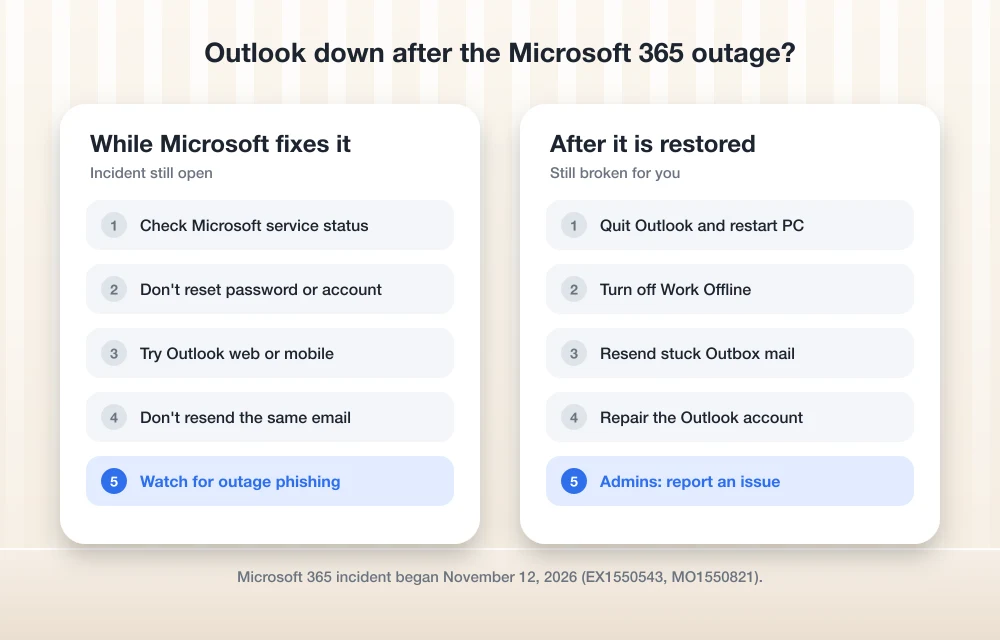
Quick answer: First check Microsoft’s service status page or, if you’re an admin, Health > Service health in the Microsoft 365 admin center. If the incident is still open, there’s nothing to fix on your side, so wait, keep Outlook closed for a bit, and avoid resending the same email over and over. Once Microsoft reports service restored, restart Outlook, turn off Work Offline, resend anything stuck in your Outbox, and repair your account if mail still won’t sync.
What happened to Outlook and Microsoft 365
Problems started around midday Eastern time on Thursday, November 12. In its status updates, Microsoft said affected servers were failing automated health checks and that a process responsible for setting up secure connections was getting overwhelmed, which stopped those servers from handling requests. Later on Thursday, Microsoft said it had started rolling back a recent network configuration change that lined up with the start of the problem and was restarting affected servers.
On Friday, Microsoft reported “early stabilization and capacity improvements” as recovery continued, and said it had no evidence of malicious activity. Admins can track the incident in the admin center under the IDs EX1550543 (Exchange Online) and MO1550821 (Microsoft 365). Microsoft has not yet published a root cause and says a post-incident report will follow once the issue is fully mitigated.
Part 1: While Microsoft is still fixing it
1. Check the official status before you change anything
Microsoft’s public service status page is the fastest way to see whether the incident is still open. If you manage a Microsoft 365 tenant, Microsoft’s service health guide says to sign in to the admin center and go to Health > Service health. Look under “Active issues Microsoft is working on” and open the incident to read every update. If the status says Investigating, Service degradation, Service interruption, Restoring service or Extended recovery, the problem is still on Microsoft’s end.
2. Don’t reset your password or remove your account
When Outlook keeps asking you to sign in during an outage, it’s tempting to change your password, delete the account from Outlook, or rebuild your profile. Hold off. Those steps don’t fix a server-side problem, and removing an account can mean re-downloading your whole mailbox once things recover.
3. Try Outlook on the web or your phone
Open Outlook in a browser or the Outlook mobile app. If those fail too, you’re looking at the outage. If they work while the desktop app doesn’t, the problem may be local, and Part 2 below is where you should go once the incident is closed.
4. Expect late email, and don’t keep hitting Send
Messages sent during a disruption can show up late once servers catch up. Some organizations told staff to plan for delays. Florida Gulf Coast University, for example, warned of delayed email for 24 to 36 hours, according to the Associated Press. Sending the same message five times just means the recipient may get five copies later. If something is urgent, call or use a channel that doesn’t run through Exchange Online.
5. Watch for outage-themed phishing
Big outages tend to bring fake “verify your mailbox” or “restore your account” emails. Microsoft’s updates are posted on its status page and in the admin center, so treat any email asking you to sign in to “fix” Outlook with suspicion. Our guide to the best email security tools for small businesses covers the filters that catch this kind of message.
Part 2: If Outlook is still broken after service is restored
6. Close Outlook fully and restart your computer
Outlook can hold onto a failed connection long after the service recovers. Quit Outlook completely (on Windows, check that it’s gone from the system tray too), restart your PC or Mac, then open Outlook and give it a few minutes to sync.
7. Turn off Work Offline
In classic Outlook for Windows, open the Send / Receive tab and check the Work Offline button. If it’s highlighted, click it to go back online. People often switch this on by accident while trying to stop error pop-ups during an outage.
8. Clear out the Outbox
Open your Outbox folder. Anything that failed during the outage may still be sitting there. Open each message, check it still needs to go out, and click Send. Delete duplicates first so recipients don’t get several copies.
9. Repair the account
If mail still won’t sync in classic Outlook, go to File > Account Settings > Account Settings, select your work account, and click Repair. If that doesn’t do it, our step-by-step guide on fixing Outlook not syncing walks through clearing the cache, rebuilding a profile and the new Outlook app.
For IT admins: what to do now
- Subscribe to updates for the incident: open it in Service health and select Manage notifications for this issue, or turn on email alerts under Customize > Email.
- If your users still have problems after Microsoft marks the incident restored, use Report an issue on the Service health page so Microsoft can check whether it’s tied to the outage.
- Watch the Issue history tab for the post-incident report, which Microsoft says will include the root cause.
- Keep a short note for staff on which backup channels to use next time, whether that’s phones, a chat tool or a secondary mailbox.
If this outage has your team rethinking its setup, our comparison of Google Workspace vs Microsoft 365 lays out how the two suites differ for small businesses.
FAQs
Is Outlook down right now?
Check Microsoft’s service status page or Health > Service health in the Microsoft 365 admin center. As of Friday, November 13, Microsoft reported early stabilization but had not announced full mitigation.
What caused the Microsoft 365 outage?
Microsoft hasn’t published a root cause yet. Its updates pointed to servers failing health checks and an overwhelmed secure-connection process, and it rolled back a network configuration change that matched the start of the problem. Microsoft said there was no evidence of malicious activity.
Will I lose emails sent during the outage?
Microsoft hasn’t said that mail was lost. Messages may arrive late as service recovers, and anything you sent that failed may still be in your Outbox, so check there before resending.
Does the outage affect personal Outlook.com accounts?
Microsoft’s incident centers on Exchange Online, which runs work and school Microsoft 365 mailboxes. If a personal account is misbehaving, check Microsoft’s status page for any separate Outlook.com notice.
Featured image: Kaitlyn Baker on Unsplash.
Disclosure: TheTechHacker has no paid relationship with Microsoft or any company mentioned here.
More in How-to

How to Fix Outlook Not Syncing Email in Microsoft 365 (Windows, Mac, iPhone and Android)
Outlook stuck on old mail? Here’s how I’d fix Microsoft 365 sync problems in new and classic Outlook on Windows, Outlook for Mac, and the Outlook app on iPhone and Android.

How to Fix Emails Bouncing When You Send to Outlook.com and Hotmail Addresses
You send an invoice and it bounces back, then a quote bounces too, and when you look closer the customers involved all have @outlook.com, @hotmail.com or @live.com addresses. Meanwhile your Gmail and company-domain contacts are getting your mail without any trouble. If this started around early November 2026, the timing isn’t a coincidence, because since…

Bing Chat not working on Edge or Windows? Best fixes to get it running today
Bing Chat, now powered by the latest ChatGPT-based model and integrated across Microsoft Edge and Windows, is drawing strong adoption, but users frequently report that it stops responding, fails to load, or throws generic “Something went wrong” errors. The good news is most issues are routine and fixable with a handful of browser, network, and…
The week in tech, minus the noise.
New reviews, fixes and the stories that matter — once a week, straight to your inbox.
We only use your email to send the newsletter. Unsubscribe any time. See our privacy policy.
Comments