

How to Fix Windows Activation Error 0x80041008 After the November Update
If you manage Windows PCs or servers and your activation scripts started failing this week with error 0x80041008, the November security update is the cause. Microsoft confirmed the bug on November 13 and released out-of-band updates the same day to fix it. The error shows up when you run slmgr.vbs commands to set a KMS…


Photo by Taylor Vick on Unsplash
If you manage Windows PCs or servers and your activation scripts started failing this week with error 0x80041008, the November security update is the cause. Microsoft confirmed the bug on November 13 and released out-of-band updates the same day to fix it. The error shows up when you run slmgr.vbs commands to set a KMS host, install a product key or activate Windows, and it reads “Invalid parameter.”
Before you start rebuilding images or calling your licensing vendor, know two things. Machines that were already activated stay activated, and the fix is a single update. The trick is that it isn’t offered the usual way for most versions.
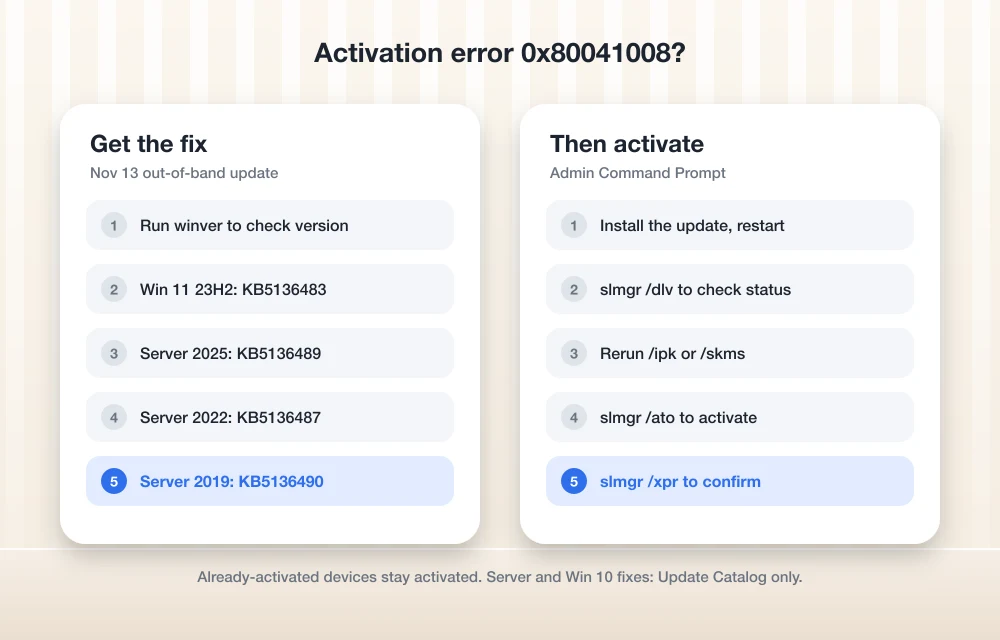
Quick answer: Install the November 13 out-of-band update for your version of Windows. On Windows 11, version 23H2, that’s KB5136483, available from Settings > Windows Update > Advanced options > Optional updates or the Microsoft Update Catalog. For Windows Server 2025 (KB5136489), Server 2022 (KB5136487), Server 2019 and Windows 10 Enterprise LTSC 2019 (KB5136490), and Windows 10 22H2 ESU and Enterprise LTSC 2021 (KB5136493), download it from the Microsoft Update Catalog. Restart, then rerun your slmgr command.
What’s actually broken
According to Microsoft’s Windows message center, after the November 2026 security update, certain licensing and activation operations that use the Software Licensing Management Tool (SLMGR) might fail with error 0x80041008. Microsoft says the bug primarily affects organizations that use slmgr.vbs commands or automated processes to configure Key Management Service (KMS) activation, install product keys or manage Windows licensing. It describes the impact as a limited number of enterprise devices.
In practice, that means commands like these can fail on an updated machine:
slmgr.vbs /ipkto install a product keyslmgr.vbs /skmsor/skms-domainto point a client at your KMS host- Deployment or imaging scripts that call slmgr during setup
Microsoft says devices with existing KMS configurations that didn’t need new slmgr commands weren’t affected. So a fleet that’s already activated and renewing normally won’t suddenly go unlicensed. The pain lands on new builds, re-imaged machines and anyone changing keys or KMS settings right now.
Find the right fix for your version
Microsoft released a separate out-of-band update for each affected version. Each one is cumulative and includes the November security fixes, so you don’t lose any protection by installing it.
| Windows version | Fix update | Where to get it |
|---|---|---|
| Windows 11, version 23H2 | KB5136483 | Optional updates or Update Catalog |
| Windows Server 2025 | KB5136489 | Update Catalog only |
| Windows Server 2022 | KB5136487 | Update Catalog only |
| Windows Server 2019, Windows 10 Enterprise LTSC 2019 | KB5136490 | Update Catalog only |
| Windows 10 22H2 ESU, Windows 10 Enterprise LTSC 2021 | KB5136493 | Update Catalog only |
To check your version, press Windows + R, type winver and press Enter.
Install the fix on Windows 11, version 23H2
This is the only version where the fix shows up in Settings. Go to Settings > Windows Update > Advanced options > Optional updates, select KB5136483 and install it. Microsoft’s KB5136483 release notes say the update brings the build to 22631.7714, and that you need the latest servicing stack update installed first. Windows Update normally handles that for you.
If 23H2 is still in your fleet, note that its Enterprise and Education editions reached the end of regular updates on November 10, so this may be one of the last fixes it gets. Our report on Windows 11 23H2 end of support covers the dates.
Install the fix on Windows Server and Windows 10
For Server 2025, 2022, 2019 and the listed Windows 10 editions, Windows Update won’t offer the fix. Go to the Microsoft Update Catalog, search for the KB number from the table above, and download the package that matches your architecture. Double-click the .msu file to install it, then restart.
If you use WSUS, the update won’t sync automatically. You can import it into WSUS manually from the Update Catalog. Microsoft also says Windows Update for Business won’t get this out-of-band update, and the fix will be in the next regular security update instead.
Rerun your activation commands
After the restart, open Command Prompt as administrator and run your activation steps again. If your script failed partway, it’s worth checking where each machine stands first:
slmgr.vbs /dlvshows detailed license information, including the KMS host the machine is using.slmgr.vbs /xprshows when the current activation expires.slmgr.vbs /atoforces an activation attempt.
Microsoft’s documentation notes that after installing a key with /ipk, you should restart the PC or the Software Protection service to keep the licensing service stable.
If you can’t patch right away
If a change freeze means you can’t install the out-of-band update yet, hold off on slmgr changes on machines that already have the November update. Already-activated devices keep working, so the safest approach is to pause re-imaging or key changes until the fix is in. Don’t uninstall the November security update to work around this. It carries this month’s security fixes, which we covered in our November 2026 Patch Tuesday report.
If the November update itself won’t install on some machines, see our guide to fixing KB5132061 not installing.
FAQs
What does error 0x80041008 mean in Windows activation?
It means “Invalid parameter.” After the November 2026 security update, Microsoft says some slmgr.vbs licensing and activation commands might fail with this error, mostly on enterprise devices using KMS activation.
Will my already-activated PCs become unactivated?
No. Microsoft says devices that are already activated remain activated. The bug affects new activation, key installation and KMS configuration commands.
Why don’t I see the fix in Windows Update?
Only Windows 11, version 23H2 gets the fix through Optional updates. For Windows Server 2025, 2022 and 2019 and the listed Windows 10 editions, Microsoft says the update is available only from the Microsoft Update Catalog.
Does this affect home users?
Microsoft describes it as affecting a limited number of enterprise devices that use slmgr commands or automated licensing processes. Home PCs that activate with a digital license normally don’t use these commands.
Featured image: Taylor Vick on Unsplash.
Disclosure: TheTechHacker has no paid relationship with Microsoft or any company mentioned here.
You might also like
How to Fix KB5132061 Not Installing on Windows 11 (0x800f0993 and More)
Windows 11’s November security update, KB5132061, arrived on Patch Tuesday, November 10, and on some PCs it just won’t go in. You click Install, the progress bar crawls, and then Windows Update shows 0x800f0993, 0x80070306 or 0x800f0989, or quietly tries again on the next restart. Microsoft has acknowledged the problem, which helps, because it means…
November 2026 Patch Tuesday: Outlook Zero-Day Fixed, USB Audio Code 10 Bug Finally Solved
Patch Tuesday landed on November 10 this month, and for once the Outlook part of the release matters more than the Windows part. Microsoft fixed a spoofing bug in Outlook (CVE-2026-124194) that it says was already being exploited before the patch was ready, and that fix doesn’t come through Windows Update at all, it comes…

How to Fix ‘No Internet, Secured’ Connection Error
No Internet, Secured is a most common error when you try to connect Windows 10 machine with an active Internet connection. It is a strange error by Windows OS and it shows No Internet even after when you connected to an Internet connection. Why No Internet Secured error occurs? In many types of Windows 10…
The week in tech, minus the noise.
New reviews, fixes and the stories that matter — once a week, straight to your inbox.
We only use your email to send the newsletter. Unsubscribe any time. See our privacy policy.
Comments