

How to Fix SQL Server Linked Server Connections Staying Open After Windows Updates
If your SQL Server box has been getting slower every day since October, and your Oracle or PostgreSQL DBA keeps asking why there are hundreds of idle sessions coming from it, this one’s for you. Microsoft has confirmed that Windows updates released on or after October 13, 2026, can leave SQL Server linked server connections…

Photo by Kevin Ache on Unsplash
If your SQL Server box has been getting slower every day since October, and your Oracle or PostgreSQL DBA keeps asking why there are hundreds of idle sessions coming from it, this one’s for you. Microsoft has confirmed that Windows updates released on or after October 13, 2026, can leave SQL Server linked server connections open after the queries finish. The connections pile up on the remote database until something gives.
A proper fix is on the way. In the meantime, there are safe ways to find the leaked connections, clean them up and stop them from taking the server down. I’ll go through what Microsoft has said, then the cleanup steps for Oracle and PostgreSQL, then how to keep it under control until the patch lands.
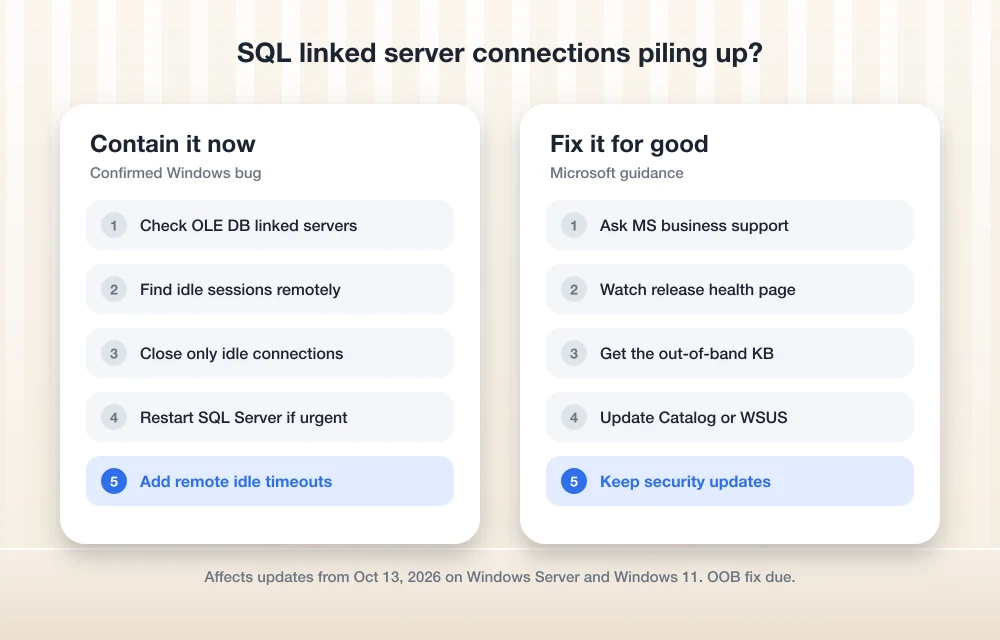
Quick answer: This is a confirmed Windows bug, not a SQL Server or driver misconfiguration. It affects linked server queries that use OLE DB providers, including connections to Oracle and PostgreSQL, after the October 13, 2026 Windows updates (KB5127648 on Windows 11 25H2) and later. Microsoft’s workarounds are to close idle connections or restart the SQL Server service, and business customers can get a mitigation from Microsoft Support. An out-of-band update to fix it is expected within days.
What Microsoft confirmed
On November 11, Microsoft added the issue to its Windows release health dashboard. It says that after the October 13 updates and later are installed on server devices, connections created by SQL Server linked server queries “might remain open after the queries complete.” As more queries run, connections to external databases accumulate instead of closing, which can slow or degrade server performance over time.
The bug sits in Windows, so it shows up across a wide range of versions:
| Type | Affected versions |
|---|---|
| Windows Server | 2025, 2022, version 1809, 2016, 2012 R2, 2012 |
| Windows client | Windows 11 26H1, 25H2, 24H2, 23H2; Windows 10 1809; Windows 10 Enterprise LTSC 2019 |
The update that introduced it depends on your version. On Windows 11 25H2 it’s the October update, KB5127648. Microsoft lists a different originating update for each Windows Server version on its release health pages, so check the one for your OS.
1. Confirm you’re affected
Look for two things: linked servers that use an OLE DB provider (the Oracle provider, or a PostgreSQL OLE DB or ODBC bridge), and a connection count on the remote database that only goes up. In SQL Server Management Studio, expand Server Objects > Linked Servers to see which providers you use. Then check the remote side, since that’s where the leaked sessions show up.
2. Find the idle connections on PostgreSQL
On the PostgreSQL server, run this query, replacing the IP with your SQL Server’s address:
SELECT pid, usename, application_name, state, state_change FROM pg_stat_activity WHERE client_addr = '10.0.0.25' AND state = 'idle' ORDER BY state_change;
Sessions that have been idle for hours, long after the linked queries finished, are the leaked ones. To close one, run SELECT pg_terminate_backend(pid); with its process ID. Start with the oldest sessions, and avoid any that show recent activity.
3. Find the idle connections on Oracle
On Oracle, query v$session for inactive sessions from your SQL Server host:
SELECT sid, serial#, username, machine, program, status, last_call_et FROM v$session WHERE machine LIKE '%SQLHOST%' AND status = 'INACTIVE' ORDER BY last_call_et DESC;
The last_call_et column shows how many seconds each session has been idle. A DBA can close stale sessions with ALTER SYSTEM KILL SESSION 'sid,serial#' IMMEDIATE;.
Microsoft’s own caution applies to both databases: closing connections or restarting services can interrupt active queries or transactions. Do it in a quiet window, and target only sessions that are clearly idle.
4. Restart the SQL Server service if it’s urgent
If the server is already struggling, restarting the SQL Server service drops every linked connection at once and restores performance. Microsoft lists this as a temporary workaround, but warns the problem can come back after enough run time. Schedule restarts during maintenance windows until the fix arrives, and let your app teams know first.
5. Add idle timeouts on the remote database
To stop the pile-up from getting out of hand between cleanups, let the remote database close idle sessions itself:
- PostgreSQL 14 and later: set
idle_session_timeoutfor the login your linked server uses, for exampleALTER ROLE linked_user SET idle_session_timeout = '30min';. - Oracle: assign the linked server’s user a profile with an
IDLE_TIMElimit, which marks long-idle sessions for cleanup.
Apply these only to the account the linked server uses, so you don’t cut off other applications.
6. Ask Microsoft for the business mitigation
Microsoft says a mitigation is available for affected enterprise devices through Microsoft Support for business. If restarting isn’t practical, open a case and reference the “SQL Server linked server connections might remain open” known issue.
7. Install the out-of-band fix when it ships
Microsoft says it will fix this with an out-of-band update “in the next few days.” Out-of-band updates often aren’t pushed through Windows Update automatically on servers. Watch your OS’s release health page for the KB number, then get it from the Microsoft Update Catalog or import it into WSUS. Don’t uninstall the October and November security updates to work around this, since they contain important security fixes.
Microsoft shipped a similar out-of-band fix this week for a licensing bug, covered in our guide to fixing Windows activation error 0x80041008. If the November update itself won’t install, see how to fix KB5132061 not installing, and find more in our Windows 11 fixes hub.
FAQs
Why are SQL Server linked server connections staying open?
Microsoft confirmed that Windows updates released on or after October 13, 2026, can leave connections from SQL Server linked server queries open after they finish. It affects linked servers that use OLE DB providers, including those connecting to Oracle and PostgreSQL.
Is there a fix for the SQL Server linked server bug?
Microsoft says an out-of-band update will fix it within days. Until then, close idle connections or restart the SQL Server service, or ask Microsoft Support for business for the mitigation.
Which Windows versions are affected?
Windows Server 2025, 2022, 1809, 2016, 2012 R2 and 2012, plus Windows 11 26H1, 25H2, 24H2 and 23H2, Windows 10 1809 and Windows 10 Enterprise LTSC 2019.
Should I uninstall the October Windows update?
Microsoft doesn’t recommend that. The updates include security fixes. Use the workarounds and install the out-of-band fix when it’s released.
Featured image: Kevin Ache on Unsplash.
More guides: See all our Windows 11 fixes.
Disclosure: TheTechHacker has no paid relationship with Microsoft, Oracle or any company mentioned here.
You might also like

How to Fix Remote Desktop Stuck on “Please Wait” in Windows 11
Is your Remote Desktop session stuck on “Please wait” or “Please wait for the Remote Desktop Configuration” in Windows 11? In most cases, the remote PC is hanging during sign-in, usually because of RDP’s network detection, a UDP transport problem, a stuck old session, or a user profile that won’t load. The quickest fixes are…

How to Fix “Headphones Not Recognized” on iPhone After iOS 26 Update
After the iOS 26 update, a small but noticeable group of iPhone users started reporting a strange issue: wired headphones are no longer being recognized properly. Some are stuck in speaker-only mode, while others see their headphones connect and disconnect randomly. Although most complaints are about wired headphones, a few Bluetooth users are facing similar…

How to Fix ‘No Internet, Secured’ Connection Error
No Internet, Secured is a most common error when you try to connect Windows 10 machine with an active Internet connection. It is a strange error by Windows OS and it shows No Internet even after when you connected to an Internet connection. Why No Internet Secured error occurs? In many types of Windows 10…
The week in tech, minus the noise.
New reviews, fixes and the stories that matter — once a week, straight to your inbox.
We only use your email to send the newsletter. Unsubscribe any time. See our privacy policy.
Comments