

Windows 11 23H2 Enterprise and Education Reach End of Updates on November 10, 2026
Windows 11 23H2 Enterprise and Education get their last update on November 10, 2026. Here's who is affected, how to check your version and how to upgrade.

Still running Windows 11 23H2 on a work or school PC? Mark November 10, 2026. That’s when Microsoft stops updating the 23H2 Enterprise and Education editions.
Home and Pro users on 23H2 lost support a whole year ago. So this is basically the end of the road for 23H2. Here’s what it means for you, and what I’d do about it.
Quick answer: Microsoft’s Windows 11 release information page lists November 10, 2026 as the end of updates for version 23H2 Enterprise and Education. That date falls on Patch Tuesday, so the November update is expected to be the final regular one for these editions. Home and Pro 23H2 already reached end of servicing on November 11, 2025. If you’re still on 23H2, plan your move to a supported version such as 25H2 or 26H2.
What happened
On Microsoft’s Windows 11 release information page, 23H2 shows a release date of October 31, 2023 and an end of updates date of November 10, 2026. The latest 23H2 build there is 22631.7654, an out-of-band fix from October 26, 2026.
So why did business PCs get a bonus year? Simple. Home and Pro versions get 24 months of servicing. Enterprise and Education get 36. That’s why Home and Pro on 23H2 stopped in November 2025, and the business editions kept going till now.
Who is affected
Microsoft’s Windows 11 Enterprise and Education lifecycle page lists Education, Enterprise and Enterprise multi-session. In real life, that means office laptops, school computers and virtual desktops that IT hasn’t got round to upgrading.
What about Windows 11 IoT Enterprise 23H2? Honestly, I couldn’t confirm its date on Microsoft’s pages. If you look after kiosks or other IoT gear, check the lifecycle page for your exact edition.
What end of servicing means
Nothing dramatic happens on November 11. Your PC boots, your apps open, life goes on. The issue is security.
Microsoft hasn’t posted a separate note just for 23H2, at least not that I found. But when 22H2 Enterprise and Education hit this point, Microsoft said they’d get no more security updates and asked people to move to the latest version. I’d expect the same thing now. Any new hole found after November 10 stays open on 23H2.
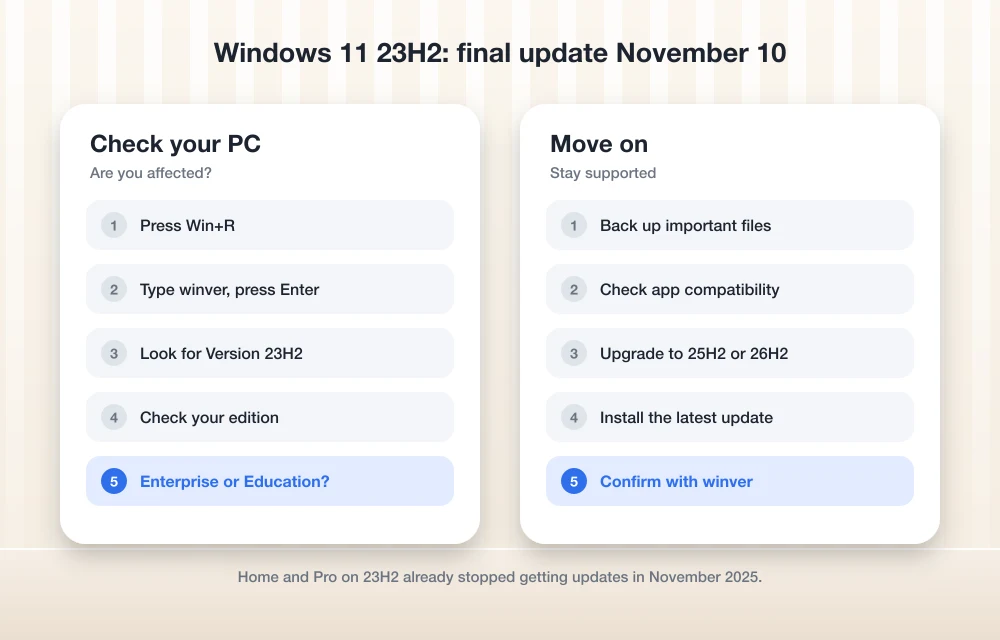
How to check your Windows 11 version
Ten seconds, tops:
- Press Windows + R on your keyboard.
- Type winver and press Enter.
- A small window shows your version (like 23H2 or 25H2) and the OS build number.
Build starts with 22631? You’re on 23H2. 26100 is 24H2, and 26200 is 25H2. You’ll also find it under Settings > System > About, in the Windows specifications part.
How to upgrade from 23H2
Microsoft says Windows 11 26H2 is now out for all eligible devices. If you’re already on 24H2 or 25H2, it comes as a tiny enablement package, basically a switch that turns on features your PC already has. Quick install. Home users on those versions just go to Settings > Windows Update.
Now the catch. Microsoft only mentions 24H2 and 25H2 as starting points for that quick route. I couldn’t confirm a direct 23H2 to 26H2 jump, so plan for a full feature update instead. On a work PC, IT will usually handle it anyway.
And forget 26H1. It only ships on select new devices and you won’t see it in Windows Update.
Big update coming? Back up first. I keep my important folders in the cloud, and I wrote about why Dropbox is still a good choice. One more heads-up: Microsoft lists a 26H2 bug where Remote Desktop fails for non-admin users if Administrator protection is on. Here’s my fix for Remote Desktop error 0xC000000D. And if you land on a blank screen after signing in, see how to fix the Windows 11 26H2 black screen.
What I’d do now
Open winver today. See 23H2 on a work or school laptop? Message your IT team and ask what the plan is. On your own Home or Pro PC, you’re already overdue, so update now. Grab the November 10 Patch Tuesday update first, then move to a supported version before December’s patches show up.
Frequently Asked Questions
When does Windows 11 23H2 Enterprise and Education support end?
Microsoft’s Windows 11 release information page lists November 10, 2026 as the end of updates for version 23H2 Enterprise and Education. That date is Patch Tuesday. Home and Pro 23H2 already reached end of servicing on November 11, 2025.
Will my PC stop working after November 10, 2026?
No. Your PC will keep running, but based on how Microsoft handled earlier versions, it will stop receiving security updates, which leaves it more exposed to new threats.
Can I upgrade from 23H2 directly to 26H2?
Microsoft’s posts only mention 24H2 and 25H2 as starting points for the quick 26H2 enablement package. I couldn’t confirm a direct jump from 23H2, so expect a full feature update instead.
More in News
Windows 10 ESU 2027: Free Consumer Security Updates Did Not End in October 2026
Windows 10 ESU 2027: Microsoft now says consumer security updates run to October 12, 2027. Here's how to enroll, check Windows 11 support and plan ahead.
Pixel 6 and Pixel 6 Pro Reach End of Support: October 2026 Was Their Last Update
Google's October 2026 Pixel update was the last for the Pixel 6 and 6 Pro. Here's what it means, how to check, and why the Pixel 6a isn't affected.
GTA 6 Preload Starts November 10 on PS5 and Xbox Series X|S
GTA 6 preload opens November 10 on PS5 and Xbox Series X|S, ahead of the November 19 launch. See the reported 212GB size, unlock time and preload steps.
The week in tech, minus the noise.
New reviews, fixes and the stories that matter — once a week, straight to your inbox.
We only use your email to send the newsletter. Unsubscribe any time. See our privacy policy.
Comments