

How to Run Payroll for a Small Business in the US: Step-by-Step Guide (2026)
Hiring your first employee is a big step, and payroll is usually the part that makes new owners nervous, because of the federal forms, tax rates and deposit deadlines that start the moment someone joins. Miss a deposit and the IRS can add penalties, even if you paid the full amount a few days late.…

Photo by Jakub Żerdzicki on Unsplash
Hiring your first employee is a big step, and payroll is usually the part that makes new owners nervous, because of the federal forms, tax rates and deposit deadlines that start the moment someone joins. Miss a deposit and the IRS can add penalties, even if you paid the full amount a few days late.
The good news is that payroll repeats the same cycle every pay period. This guide walks through it step by step, using the IRS’s 2026 rules for US employers.
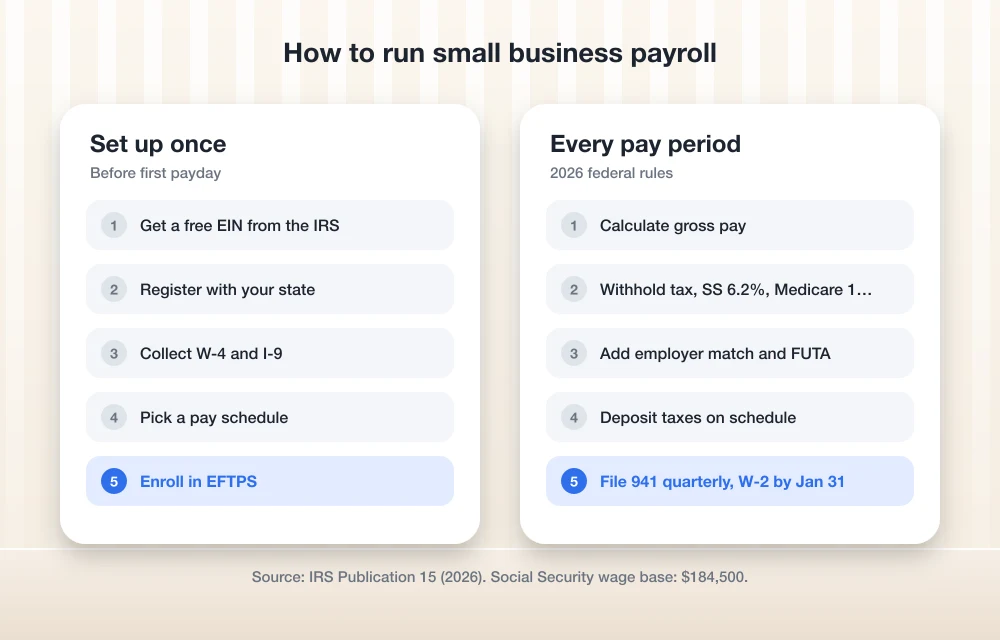
Quick answer: Get an EIN, register with your state for withholding and unemployment taxes, and collect a Form W-4 and Form I-9 from each employee. Each payday, calculate gross pay, withhold federal income tax, Social Security (6.2%) and Medicare (1.45%), and pay the employer’s matching share. Deposit taxes electronically on schedule, file Form 941 quarterly and Form 940 yearly, and issue W-2s by January 31.
Before your first payday: set up payroll
1. Get an Employer Identification Number (EIN)
You need an EIN to report employment taxes. You can apply for an EIN online for free through the IRS.
2. Register with your state
Most states require employers to register for state income tax withholding and state unemployment insurance. Your state’s labor or revenue department will give you account numbers and a state unemployment tax rate. Some cities and counties have their own payroll taxes too.
3. Collect forms from each new hire
- Form W-4: the employee’s federal withholding choices. You use it to work out how much federal income tax to withhold.
- Form I-9: verifies the employee is eligible to work in the US. You keep it on file and don’t send it to the government.
- State withholding form: many states have their own version of the W-4.
Every state also requires you to report new hires to a state directory, usually within 20 days of the start date.
4. Decide on a pay schedule
Weekly, biweekly, semimonthly or monthly all work, but many states set a minimum pay frequency, so check yours first.
5. Set up how you’ll pay employees and the IRS
Set up direct deposit or another payment method for employees. For taxes, the IRS says you must use electronic funds transfer (EFT) for all federal tax deposits. Options include EFTPS and IRS Direct Pay.
Every payday: the payroll cycle
6. Calculate gross pay
For salaried employees, divide the annual salary by the number of pay periods. For hourly employees, multiply hours worked by the hourly rate, and add overtime for nonexempt employees who work more than 40 hours in a workweek. Our list of employee scheduling and time tracking software compares options.
7. Withhold taxes and deductions
From each paycheck, withhold:
- Federal income tax, based on the employee’s W-4 and the IRS withholding tables in Publication 15-T.
- Social Security tax of 6.2%, up to the 2026 wage base of $184,500.
- Medicare tax of 1.45% on all wages. Once an employee’s wages pass $200,000 for the year, you also withhold 0.9% Additional Medicare Tax on the amount above that. There’s no employer share of the additional tax.
- State and local income tax, where it applies.
- Other deductions, such as health insurance premiums or retirement contributions.
8. Calculate your employer taxes
As the employer, you match the employee’s Social Security (6.2%) and Medicare (1.45%). You also owe federal unemployment tax (FUTA). According to the IRS’s Publication 15 (Circular E), Employer’s Tax Guide, the 2026 FUTA rate is 6.0% on the first $7,000 paid to each employee, but a credit of up to 5.4% for state unemployment taxes paid usually brings it down to 0.6%. That works out to a maximum of $42 per employee per year. FUTA is paid only by the employer and isn’t withheld from wages. You’ll also owe your state unemployment tax.
For one employee paid $2,000 every two weeks, it adds up like this:
| Item | Employee pays | Employer pays |
|---|---|---|
| Social Security (6.2%) | $124.00 | $124.00 |
| Medicare (1.45%) | $29.00 | $29.00 |
| FUTA (0.6%, first $7,000 only) | None | $12.00 |
| Federal income tax | Per W-4 | None |
9. Pay employees and keep records
Pay employees on schedule with a pay stub showing gross pay, deductions and net pay. The IRS says to keep employment tax records for at least four years.
Deposit taxes on time
10. Know your deposit schedule
The IRS assigns you a monthly or semiweekly deposit schedule based on a lookback period. If you reported $50,000 or less in taxes during that period, you’re a monthly depositor, and new employers usually start as monthly depositors. Monthly depositors deposit each month’s taxes by the 15th of the following month. Semiweekly depositors pay Wednesday, Thursday or Friday paydays by the following Wednesday, and Saturday through Tuesday paydays by the following Friday.
There’s one exception for everyone. If you build up $100,000 or more in taxes on any day, you must deposit by the next business day. Very small employers get a break in the other direction too. If your quarterly Form 941 liability is under $2,500, you can generally pay it with the return instead of making deposits.
File quarterly and year-end forms
11. File Form 941 every quarter
Form 941 reports the income tax, Social Security and Medicare you withheld and paid. It’s due by the last day of the month after each quarter ends, so April 30, July 31, October 31 and January 31. If you made all your deposits on time, you get until the 10th of the following month.
12. File Form 940 and W-2s at year end
Form 940 reports FUTA once a year and is due in late January or early February, depending on the calendar. By January 31, give each employee a Form W-2 and file copies with the Social Security Administration along with Form W-3.
Should you use payroll software?
You can do all of this by hand, but payroll software calculates withholding, makes tax deposits and files forms for you, which cuts the risk of a missed deadline. Our guide to the best payroll software for small businesses compares the main options, and if you also need hiring and employee records, see our list of the best HR software for small businesses.
FAQs
What payroll taxes does a small business pay in 2026?
Employers pay 6.2% Social Security on wages up to $184,500, 1.45% Medicare, federal unemployment tax (usually 0.6% on the first $7,000 per employee), and state unemployment tax. They also withhold the employee’s share of Social Security and Medicare, plus income taxes.
How often do I have to deposit payroll taxes?
Most new employers are monthly depositors and deposit by the 15th of the following month. Larger employers deposit semiweekly. If taxes reach $100,000 or more on any day, the deposit is due the next business day.
When are W-2s due to employees?
Give each employee a Form W-2 by January 31, and file copies with the Social Security Administration by the same date.
This article is general information, not tax or legal advice. Check IRS guidance or a tax professional for your situation.
Featured image: Jakub Żerdzicki on Unsplash.
More guides: See all our small business software guides.
Disclosure: TheTechHacker built QrewHR, mentioned above. We have no paid relationship with any other company mentioned here.
You might also like

Best Payroll Software for Small Businesses: Gusto, ADP, QuickBooks Payroll and More (2026)
I compare Gusto, QuickBooks Payroll, ADP RUN, Paychex Flex, Rippling and OnPay for US small businesses, with official pricing where it exists, contractor plans, tax penalty guarantees, mid-year switching and when payroll inside an ERP makes more sense.

Best Accounting Software for Small Businesses: QuickBooks vs Xero vs FreshBooks (2026)
I compare QuickBooks Online, Xero, FreshBooks, Zoho Books and Wave for US small businesses, covering plans, user limits, payroll add-ons, accountant access and migration. I also explain when accounting inside an ERP is the better fit.

Best HR Software for Small Businesses (2026)
A practical look at the best HR software for US small businesses in 2026, from all-in-one platforms and PEOs to budget per-user tools, plus how to choose by team size, security and compliance needs.
The week in tech, minus the noise.
New reviews, fixes and the stories that matter — once a week, straight to your inbox.
We only use your email to send the newsletter. Unsubscribe any time. See our privacy policy.
Comments