

Best VPS Hosting in 2026: DigitalOcean vs Linode vs Vultr vs Hostinger vs AWS Lightsail
I compare DigitalOcean, Akamai Linode, Vultr, Hostinger VPS and AWS Lightsail on CPU and RAM per plan, US data centers, backups and how much server work you’ll handle yourself.


Photo by Taylor Vick on Unsplash
Disclosure: TheTechHacker has no paid relationship with the companies in this article.
Almost every host sells a VPS now, and the entry plans look nearly identical on paper. The differences only show up after you deploy. What’s the CPU, really? Where does the server sit, what do backups cost, and how much admin work lands on you? And the homepage price is rarely the one you end up paying.
I’d shortlist five providers for a US-based site or app in 2026: DigitalOcean, Akamai’s Linode, Vultr, Hostinger VPS and AWS Lightsail. I’m comparing them on CPU and RAM per plan, US data center locations, how backups work, and how much of the server you’ll be maintaining yourself.
Quick answer: For most beginners, DigitalOcean is the easiest unmanaged VPS to start with, thanks to clear plans and optional extras like managed databases. Pick Akamai Linode or Vultr if you want the most US data center choices, Hostinger if you want the most RAM per plan and don’t mind prepaying, and AWS Lightsail if you already use AWS. All five are self-managed by default, so you’re responsible for updates and security.
What a VPS is, and what “unmanaged” really means
A VPS (virtual private server) is a slice of a physical server that acts like your own machine. You get a fixed share of CPU, RAM and storage, plus root access, which is full admin control. Each vCPU is a virtual processor core, and on cheaper plans you’re usually sharing it with other customers on the same hardware.
With an unmanaged server, the provider keeps the hardware and network running. Everything else is on you: installing and updating the OS, applying security patches, setting up the firewall and web server, and sorting out backups. Managed hosting takes that work away, but you pay more for it.
All five providers here are self-managed by default. A few sell managed add-ons for specific pieces, and I’ve noted those where they matter.
Don’t want to patch a Linux server? Then skip the VPS. The guide to the best web hosting for small business websites covers easier options, and a website builder is simpler still if you’d rather never touch a server at all.
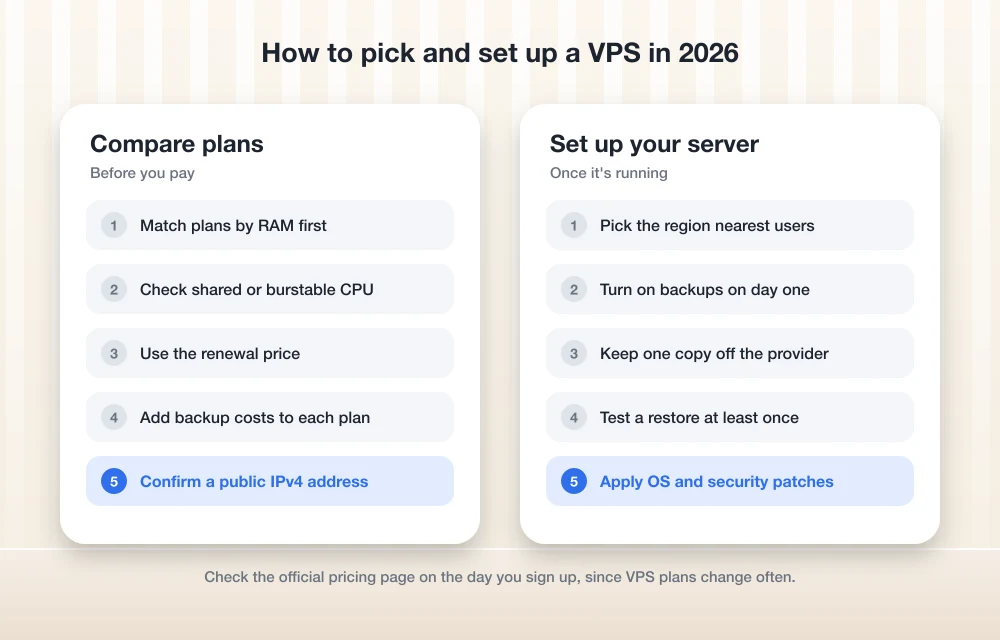
VPS comparison at a glance
Every spec in this table and the sections below comes from each provider’s published plan listings and docs. We didn’t run any tests of our own.
| Feature | DigitalOcean | Akamai Linode | Vultr | Hostinger VPS | AWS Lightsail |
|---|---|---|---|---|---|
| Smallest plan RAM | 512 MiB | 1 GB | 1 GB | 4 GB | 512 MB |
| Smallest plan vCPU | 1 | 1 | 1 | 1 | 2 (burstable) |
| Smallest plan storage | 10 GiB SSD | 25 GB | 25 GB SSD | 50 GB NVMe | 20 GB SSD |
| Smallest plan transfer | 500 GiB | 1 TB | 1 TB | 4 TB | 1 TB |
| US data center cities | New York, San Francisco, Atlanta | 9 cities, including Dallas and Chicago | 9 cities, including Dallas, Chicago and Honolulu | Not confirmed | 3 regions (N. Virginia, Ohio, Oregon) |
| Automatic backups | Paid add-on (weekly or daily) | Paid add-on (daily, weekly, biweekly) | Paid add-on | Weekly included, daily extra | Paid snapshots, automatic daily option |
The smallest plans aren’t priced the same, so don’t read the first four rows as like-for-like. Plans and specs change often, so confirm them on each provider’s official page before you buy.
The best VPS hosting providers in 2026
I ranked these on published plans, features and US coverage, plus my own call on who each one suits. No speed tests.
1. DigitalOcean
DigitalOcean calls its virtual servers Droplets, and its plans are the easiest to read of this group. Basic Droplets mostly step up by RAM. The smallest gets you 1 vCPU, 512 MiB of RAM, 10 GiB of SSD storage and 500 GiB of monthly transfer, and then you’ve got 1 GB, 2 GB, 4 GB and 8 GB options above it. The 2 GB tier comes in both 1 vCPU and 2 vCPU versions, which helps if your app needs more compute than memory.
That starter plan is tiny. Fine for a chat bot, a personal VPN or a test box. But 512 MiB won’t carry a busy WordPress site. You’ll find the current lineup on the official Droplet pricing page.
US regions are New York (NYC1 and NYC3), San Francisco (SFO2 and SFO3) and Atlanta (ATL1). Older regions sometimes stop taking new Droplets, so check the region picker when you sign up. Backups are an add-on billed as a percentage of the Droplet price, and daily costs more than weekly.
Where DigitalOcean really helps beginners is everything around the server. Droplets are unmanaged, sure, but you can add managed databases or move an app onto App Platform later without switching providers. So once running a database yourself stops being worth the hassle, you’ve got a way out.
What I liked
- Plan tiers that are easy to read and mostly sized by RAM
- Managed databases and App Platform for when you want less server work
- Regions on both coasts, plus Atlanta
What could be better
- The smallest plan only has 512 MiB of RAM
- Backups cost extra
- No central US region in its published list
2. Akamai Linode
Linode is part of Akamai now, so linode.com may bounce you to an Akamai page. The entry Shared CPU plan, Nanode 1 GB, gives you 1 vCPU, 1 GB of RAM, 25 GB of storage and 1 TB of transfer, which is a far more usable starting point than DigitalOcean’s smallest Droplet. Shared plans carry on at 2 GB, 4 GB and 8 GB. Some non-US regions cost more, but that won’t touch you if you stay in the US.
Coverage is the main reason it made the list. Linode lists US data centers in Newark, Atlanta, Dallas and Fremont, plus newer regions in Chicago, Washington DC, Seattle, Los Angeles and Miami. Two of those are in the central US.
Its Backup Service is also one of the better setups here. It’s a paid add-on that scales with plan size, and it keeps daily, weekly and biweekly automatic backups plus one manual snapshot slot. Why does that matter? Because if something breaks and you don’t notice for several days, a two-week-old restore point is what gets you back.
Linode is unmanaged by default. I couldn’t confirm whether Akamai still sells a paid managed-services add-on, so I’d plan on doing the admin work yourself.
What I liked
- Entry plan starts at 1 GB of RAM
- Nine US data center cities in its published list
- Backups keep several restore points on their own
What could be better
- Backups are an extra monthly cost
- I couldn’t confirm any managed support option
- The move to Akamai can make docs and pricing harder to track down
3. Vultr
Vultr’s Regular Cloud Compute plans start at 1 vCPU, 1 GB of RAM, 25 GB of SSD storage and 1 TB of bandwidth, then climb to 2 GB, 4 GB (with 2 vCPUs) and 8 GB. That’s close to Linode’s lineup. So picking between the two usually comes down to location and which dashboard you’d rather use.
Vultr has also offered cheaper IPv6-only plans in some locations. IPv6 is the newer internet address format, and a server that only has IPv6 has no IPv4 address at all, so some visitors, networks and tools may not be able to reach it directly. Fine for experiments. For a customer-facing site, I’d stay away unless you understand exactly what you’re giving up.
Vultr’s US list: Atlanta, Chicago, Dallas, Honolulu, Los Angeles, Miami, New Jersey, Seattle and Silicon Valley. Honolulu is the odd one out, in a good way. If your users are in Hawaii, nothing else here gets you closer.
Automatic backups are a paid add-on, priced as a percentage of the server cost. Managed databases and Kubernetes (a system for running containerized apps) are sold separately.
What I liked
- Wide US coverage, including Chicago, Dallas and Honolulu
- Entry plan starts at 1 GB of RAM
- IPv6-only plans mean cheap test servers are possible
What could be better
- Backups aren’t included
- IPv6-only plans are limited on location and compatibility
4. Hostinger VPS
Hostinger doesn’t bother with small starter servers. Its KVM plans start big, at least on paper. (KVM is the virtualization tech underneath; just treat it as part of the plan name.) Here’s how Hostinger lists them:
- KVM 1: 1 vCPU, 4 GB RAM, 50 GB NVMe storage, 4 TB bandwidth
- KVM 2: 2 vCPU, 8 GB RAM, 100 GB NVMe storage, 8 TB bandwidth
- KVM 4: 4 vCPU, 16 GB RAM, 200 GB NVMe storage, 16 TB bandwidth
- KVM 8: 8 vCPU, 32 GB RAM, 400 GB NVMe storage, 32 TB bandwidth
On RAM per plan, Hostinger wins easily. KVM 1 already matches the 4 GB tiers elsewhere, and the storage and bandwidth allowances are generous too.
The catch is billing. You only get Hostinger’s lowest prices by prepaying for a longer term, and the plans renew at a higher rate. So compare the renewal price against the other providers, not the first-term deal. I haven’t listed figures because I couldn’t confirm them; check the official VPS page.
Hostinger says weekly backups are included and daily ones cost extra. That’s a real plus when every other provider here charges for any automatic backups at all. You also get its own VPS control panel, prebuilt OS and app templates, and an AI assistant called Kodee for server tasks. Still self-managed, though. The panel makes life easier, but it won’t patch your server for you.
One big gap for a US-focused guide: I couldn’t confirm which US city or cities host Hostinger’s VPS data centers. Not ideal. Check the location options at checkout before you commit.
What I liked
- Most RAM, storage and bandwidth per plan in this group
- Weekly backups are included
- Its own panel, app templates and the Kodee AI assistant
What could be better
- Best prices need a long prepaid term, and renewals cost more
- US data center location isn’t confirmed
- Not as flexible if you only need a server for a short project
5. AWS Lightsail
Lightsail is the simpler, fixed-price corner of AWS. You pick a bundle with a set amount of RAM, CPU, SSD storage and transfer, and you never have to wade through the full AWS console.
Bundles with a public IPv4 address start at 512 MB of RAM, 2 vCPUs, 20 GB of SSD and 1 TB of transfer. After that come 1 GB (40 GB storage, 2 TB transfer), 2 GB (60 GB, 3 TB), 4 GB (80 GB, 4 TB) and 8 GB options. There are cheaper IPv6-only bundles too, with the same caveats as Vultr’s.
Those 2 vCPUs need a footnote. Lightsail CPU is burstable: each bundle gets a baseline level of CPU, and if you keep running above it, the server can get throttled. Fine for a blog with the occasional traffic spike. Less fine for anything that’s compute-heavy all day.
US regions are N. Virginia (us-east-1), Ohio (us-east-2) and Oregon (us-west-2). Backups are snapshots, billed by the storage they take up each month, and you can switch on automatic daily snapshots. AWS has also offered a free trial on selected bundles, so check the official Lightsail pricing page for current terms.
I’d only reach for Lightsail if you already use AWS or expect to move into it. Same account, same bill.
What I liked
- An easy way into the AWS ecosystem
- Snapshots, with an automatic daily option
- Free trial on selected bundles (check the current terms)
What could be better
- Burstable CPU can get throttled under sustained load
- Only three US regions
- Snapshot costs go up as your storage grows
How I’d compare CPU and RAM per dollar
Without benchmark data, I’ve got no basis for saying one provider’s CPU is faster. But you can still line plans up against each other using the numbers on each official pricing page.
Start with RAM
Figure out how much memory your app needs, then grab the plan at that RAM level from each provider. Memory is often the first thing to run out on WordPress sites and databases.
Check the CPU type
Note whether the vCPU is shared or burstable. A burstable 2 vCPU plan isn’t the same thing as two full cores you can hammer all day.
Use the renewal price
For prepaid plans like Hostinger’s, work out the monthly cost from the renewal price, not the intro one.
Add backups
Tack the backup add-on or snapshot cost onto each plan, because that’s part of what you’ll really pay every month.
Confirm IPv4
Make sure the plan comes with a public IPv4 address if your site needs one. IPv6-only plans are cheaper for a reason.
Do that, and the “cheapest” VPS often isn’t.
Backups: budget for them from day one
Every provider here sells backups, just priced differently. DigitalOcean and Vultr take a percentage of the server price. Linode charges an add-on that scales with plan size and keeps several restore points. Lightsail bills snapshots by the storage they use. Hostinger throws in weekly backups and sells daily ones.
Turn on automatic backups when you create the server, not after something breaks. And remember that provider backups live with the same company as your server, so if your account gets locked or a billing problem shuts everything down, you’ll want a copy somewhere else. The guide on how to back up your business data covers off-site options.
US data centers: closer is better
The farther your server is from a visitor, the more latency you add, which is just the delay between their request and your server’s reply. So put the server near most of your users.
East Coast audience? Look at New York, Newark, New Jersey, Washington DC, N. Virginia or Atlanta. On the West Coast, these providers give you San Francisco, Fremont, Silicon Valley, Los Angeles, Seattle and Oregon. If your users are spread across the country, a central region like Dallas or Chicago (Linode and Vultr) or Ohio (Lightsail) makes a sensible middle point.
Which VPS hosting should you choose?
For a first VPS, I’d go with DigitalOcean. The plans are clear, and managed databases plus App Platform give you a way to offload server work later.
Need a specific US city, especially somewhere central? Akamai Linode and Vultr have the longest lists, and Linode’s multi-point backups are a genuine advantage. For Hawaii, it’s Vultr.
Hostinger makes sense if you want lots of RAM and you’re fine prepaying, but confirm its US location and renewal price first. And if your business already runs on AWS, Lightsail keeps everything in one account, as long as burstable CPU suits your workload.
Whichever one you pick, check the official pricing page on the day you sign up, turn on backups straight away, and keep one copy completely off the provider. That off-site copy is the one that saves you when the provider itself is the problem.
Frequently Asked Questions
Is a VPS better than shared hosting?
A VPS gives you your own share of CPU, RAM and storage plus full admin access, so it’s more flexible and other customers affect it less. The trade-off? On an unmanaged VPS, updates, security and backups are your job, and shared hosting usually handles those for you.
What’s the difference between managed and unmanaged VPS hosting?
With unmanaged hosting, the provider keeps the hardware and network running, and you handle the operating system, security patches, web server and backups. Managed hosting does that work for you, at a higher price. DigitalOcean, Akamai Linode, Vultr, Hostinger VPS and AWS Lightsail are all self-managed by default.
Which VPS provider has the most US data centers?
Going by their published lists, Akamai Linode and Vultr each have nine US cities, including central options like Dallas and Chicago. Vultr also lists Honolulu. Locations change, so check each provider’s official region page.
Are backups included with VPS hosting?
Usually not. DigitalOcean, Vultr and Akamai Linode sell backups as paid add-ons, and AWS Lightsail bills snapshots by the storage they use. Hostinger says weekly backups come with its VPS plans, and daily backups cost extra.
What does burstable CPU mean on AWS Lightsail?
Each Lightsail bundle gets a baseline level of CPU performance. You can go above it briefly, but stay above it for long and the server can get throttled. So it suits sites with occasional spikes better than steady heavy workloads.
Featured image: Taylor Vick on Unsplash.
You might also like

Top 5 Cloud Hosting Providers for Performance & Security
Choosing a good cloud host is essential to having fast response times and consistent uptime, as well as being able to secure your data and resources reliably. This list contains 5 of the best options for 2026 that balance all of these needs. Cloud hosting provides more flexibility than shared hosting in terms of resource…

Best Web Hosting for Small Business Websites (2026)
How to choose web hosting for a US small business site, from shared and managed WordPress plans to cloud servers and website builders, plus the renewal-price traps to avoid and how to migrate safely.
Top 5 Managed WordPress Hosting Services for Maximum Speed in 2026
There is more to a website’s speed than speed itself—it affects the user experience, search engines and how well or poorly your visitors convert. Research has shown that as little as a second delay in loading a web page can reduce conversion rates and increase the number of bounce visitors. One of the most effective…
The week in tech, minus the noise.
New reviews, fixes and the stories that matter — once a week, straight to your inbox.
We only use your email to send the newsletter. Unsubscribe any time. See our privacy policy.
Comments