

Best Cloud Hosting for Startups in 2026: AWS vs Google Cloud vs Azure vs DigitalOcean
I compare AWS, Google Cloud, Microsoft Azure and DigitalOcean on the things founders care about: free credits, startup programs, managed databases, serverless and keeping your bill under control.


Photo by Growtika on Unsplash
Disclosure: TheTechHacker has no paid relationship with the companies in this article.
Every major cloud provider hands out free credit to new startups. Very few explain what your bill looks like once that credit’s gone. So this guide compares AWS, Google Cloud, Microsoft Azure and DigitalOcean on what an early-stage team actually cares about: new-account credit, startup programs that can cover your bills for a year or two, managed databases, serverless, and how you keep the invoice from getting away from you.
Quick answer: For most startups, I’d start with Google Cloud or AWS. Google gives new customers the biggest trial credit ($300 for 90 days), and its startup program goes up to $350,000 for AI startups, while AWS Activate lets any startup apply for up to $100,000 in credits. If you haven’t raised money yet, Microsoft for Startups Founders Hub offers up to $150,000 in Azure credits with no funding required. DigitalOcean is the one to look at if you care more about simple, predictable monthly pricing than a giant menu of services.
First, do you actually need a big cloud platform?
Plenty of founders sign up for AWS when all they need is a website. Is your startup a landing page, a blog or a small online shop right now? Then standard hosting is cheaper and a lot simpler to run. Our guide to the best web hosting for small business websites covers that.
Same goes for files. If your team mostly needs shared folders and synced documents, you want a storage service, not a full cloud platform. There’s a separate roundup of the best cloud storage for business for that.
The four providers below start to make sense once you’re building software: a web app, an API, a SaaS product, a mobile backend, or anything with AI in it.
The best cloud hosting for startups
1. AWS (Amazon Web Services)
Best for: startups that want the widest range of services and a credit program any company can apply to.
AWS has changed its free offer for new accounts. You now get $100 in Free Tier credits straight away, and you can earn up to $100 more by trying key services. The Free plan runs for up to 6 months or until the credits are gone, whichever hits first. Current terms are on the AWS getting started page.
According to a post on AWS’s Builder Center (hosted by AWS, written by the community), this credit model kicked in on July 15, 2025 and replaced the old 12-month Free Tier for new accounts. Existing accounts keep the old setup.
Two small things worth knowing. AWS says most new customers don’t need a credit card to start. And you can sign up with a Google or GitHub account.
The bigger deal is AWS Activate. Any startup can join and apply for up to $100,000 in AWS credits, and AWS says those credits also work on third-party models in Amazon Bedrock, its managed service for running AI models. Gaming startups get their own Activate track, with up to $200,000.
What happens when the Free plan ends? AWS’s page says you upgrade to the Paid plan to keep going. But it doesn’t say clearly whether an account that doesn’t upgrade gets closed or paused. Not ideal. Read that part of the sign-up terms before you commit.
Strengths
- Activate is open to any startup, funded or not
- The Free plan can run for up to 6 months
- Most new customers can start with no credit card
- Activate credits cover third-party models on Bedrock
Weaknesses
- Smaller up-front credit than Google’s trial
- The Free plan is only for brand-new customers
- So many services that a small team can get lost
2. Google Cloud
Best for: founders who want room to experiment, and AI startups.
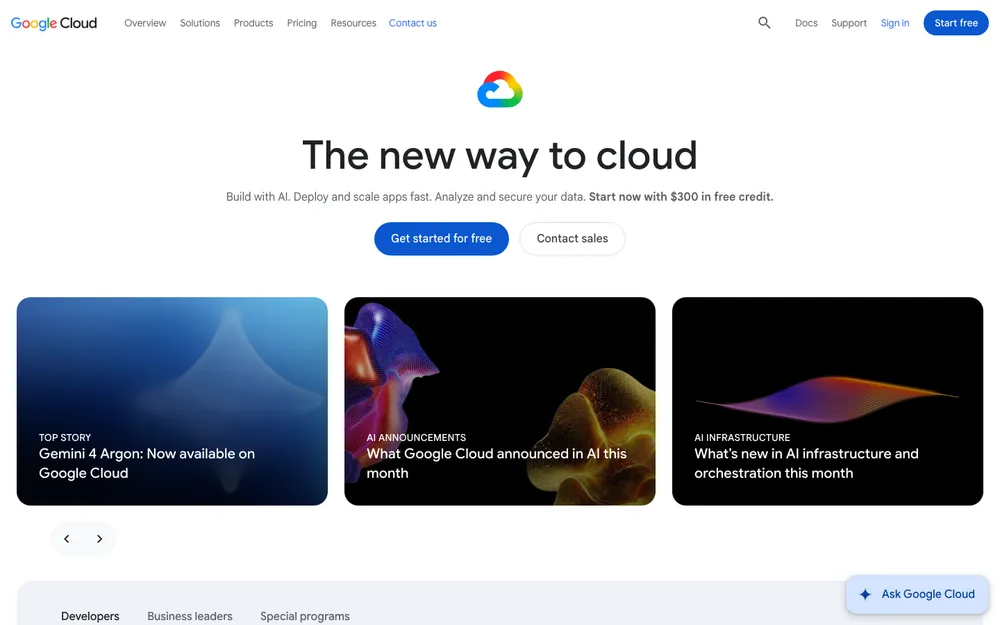
New Google Cloud customers get a $300 Welcome credit that’s good for 90 days. Signing up creates a Free Trial billing account, and Google says that account closes on its own once the $300 is spent or the 90 days run out. You aren’t charged unless you upgrade manually. If you’re a first-time founder and runaway costs keep you up at night, this is the lowest-risk trial of the four.
On top of that, the Google Cloud Free Tier gives you free monthly usage on 20+ products, including Compute Engine (virtual machines), Cloud Storage and BigQuery. None of it comes out of the $300.
Google also runs trials for specific products. There’s a 30-day Cloud SQL trial instance (8 vCPU Enterprise Plus, 64 GB memory, 100 GB storage) and a 90-day Spanner trial with 10 GB of storage. Choosing a database? That’s enough capacity to test one under realistic load.
Then there’s the Google for Startups Cloud Program, with up to $200,000 in credits over your first two years, or up to $350,000 if you’re an AI startup. For AI startups, Google says it covers 100% of spend up to $250,000 in year one, then 20% of spend in year two, up to another $100,000.
The catch is eligibility. You can’t have already received more than $5,000 in Google Cloud credits. And the funded tiers (Scale and Scale AI, the $200K to $350K ones) need verifiable Pre-Seed to Series A funding.
Strengths
- The biggest trial credit here at $300
- Trial account shuts itself, no surprise charge
- Ongoing free usage on 20+ products
- Huge credits for funded AI startups
Weaknesses
- The biggest credit tiers need outside funding
- Had more than $5,000 in past credits? You’re out
- Trial credit only lasts 90 days
3. Microsoft Azure
Best for: bootstrapped founders, and teams already on the Microsoft stack.
Azure’s free account gives you $200 in credit to spend within 30 days, plus 12 months of selected free services (Microsoft says these can change). One per eligible customer.
Two terms to watch. You can’t spend the $200 on third-party Marketplace purchases. And if you upgrade before day 30, whatever credit’s left carries over to pay-as-you-go for the rest of that period, so upgrading early doesn’t cost you anything.
The real draw is Microsoft for Startups Founders Hub. Up to $150,000 in Azure credits, and Microsoft says it’s open to all founders with no funding required. If you’re self-funding and haven’t pitched an investor yet, that’s a big deal.
Some sources say Founders Hub releases credits in stages as you verify your business. I couldn’t confirm the exact tiers from Microsoft’s official policy, though, so check the Microsoft for Startups site for current details before you plan around any number.
Strengths
- Up to $150,000 in credits, no funding needed
- 12 months of selected free services
- Leftover trial credit carries over if you upgrade early
Weaknesses
- Just 30 days to use the $200 credit
- Trial credit won’t cover Marketplace purchases
- Founders Hub credit stages aren’t clearly confirmed
4. DigitalOcean
Best for: small teams who want simple servers and a predictable bill.
DigitalOcean plays a different game from the big three. You don’t get hundreds of services. You get a short list: Droplets (its name for virtual servers), managed databases, and Functions for serverless code. Each Droplet size has a fixed monthly price, and that’s far easier to budget than a dozen usage meters ticking away.
One gap in this comparison. I couldn’t confirm DigitalOcean’s current new-user credit, its cheapest Droplet price, its managed database prices or the terms of Hatch, its startup program, from DigitalOcean’s own pages. So those numbers are left out rather than guessed. Check the official pricing pages before you decide.
Strengths
- Smaller lineup that’s easier to learn
- Set monthly price per Droplet
- Handles the basics most early apps need
Weaknesses
- Fewer services than the big three
- I couldn’t confirm current credit or startup program terms
AWS vs Google Cloud vs Azure vs DigitalOcean at a glance
| Feature | AWS | Google Cloud | Azure | DigitalOcean |
|---|---|---|---|---|
| New-customer credit | $100, plus up to $100 more | $300 Welcome credit | $200 | Not confirmed |
| How long it lasts | Up to 6 months | 90 days | 30 days | Not confirmed |
| Ongoing free usage | Credit-based Free plan | 20+ products monthly | Selected services for 12 months | Not confirmed |
| When the trial ends | Upgrade to Paid plan to continue | Account closes, no charge unless you upgrade | Leftover credit carries over if you upgrade before day 30 | Not confirmed |
| Startup program (max credits) | Up to $100,000 (Activate) | Up to $200,000, or $350,000 for AI | Up to $150,000 (Founders Hub) | Hatch (terms not confirmed) |
| Funding needed | Any startup can apply | Pre-Seed to Series A for funded tiers | No funding required | Not confirmed |
| Managed database trial | Not confirmed | 30-day Cloud SQL trial | Not confirmed | Not confirmed |
| Pricing style | Pay as you go | Pay as you go | Pay as you go | Set monthly price per Droplet |
All figures here are taken from each provider’s published offer pages, which change often, so recheck them before you sign up.
Startup credit programs: who actually qualifies
The headline numbers are huge. But which program can you actually get into today?
If you haven’t raised anything, Founders Hub is the obvious fit, since Microsoft says no funding is required. AWS Activate is open to any startup too. Google’s biggest tiers are built for funded companies, Pre-Seed to Series A, and they want proof.
Treat credits as runway. Not a business model. Google’s program, for example, covers your first two years, and after that you’re paying full price, so build your architecture with that date in mind.
Managed databases: worth it for most startups
With a managed database, the provider runs the database server for you. No installing, no patching, no overnight maintenance. You point your app at it and keep building.
Each provider has its own: Amazon RDS on AWS, Cloud SQL on Google Cloud, Azure SQL Database and Azure Database for PostgreSQL on Azure, and DigitalOcean Managed Databases. I’ve left prices out because I couldn’t confirm them, and they swing a lot by instance size and region. Google’s 30-day Cloud SQL trial was the only database trial I found.
Remember that databases run 24/7. So they bill 24/7. Leave an oversized instance running and it can quietly turn into your biggest line item.
Managed or not, keep a copy of important data outside that provider. Our guide on how to back up business data covers the options.
Serverless: pay only when your code runs
Serverless lets you deploy code without looking after a server. Your code runs when a request comes in, and you pay for that run instead of a machine sitting idle. If your traffic is low or spiky, it’s a good fit.
The main options are AWS Lambda, Google Cloud Run, Azure Functions and DigitalOcean Functions. Each prices serverless its own way and some include free monthly usage, but I didn’t confirm the current amounts, so check each pricing page.
The risk? Serverless scales automatically. Which means a looping bug or a traffic spike scales your bill automatically too. That’s the annoying part, and it’s why the next section matters.
How to avoid surprise cloud bills
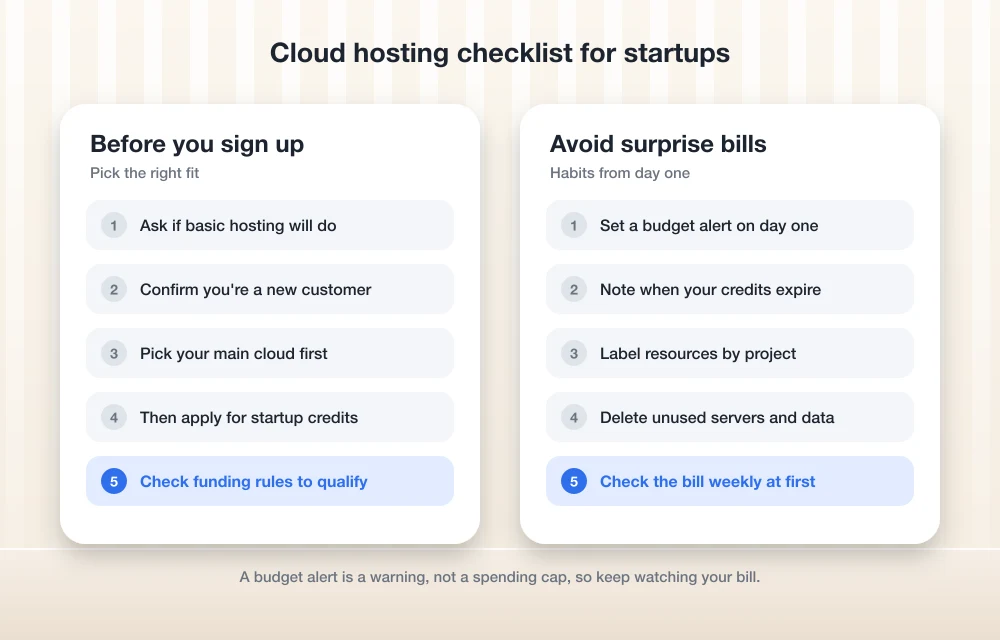
Every provider bills a bit differently, but the controls that protect you are the same everywhere. Set them up on day one.
Set a budget alert on sign-up day
Use AWS Budgets, Google Cloud Billing budgets, Azure Cost Management budgets or DigitalOcean’s billing alerts, so you get an email before spending goes past a limit you pick.
Put your credit expiry date in your calendar
Write down when your trial or startup credits run out, and go over your usage a couple of weeks before then.
Label everything you create
Tag or label resources by project or environment. That way you can see exactly what’s costing you money.
Delete what you’re not using
Test servers, old databases, leftover storage. It all adds up. Even a stopped server can leave attached storage behind that keeps billing you.
Watch data leaving the cloud
Sending data out to users or other services is often billed on its own, so keep an eye on it as you grow.
Check the bill weekly at first
Give the billing page five minutes a week for your first few months. You’ll catch problems while they’re still tiny.
I haven’t listed exact menu paths because cloud consoles move things around all the time. Search your provider’s docs for “budgets” and you’ll find the current steps.
Matching a cloud provider to your startup’s stage
Raised a round, especially for an AI product? Look at Google Cloud first. A $300 trial that closes itself, plus the size of its startup credits, puts you in a strong spot.
If you want the widest service catalogue and a program any startup can apply to, AWS is the safe pick. Bootstrapping? Azure’s Founders Hub, with no funding requirement, is hard to ignore. And if your app is fairly simple and you’d rather have a predictable bill than a huge catalogue, DigitalOcean is worth a look once you’ve confirmed its current pricing.
Whichever one you go with, set up a budget alert before you deploy anything. A few minutes of work. It’s the cheapest protection you’ll get.
Frequently Asked Questions
Which cloud provider gives new users the most free credit?
Of the offers I could confirm, Google Cloud gives the most: a $300 Welcome credit that’s good for 90 days. Azure gives you $200 for 30 days, and AWS gives $100 up front plus up to $100 more for trying key services. Offers change, so check each official page before you sign up.
Can I get cloud startup credits without funding?
Yes. Microsoft for Startups Founders Hub offers up to $150,000 in Azure credits and says no funding is required. AWS Activate is open to any startup too, for up to $100,000. Google’s biggest tiers are different, though. They need verifiable Pre-Seed to Series A funding.
Will Google Cloud charge me after the free trial ends?
Not unless you upgrade manually. Google says the Free Trial billing account closes on its own when the $300 credit is spent or 90 days pass.
Is the AWS Free Tier still 12 months?
Not for new accounts. New customers now get $100 in Free Tier credits plus up to $100 more, on a Free plan that lasts up to 6 months or until the credits run out. Existing accounts keep the older setup.
Do budget alerts stop my cloud spending?
Don’t count on it. A budget alert is a warning email, not a hard cap. Check your provider’s billing docs to see what, if anything, can be stopped automatically.
Featured image: Growtika on Unsplash.
You might also like

Top 5 Cloud Hosting Providers for Performance & Security
Choosing a good cloud host is essential to having fast response times and consistent uptime, as well as being able to secure your data and resources reliably. This list contains 5 of the best options for 2026 that balance all of these needs. Cloud hosting provides more flexibility than shared hosting in terms of resource…

Best Web Hosting for Small Business Websites (2026)
How to choose web hosting for a US small business site, from shared and managed WordPress plans to cloud servers and website builders, plus the renewal-price traps to avoid and how to migrate safely.
Top 5 Managed WordPress Hosting Services for Maximum Speed in 2026
There is more to a website’s speed than speed itself—it affects the user experience, search engines and how well or poorly your visitors convert. Research has shown that as little as a second delay in loading a web page can reduce conversion rates and increase the number of bounce visitors. One of the most effective…
The week in tech, minus the noise.
New reviews, fixes and the stories that matter — once a week, straight to your inbox.
We only use your email to send the newsletter. Unsubscribe any time. See our privacy policy.
Comments