

How to Track Price Drops Before Cyber Monday 2026: Google, Chrome and Amazon Alerts
Cyber Monday is November 30, 2026, and Amazon’s Black Friday Week sale has been running since November 19. The best way to tell a real deal from a fake one is to watch the price before you buy. Google, Chrome and Amazon all have free tools that track a product’s price and alert you when…

Image: Google
Cyber Monday is November 30, 2026, and Amazon’s Black Friday Week sale has been running since November 19. The best way to tell a real deal from a fake one is to watch the price before you buy. Google, Chrome and Amazon all have free tools that track a product’s price and alert you when it drops, and most also show the price history. This guide shows how to set each one up in a few minutes, and how to tell whether a “Black Friday price” is actually a good one.
Quick answer: To track price drops before Cyber Monday, search for the product on Google and tap Track price on its product card. You can set a target price, and Google alerts you by push notification and email. In Chrome on a computer, open the product page and click the Shopping Insights icon in the address bar to see its price history, then bookmark it to track it. On Amazon, tap Price history on a product page and ask Alexa for Shopping something like “Alert me when this drops to $50.” Check Google’s low / typical / high label before you buy.
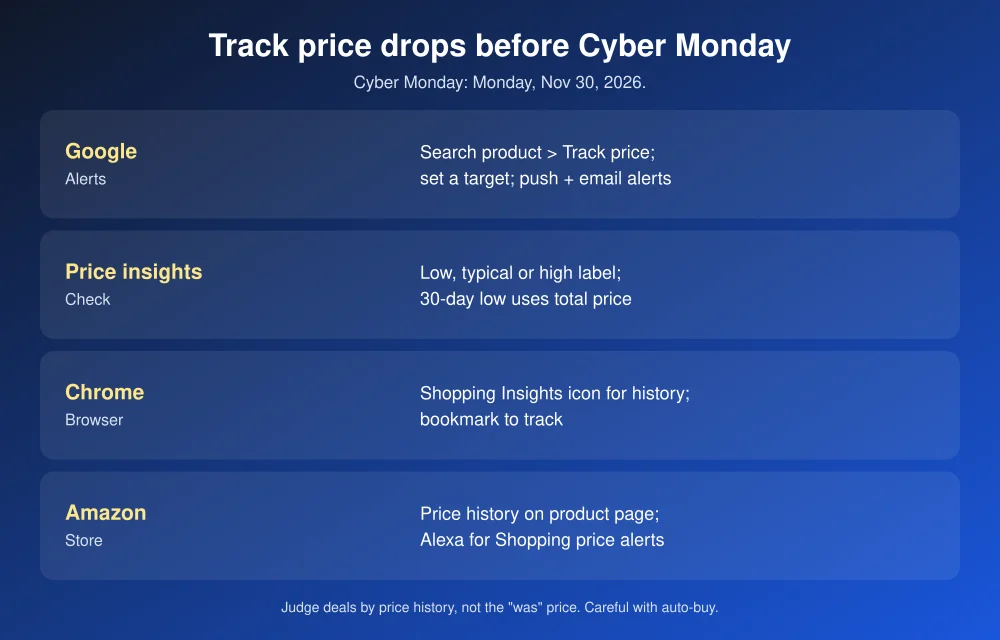
1. Google Search and Shopping: Track price
This works for products sold by many retailers, so it’s the best all-round option. According to Google’s price tracking help page:
- Sign in to your Google Account and turn on notifications for the Google app.
- Search for the product on Google (web or app) and scroll to its product card.
- Tap Track price. Pick the size or color if asked.
- Optionally set a target price, then tap OK.
When the price falls below your target, you get a push notification in the Google app and an email. To see or remove tracked items, tap your profile picture > Saves & Collections > All saved items.
Check if it’s really a deal: price insights
On shopping.google.com, open a product and scroll to price insights. Google labels the current price as lower, typical or higher than normal and shows how it has changed over recent months, based on prices from sellers across the web. A “30-day low” badge means it’s the lowest total price, including shipping, in the past month. Google’s 2026 holiday shopping post also mentions Universal Cart, which collects items from different stores and alerts you to price drops and restocks.
2. Chrome: price history in the address bar
Chrome can do this right on the store’s page. You need to be signed in with sync on and “Make searches and browsing better” turned on. It works in the US, and also in Canada, Australia, Japan and India on computers and Android.
- Computer: on a product page, click the Shopping Insights icon on the right of the address bar. A side panel shows the price history and typical range. Click the Bookmark icon to save it to your Shopping list with tracking on. For email alerts, go to Settings > Google services and turn on Get price tracking notifications.
- Android: tap More > Track prices, or the price icon in the address bar. Find tracked items under More > Bookmarks > Tracked products.
- iPhone and iPad (US only): tap More > Track Price > pick the product > Track, and allow notifications.
Steps are from Chrome’s shopping insights help page.
3. Amazon: price history and Alexa for Shopping alerts
Amazon’s AI shopping assistant, formerly Rufus, is now called Alexa for Shopping. Amazon’s guide to its AI shopping tools says you can:
- Tap Price history on a product page to see how the price changed over the past year.
- Ask Alexa for Shopping to alert you at a price, such as “Alert me when this drops to $50.”
- Set alerts on a whole List, such as “Alert me when anything on my holiday list drops in price,” or filter a List to show items on sale.
- Use auto-buy: “Buy these headphones when they’re $75 or less” buys it with your default payment method when it hits that price.
Be careful with auto-buy. It spends money without asking again, so set a realistic price and double-check which payment method is your default.
4. Microsoft Edge: now inside Copilot
Edge’s old shopping icon is gone. Microsoft says price history and tracking moved into Copilot, under Product Insights in the Copilot pane on supported product pages. Edge’s coupons feature was retired.
How to tell if a Black Friday price is real
- Check the history, not the “was” price. Under the FTC’s pricing guides, a “former price” should be one the item was actually offered at for a reasonably substantial period. A price history chart shows whether the “was” price was real.
- Compare the total. Add shipping, fees and tax before deciding. Google’s 30-day low uses the total price.
- Watch for drops after Black Friday. Keep tracking through Cyber Monday. Some retailers repeat or improve deals.
- Know the return window in case the price falls further. Some stores will match their own lower price, so ask.
- Avoid fake deal sites. The FTC’s November 19 alert warns that scam stores appear in top and sponsored search results. Type the store’s address yourself.
Ready to buy? Check our Black Friday 2026 sale dates, see whether the Switch 2 Black Friday bundle is worth it, and learn how to check if an online store is legit before paying somewhere new.
FAQs
How do I get price drop alerts on Google?
Search for the product on Google while signed in, tap Track price on its product card, and optionally set a target price. Google sends a push notification in the Google app and an email when the price drops.
Can I see an Amazon product’s price history?
Yes. Amazon says you can tap Price history on a product page to see how the price has changed over the past year.
How do I know if a Black Friday deal is real?
Check the price history in Google, Chrome or Amazon, compare the total with shipping and fees, and look at Google’s low, typical or high label instead of trusting the “was” price.
When is Cyber Monday 2026?
Monday, November 30, 2026. Black Friday is November 27, and Amazon’s Black Friday Week runs from November 19 to 30.
Featured image: Google.
Disclosure: TheTechHacker has no paid relationship with Google, Amazon, Microsoft or any retailer mentioned here, and earns no commission from these links.
More in Guides
How to Track Black Friday Price Drops and Spot Fake Discounts (Google, Chrome, Amazon)
Every Black Friday listing says “deal,” but plenty of them aren’t. A TV marked “$300 off” might have sold at the sale price for months, and a “was” price can come from a list price almost nobody paid. The good news is you don’t need a browser extension or a spreadsheet to see through it.…

Black Friday Tech Deals 2026: Store-by-Store Calendar for US Shoppers
Black Friday 2026 lands on November 27 and Cyber Monday on November 30. Here’s what Best Buy, Walmart, Target and Amazon have actually confirmed, what’s still a guess, and how to use holiday price match rules so you don’t buy too early.

Black Friday 2026 Tech Deals: Sale Dates at Amazon, Best Buy and Walmart
Black Friday 2026 is on Friday, November 27, but the big tech sales have already started. Amazon and Best Buy both launched their main Black Friday events on November 19, and Walmart’s starts online on November 23. Here are the official dates for each retailer, when the best tech deals drop, and how to make…
The week in tech, minus the noise.
New reviews, fixes and the stories that matter — once a week, straight to your inbox.
We only use your email to send the newsletter. Unsubscribe any time. See our privacy policy.
Comments