

How to Check If an Online Store Is Legit Before You Buy on Black Friday
Black Friday is November 27, and fake online stores are already running ads. They look like real shops, with polished product photos, AI-written descriptions, five-star reviews and prices that are hard to ignore. You pay, and the order never arrives, or a cheap knockoff does. Most fake stores share the same warning signs, and checking…
Image: BBB
Black Friday is November 27, and fake online stores are already running ads. They look like real shops, with polished product photos, AI-written descriptions, five-star reviews and prices that are hard to ignore. You pay, and the order never arrives, or a cheap knockoff does. Most fake stores share the same warning signs, and checking a site takes about two minutes. This guide covers how to check if an online store is legit before you buy, which payment methods protect you, and what to do if you’ve already been scammed.
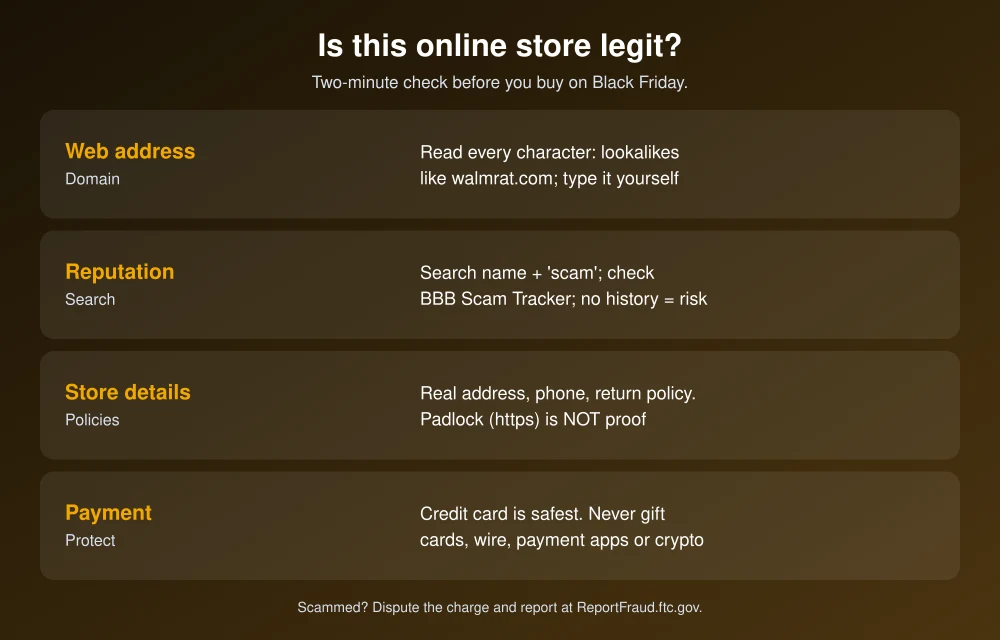
Quick answer: To check if an online store is legit, read the full web address for misspellings or extra words, search the store’s name plus “scam” or “complaint,” and look it up on BBB Scam Tracker. Check for a real address, phone number and return policy. Be wary of brand-name items at very low prices, and remember that the padlock (https) doesn’t prove a site is real. Pay with a credit card, and never pay a store with gift cards, wire transfers, payment apps or crypto. If something goes wrong, dispute the charge with your card company and report it at ReportFraud.ftc.gov.
How to check if an online store is legit
1. Read the whole web address
Fake stores use lookalike domains, such as a swapped letter (walmrat.com) or an extra word added to a real brand (“bestbuy-deals-outlet.com”). Tap the address bar and read every character, especially on your phone, where the address is cut off. If you came from an ad, close the tab and type the retailer’s address yourself. The FTC warned on November 19 that scammers place fake store ads in search results. Going straight to a company’s website is the safer option.
2. Search the store’s name with “scam” or “complaint”
The FTC recommends searching the company or product name with words like “complaint” or “scam” before you buy. If you find nothing at all, that’s a warning sign too. Fake stores are often only days or weeks old, so nobody has written about them yet.
3. Look it up on BBB Scam Tracker
BBB Scam Tracker lets you search by website, business name, phone number or email to see if other shoppers have reported it. It’s free and doesn’t require an account.
4. Check the contact details and policies
- A real store lists a physical address, a working phone number and a business email, not only a contact form or a Gmail address.
- Read the return and refund policy. Vague policies, “all sales final” on everything, or returns that have to be shipped overseas are red flags.
- Check that the business name in the footer matches the store’s social media accounts and its BBB profile.
5. Don’t trust the padlock or the reviews
The padlock icon only means your connection to the site is encrypted. The FTC says https “doesn’t mean it’s a legitimate site,” and scam stores get certificates as easily as real ones. Star ratings on the store’s own pages can be fake too. Look for reviews on other sites, and be suspicious of dozens of short, similar five-star reviews posted around the same time.
6. Ask if the price is too good
A $1,000 phone at 70% off from a store you’ve never heard of isn’t a deal. The FTC warns that cheap brand-name items could be counterfeit or stolen. Compare the price with Amazon, Best Buy or the maker’s own site. Our guide to tracking Black Friday price drops and spotting fake discounts shows how to check a product’s real price history.
7. Run the address through Google Safe Browsing
Paste the store’s address into Google’s Safe Browsing site status tool. It flags sites Google knows host phishing or malware. A clean result doesn’t prove a store is honest, since new scam sites may not be listed yet, but a warning means you should leave.
How to pay safely
| Payment method | Protection if the store is fake |
|---|---|
| Credit card | Best. You can dispute charges for items you never got or that aren’t as described. |
| Apple Pay, Google Pay or PayPal linked to a credit card | Good. The site never sees your card number, and card dispute rights still apply. |
| Debit card | Weaker. The money leaves your account right away, and getting it back can take longer. |
| Gift cards, wire transfers, payment apps (Zelle, Cash App), crypto | Almost none. The FTC says never buy from sellers that insist on these. |
If you’re charged for something that never arrives, the FTC says to contact your card company right away. Then send a letter that reaches it within 60 days of the first bill showing the charge.
Watch for these Black Friday scams too
- Fake delivery texts: Messages about a “missed delivery” or “address problem” with a link are a classic holiday scam. Check tracking in the retailer’s or carrier’s own app. The same tricks show up in fake travel texts, which we cover in how to spot fake flight cancellation texts.
- Fake social media shops: Ads on Instagram, Facebook and TikTok for “closing down” sales or “mystery boxes” of gadgets often lead to stores that ship nothing.
- Impersonated retailers: Emails that look like they’re from Amazon or Best Buy with a deal link. Open the retailer’s app instead of tapping the link.
For real deals and dates, see our Black Friday 2026 sale dates at Amazon, Best Buy and Walmart.
What to do if you bought from a fake store
- Call your card company or bank and dispute the charge. Ask for a new card number if you typed yours into the site.
- Save everything: the store’s address, order confirmation, emails and screenshots of the product page.
- Report the store at ReportFraud.ftc.gov and on BBB Scam Tracker. If you found it through an ad, report the ad to the platform too.
- Change your password if you created an account with a password you use anywhere else.
- Watch your statements for the next few months for unfamiliar charges.
FAQs
How can I tell if a website is a scam before buying?
Read the full web address for misspellings, search the store name with scam or complaint, look it up on BBB Scam Tracker, and check for a real address, phone number and return policy. Prices that are far below other stores are a red flag.
Does the padlock mean a website is safe?
No. The padlock only means the connection is encrypted. The FTC says https doesn’t mean a site is legitimate, and scam stores use it too.
What is the safest way to pay online?
A credit card, or a wallet like Apple Pay or Google Pay linked to one. You can dispute charges if an item never arrives. Never pay a store with gift cards, wire transfers, payment apps or crypto.
Where do I report a fake online store?
Report it to the FTC at ReportFraud.ftc.gov and on BBB Scam Tracker, and dispute the charge with your card company. If an ad led you there, report the ad to the platform.
Featured image: BBB.
Disclosure: TheTechHacker has no paid relationship with the BBB, Google or any company mentioned here.
More in Guides
Black Friday 2026 Tech Deals: Sale Dates at Amazon, Best Buy and Walmart
Black Friday 2026 is on Friday, November 27, but the big tech sales have already started. Amazon and Best Buy both launched their main Black Friday events on November 19, and Walmart’s starts online on November 23. Here are the official dates for each retailer, when the best tech deals drop, and how to make…

Black Friday Tech Deals 2026: Store-by-Store Calendar for US Shoppers
Black Friday 2026 lands on November 27 and Cyber Monday on November 30. Here’s what Best Buy, Walmart, Target and Amazon have actually confirmed, what’s still a guess, and how to use holiday price match rules so you don’t buy too early.
Black Friday 2026 Tech Buying Guide: What’s Worth Buying and What to Skip
Black Friday 2026 is November 27, eight days after GTA 6 launches. Here’s my practical guide to which phones, laptops, consoles, storage, earbuds, smart home gear and TVs are worth buying, and how to avoid fake discounts.
The week in tech, minus the noise.
New reviews, fixes and the stories that matter — once a week, straight to your inbox.
We only use your email to send the newsletter. Unsubscribe any time. See our privacy policy.
Comments