

How to Fix Accidental Mutes From YouTube’s New Mobile Mute Button
If your YouTube videos keep going silent when you try to skip ahead, the app’s new mute button may be why. Android Authority reports that YouTube is gradually adding a mute button to its mobile video player. It sits right above the progress bar, so some people hit it while trying to seek. YouTube hasn’t…


Image: YouTube
If your YouTube videos keep going silent when you try to skip ahead, the app’s new mute button may be why. Android Authority reports that YouTube is gradually adding a mute button to its mobile video player. It sits right above the progress bar, so some people hit it while trying to seek. YouTube hasn’t announced it, and we found no official setting to hide it. You can still avoid most accidental taps by seeking in a different way. This guide shows the options in YouTube’s own help pages.
Quick answer: To fix accidental mutes on YouTube mobile, tap the mute icon again to bring sound back, then stop dragging the bar. Double-tap the left or right side of the video to jump 10 seconds instead, and tap away from the bottom edge. If you aren’t skipping, use Settings (gear) > Lock screen in the player to block accidental taps. There’s no official way to remove the button, and updating or reinstalling the app isn’t known to help.
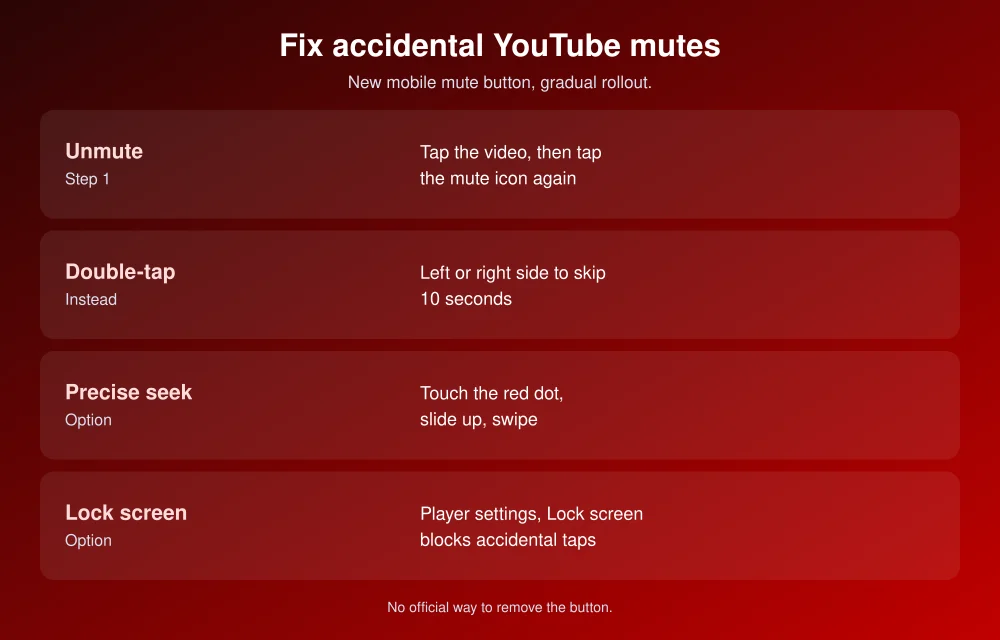
What the new mute button does
- Where: just above the progress bar, in both portrait and full screen, according to reports.
- What: one tap silences the video without changing your phone’s volume.
- Who has it: it’s rolling out gradually. Android Authority saw it on iOS but not on its Android phones, while some Android users do have it.
- Why it isn’t on every phone: one user with the same app version on three Pixel devices found it on only one, which suggests YouTube turns it on from its servers.
Not sure the button is the cause? Tap the video to show its controls and look for a mute icon above the progress bar. If there isn’t one, check your phone’s media volume.
1. Unmute the video
Tap the video once to show the controls, then tap the mute icon. If there’s still no sound, press your phone’s volume-up button.
2. Double-tap instead of dragging
Double-tap the right side of the video to go forward 10 seconds, or the left side to go back. Aim for the middle of the picture. You can also touch and hold to play at 2x speed. Both are on YouTube’s player help page.
3. Use precise seeking
- Tap the video, then touch the red dot on the progress bar and slide up.
- Swipe through the thumbnails to the moment you want.
- Tap Play. To cancel, drag back until you see Release to cancel.
It’s described in YouTube’s precise seeking guide. You still start near the button, so touch the red dot itself.
4. Lock the screen while you watch
- Tap the video and open Settings (the gear).
- Choose Lock screen.
- To unlock, tap the screen, then Tap to unlock.
YouTube says this “prevents unintentional taps or swipes from interrupting playback.” You can’t seek while it’s locked, so it’s best for long videos, kids or watching in bed.
What doesn’t help
- Full screen: the button is reported there too.
- Updating or rolling back the app: not documented, and the Pixel report suggests the app version doesn’t decide it.
- Modified YouTube apps: avoid them. They can put your Google account at risk.
How to tell YouTube you don’t like it
Use the app’s Send feedback option. Mention the mute button and your phone model. A post about it in YouTube’s community had no company reply when outlets covered it on November 23.
More fixes: YouTube TV channels missing from Google TV, iPhone 18 Pro speaker crackling, and One UI 9 freezing and battery drain.
FAQs
Can I remove the mute button on YouTube mobile?
We found no official setting to hide it, and YouTube hasn’t announced one as of November 24, 2026.
Why does YouTube keep muting my videos?
You may be tapping the new mute button above the progress bar while skipping. Double-tap the side of the video to skip instead.
Does the YouTube mute button change my phone’s volume?
No. It’s reported to mute only the video and leave your phone’s volume alone.
Why don’t I have the YouTube mute button?
It’s rolling out gradually, and not every phone has it even on the same app version.
Featured image: YouTube.
Disclosure: TheTechHacker has no paid relationship with Google or YouTube.
More in How-to

How To Fix Your Xbox One Mic Not Working Issue Easily
We have all noticed how online streaming and game streaming, in particular, have picked up ever since people have been locked down to their houses due to the pandemic. In this scenario, e all know that gaming can be a stress buster as well as a good way to pass time as well. Talking about…

How To Mute Microphone On Windows 10 With Keyboard Shortcut
Muting the microphone on Windows 10 can be a useful feature when you need to block out background noise or take a break from speaking during an online meeting or call. In this article, we will show you how to mute your microphone on Windows 10 using a keyboard shortcut. Method 1: Use the Mute…

How to Mute and Unmute On Zoom
We all know Zoom is a very popular conferencing app in the year 2020. Many businesses, educational institutions have adopted the online conferencing working style to avoid COVID-19 exposure and Zoom is their favourite choice as a conferencing app. Previously we have written very detailed Zoom conferencing app guides like enable end-to-end encryption for Zoom…

The week in tech, minus the noise.
New reviews, fixes and the stories that matter — once a week, straight to your inbox.
We only use your email to send the newsletter. Unsubscribe any time. See our privacy policy.
Comments