

Apple’s Clips app now supports Animoji, Emojis and new stickers
The one thing that we have come to expect from Apple is that it does something new to the technology sector. Right from the start, we know that Apple

The one thing that we have come to expect from Apple is that it does something new to the technology sector. Right from the start, we know that Apple products such as the iPhones, MacBooks and iPads have been known to have a feature or two which stand out from the rest.
Also, the brand name from Apple is a major factor in people buying their products. In recent times, Apple is adding features in its software which are then picked up by other brands and one of them is Animoji. Basically, Animoji is an animated emoji feature which is personalized according to your facial features.
Now, we know that people have been making their Animojis quite a lot for having a personal touch to the emoji. Also, they have been sharing their Animojis apart from Emojis to other people as well.
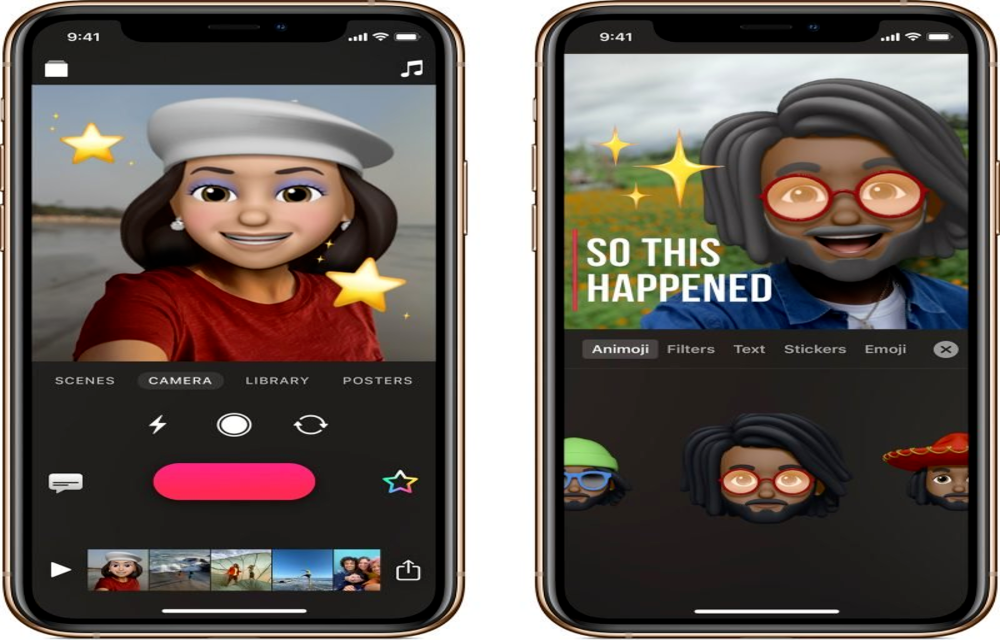
We can now inform you that one new app from Apple has received support for Animoji, Emojis and new stickers. The app we are talking about is Clips which has just received this latest support with an update.
Clips is an app on your iPhone and iPad which lets you make short videos of yourself and you can now make those videos with your Animojis. Also, a new mode called ‘Let it snow’ which according to Apple “beautifully captures the feeling of winter weather.”
Obviously, we know that Apple’s animoji feature is not just a software trick but uses dedicated hardware. For this reason, the new Animoji and Memoji features are only available for devices with TrueDepth cameras.
That being said, you could only use the Animoji feature on Face Time and iMessage only before this so it is a welcome addition that you can use it inside Clips app. On the other hand, we feel that the support should come to third-party apps like Facebook, WhatsApp and others too.
More in News

How to Edit an Instagram Story After Posting (and What You Can’t Change)
For years, a typo in an Instagram Story meant deleting it, reposting it and losing every view it had already picked up. That’s finally over. On November 18, 2026, Instagram head Adam Mosseri announced that you can now edit a Story after it goes live. You get 15 minutes, though, and you can’t change everything.…

Apple Support Community Is Gone: Where to Get iPhone and Mac Help Now
Apple closed its Support Community forum on Nov 20, and old thread links now redirect. How to find archived answers and every official way to get iPhone and Mac help.

Copy and Paste Between iPhone and Mac Not Working? 9 Fixes for Universal Clipboard
You copy a link on your iPhone, walk over to the Mac, press Command + V, and… nothing. Or worse, it pastes something you copied an hour ago. If that sounds like your day, you’re dealing with Universal Clipboard, the Apple feature that’s supposed to make copy and paste between iPhone and Mac feel like…
The week in tech, minus the noise.
New reviews, fixes and the stories that matter — once a week, straight to your inbox.
We only use your email to send the newsletter. Unsubscribe any time. See our privacy policy.
Comments