

Apple Support Community Is Gone: Where to Get iPhone and Mac Help Now
Apple closed its Support Community forum on Nov 20, and old thread links now redirect. How to find archived answers and every official way to get iPhone and Mac help.


The Apple Support Community, the forum where iPhone and Mac owners helped each other for about 28 years, closed on Friday, November 20, 2026. We checked on November 21. Both the forum’s homepage and old thread links now redirect to Apple’s main support site, support.apple.com. Search results that once led to a fix for a stubborn iPhone or Mac problem now land on a generic page. This guide covers what changed, how to still find old answers, and where to get help with an Apple device now.
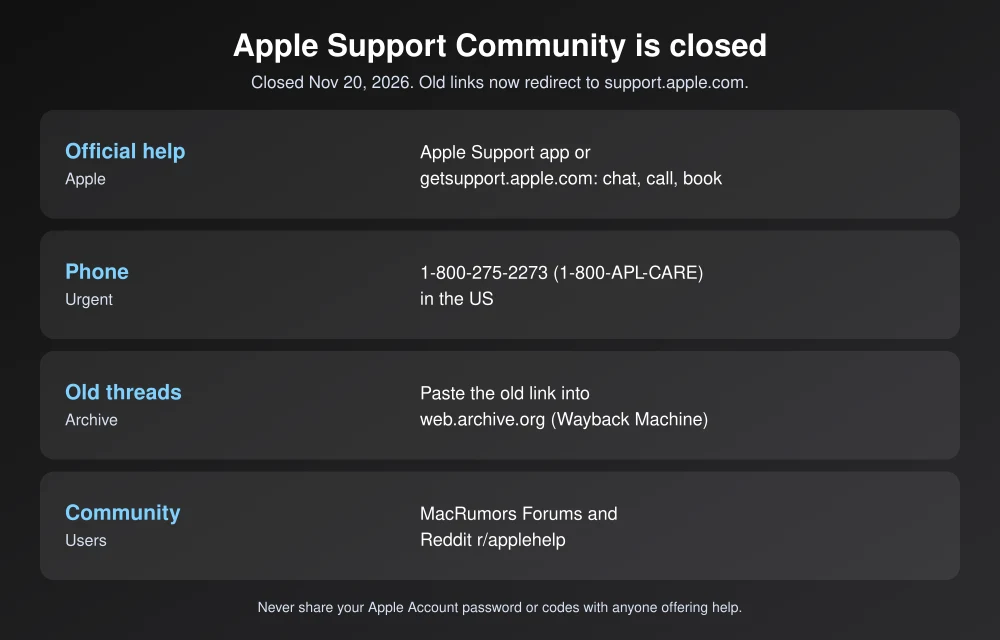
Quick answer: The Apple Support Community (discussions.apple.com) is gone. In our checks, its pages redirect to support.apple.com. To get help now, use getsupport.apple.com or the Apple Support app to chat, call or book a Genius Bar appointment, or call 1-800-275-2273 in the US. To read an old thread, paste its link into the Internet Archive’s Wayback Machine (web.archive.org). Many threads were saved there before the shutdown. For help from other users, MacRumors Forums and Reddit’s r/applehelp are the largest communities left.
What happened to the Apple Support Community
- November 10: Apple made the forum read-only and posted a notice that it “will permanently close on November 20, 2026,” MacRumors reported. You could still browse and search, but nobody could post questions or replies.
- November 20: The forum closed.
- November 21 (our check): discussions.apple.com, community pages and individual thread links all redirect to support.apple.com. Old threads are no longer available on Apple’s site.
Apple told MacRumors it made the decision “after a careful evaluation of strategy and customer needs.” It hasn’t given more detail. The forum began in 1998 as Apple Tech Exchange and was later called Apple Discussions, then Apple Support Communities.
Why this matters
For many problems, a forum thread was the only place to find a fix. That includes odd bugs after an iOS update, older Macs, and edge cases Apple’s support articles don’t cover. Volunteer experts, often with years of posts behind them, answered questions Apple support staff couldn’t. Those answers also powered a huge share of search results. If you’ve noticed “discussions.apple.com” results suddenly sending you to Apple’s homepage for support, this is why.
How to find an old Apple Support Community thread
- Copy the old link from your search result, bookmark or email. It looks like discussions.apple.com/thread/ followed by a number.
- Go to web.archive.org and paste the link into the search box.
- Pick a date from the calendar, ideally before November 10, 2026, to see the full thread.
We tested this with a thread about iOS 26 problems, and the Wayback Machine had a copy saved on November 16, 2026. Not every thread was archived, though, especially small ones. If a search engine shows a cached preview, read the snippet. It often includes the key step.
Where to get Apple support now
| Option | Best for | How |
|---|---|---|
| Apple Support app | Chat, calls, repairs, Genius Bar bookings | Free on the App Store. Sign in with your Apple Account. |
| getsupport.apple.com | Same options, from any browser | Pick your device and problem, then chat, call or schedule |
| Phone | Urgent problems, account lockouts | 1-800-275-2273 (1-800-APL-CARE) in the US |
| support.apple.com | Official how-to and troubleshooting articles | Search by device or error message |
| Apple Store Genius Bar | Hardware problems, screen and battery repairs | Book through the Support app first |
Software support is free whether or not your device is under warranty. Repairs outside warranty cost money unless you have AppleCare+. If you’re deciding on coverage, see our comparison of AppleCare vs carrier phone insurance.
Where to get help from other Apple users
- MacRumors Forums: One of the largest Apple communities, with separate iPhone, iPad, Mac and Apple Watch sections. MacRumors pointed readers there after the shutdown.
- Reddit: r/applehelp handles general troubleshooting. r/iphone, r/mac and r/ios cover specific devices.
- Apple’s own feedback: To report a bug rather than fix it, use apple.com/feedback or, if you run betas, the Feedback app.
Unofficial forums have a downside. Nobody checks the answers, so never share your Apple Account password, verification codes or recovery key with anyone who offers help. Apple support staff will never ask for your password. To lock your account down further, see how to turn on Advanced Data Protection for iCloud. If Apple services themselves stop working, our report on the November 17 Apple outage shows how to check Apple’s System Status page first.
FAQs
Is the Apple Support Community gone for good?
Yes. Apple closed it permanently on November 20, 2026. As of November 21, discussions.apple.com redirects to support.apple.com, and Apple hasn’t announced a replacement forum.
Can I still read old Apple Support Community threads?
Not on Apple’s site. Old thread links redirect to support.apple.com. Many threads were saved by the Internet Archive, so paste the old link into web.archive.org to look for a copy.
Why did Apple shut down the Support Community?
Apple told MacRumors it decided to close the forum after a careful evaluation of strategy and customer needs. It hasn’t shared any other reason.
How do I contact Apple Support now?
Use the Apple Support app or getsupport.apple.com to chat, call or book a Genius Bar appointment, or call 1-800-275-2273 in the US.
Featured image: Apple.
Disclosure: TheTechHacker has no paid relationship with Apple, MacRumors, Reddit or any company mentioned here.
More in News

Best MDM Software for Small Businesses (2026): Intune vs Jamf vs Iru vs Hexnode vs ManageEngine
Someone in your company is going to leave a laptop in a rideshare this year. When that happens, the question isn’t whether the hardware is gone. The question is whether you can lock it, wipe it and prove to a client or an insurer that their data didn’t walk off with it. Mobile device management…

How to Fix Outlook Not Syncing Email in Microsoft 365 (Windows, Mac, iPhone and Android)
Outlook stuck on old mail? Here’s how I’d fix Microsoft 365 sync problems in new and classic Outlook on Windows, Outlook for Mac, and the Outlook app on iPhone and Android.

Copy and Paste Between iPhone and Mac Not Working? 9 Fixes for Universal Clipboard
You copy a link on your iPhone, walk over to the Mac, press Command + V, and… nothing. Or worse, it pastes something you copied an hour ago. If that sounds like your day, you’re dealing with Universal Clipboard, the Apple feature that’s supposed to make copy and paste between iPhone and Mac feel like…
The week in tech, minus the noise.
New reviews, fixes and the stories that matter — once a week, straight to your inbox.
We only use your email to send the newsletter. Unsubscribe any time. See our privacy policy.
Comments