

How to Edit an Instagram Story After Posting (and What You Can’t Change)
For years, a typo in an Instagram Story meant deleting it, reposting it and losing every view it had already picked up. That’s finally over. On November 18, 2026, Instagram head Adam Mosseri announced that you can now edit a Story after it goes live. You get 15 minutes, though, and you can’t change everything.…


Image: Instagram
For years, a typo in an Instagram Story meant deleting it, reposting it and losing every view it had already picked up. That’s finally over. On November 18, 2026, Instagram head Adam Mosseri announced that you can now edit a Story after it goes live. You get 15 minutes, though, and you can’t change everything. This guide covers how it works, what you can and can’t edit, and what to do when the option doesn’t show up.
Quick answer: To edit an Instagram Story after posting, open your Story within 15 minutes of publishing it, tap the three-dot (…) button at the bottom of the screen and choose Edit story. You can fix text, change the music, and add or remove stickers and drawings, and your views and replies stay. Outlets testing the feature report that you can’t swap the photo or video itself. After 15 minutes the option disappears, so you’d have to delete the Story and post it again.
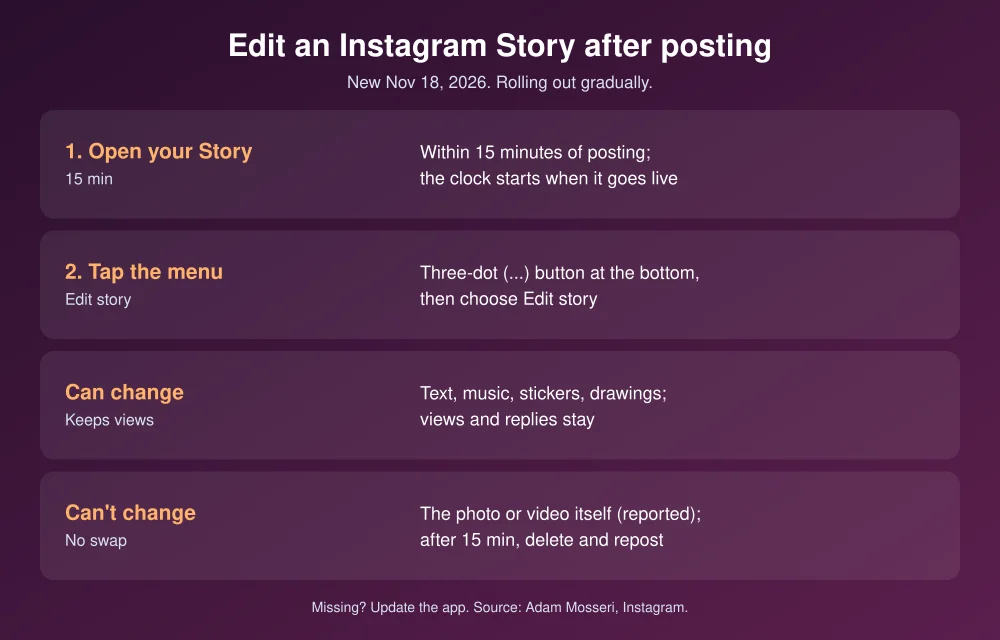
How to edit an Instagram Story after posting
- Update Instagram from the App Store or Google Play. The feature is rolling out gradually.
- Post your Story as usual.
- Within 15 minutes, tap your profile picture at the top of the feed to open your live Story.
- Tap the three-dot (…) button at the bottom of the screen.
- Choose Edit story.
- Make your changes: fix the text, swap the song, or add, move or delete stickers and drawings.
- Save your changes. The edited Story stays live with its views and replies.
The 15-minute clock starts when the Story goes live, not when you open the editor, so make changes as soon as you spot the mistake. Mosseri shared the update in an Instagram post.
What you can and can’t change
| Can edit | Can’t edit (as reported) |
|---|---|
| Text, including typos and captions | The photo or video itself |
| Music | Anything after the 15-minute window |
| Stickers (add, move or remove) | |
| Drawings |
Views and replies stay attached to the edited Story, which is the main reason to edit rather than repost. If you uploaded the wrong photo or clip, though, deleting it is still the only fix.
Why don’t I see Edit story?
- More than 15 minutes have passed. The option disappears once the window closes.
- Your app is out of date. Update Instagram and force-close it, then reopen it.
- It hasn’t reached your account yet. Instagram is rolling the feature out gradually. Some accounts get it days after others.
If Instagram is acting up in other ways, see our fixes for Instagram DMs not working and emoji reactions not working on Android. You can also get help from the Instagram Help Center.
Tips to avoid reposting
- Check text right after posting. A quick tap through your own Story catches most typos while the window is still open.
- Add the music last. Music is editable, so if a song doesn’t line up, swap it rather than starting over.
- Use Close Friends for drafts. Share a test version with a small Close Friends list before posting to everyone.
- Edit comments the same way. Instagram added a similar 15-minute window for editing comments in April 2026.
Meta is changing more than Stories this month. Learn how to turn off Facebook camera roll suggestions, which can scan your phone’s photos.
FAQs
Can you edit an Instagram Story after posting it?
Yes. Since November 18, 2026, you can edit a Story for 15 minutes after posting by tapping the three-dot button on your Story and choosing Edit story.
Will I lose views if I edit my Instagram Story?
No. Views and replies stay with the Story after you edit it. Only deleting and reposting resets them.
Can I change the photo or video in a posted Story?
Outlets testing the feature report that you can’t. You can edit text, music, stickers and drawings, but replacing the media itself still means deleting and reposting.
Why can’t I edit my Instagram Story?
Either more than 15 minutes have passed, your app needs an update, or the feature hasn’t reached your account yet. Instagram is rolling it out gradually.
Featured image: Instagram.
Disclosure: TheTechHacker has no paid relationship with Instagram, Meta or any company mentioned here.
More in How-to

How to Delete Instagram Account
Instagram is slowly becoming popular among people. Nowadays, every tech-savvy person or tech blog has an Instagram account. The idea is to select an image or video and comment about it. You can add hashtags to generate more leads. When it comes to social media, security and privacy is an important factor. Nowadays, the actions…
How To Edit Your WhatsApp Messages
Through text messages, voice calls, and multimedia sharing, WhatsApp users can stay in touch with friends, family, and coworkers around the world. But we’ve all had that experience of reading a sent message and finding a typo or mistake. Fortunately, WhatsApp has introduced a convenient feature that allows you to edit your messages, providing the…

How to hide photos you liked accidentally on Instagram
This is one of those things that happens to every one of us, and it is surely embarrassing. It is related to Instagram and other platforms, so we feel that most of our readers can relate to it. Let’s take an example: you are in bed at night but cannot sleep, so you take your…

The week in tech, minus the noise.
New reviews, fixes and the stories that matter — once a week, straight to your inbox.
We only use your email to send the newsletter. Unsubscribe any time. See our privacy policy.
Comments