

ChatGPT Users Will Hit GPT-6.2 Limits Faster After OpenAI Fixes a Bug: How to Use Your Free Reset
OpenAI fixed a bug that under-counted GPT-6.2 Astra and Sol usage. Limits now arrive 40% and 25% faster. How to use the free reset and stretch limits.

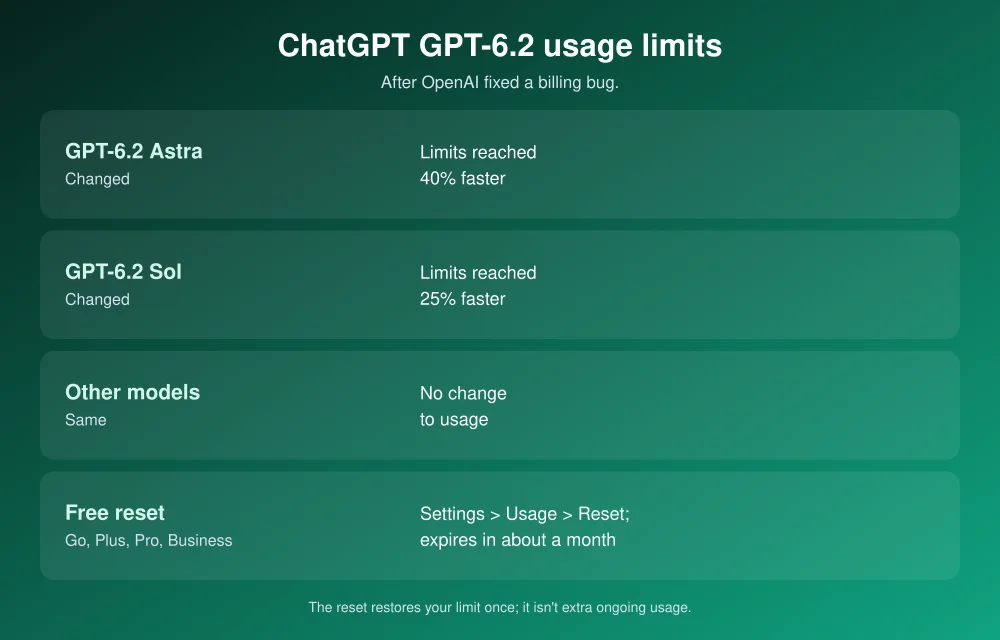
ChatGPT users will hit their usage limits sooner on OpenAI’s newest models. OpenAI says a billing bug had been under-counting usage of GPT-6.2 Astra and Sol, and fixing it means the same work now uses more of your plan’s allowance.
Quick answer: OpenAI’s Tibo Sottiaux said on X that, compared with last week, you’ll reach limits 40% faster on GPT-6.2 Astra and 25% faster on GPT-6.2 Sol. Other models aren’t affected. As an apology, OpenAI added one banked usage reset for Go, Plus, Pro and Business users. BleepingComputer reports you can use it in ChatGPT Settings > Usage > Reset, and it expires after a month.
What Changed
- A bug “incorrectly discounted” GPT-6.2 Astra and Sol usage for most users, OpenAI said.
- The fix means tasks on those two models count more against your limit.
- OpenAI says both models are still more efficient than GPT-6 Astra and GPT-6.1 Sol.
- OpenAI isn’t charging for the difference caused by the bug.
How to Use Your Free Reset
- Open ChatGPT on the web or in the app.
- Go to Settings > Usage.
- When you’ve hit your limit, tap Reset.
- Use it before it expires, about a month after it was added.
Save the reset for a busy day. It restores your limit once; it doesn’t give you 40% more usage going forward.
How to Make Your Limits Last Longer
- Pick the right model. Use GPT-6.2 Astra for hard tasks and a lighter model for quick questions, since only Astra and Sol count more now.
- Batch questions into one message instead of many short ones.
- Trim long pastes. Big documents and long chats use more.
- Check the Usage page before starting a long task.
Which Plans Are Affected?
The reset is going to Go, Plus, Pro and Business users. OpenAI lists plan limits on its ChatGPT pricing page and has more in the OpenAI Help Center. This week, OpenAI also said it is merging ChatGPT’s Chat and Work modes and that heavy users may hit limits sooner, TechCrunch reported.
More ChatGPT news: GPT-6.2 in the Chat tab and the GPT-5.6 Sol cutoff, the new mobile app design and how to use Live Dictation.
FAQs
Why am I hitting ChatGPT limits faster?
OpenAI fixed a bug that under-counted GPT-6.2 Astra and Sol usage. Limits are reached 40% and 25% faster, respectively.
How do I use the free ChatGPT reset?
Go to Settings > Usage and tap Reset when you hit your limit. It expires after about a month.
Who gets the reset?
Go, Plus, Pro and Business users, OpenAI said.
Are other ChatGPT models affected?
No. The change applies to GPT-6.2 Astra and Sol.
Featured image: OpenAI.
Disclosure: TheTechHacker has no paid relationship with OpenAI.
More in News

ChatGPT Plans Compared: Free vs Go vs Plus vs Pro (Prices and Features)
ChatGPT now has four plans for individuals: Free, Go, Plus and Pro, and Pro itself comes in three price tiers. With GPT-6.2 Astra and Sol rolling out this week, many people are asking which plan actually gets them the new models and whether paying more is worth it. This guide compares every individual plan using…
How to Fix GPT-6.2 Not Showing in ChatGPT (Astra and Sol Missing)
OpenAI released GPT-6.2 Astra and GPT-6.2 Sol on November 17, 2026, but many paying subscribers open ChatGPT and still see only the older models. In most cases nothing is broken: the new models live in a different part of ChatGPT than people expect, the rollout is gradual, or the app needs an update. Quick answer:…
ChatGPT Adds GPT-6.2 to the Chat Tab and Sets a December 23 Cutoff for GPT-5.6 Sol
GPT-6.2 is rolling out in ChatGPT's Chat tab for Plus, Pro, Business and Enterprise. Which models leave on December 23, and how to switch.
The week in tech, minus the noise.
New reviews, fixes and the stories that matter — once a week, straight to your inbox.
We only use your email to send the newsletter. Unsubscribe any time. See our privacy policy.
Comments