

Microsoft 365 Copilot Usage-Based Billing: What It Costs and Who It Affects
Microsoft is billing advanced Copilot features in Copilot Credits at about $0.01 each. What's included, what's metered, license prices and admin spending controls.


Microsoft is splitting how businesses pay for Copilot. The per-user license will cover what Microsoft calls “everyday AI,” such as Copilot Chat and Copilot in Word, Excel and PowerPoint. “Advanced AI” will be billed per use in Copilot Credits, at $0.01 a credit on pay-as-you-go. That includes frontier models in the model picker, Cowork, Code, Autopilot and some agent features. Microsoft explained the change in its Evolution of the Copilot pricing model post in September. The metered models in Chat and Office are now in public preview, and broad rollout is expected in early to mid-December 2026. This article covers what’s metered, what it costs, who’s affected, and how admins can cap or turn off spending.
Quick answer: Microsoft 365 Copilot usage-based billing charges Copilot Credits, about $0.01 each on pay-as-you-go, for advanced features. These include premium models in Copilot Chat, Word, Excel and PowerPoint, plus Cowork, Code, Autopilot and Copilot Studio agents. Everyday Copilot use stays included in the license, which costs $30 per user per month (annual) for enterprises, or from $21 for Copilot Business. Nothing is billed until an admin creates a spending policy, except that some new Copilot Business purchases get a default cap of 4,000 credits per user a month. Admins manage it at Microsoft 365 admin center > Copilot > Cost Management. Personal and Family plans aren’t affected.
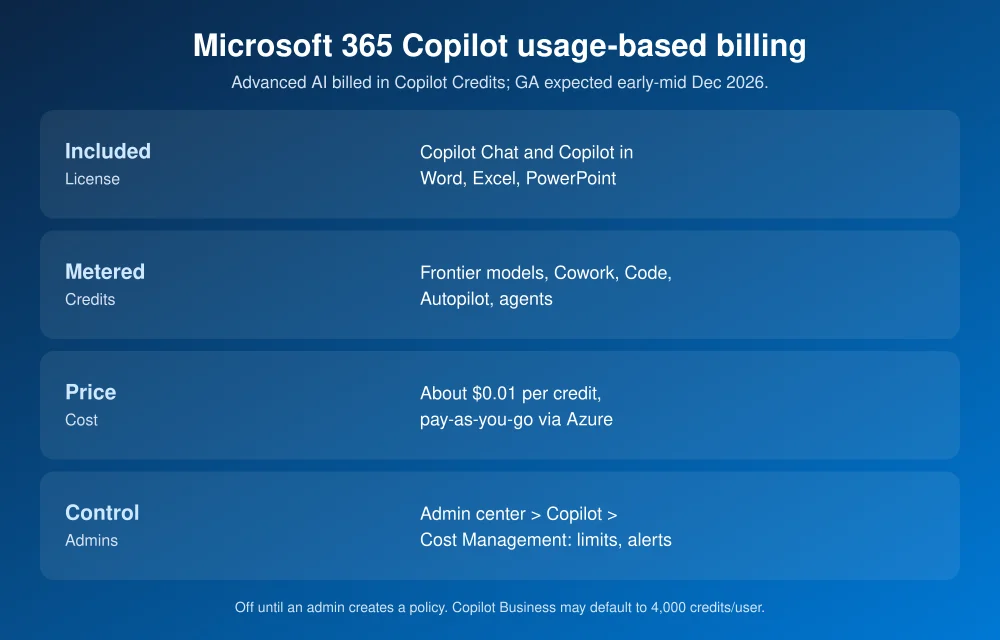
What’s included and what’s metered
| Included in the Copilot license | Billed in Copilot Credits |
|---|---|
| Copilot Chat | Frontier models in the model picker (Chat, Word, Excel, PowerPoint) |
| Copilot in Word, Excel, PowerPoint and other apps | Cowork, Code and Autopilot |
| Auto model routing | Advanced SharePoint and OneDrive agent work |
| Some models under fair use | Copilot Studio agents, Teams Phone Agent, Teams interpretation |
| Clipchamp video creation, Windows 365 Agent, Work IQ API |
The full list is on Microsoft’s Copilot Credits overview. Microsoft’s license vs usage guide says users still need a Copilot license to use the metered features. When a user hits a license limit, Copilot warns them, and they can continue on credits or switch back to the Auto model at no extra cost.
When it starts
- September 25, 2026: Microsoft announced the new pricing model.
- Early November: metered models in Chat and Office reached Frontier, Microsoft’s early-access program.
- Early to mid-December 2026: broad availability of the metered models, plus the option to keep using a chosen model with credits after hitting license limits, according to Microsoft 365 message center posts MC1519122 and MC1557754 as relayed by partner sites.
Some earlier reports said this went live in early November. Microsoft later moved general availability to December.
What it costs
- Copilot Credits: $0.01 per credit on pay-as-you-go, billed to an Azure subscription. Microsoft also sells a one-year pre-purchase plan with discounts. From January 1, 2027, that plan is only available through an Enterprise Agreement or a Microsoft partner.
- How much a task uses: Microsoft hasn’t published a simple price list per task. Partner site ChangePilot estimates a light Cowork task at roughly 70 to 200 credits, or about $0.70 to $2, with heavy tasks going past 1,000 credits.
- Seeing the cost: a filled credit icon in Copilot shows when a request is metered, and typing /cost shows the session’s details, according to MC1557754.
Copilot license prices (US)
| Plan | Per user/month, annual | Per user/month, monthly billing |
|---|---|---|
| Microsoft 365 Copilot (enterprise add-on) | $30.00 | $31.50 |
| Copilot Business add-on | $21.00 (promo $18.00 shown) | $25.20 |
| Business Standard with Copilot | $23.50 | $28.20 |
| Business Premium with Copilot | $32.00 | $38.40 |
Prices are from Microsoft’s Copilot business pricing page, which now lists “usage-based billing for select advanced AI features” on each plan.
Who it affects
- Companies with Microsoft 365 Copilot licenses: metered features only work once an admin sets up a spending policy. Microsoft says usage billing stays off, and nothing is billed, until then.
- Small businesses buying Copilot Business: Microsoft’s Copilot Business billing FAQ says eligible new purchases may get pay-as-you-go turned on by default, with a policy capped at 4,000 credits per user per month, about $40. You’re only charged if someone uses a metered feature, and admins can lower the cap or turn it off.
- Staff using free Copilot Chat at work: agents and SharePoint agents there were already metered at $0.01 per message through a separate pay-as-you-go setup, which is off unless IT enables it.
- Home users: Microsoft 365 Personal, Family and Premium use a separate system of AI credits and usage limits. This business billing change doesn’t apply to them.
How admins can control spending
From Microsoft’s setup guide:
- Go to Microsoft 365 admin center > Copilot > Cost Management and select Get started. A Global or Billing admin must create the first policy.
- Choose how to pay: an Azure subscription (pay-as-you-go), pre-purchased credits, or capacity packs.
- Set a monthly limit for the policy, and optionally a per-user limit.
- Add alerts by credit amount or percentage.
- Check Auto-apply new services, which is on by default. Turn it off if you don’t want new metered features added automatically.
- Optionally limit the policy to specific groups, then select Activate.
To allow the premium models in Chat and Office, the policy must include Models with usage-based billing in Chat and Office. To stop all metered use, turn off usage billing in Cost Management. Included Copilot features keep working. Track spend in the Cost Management dashboards and in Azure Cost Management.
Comparing office suites for a small team? See Google Workspace vs Microsoft 365 for small business and what Microsoft announced at Ignite 2026. If Outlook or Teams stops working, check whether Microsoft 365 is down.
FAQs
How much does a Copilot Credit cost?
Microsoft’s pay-as-you-go rate is $0.01 per Copilot Credit, billed through an Azure subscription. Pre-purchase plans offer discounts.
Will Microsoft 365 Copilot cost more for my company?
Only if your admin enables usage billing and people use advanced features. The license price stays the same, and everyday Copilot Chat and app features remain included.
When does Copilot usage-based billing start?
Microsoft announced it in September 2026. The metered models in Chat, Word, Excel and PowerPoint are expected to reach general availability in early to mid-December 2026.
Does this affect Microsoft 365 Personal or Family?
No. Consumer plans use their own AI credits and limits. The usage-based billing change is for business Copilot plans.
Featured image: Microsoft.
Disclosure: TheTechHacker has no paid relationship with Microsoft or any company mentioned here.
More in News

Google Workspace vs Microsoft 365 for Small Business (2026): Prices, Storage, Email and Security Compared
Most small businesses end up choosing between Google Workspace and Microsoft 365 around the time they stop using personal Gmail addresses. The first suite you pick tends to stay for years. That’s because email, shared files, calendars and meeting links all pile up inside it, and moving out later takes a weekend nobody wants to…

Fireflies vs Otter 2026: Which AI Meeting Notetaker Should You Use?
Fireflies.ai and Otter.ai are the two AI meeting notetakers most people compare first. Both join Zoom, Google Meet and Microsoft Teams calls, transcribe what is said and write a summary. The differences are in the free plans, how they limit usage and what the paid tiers add. This guide compares Fireflies and Otter on price,…

Microsoft Ignite 2026: Copilot Is Getting File Actions on Copilot+ PCs, Plus Copilot in Windows Search
At Ignite 2026, Microsoft said Copilot on Copilot+ PCs will soon move, rename and organize files and diagnose PC problems, plus a Copilot handoff in Windows Search.
The week in tech, minus the noise.
New reviews, fixes and the stories that matter — once a week, straight to your inbox.
We only use your email to send the newsletter. Unsubscribe any time. See our privacy policy.
Comments