

Google Workspace vs Microsoft 365 for Small Business (2026): Prices, Storage, Email and Security Compared
Most small businesses end up choosing between Google Workspace and Microsoft 365 around the time they stop using personal Gmail addresses. The first suite you pick tends to stay for years. That’s because email, shared files, calendars and meeting links all pile up inside it, and moving out later takes a weekend nobody wants to…

Photo by KOBU Agency on Unsplash
Most small businesses end up choosing between Google Workspace and Microsoft 365 around the time they stop using personal Gmail addresses. The first suite you pick tends to stay for years. That’s because email, shared files, calendars and meeting links all pile up inside it, and moving out later takes a weekend nobody wants to give up.
The two suites now cost almost the same at the entry and middle tiers, so price on its own rarely settles it. What separates them is how your team works with documents, how storage is counted, and how much security management you want built into the plan you’re already paying for. I compare all three below using Google’s and Microsoft’s own US pricing and plan pages, checked in November 2026. At the end there’s a recommendation for the most common small business setups.
Quick answer: For teams that work in the browser, share documents constantly and want simple administration, Google Workspace Business Standard ($14 per user per month on an annual plan) is the easier fit. Microsoft 365 Business Standard costs the same $14 and makes more sense if your clients send Word and Excel files, or your staff rely on desktop Office apps. If you need device management and stronger threat protection without buying extra tools, Microsoft 365 Business Premium ($22) bundles more security than Google Workspace Business Plus at the same price.
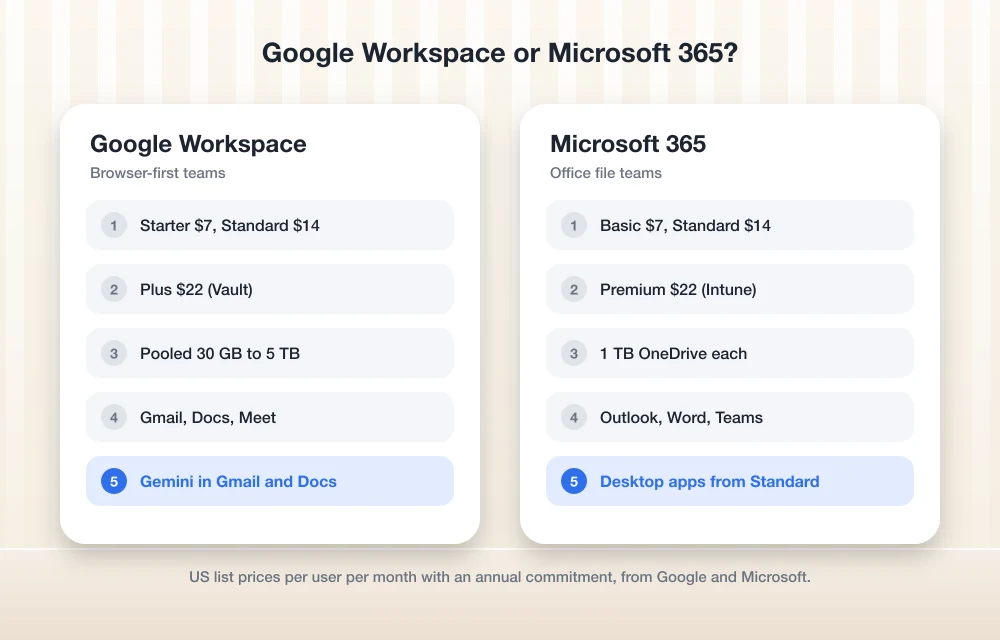
The Plans Side by Side
Both companies sell three main business tiers capped at 300 users, with enterprise plans above that. The prices below are US list prices per user per month with an annual commitment, before tax.
| Google Workspace | Microsoft 365 | |
|---|---|---|
| Entry plan | Business Starter, $7 | Business Basic, $7 |
| Middle plan | Business Standard, $14 | Business Standard, $14 |
| Top small business plan | Business Plus, $22 | Business Premium, $22 |
| Paying month to month | Google says an annual commitment saves 16% | $8.40, $16.80 and $26.40 |
| Cloud storage | 30 GB, 2 TB or 5 TB per user, pooled | 1 TB OneDrive per user |
| Email storage | Counts against pooled storage | Separate mailbox (100 GB primary on Standard and Premium) |
| Video meetings | Meet: 100, 150 or 500 participants | Teams on every plan above, or “no Teams” versions |
| Desktop apps | Browser-first; no installed office apps | Word, Excel, PowerPoint and Outlook from Business Standard up |
| User cap | 300 on Business plans | 300 on Business plans |
Two details are easy to miss on the pricing pages. Google’s site often shows a temporary discount for the first few months, so the figure you see at checkout may be lower than the list price you’ll pay afterwards. Microsoft also sells cheaper “no Teams” versions of each plan ($5.40, $10.79 and $18.79 per user per month on an annual plan), which only make sense if you already pay for Zoom or another meeting tool.
Google Workspace: Built Around the Browser
Google Workspace gives you Gmail on your own domain, Drive, Docs, Sheets, Slides, Calendar, Meet and Chat, and almost everything happens in a browser tab. When two people edit the same proposal at once, nobody has to think about versions or email attachments. For teams that already live in Gmail, that’s usually the deciding factor.
Business Starter ($7) includes 30 GB of pooled storage per person, custom business email, 100-person video meetings and Gemini in Gmail. Business Standard ($14) raises storage to 2 TB per person and adds meeting recording, noise cancellation, 150-person meetings, appointment booking pages, eSignature in Docs and PDFs, and Gemini across Gmail, Docs, Meet and other apps. Business Plus ($22) moves to 5 TB per person and 500-person meetings with attendance tracking. It also adds Vault for retaining, archiving and searching data, eDiscovery, secure LDAP and advanced endpoint management.
Storage in Workspace is pooled. Google multiplies the per-person allowance by your number of users and lets the whole organization share the total, so one heavy video user doesn’t run out while everyone else sits on empty space. Gmail messages and attachments count toward that same pool, which matters on Starter, where 30 GB per person fills up faster than most owners expect.
Microsoft 365: The Office Apps and More Security in the Box
Microsoft 365 is the safer choice when documents leave your company. If your accountant, lawyer, lender or biggest customer sends spreadsheets with macros, tracked changes in Word, or complex PowerPoint decks, the desktop apps open them exactly as they were made. That alone keeps a lot of firms on Microsoft.
Business Basic ($7) covers business email, 1 TB of OneDrive storage per user, Teams, and the web and mobile versions of Word, Excel, PowerPoint and Outlook. Business Standard ($14) adds the full desktop apps on up to five PCs or Macs, five tablets and five phones per user, plus webinar hosting in Teams. Business Premium ($22) is where Microsoft pulls ahead on security. It includes Intune Plan 1 for device and app management, Microsoft Defender for Business for device protection, Defender for Office 365 against phishing and ransomware, Purview tools for protecting sensitive data, and policy-based access controls through Microsoft Entra ID.
Microsoft also sells plans with Copilot built in, priced at $23.50 per user per month for Business Standard with Copilot and $32 for Business Premium with Copilot on an annual plan. The basic Copilot Chat assistant is included at no extra cost with eligible Microsoft 365 business subscriptions, so most small teams can try it before paying for the bundled version.
Email and Storage: Where the Real Differences Show
Day to day, Gmail and Outlook both handle shared calendars, mobile apps, spam filtering and custom domains well. The practical gap is how storage is counted. Microsoft gives each user a separate mailbox, which Microsoft’s comparison table lists at 100 GB on Business Standard and Premium. That sits on top of 1 TB of OneDrive, so a busy inbox never eats into file storage. Google’s pooled model is more flexible across a team, but email and files draw from the same pool. If storage is the main reason you’re comparing, our guide to cloud storage for business puts Drive and OneDrive next to Dropbox and Box.
If you’re moving from one to the other, both companies provide migration tools. Google lists its Workspace Migrate tool on Business Standard and above. Plan the cutover for a quiet weekend, and lower your DNS record TTLs a day or two before you switch email, so new messages start arriving in the new system quickly.
Security and Admin Controls Compared
Every plan from both companies includes two-step verification, admin controls and encryption. The differences show up when you need to manage laptops and phones or keep records for legal reasons.
- Device management: Google lists “fundamental” endpoint management on Starter and Standard and “advanced” on Business Plus. Microsoft includes Intune Plan 1 only in Business Premium.
- Email threat protection: Business Premium includes Defender for Office 365. On Google, Gmail’s built-in protections apply on every plan, and Google reserves features like data loss prevention for its enterprise tiers.
- Records and legal holds: Google Vault and eDiscovery start at Business Plus. On Microsoft, Business Premium adds the stronger archiving and Purview compliance tools.
- Endpoint antivirus: Business Premium includes Defender for Business. Microsoft also sells it as a $3 per user per month add-on for other plans.
For a company with laptops in the field, Business Premium is often cheaper than Business Standard plus a separate device management and endpoint protection product. If that’s your situation, price the whole stack rather than the suite on its own.
What a Five-Person Team Would Pay
At list prices on an annual plan, a five-person team on either middle tier pays $70 a month, or $840 a year. Moving all five people to Business Plus or Business Premium costs $110 a month, or $1,320 a year. Paying month to month on Microsoft raises Business Standard to $84 a month for the same five people, which is why most owners take the annual commitment once they’re sure of their headcount.
Which One Should You Choose?
Pick Google Workspace if
Your team already uses Gmail and Google Docs, most work happens in the browser, people collaborate on the same documents every day, and you want the simplest admin console. Business Standard is the sweet spot for most small offices, because 2 TB of pooled storage per person and recorded meetings cover what growing teams need.
Pick Microsoft 365 if
Your clients and partners exchange Office files, your finance person can’t live without desktop Excel, or you need to manage company laptops and phones. Business Standard covers the apps, and Business Premium is worth the extra $8 per user once you have devices to protect. If your team already meets in Teams, our comparison of video conferencing software for small businesses shows how Teams stacks up against Meet and Zoom.
Before signing up, check the latest prices on Google Workspace’s pricing page and Microsoft’s business plan comparison. Both companies change promotions often, and both offer free trials. If you land on Microsoft and mail stops arriving on someone’s phone after the move, our guide on fixing Outlook not syncing in Microsoft 365 covers the usual causes.
FAQs
Is Google Workspace cheaper than Microsoft 365?
Not at list price. Google Workspace Business Starter, Standard and Plus cost $7, $14 and $22 per user per month on an annual plan, and Microsoft 365 Business Basic, Standard and Premium cost the same $7, $14 and $22. Google often runs introductory discounts, and Microsoft sells cheaper versions without Teams.
Does Google Workspace include Microsoft Word and Excel?
No. Google Workspace uses Docs, Sheets and Slides, which can open and save Word, Excel and PowerPoint files. If you need the installed desktop Office apps, you need Microsoft 365 Business Standard or Business Premium.
Which has more storage, Google Workspace or Microsoft 365?
Google Workspace Business Standard gives 2 TB per user and Business Plus 5 TB, pooled across the company, with email counted inside that pool. Microsoft 365 gives 1 TB of OneDrive per user plus a separate mailbox.
Can I switch from Google Workspace to Microsoft 365 later?
Yes. Both companies provide migration tools for email, calendars and files, but plan for a weekend cutover and update your domain’s DNS records when you move email.
Featured image: KOBU Agency on Unsplash.
Disclosure: TheTechHacker has no paid relationship with Google, Microsoft or any company mentioned here.
You might also like

Best Cloud Storage for Business in 2026: Google Drive vs OneDrive vs Dropbox vs Box
Google Drive, OneDrive, Dropbox and Box compared for business on storage, sharing, admin controls, security, backup vs sync and per-user pricing. Confirmed prices only, with clear notes where details couldn’t be verified.

Best Video Conferencing Software for Small Businesses (2026): Zoom vs Teams vs Google Meet vs Webex vs RingCentral
Zoom, Microsoft Teams, Google Meet, Webex and RingCentral Video compared for small teams, with Zoom’s official limits and prices and a clear list of what to check for the rest.

Best Document Management Software for Small Businesses (2026)
I compare six document management options for small businesses in 2026, from SharePoint and Google Drive to Box, M-Files, DocuWare and our own custom ERP. The comparison focuses on version control, search, permissions and retention.
The week in tech, minus the noise.
New reviews, fixes and the stories that matter — once a week, straight to your inbox.
We only use your email to send the newsletter. Unsubscribe any time. See our privacy policy.
Comments