

Microsoft Ignite 2026: Copilot Is Getting File Actions on Copilot+ PCs, Plus Copilot in Windows Search
At Ignite 2026, Microsoft said Copilot on Copilot+ PCs will soon move, rename and organize files and diagnose PC problems, plus a Copilot handoff in Windows Search.


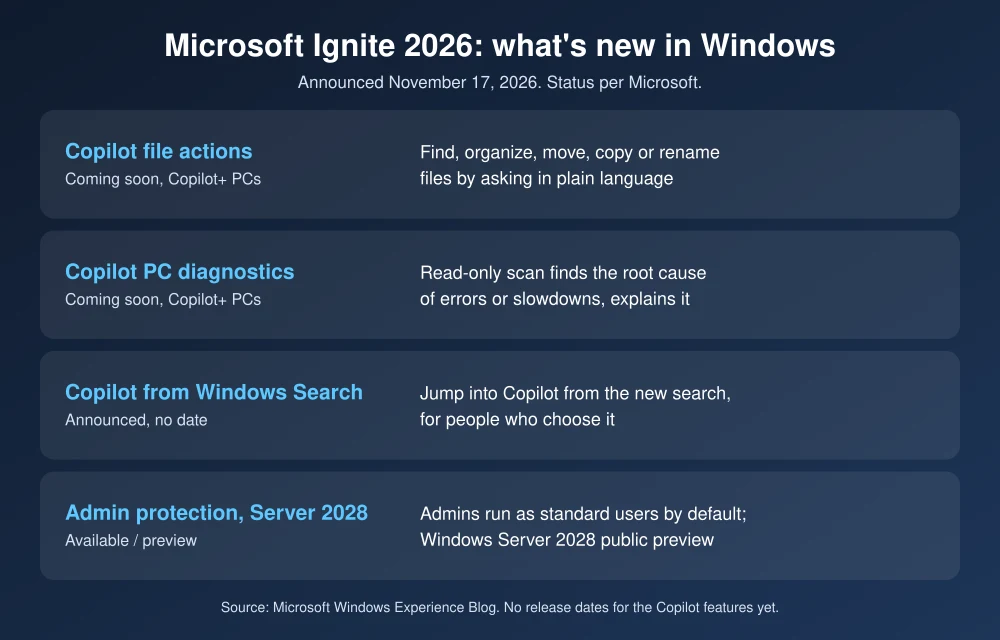
Microsoft used its Ignite 2026 conference this week to show where Windows 11 is heading next, and the biggest change for everyday users is simple: Copilot is about to start doing things on your PC, not just answering questions about it. In a post on the Windows Experience Blog dated November 17, Windows chief Pavan Davuluri said Copilot on Copilot+ PCs will soon be able to find, organize, move, copy and rename files from a plain-language request, and run a read-only scan to explain what’s wrong with a slow or misbehaving PC.
Quick answer: Microsoft says three local Copilot features are “coming soon” to Copilot+ PCs: local file actions (find, organize, move, copy or rename files by asking), local context that Copilot can use with your permission, and local PC diagnostics that run a read-only scan to find the cause of errors. Microsoft also says the new Windows Search will let people who choose it jump straight into Copilot. No release date has been given, and the features are not available yet.
Copilot can soon move and rename your files
This is the feature most people will notice. According to Microsoft, “local file actions” let you ask Copilot in normal language to find, organize, move, copy or rename files on your PC. Think requests like “put all my tax PDFs from this year in one folder” or “rename these photos by date,” handled by Copilot instead of by you dragging files around in File Explorer.
Microsoft is pitching this as something that happens while “the user stays in control.” Copilot can also use local context from your PC, but the company says it does so “with permission.” Microsoft hasn’t yet explained exactly what the approval prompts look like, so it’s worth waiting for the rollout details before handing over a messy Downloads folder.
Copilot will troubleshoot PC problems for you
The second local feature is PC diagnostics. Microsoft says Copilot can run a read-only scan of the system to find the root cause of errors or performance issues, then explain what’s going on in clear terms. Read-only matters here: the scan looks, it doesn’t change settings on its own. For anyone who has spent an evening chasing a Windows update that won’t install or a browser that crashes when printing, a clear explanation of the actual cause could save real time.
Which PCs get it, and when
Only Copilot+ PCs are named. These are the newer Windows 11 laptops and desktops with a built-in NPU (neural processing unit) designed for on-device AI. Microsoft’s exact wording is that the three local capabilities are “coming soon,” with no date, no Insider channel and no list of regions yet. If you’re on an older Windows 11 PC without an NPU, nothing in this announcement says the features are coming to your machine.
Copilot inside Windows Search
Microsoft has been testing a rebuilt Windows Search with Windows Insiders since October. The Insider preview is faster, handles typos better and can run quick actions from the search box, such as turning on dark mode, night light or Bluetooth, dimming the screen or minimizing all windows. It’s rolling out gradually in the Experimental channel, in English first, behind a feature flag called “New Windows Search Experience” (Settings, Windows Update, Windows Insider Program, Feature flags).
At Ignite, Microsoft said it is building on that search experience and making it seamless to move into Copilot from the same flow, “for people who choose it.” In other words, Copilot in Search is framed as opt-in. Microsoft didn’t share a settings path or timing for the Copilot handoff itself.
The rest of the Ignite 2026 Windows news
- Administrator protection is now generally available. IT can make local admins run with standard user privileges by default, which limits damage from malware.
- Windows endpoint security platform is generally available, with partners including Bitdefender, CrowdStrike, ESET, SentinelOne, Sophos and Trellix. Windows baseline protection is in preview for Insiders.
- Microsoft Execution Containers (MXC), the sandbox Windows uses to contain AI agents, gets process container improvements in preview, and local micro VMs as an experiment. Microsoft says OpenAI has turned MXC on by default in Codex.
- Windows 365 for Agents is available as a computer-use tool in Microsoft Copilot Studio and is now eligible for Copilot Credits.
- Windows Server 2028 is in public preview, with Trusted Launch virtual machines, post-quantum cryptography and a hardened OS baseline.
- GitHub Copilot Fusion can route coding work to local models on developer PCs, in preview.
What it means for you
For most US Windows users, nothing changes today. The file actions and diagnostics are announcements, not updates you can install. If you’re shopping for a new laptop this Black Friday and these features matter to you, look for the Copilot+ PC label. If privacy is your main concern, the key details to watch are the permission prompts Microsoft promised and whether the Copilot handoff in Search stays switched off unless you turn it on. If you’re comparing AI assistants more broadly, our ChatGPT plans comparison covers what you get on the other side.
FAQs
Can Copilot move and rename files in Windows 11 now?
Not yet. Microsoft says local file actions are coming soon to Copilot+ PCs, and it hasn’t given a release date.
Will Copilot file actions work on my older PC?
Microsoft has only named Copilot+ PCs, which have a built-in NPU. It hasn’t announced support for other Windows 11 PCs.
Is Copilot in Windows Search turned on automatically?
Microsoft describes moving into Copilot from Windows Search as being “for people who choose it,” which suggests it’s optional. It hasn’t published the setting yet.
Can Copilot change my PC settings when it troubleshoots?
Microsoft says the PC diagnostics feature runs a read-only scan to find the root cause of errors or performance issues and explain it, so the scan itself doesn’t change your system.
Featured image: Microsoft.
Disclosure: TheTechHacker has no paid relationship with Microsoft or any company mentioned here.
More in News

How to Fix KB5132061 Not Installing on Windows 11 (0x800f0993 and More)
Windows 11’s November security update, KB5132061, arrived on Patch Tuesday, November 10, and on some PCs it just won’t go in. You click Install, the progress bar crawls, and then Windows Update shows 0x800f0993, 0x80070306 or 0x800f0989, or quietly tries again on the next restart. Microsoft has acknowledged the problem, which helps, because it means…

Best Laptops for Small Business in 2026 (Windows and Mac)
My picks for the best small business laptops in 2026, grouped by role, from the MacBook Air M5 to ThinkPad, Dell, HP EliteBook and Surface. You’ll also find what specs to check, Black Friday tips and fleet management basics.
How to Fix an External Hard Drive or SSD Not Showing Up on Windows 11 or Mac
External drive not detected on Windows 11 or your Mac? Here’s how I work through it, from cables and Disk Management to Disk Utility First Aid, and when to stop and call a data recovery service.
The week in tech, minus the noise.
New reviews, fixes and the stories that matter — once a week, straight to your inbox.
We only use your email to send the newsletter. Unsubscribe any time. See our privacy policy.
Comments