

Is Microsoft 365 Down? How to Check Outlook and Teams Outages and Keep Working
After November's day-long Outlook and Teams outage, how to check Microsoft 365 status the official way, tell if it's just you, and keep working when it's down.


Microsoft 365 users have had a rough November. On November 12, a global outage took down Outlook and Teams for about a day. Downdetector logged more than 100,000 reports within an hour of Microsoft’s first post, and some customers waited until November 16 for a full fix. On Thursday and again on Friday, November 20, Downdetector showed new spikes of reports for Microsoft 365 and Outlook, though Microsoft hadn’t confirmed a new outage. Microsoft blamed the big outage on a software bug, not a cyberattack. If email or Teams stops working, the first five minutes matter most: finding out whether the problem is Microsoft’s or yours. This guide covers how to check, and how to keep working when Microsoft is down.
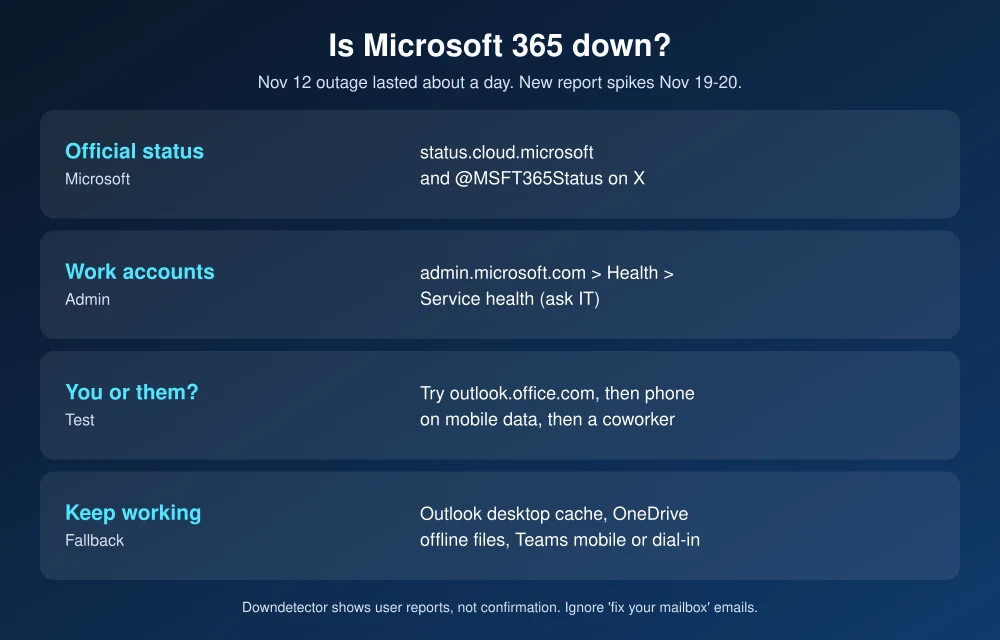
Quick answer: To check if Microsoft 365 is down, go to Microsoft’s official service status page at status.cloud.microsoft and the @MSFT365Status account on X, where Microsoft posts outage updates. If you’re on a work account, your IT admin sees more detail under Health > Service health in the Microsoft 365 admin center. Downdetector spikes show what users are reporting but aren’t confirmation. If Microsoft is down, use apps that cache data, such as Outlook desktop’s offline mailbox and synced OneDrive files, and switch to Teams on your phone or a phone call for meetings.
What happened in November
- November 12 to 13: Outlook, Teams and other Microsoft 365 services went down starting late Thursday morning Eastern time. Microsoft said “There is no indication this is the result of malicious or cyber activity,” ABC News reported. Microsoft paused deployments and restarted affected servers. It declared the incident over at about 11:10 a.m. ET on November 13, with remaining customers fully recovered by November 16.
- The cause: According to Microsoft’s preliminary report, as described by IBTimes, a bug from an earlier fix to networking gateway servers combined with a surge in traffic and reduced server capacity. Microsoft says it has added capacity.
- November 19 and 20: Downdetector showed new spikes in user reports for Microsoft 365 and Outlook. Microsoft hadn’t confirmed a new outage at the time.
How to check if Microsoft 365 is down
- Microsoft’s service status page: status.cloud.microsoft shows major incidents affecting Microsoft 365, Outlook.com and Teams. The old portal.office.com/servicestatus address now redirects here.
- @MSFT365Status on X: Microsoft posts outage updates here, often before the status page changes. During the November 12 outage, this was the main source of updates.
- Service health in the admin center (work and school accounts): Admins can go to admin.microsoft.com > Health > Service health to see incidents affecting their organization, including ones too small for the public status page. If you’re not the admin, ask IT.
- Downdetector: Useful as an early warning, but it only counts user reports. A spike isn’t confirmation, as the November 20 reports showed.
Is it Microsoft or just you?
| Test | If it works | If it fails |
|---|---|---|
| Open outlook.office.com in a browser | Your Outlook app or PC is the problem. Restart it or repair Office. | Likely a Microsoft or account problem |
| Try Outlook or Teams on your phone using mobile data | Your Wi-Fi, network or VPN is the problem | Likely Microsoft |
| Ask a coworker to send a test email | Your mailbox is fine | Check status pages and tell IT |
If only you are affected, sign out of Office and back in, check your internet connection, and turn off your VPN briefly. If you use a VPN for work, see how to fix a VPN not connecting on Windows 11.
How to keep working when Microsoft 365 is down
- Outlook desktop keeps a local copy: Classic Outlook for Windows and Mac stores a copy of your mailbox in Cached Exchange Mode, so you can read existing email and draft replies. They send when service returns.
- Synced OneDrive files still open: Files marked Always keep on this device in OneDrive open without a connection. Before a big deadline, mark the files you need this way.
- Move meetings off Teams if needed: If Teams is down but phones work, use the meeting’s dial-in number or a quick phone call. Teams on your phone may also work when the desktop app doesn’t.
- Use a backup channel: Agree in advance on a fallback, such as a team text thread, so people aren’t stuck waiting on email.
- Don’t fall for “fix” emails: Scammers send fake Microsoft password-reset and “mailbox full” emails during outages. Microsoft won’t email you a link to fix an outage.
Small businesses comparing options after the November outage can see our Google Workspace vs Microsoft 365 comparison. For what’s new in Microsoft’s apps, read our Microsoft Ignite 2026 coverage. If Apple services fail instead, see how to check if iCloud or the App Store is down.
FAQs
How do I know if Microsoft 365 is down?
Check status.cloud.microsoft and the @MSFT365Status account on X. Work and school users can ask IT to check Service health in the Microsoft 365 admin center. Downdetector shows user reports but isn’t official.
What caused the Microsoft 365 outage in November 2026?
Microsoft said the November 12 outage came from a software bug introduced during earlier network work, combined with a traffic surge and reduced server capacity. It said the outage wasn’t a cyberattack.
Was Microsoft 365 down on November 20?
Downdetector showed a spike in user reports for Microsoft 365 and Outlook on November 20, but Microsoft hadn’t publicly confirmed a new outage at the time.
Can I use Outlook when Microsoft 365 is down?
Partly. Classic Outlook desktop keeps a local copy of your mailbox, so you can read existing email and draft replies. New messages won’t send or arrive until service returns.
Featured image: Microsoft.
Disclosure: TheTechHacker has no paid relationship with Microsoft or any company mentioned here.
More in News

How to Fix Outlook Not Working After the Microsoft 365 Outage
If Outlook has been spinning, refusing to send, or showing an empty inbox since Thursday, November 12, you’re not alone and it probably isn’t your computer. Microsoft has been dealing with a large Microsoft 365 incident that hit Exchange Online, the service behind work and school Outlook mailboxes, and features in Teams and other apps…

How to Fix Outlook Not Syncing Email in Microsoft 365 (Windows, Mac, iPhone and Android)
Outlook stuck on old mail? Here’s how I’d fix Microsoft 365 sync problems in new and classic Outlook on Windows, Outlook for Mac, and the Outlook app on iPhone and Android.

Best Email Security Software for Small Businesses on Microsoft 365 and Google Workspace (2026)
A huge share of small business security incidents start in the same place: an inbox. Someone gets a convincing invoice from a “vendor” with new bank details, or a Microsoft sign-in page that looks right but isn’t, and by the time anyone notices, money or a password is gone. Microsoft 365 and Google Workspace both…
The week in tech, minus the noise.
New reviews, fixes and the stories that matter — once a week, straight to your inbox.
We only use your email to send the newsletter. Unsubscribe any time. See our privacy policy.
Comments