

pCloud Confirms Password Manager Hack: What pCloud Pass Users Should Do Now
pCloud confirmed a cyberattack on its pCloud Pass password manager. What was exposed, what pCloud hasn't said, and the steps to take now.

pCloud has confirmed that its password manager, pCloud Pass, was hit by a cyberattack. Users around the world got emails saying an unknown device had connected to their accounts, some even with two-factor authentication turned on. It’s the third password-related breach this week, after 1Password and the game tracker Backloggd.
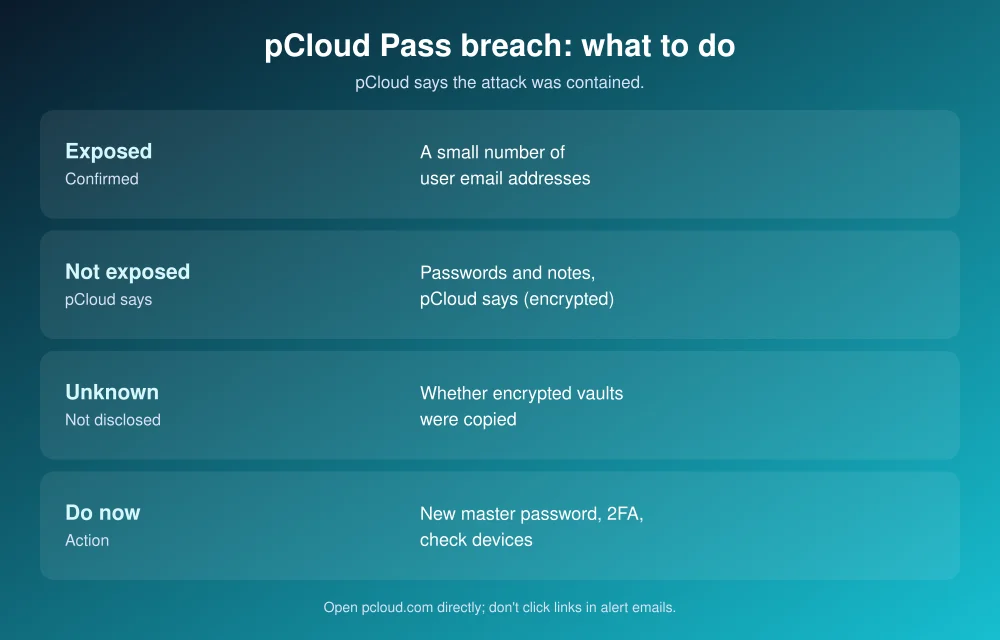
Quick answer: pCloud says a cyberattack on pCloud Pass was “promptly contained.” A small number of user email addresses were exposed and login attempts were made. pCloud says stored passwords and notes were not compromised because they’re encrypted with your master password, and its cloud storage wasn’t affected. It hasn’t said whether encrypted vaults were copied. If you use pCloud Pass, change your master password, make sure 2FA is on, review connected devices, and change passwords for your most important accounts.
What Happened
- pCloud Pass users got emails saying a new device named “pd” had connected from a Luxembourg IP address, BleepingComputer reports.
- Some had 2FA enabled. Others got the alert without ever using pCloud Pass, including one person whose pCloud account was deleted a year ago.
- pCloud’s statement: “A cyberattack targeting pCloud Pass occurred, which was promptly contained by the pCloud team.”
- pCloud says it automatically sent a notification to each exposed email address.
Why It Matters Even If Passwords Are Encrypted
pCloud says vault data is encrypted on your device and can only be decrypted with your master password. But it hasn’t said whether encrypted vaults were accessed. If attackers copy encrypted vaults, they can try to crack weak master passwords offline, without login limits or 2FA. That’s what happened after the 2022 LastPass breach, which researchers later linked to cryptocurrency thefts.
What pCloud Pass Users Should Do Now
- Change your master password to a long, unique passphrase you don’t use anywhere else.
- Turn on 2FA with an authenticator app if it isn’t already on.
- Check connected devices in pCloud Pass and remove any you don’t recognize.
- Change passwords for your most important accounts first: email, bank, and any crypto wallets. Move crypto seed phrases out of a password manager.
- Be careful with breach emails. A BleepingComputer reader noticed a link in pCloud’s alert pointed to a test domain. Instead of clicking links, open pCloud directly by typing pcloud.com.
CISA’s strong password guide explains how to build a master password that resists cracking. pCloud’s help center has account security settings.
A Bad Week for Password Managers
- 1Password: customer names and emails were stolen after an employee’s GitHub account was breached. 1Password says vaults and encryption keys weren’t affected.
- Backloggd: the game-tracking site urged users to change passwords after a breach.
- pCloud Pass: email addresses exposed and login attempts made.
Still need a password manager? Compare options in our best password managers guide, and check whether your logins leaked with our exposed-password guide. Also see how to spot fake extensions stealing Gmail.
FAQs
Was pCloud hacked?
Yes. pCloud confirmed a cyberattack on its pCloud Pass password manager that it says was quickly contained.
Were my pCloud passwords stolen?
pCloud says stored passwords weren’t compromised because they’re encrypted with your master password. It hasn’t said whether encrypted vaults were copied.
Was pCloud cloud storage affected?
No. pCloud says the attack was limited to pCloud Pass.
What should pCloud Pass users do?
Change the master password, turn on 2FA, check connected devices and update passwords for key accounts.
Featured image: pCloud.
Disclosure: TheTechHacker has no paid relationship with pCloud.
More in News
Best Password Managers for Families and Small Businesses (2026)
I compared 1Password, Bitwarden, Dashlane and the built-in Apple and Google options using official vendor pages, so you can choose the right password manager for your family or small team.
Billions of Passwords Exposed: What the 2 Billion and 3.6 Billion Figures Mean and How to Check Yours
You may have seen two alarming numbers this week: 2 billion credentials exposed, and 3.6 billion usernames, passwords and documents. They sound like one giant leak, but they aren’t. The larger number adds together two unrelated databases, and only one of them holds login credentials. The other is a set of Chinese identity records. Neither…

Apple Outage Hits App Store and iCloud Sign-In; Apple Blames Internal Update
Apple says an internal update caused the Nov 17 outage that hit the App Store, iCloud sign-in and AppleCare. Times, what was affected and what to do now.
The week in tech, minus the noise.
New reviews, fixes and the stories that matter — once a week, straight to your inbox.
We only use your email to send the newsletter. Unsubscribe any time. See our privacy policy.
Comments