

Billions of Passwords Exposed: What the 2 Billion and 3.6 Billion Figures Mean and How to Check Yours
You may have seen two alarming numbers this week: 2 billion credentials exposed, and 3.6 billion usernames, passwords and documents. They sound like one giant leak, but they aren’t. The larger number adds together two unrelated databases, and only one of them holds login credentials. The other is a set of Chinese identity records. Neither…
Image: Have I Been Pwned
You may have seen two alarming numbers this week: 2 billion credentials exposed, and 3.6 billion usernames, passwords and documents. They sound like one giant leak, but they aren’t. The larger number adds together two unrelated databases, and only one of them holds login credentials. The other is a set of Chinese identity records. Neither means Google, Facebook or Amazon was hacked. This guide explains what was found, what’s still unknown, and how to check your own passwords with free tools in a few minutes.
Quick answer: A researcher found about 2 billion credentials in an open database that appears tied to infostealer malware. A separate database held 1.64 billion records on people in mainland China. The 3.6 billion figure adds the two. To check yourself, search your email at haveibeenpwned.com, then run Google Password Checkup, Apple Passwords > Security or Edge’s password security check. Change any exposed or reused password and turn on two-step verification. If your computer is infected, clean it first, or the new passwords can be stolen too.
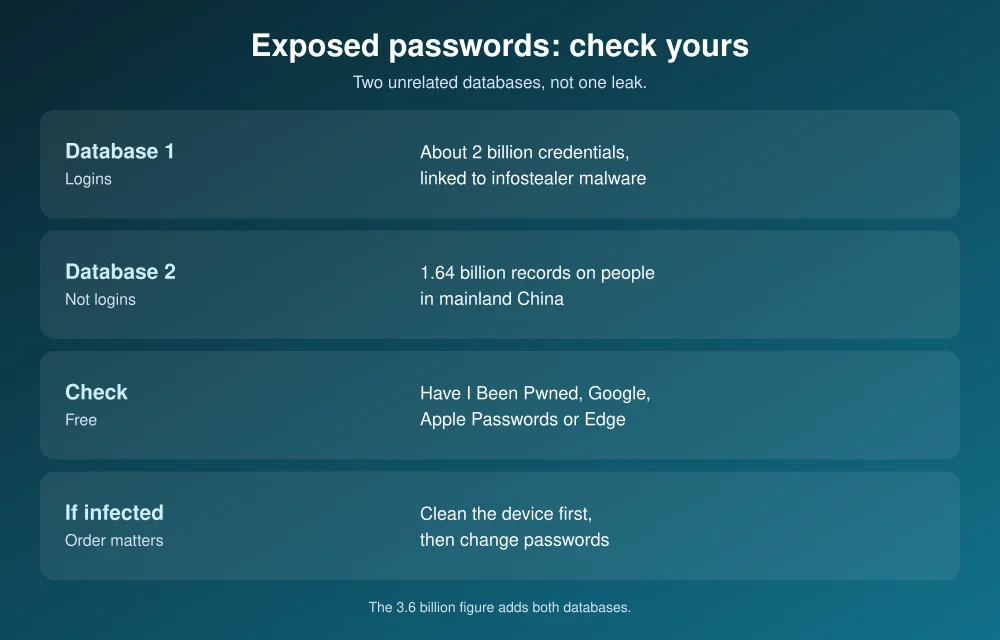
Two databases, not one leak
| Database 1 | Database 2 | |
|---|---|---|
| Found by | Jeremiah Fowler, published by ExpressVPN | Greg Pollock, UpGuard |
| Size | About 2 billion credentials | 1.64 billion documents |
| What’s in it | Logins in plain text, plus about 400,000 documents | National IDs, phone numbers and student records |
| Who it’s about | Users of many services | People in mainland China |
| Likely source | Infostealer and other malware, from several sources | Owner not found |
| Status | Public access restricted days after the host was told | No longer accessible |
WIRED calls the findings unconnected. For the original reports, see Fowler’s findings and UpGuard’s report. ExpressVPN sells security products, so keep that in mind as you read.
What the 2 billion figure does and doesn’t mean
- It isn’t 2 billion people. Duplicates and old passwords are likely.
- It isn’t a hack of Google or Facebook. WIRED reports no indication that companies were breached. Infostealers take passwords from infected devices.
- Big names appear. Engadget lists more than 114 million Google-linked credentials, 88 million for Facebook, nearly 42 million for Roblox, 36.6 million for Amazon and nearly 33 million for X.
- Cookies were seen. Fowler saw cookies and session tokens in a limited sample. Those can let someone in without a password.
- Nobody knows who accessed it or how long it was open. Fowler doesn’t claim it was used in attacks.
How to check your passwords
Have I Been Pwned
- Go to haveibeenpwned.com and search your email address.
- Use Notify Me to get alerts about future breaches.
- To check a password, use its Passwords page. Only the first five characters of a scrambled version are sent.
The site includes some infostealer data, but we couldn’t confirm it has this set. A clean result isn’t proof you’re safe.
Google Password Checkup
- In Chrome, go to menu > Passwords and autofill > Google Password Manager > Checkup.
- In another browser, go to passwords.google.com and choose Go to Password Checkup > Check passwords.
Full steps are on Google’s help page.
Apple Passwords
- Open the Passwords app and tap Security.
- Select an account to see the problem and change the password.
- For alerts, go to Settings > Apps > Passwords and turn on Detect Compromised Passwords.
Microsoft Edge
- Go to Settings > Passwords and autofill > Microsoft Password Manager.
- Choose Password security check > Check.
What to do if you’re exposed
- Scan your devices first. If malware is still running, it can take the new password too. Use a clean device to change passwords.
- Change your email password, since email resets everything else. Then do banking, shopping and social accounts.
- Sign out of all devices. This ends stolen sessions, which a new password alone may not do on every service.
- Turn on two-step verification or a passkey.
- Stop reusing passwords. A manager makes it easy. See the best password managers.
- Freeze your credit if identity documents or your Social Security number may be exposed. USA.gov says it’s free, but you must contact Equifax, Experian and TransUnion separately.
- Report identity theft at IdentityTheft.gov.
Our data breach checklist covers each step in more detail. Scammers will use this news, so learn to spot phishing emails and don’t tap “your password was leaked” links. It’s also worth checking that you have the latest Chrome update.
FAQs
Are the 2 billion and 3.6 billion leaks the same?
No. The 3.6 billion figure combines the 2 billion credentials with a separate database of 1.64 billion Chinese identity records.
Was Google or Facebook hacked?
There’s no indication of that. The records appear to come from malware on people’s devices, and they include logins for many services.
How do I know if my password was in this leak?
We found no lookup tool for this set. Check Have I Been Pwned and your password manager’s checkup, and change any reused passwords.
Is changing my password enough?
Not if your device is infected. Clean it first, sign out of all sessions, then change passwords from a clean device.
Featured image: Have I Been Pwned.
Disclosure: TheTechHacker has no paid relationship with ExpressVPN, UpGuard or any company mentioned here.
More in Guides
Cyber Insurance for Small Businesses: What It Covers and What Insurers Require
A guide to cyber insurance for US small businesses: first-party vs third-party coverage, common exclusions, what insurers ask about on applications, and the questions to put to your broker.

What to Do After a Data Breach: A 10-Step Checklist to Protect Your Identity
A data breach notice usually arrives the same way: a plain envelope or an email with a subject line about “a security incident,” a few paragraphs of careful language, and an offer of free credit monitoring. It is easy to set aside. But what you do in the first few days decides whether a breach…

What is Android? A Beginners Guide
What is Android operating system? Many of you may already know the answer, and it may sound funny to some of you. But the fact is that there is still a few percentage of people who don’t know what does Android means and what is the specialty of Android smartphones. So, we’ve decided to write…
The week in tech, minus the noise.
New reviews, fixes and the stories that matter — once a week, straight to your inbox.
We only use your email to send the newsletter. Unsubscribe any time. See our privacy policy.
Comments