

VMware vCenter CVE-2026-123903: Who Needs to Patch Again and Who Doesn’t
vCenter CVE-2026-123903 is rated 9.8. Fixed versions, why 8.0 U3m users are covered on vCenter, and the ESX update everyone still needs.

VMware admins have another vCenter patch to deal with, days after the last one and right before Thanksgiving. Broadcom published VMSA-2026-0011 on November 24, and its headline flaw is CVE-2026-123903, a vCenter authentication bypass rated 9.8 out of 10. There’s good news hidden in Broadcom’s FAQ, though. If you moved vCenter to 8.0 U3m for last week’s advisory, you’re already covered on vCenter. The bad news is that your ESX hosts aren’t, and two of the ESX flaws are also rated 9.8. Before you cancel anyone’s holiday, let’s sort out who actually has work to do.
Quick answer: CVE-2026-123903 lets an attacker with network access to vCenter bypass authentication. The fixed versions are vCenter 9.1.2, 9.0.2.0300 and 8.0 U3m, with VCF 5.2.5 for VCF 5.x. If you already installed 8.0 U3m, you don’t need to patch vCenter again. Everyone on 9.1.x needs 9.1.2, even if they patched last week. There’s no workaround. ESX still needs its own update in every case. Broadcom’s advisory doesn’t report attacks using CVE-2026-123903, but a similar vCenter flaw, CVE-2026-123890, was used in real attacks.
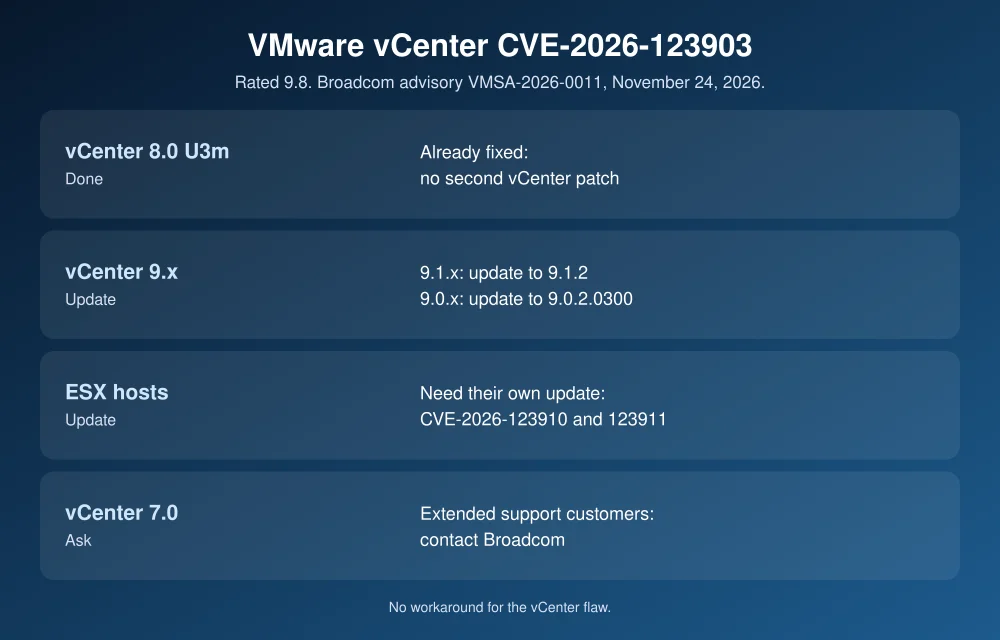
Do you need to patch again?
This is where most of the confusion will be. Find your row:
| What you run now | vCenter | ESX |
|---|---|---|
| vCenter 8.0 U3m (installed last week) | Already fixed | Update to ESXi80U3m |
| vCenter 8.0, older build | Update to 8.0 U3m | Update to ESXi80U3m |
| vCenter 9.1.1.0200 (last week’s fix) | Update to 9.1.2 | Update to 9.1.2 |
| vCenter 9.0.2.0200 (last week’s fix) | Update to 9.0.2.0300 | Update to ESXi-9.0.2.0200-25953133 |
| VCF 5.x | 5.2.5, through KB88287 | 5.2.5, through KB88287 |
| vCenter or ESX 7.0 | Contact Broadcom if you have extended support | Contact Broadcom if you have extended support |
Two traps to avoid. On 9.0.x, last week’s vCenter 9.0.2.0200 is not the fix for this one, although ESX uses the same 9.0.2.0200 number with its own build. Also, on VCF 5.x, updating SDDC Manager to 5.2.5 doesn’t update ESX, so check the hosts themselves.
On ESX 9.0.x, fixes for two moderate flaws (CVE-2026-123914 and CVE-2026-123915) are still marked as pending.
Is CVE-2026-123903 being exploited?
Broadcom’s advisory and FAQ don’t report attacks using it, and it isn’t in the copy of CISA’s Known Exploited Vulnerabilities catalog dated November 23, the day before disclosure. So we wouldn’t call it a zero-day.
We also wouldn’t wait. It sits in the same part of vCenter, the VMware Directory Service (vmdir), as CVE-2026-123890. Google says a suspected China-linked group it calls ARMORY CASTLE exploited that one in early September, more than two months before the patch. CISA added it to the catalog on November 20 and gave federal agencies until November 23 to act. Broadcom says the two flaws are separate, so check your version against this new advisory, not last week’s.
One detail in Google’s report matters for smaller teams. The attackers didn’t need vCenter to be on the internet. They got in through a BeyondTrust Remote Support flaw, then moved to vCenter from inside. “It’s only on the internal network” is not a good reason to delay.
Don’t stop at vCenter
The vCenter bug gets the headlines, but Broadcom rates four of the 23 flaws as Critical:
- CVE-2026-123903 (vCenter, 9.8): bypass authentication over the network.
- CVE-2026-123910 and CVE-2026-123911 (ESX, 9.8 each): an attacker with network access to ESX may run code on the host. No access to a virtual machine is needed. Broadcom lists a workaround for ESX 8.0 in KB463535, but tells customers to update instead.
- CVE-2026-123912 (Workstation and Fusion, 9.3): someone with admin rights inside a virtual machine may run code on your computer. The fix is 26H1u1. On ESX the same flaw is contained in a sandbox.
So if you only run VMware Workstation or Fusion on a laptop, this advisory is for you too, especially if you open virtual machines from other people. VMware Tools needs 13.1.10 or 12.5.6, and updating vCenter or ESX doesn’t update it. Avi Load Balancer’s recommended version is 32.1.4.
What to do now
- Check your versions. In the vSphere Client, look at the Summary tab for vCenter and each host.
- Take a vCenter backup and check that it’s usable before you start.
- Update vCenter. Broadcom says running virtual machines aren’t affected, but you’ll lose the vSphere Client for a while. Quick Patch isn’t supported for this one.
- Update ESX. Hosts restart, and Live Patch isn’t supported. Move virtual machines with vMotion. Virtual machines that can’t migrate have to be shut down.
- Handle the extras. Update VMware Tools, and SDDC Manager if you skipped it last week.
- Limit who can reach vCenter and ESX. Management networks should be open to admins only. This reduces risk but doesn’t replace the update.
Can’t do it all before the holiday? We’d start with whichever of vCenter and ESX more people and devices can reach, and restrict network access to both in the meantime.
Were you already hit by last week’s flaw?
Patching closes the hole but doesn’t remove an intruder. If vCenter was unpatched since September, look for these signs from Google’s report:
- Accounts you don’t recognize in vsphere.local, including ones starting with sps-.
- SSH turned on through the appliance management interface (port 5480) when nobody on your team did it.
- Unknown keys in the ESXi root authorized_keys file.
- Unexpected files on your Linux appliances, such as /tmp/123, /tmp/sss, /tmp/dbr or /usr/bin/vmtoolscs.
If you find any of these, keep the evidence and call your incident response team before you clean up. These signs relate to CVE-2026-123890, and not finding them doesn’t prove you’re clear.
More patches to check today: Chrome’s exploited zero-day and Java4Shell. If data was exposed, use our data breach checklist. Reviewing your security vendors? Read what the CrowdStrike and Zscaler deal means for customers.
FAQs
Which vCenter versions fix CVE-2026-123903?
vCenter 9.1.2, 9.0.2.0300 and 8.0 U3m. VCF 5.x uses 5.2.5. Customers on vCenter 7.0 with an extended support contract should contact Broadcom.
I installed vCenter 8.0 U3m last week. Am I protected?
Yes for vCenter. Broadcom says 8.0 U3m also fixes this advisory’s vCenter flaws. You still need to update ESX and VMware Tools.
Is there a workaround for CVE-2026-123903?
No. Broadcom lists none, and not using Enhanced Linked Mode doesn’t protect you.
Will updating vCenter shut down my virtual machines?
No. Broadcom says virtual machines keep running while vCenter updates. ESX hosts restart, so virtual machines need to migrate first.
Featured image: VMware by Broadcom.
Disclosure: TheTechHacker has no paid relationship with Broadcom, Google or any company mentioned here.
More in News
November 2026 Patch Tuesday: Outlook Zero-Day Fixed, USB Audio Code 10 Bug Finally Solved
Patch Tuesday landed on November 10 this month, and for once the Outlook part of the release matters more than the Windows part. Microsoft fixed a spoofing bug in Outlook (CVE-2026-124194) that it says was already being exploited before the patch was ready, and that fix doesn’t come through Windows Update at all, it comes…
Android November 2026 Security Update Fixes 216 Flaws, but Android 12 and 13 Miss the SMS of Death Fix
Google's November 2026 Android security update fixes 216 flaws, but the SMS of Death crash bug stays unpatched on Android 12 and 13. Here's how to check.

Update Chrome Now: Google Fixes Actively Exploited Zero-Day CVE-2026-125350
Google fixed an actively exploited Chrome zero-day, CVE-2026-125350. Which versions fix it, how to update Chrome on every device, and Edge and Brave fixes.
The week in tech, minus the noise.
New reviews, fixes and the stories that matter — once a week, straight to your inbox.
We only use your email to send the newsletter. Unsubscribe any time. See our privacy policy.
Comments